00198661-02_UM_SX12-V3_EN.pdf - 第305页
Instruction manual SIPLACE SX1/SX2 Edition V2 and V3 6 Station e xtensi ons From software version SC.713.1 Edition 12/2020 6.1 Nozzle changer 305 6.1.4.4 Assembly The nozzle changer is fix ed to the COT insert. 6 Fig. 6.…
6 Station extensions Instruction manual SIPLACE SX1/SX2 Edition V2 and V3
6.1 Nozzle changer From software version SC.713.1 Edition 12/2020
304
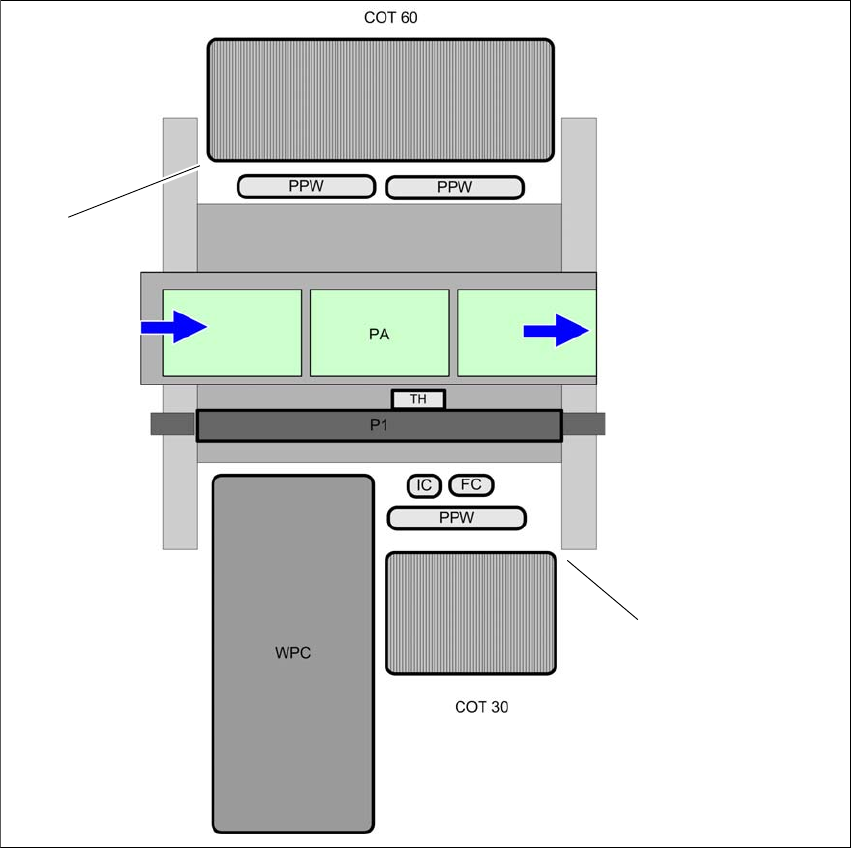
6.1.4.3 Position of the nozzle changer for the SIPLACE TwinStar
6
Fig. 6.1 - 11 Position of nozzle changer for the SIPLACE TwinStar - example
6
(1) Component trolley 60 in the inner position
(2) Component trolley 30 in the outer position
(NC) Nozzle changer
(PA) Placement area
(1)
(2)
Instruction manual SIPLACE SX1/SX2 Edition V2 and V3 6 Station extensions
From software version SC.713.1 Edition 12/2020 6.1 Nozzle changer
305
6.1.4.4 Assembly
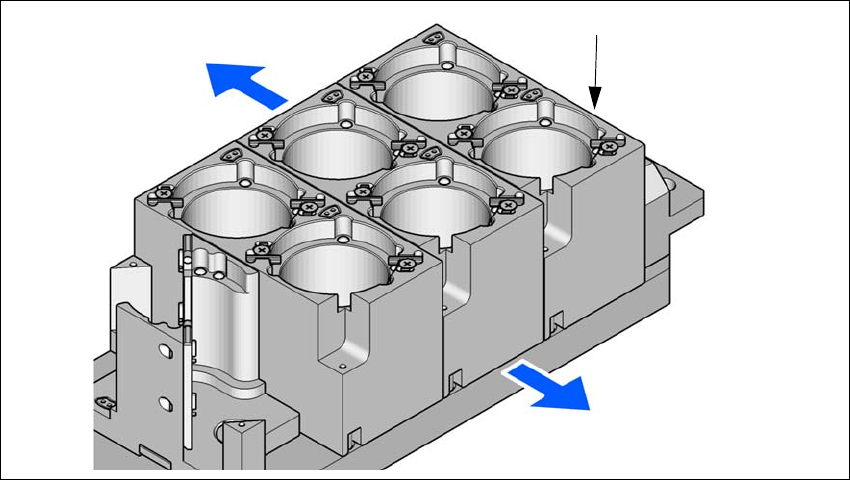
The nozzle changer is fixed to the COT insert.
6
Fig. 6.1 - 12 Assembly position
(1) Marking hole
(2) Operator side
(3) Arrow pointing toward the PCB conveyor
6
Align the nozzle changer so that the marking hole (item 1) is on the left, as viewed by the op-
erator.
6.1.4.5 Special nozzles
The SIPLACE placement machines process components in accordance with the standard SMT
spectrum.
ASM is continually developing its range of special nozzles.
Special nozzles are available for all placement heads in order to process placement jobs with max-
imum speed, precision and flexibility. The use of automatic nozzle changers also reduces the
setup times that occur at a product change.
For the production of special magazines and grippers, please contact ASM.
6.1.4.6 Component reject bin for the SIPLACE TwinStar
A component reject bin can be installed for the SIPLACE TwinStar. This is positioned next to the
fine pitch Vision module.
(1)
(2)
(3)

6 Station extensions Instruction manual SIPLACE SX1/SX2 Edition V2 and V3
6.2 PCB barcode scanner From software version SC.713.1 Edition 12/2020
306
6.2 PCB barcode scanner
6.2.1 Description
The PCB barcode reader is used to automatically record and decode barcodes on PCBs. The
PCB barcode scanners are installed on the input conveyor extension on the input side of the
placement machine on the PCB conveyor. Depending
on the position of the barcode strips, the barcode scanner can be attached in a few simple
steps so that the strips can be read parallel to or across the PCB transport direction.
When using single conveyors, two board barcode readers can be retrofitted. These can either
scan the top or bottom of the boards.
When using dual conveyors, four board barcode readers can be retrofitted. These can scan both
the top or bottom of the boards on both conveyor lanes.
The following barcode readers are available:
– 2D board code reader
This code reader processes barcodes and matrix codes. Matrix code is primarily used when
there is
not enough space for barcode labels.
6
6.2.2 Technical data - 2D code reader
6
Dimensions (L x W x H)
55 x 42 x 22 mm
3
Weight 125 grams
Code types 2D Data Matrix ECC 0, 50, 80, 100, 140 and 200
Data Matrix ECC200
QR Code, MicroQR Code
Barcode length
Single conveyor
Dual conveyor, asynchronous
Dual conveyor, synchronous
Max. 40 characters
Max. 40 characters
Max. 40 characters
Data interface RS232, USB 2.0
Electrical connection 15-pin D-Sub HD plug
Operating voltage 5 V- to 24 V-