2OM-1104-001.pdf - 第111页
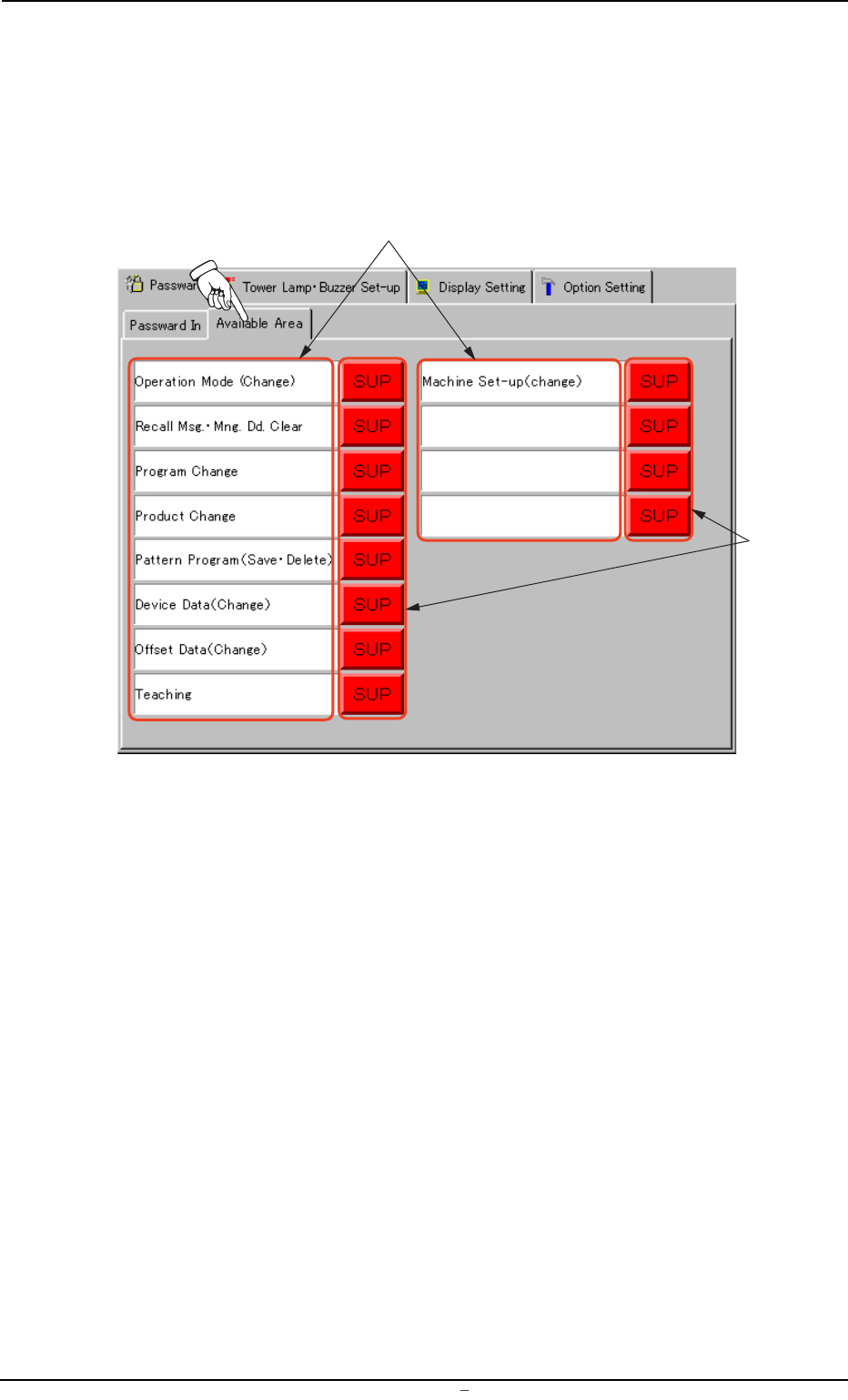
2.1.2 "A vailable Area" T a b • Sheet Layout When the "Available Area" tab is pressed in the "Password" tab sheet, the following tab sheet appears. Fig. 3D7 "A vailable Area" T ab …

Operation Procedure
(1) Make the virtual keyboard or the tenkey window appear.
(2) Use the virtual keyboard or the tenkey window to enter alpha-
numeric characters (up to 8 characters) as a password and
press the *3 [SET] button.
(3) The "REENTER PASSWORD" dialog box pops out. Enter the
password again.
When the first and second passwords are identical, the "LOG
IN" window appears.
Otherwise, the "ENTER PASSWORD" dialog box pops out.
Enter the correct password again.
(a) When a wrong password is entered, press the *4
[Password Clear] button and enter the correct one from
the beginning. Or, use the [BS] (backspace) key, the
[←] key, or the [→] key to correct the entry.
(b) When no password is entered and the *3 [SET] but-
ton is pressed or a button or a tab is selected to open
another window or sheet, another window or sheet
does not open because the system recognizes that
no password is entered. The "Password" tab sheet
remains active.
0106-003 Chapter 1 4 8 AFU01EDTP
2.1
"
Password
"
Tab
2.1.2 "Available Area" Tab
• Sheet Layout
When the "Available Area" tab is pressed in the "Password" tab sheet,
the following tab sheet appears.
Fig. 3D7 "Available Area" Tab Sheet
• Sheet Composition
*1 Function Names
Some function names are displayed, indicating that they can be
set or changed by the authorized operator.
*2 Authorization Buttons
These buttons are used to assign security levels to the correspond-
ing functions.
Every time a button is pressed, the label changes in the order of
[SUP] → [OP1] → [OP2]. The background color also changes in
the order of "Red" → "Green" → "Yellow".
Each label has the following meanings.
[SUP]: Operations available to the supervisor (log-in authoriza-
tion)
[OP1]: Operations available to both supervisor and operator #1
[OP2]: Operations available to the supervisor, operator #1, and
operator #2
*1
*2
0106-002 Chapter 1 4 9 AFU01EDTP
2.1
"
Password
"
Tab

(a) When the system is logged in as Operator #1 or #2
(other than Supervisor), the available functions can-
not be specified but the confirmation is possible.
(b) When a tab sheet has a function not specified as an
available area, the "OPERATION DENIED BY LOGIN
TYPE" dialog box pops out, enabling only confirma-
tion of the setting.
(c) When a sheet for data editing has a function not speci-
fied as an available area, the "CANNOT INPUT THE
DAT
" dialog box pops out, enabling only confirma-
tion of the setting.
(d) Even at the level in which no password is set, an avail-
able area for a password can be specified.
0004-001 Chapter 1 4 10 AFU01EDTP
2.1
"
Password
"
Tab