2OM-1104-001.pdf - 第41页
1.2.7 Setup Data It can be determined whether or not each unit should be set up. The settings can be changed using the menus in the "ALL PROD. CHG." window . (1) All Conveyor Setup It can be determined whether …
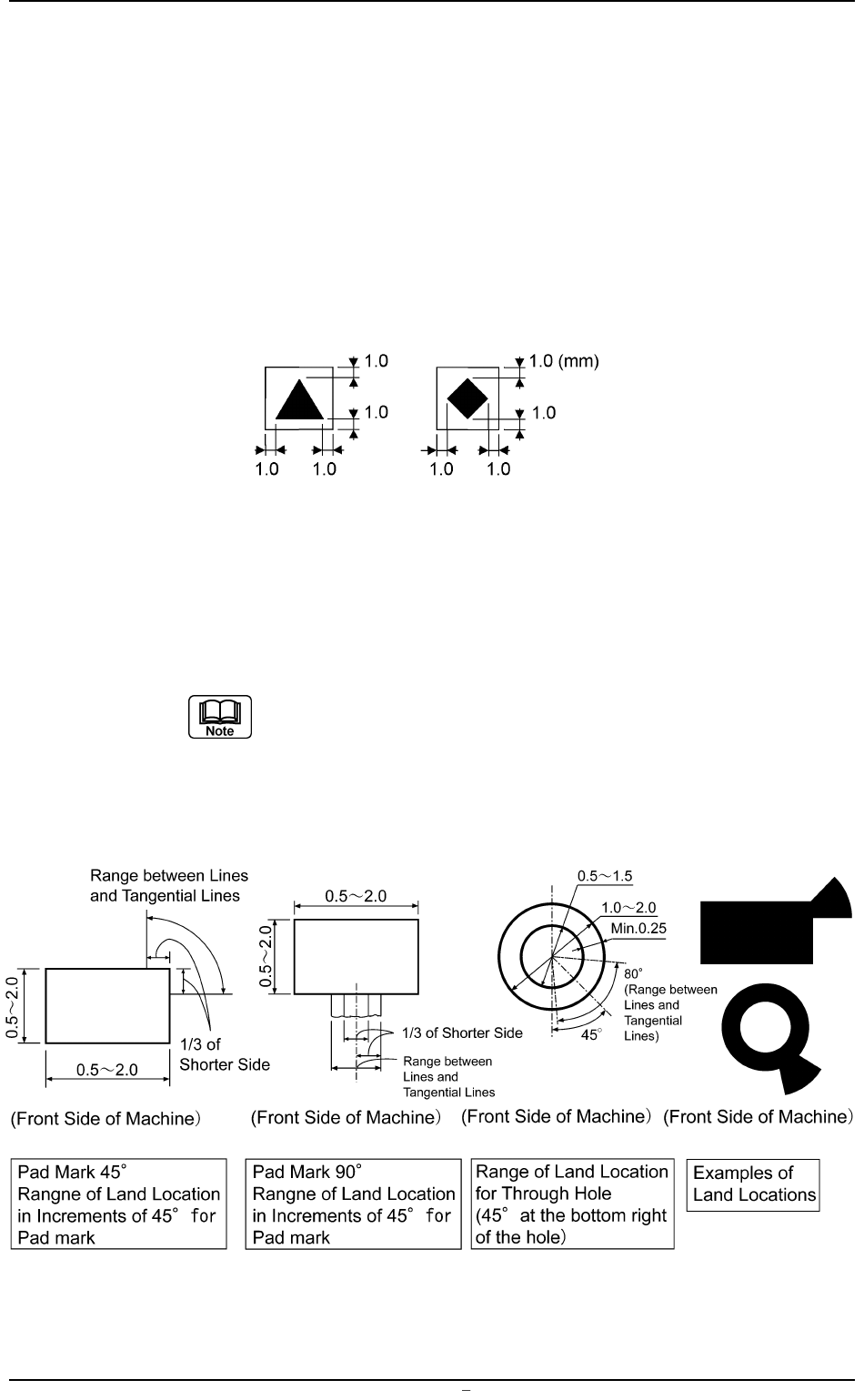
Regulations regarding Mark Surroundings
• A fiducial mark should make ample contrast with the surroundings. (Preven-
tion of False Recognition)
• The shape of P.C.B. (a cutout, a punched hole), the external elements (light
reflected from a structure, light emitted from an external device, etc.,) may
sometimes interfere with recognition.
(Consult our marketing department for details.)
• A copper leaf, a resist, a coating, a silk print, and a punched hole should not
exist in the range of 1.0 mm in both X and Y directions from the outermost
edges of a fiducial mark. They may cause false recognition.
Fig. 3B50
• Anything resembling a pattern similar to a fiducial mark should not exist in
the designated recognition area. If one exists, it may cause false recogni-
tion.
Refer to "Chapter 2" in "Volume 1" for the material of the screen
plate and the settings of screen fiducial marks.
Specification of Lines extended from a Pad Mark or a Through Hole
Unit: mm
Fig. 3B52
0009-002 Chapter 1 2 17 AFU01EDTP
1.2 Operation Data
1.2.7 Setup Data
It can be determined whether or not each unit should be set up.
The settings can be changed using the menus in the "ALL
PROD. CHG." window.
(1) All Conveyor Setup
It can be determined whether or not the L conveyor width, the
table chute conveyor width, and the R conveyor width should be
set up according to the P.C.B. dimension Y (vertical).
OFF : Each conveyor width is not set up.
ON : Each conveyor width is set up.
(2) Two Camera Auto Calib.
It can be determined whether or not the two camera automatic
calibration should be performed, using the "ALL PROD. CHG."
menu.
OFF : The machine does not perform the setup operation for the
two camera automatic calibration.
ON : The machine performs the setup operation for the two cam-
era automatic calibration.
The two camera automatic calibration function works to
automatically correct the positional coordinates of the
P.E.C. and screen recognition cameras.
(3) Screen Recog
It can be determined whether or not the screen recognition should
be performed, using the "ALL PROD. CHG." menu.
OFF : The machine does not perform any setup operation for
screen recognition.
ON : The machine performs the setup operation for screen rec-
ognition.
Screen Recog
ON
Fig.3B55
0009-002 Chapter 1 2 18 AFU01EDTP
1.2 Operation Data
All Conveyor Setup
ON
Fig.3B53
Two Camera Auto Calib.
ON
Fig.3B54
1.2.8 Auto Stop
(1) Hand Cleaning Stop (PCB)
Set the number of P.C.B.’s to be produced before the machine is
automatically stopped for manual cleaning operation.
When "00" is set, this function becomes invalid.
Unit: pieces
Data Input Range: 0 to 99
(2) Hand Cleaning Stop (CLNG.)
Set the number of cleaning operations to be performed before the
machine is automatically stopped for manual cleaning operation.
When "00" is set, this function becomes invalid.
Unit: counts
Data Input Range: 0 to 99
(3) Solv. Empty Stop (CLNG.)
Set the number of P.C.B.’s to be produced before the machine is
automatically stopped to replenish solvent for screen frame clean-
ing.
When "00" is set, this function becomes invalid.
Unit: pieces
Data Input Range: 0 to 99
(4) Paste Supply Interval Mode
Select a criteria based on which the machine should be automati-
cally stopped for solder paste replenishment (related to "(5) Paste
Empty Stop (PCB)").
Paste Detect : The machine stops automatically according to the
detected amount of remaining paste.
Print PCB : The machine stops automatically according to the
number of paste-printed P.C.B.’s.
(5) Paste Empty Stop (PCB)
Set the number of P.C.B.’s to be produced before the machine is
automatically stopped for solder paste replenishment.
When "000" is set, this function becomes invalid.
Unit: pieces
Data Input Range: 0 to 999
Paste Supply Interval Mode
Print PCB
Fig.3B59
0106-003 Chapter 1 2 19 AFU01EDTP
1.2 Operation Data
Paste Empty Stop (PCB)
000
Fig.3B60
Solv. Empty Stop (CLNG.)
50
Fig.3B58
Hand Cleaning Stop (CLNG.)
00
Fig.3B57
Hand Cleaning Stop (PCB)
30
Fig.3B56