2OM-1104-001.pdf - 第147页
0009-002 Chapter 2 1 2 AFU01ETRP 1. "ERROR " Window 1. "ERROR" Window When an error is detected, the following window opens. Fig. 4A1 • Window Composition *1 [MAC. ERR.] Button Pressing this button di…

Section 1
"CHECK" and "ERROR" Windows
0009-002 Chapter 2 1 1 AFU01ETRP
This section describes how to view the contents of the
"CHECK" and "ERROR" windows and how to understand
the contents of error IDs and messages.
0009-002 Chapter 2 1 2 AFU01ETRP
1. "ERROR" Window
1. "ERROR" Window
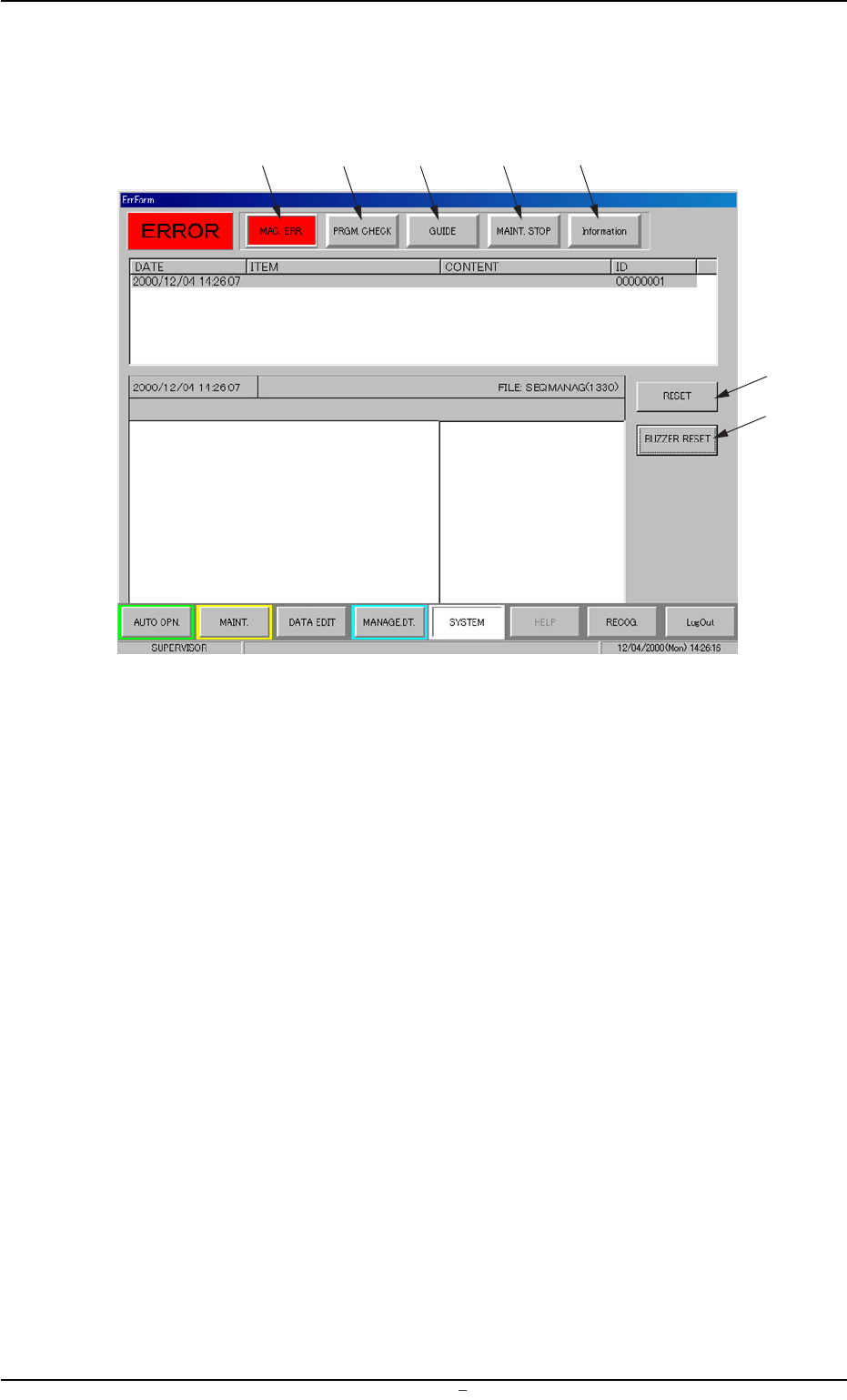
When an error is detected, the following window opens.
Fig. 4A1
• Window Composition
*1 [MAC. ERR.] Button
Pressing this button displays the contents of the error.
Refer to "1.1 "MAC. ERR." Window" for details.
*2 [PRGM. CHECK] Button
When "Pattern Program Data Error" appears under "ITEM" in the
"ERROR" window and this button is pressed, the contents of the
pattern program are displayed.
Refer to "1.2 "PRGM. CHECK" Window" for details.
*3 [GUIDE] Button
Pressing this button displays the procedure to re-start the halted
machine.
When the [GUIDE] button flickers in blue and gray, it indicates that
a re-starting procedure is found.
Refer to "1.3 "GUIDE" Window" for details.
*1
*2
*3
*4
*5
*6
*7
0106-003 Chapter 2 1 3 AFU01ETRP-
*4 [MAINT. STOP] Button
Pressing this button displays the contents of a situation where the
machine has stopped under the condition specified in advance for
maintenance.
When this button flickers in blue and gray, it indicates that the
machine has stopped for maintenance concurrently with another
error (machine error).
Refer to "1.4 "MAINT. STOP" Window" for details.
*5 [Information] Button
Pressing this button displays the contents of an alarm issued un-
der the condition specified in advance in order to stop the machine
due to a shortage of components, etc.
When this button flickers in blue and gray, it indicates that the above
condition is fulfilled concurrently with another error (machine er-
ror).
Refer to "1.5 "Information" Window" for details.
*6 [RESET] Button
Pressing this button cancels an alarm (sound) and closes the "ER-
ROR" window.
*7 [BUZZER RESET] Button
Pressing this button cancels an alarm (sound) only.
When a mark recognition error is displayed, refer to “6.2.3
Manual Alignment Operation” (Section 6)in “Chapter 2” of
“Vol. 1” for details.
When the [STOP] button on the front operation panel is
pressed after the manual alignment operation, the “ER-
ROR” window closes and the previous window resumes.
1. "ERROR" Window