2OM-1104-001.pdf - 第72页
* 6 Paste Detect (Option) Make the tenkey window appear and enter a value in the text box. This data becomes valid only when "Paste Detect" is se- lected in the "Paste Supply Interval Mode" text box *…
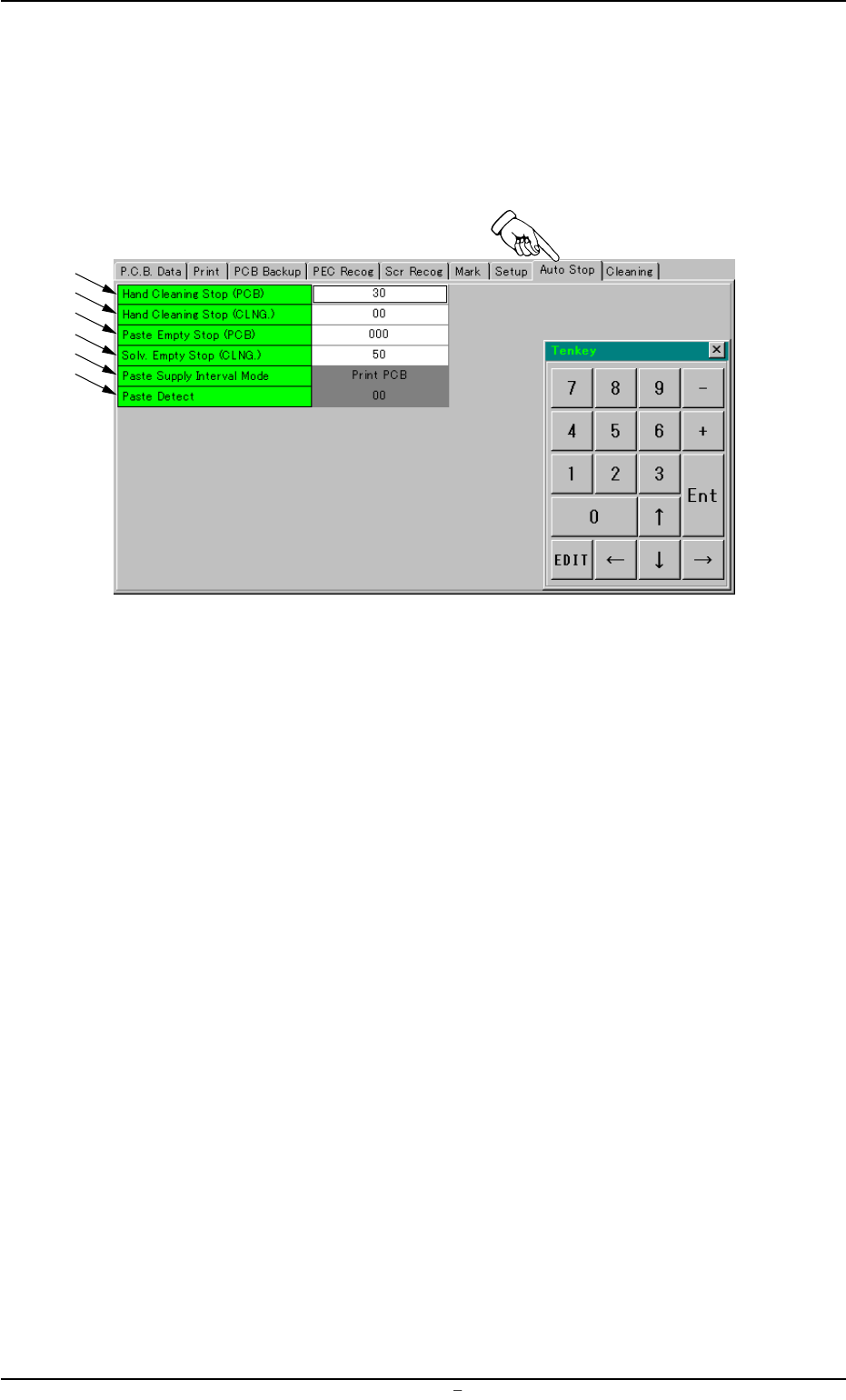
2.9 "Auto Stop" Tab
• Sheet Layout
When you push "Auto Stop" tab in the "Pattern Program" edit win-
dow, the following tab sheet appears.
Fig. 3B93 "Auto Stop" Tab Sheet
• Sheet Composition
*1 Hand Cleaning Stop (PCB)
Make the tenkey window appear and enter a value in the text box.
*2 Hand Cleaning Stop (CLNG.)
Make the tenkey window appear and enter a value in the text box.
*3 Paste Empty Stop (PCB)
Make the tenkey window appear and enter a value in the text box.
*4 Solv. Empty Stop (CLNG.)
Make the tenkey window appear and enter a value in the text box.
*5 Paste Supply Interval Mode
Push the text box twice. The text box changes to a combo box.
Push the down arrow to open the drop-down list. Select "Paste
Detect" or "Print PCB" from the drop-down list.
0106-002 Chapter 1 2 46 AFU01EDTP
2.9 “Auto Stop” Tab
*1
*2
*3
*4
*5
*6

*6 Paste Detect (Option)
Make the tenkey window appear and enter a value in the text box.
This data becomes valid only when "Paste Detect" is se-
lected in the "Paste Supply Interval Mode" text box *5.
0106-002 Chapter 1 2 47 AFU01EDTP
2.9 “Auto Stop” Tab
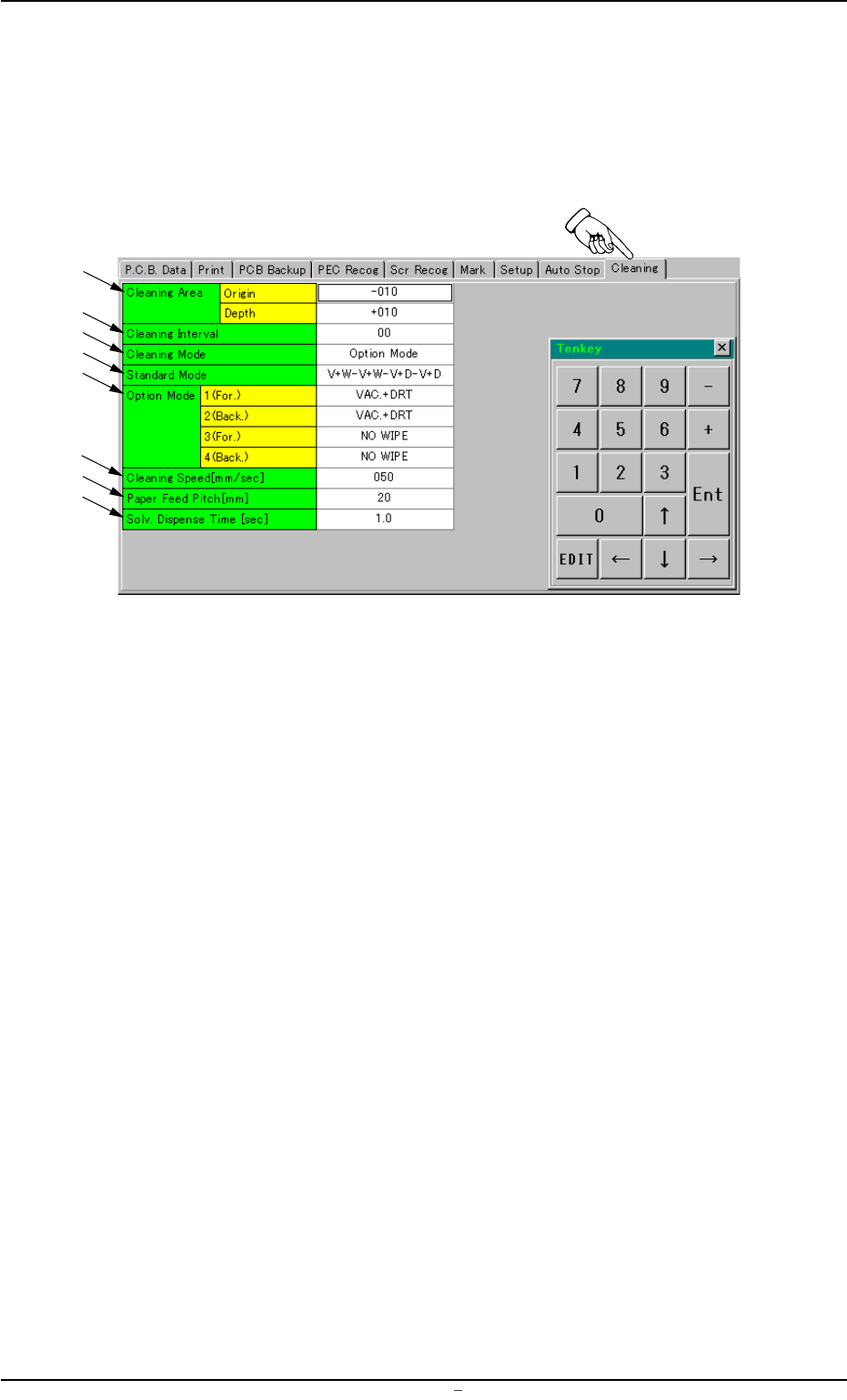
2.10 "Cleaning" Tab
• Sheet Layout
When you push "Cleaning" tab in the "Pattern Program" edit win-
dow, the following tab sheet appears.
Fig. 3B94 "Cleaning" Tab Sheet
• Sheet Composition
*1 Cleaning Area
Make the ten-key window appear and enter values in the text boxes.
*2 Cleaning Interval
Make the ten-key window appear and enter a value in the text box.
*3 Cleaning Mode
Push the text box twice. The text box changes to a combo box.
Push the down arrow to open the drop-down list. Select "Standard
Mode" or "Option Mode" from the drop-down list.
*4 Standard Mode
Push the text box twice. The text box changes to a combo box.
Push the down arrow to open the drop-down list. Select the de-
sired pattern from the drop-down list.
*5 Option Mode
Push the text box twice. The text box changes to a combo box.
Push the down arrow to open the drop-down list. Select one of the
options from the drop-down list.
2.10 “Cleaning” Tab
*1
*2
*3
*4
*6
*5
*7
*8
0004-001 Chapter 1 2 48 AFU01EDTP