2OM-1104-001.pdf - 第70页
2.8 "Setup" T ab • Sheet Layout When you push "Setup" tab in the "Pattern Program" edit window , the following tab sheet appears. Fig. 3B92 "Setup" T ab Sheet • Sheet Composition *…

*6 Pol.
Push a text box twice. The text box changes to a combo box. Push
the down arrow to open the drop-down list. Select "Bright" or "Dark"
from the drop-down list.
*7 Level
Push a text box twice. The text box changes to a combo box. Push
the down arrow to open the drop-down list. Select "High", "Middle"
or "Low" from the drop-down list.
*8 Lighting
Only “Normal” can be selected for the standard machine (standard
specifications).
0106-002 Chapter 1 2 44 AFU01EDTP
2.7 “Mark” Tab
2.8 "Setup" Tab
• Sheet Layout
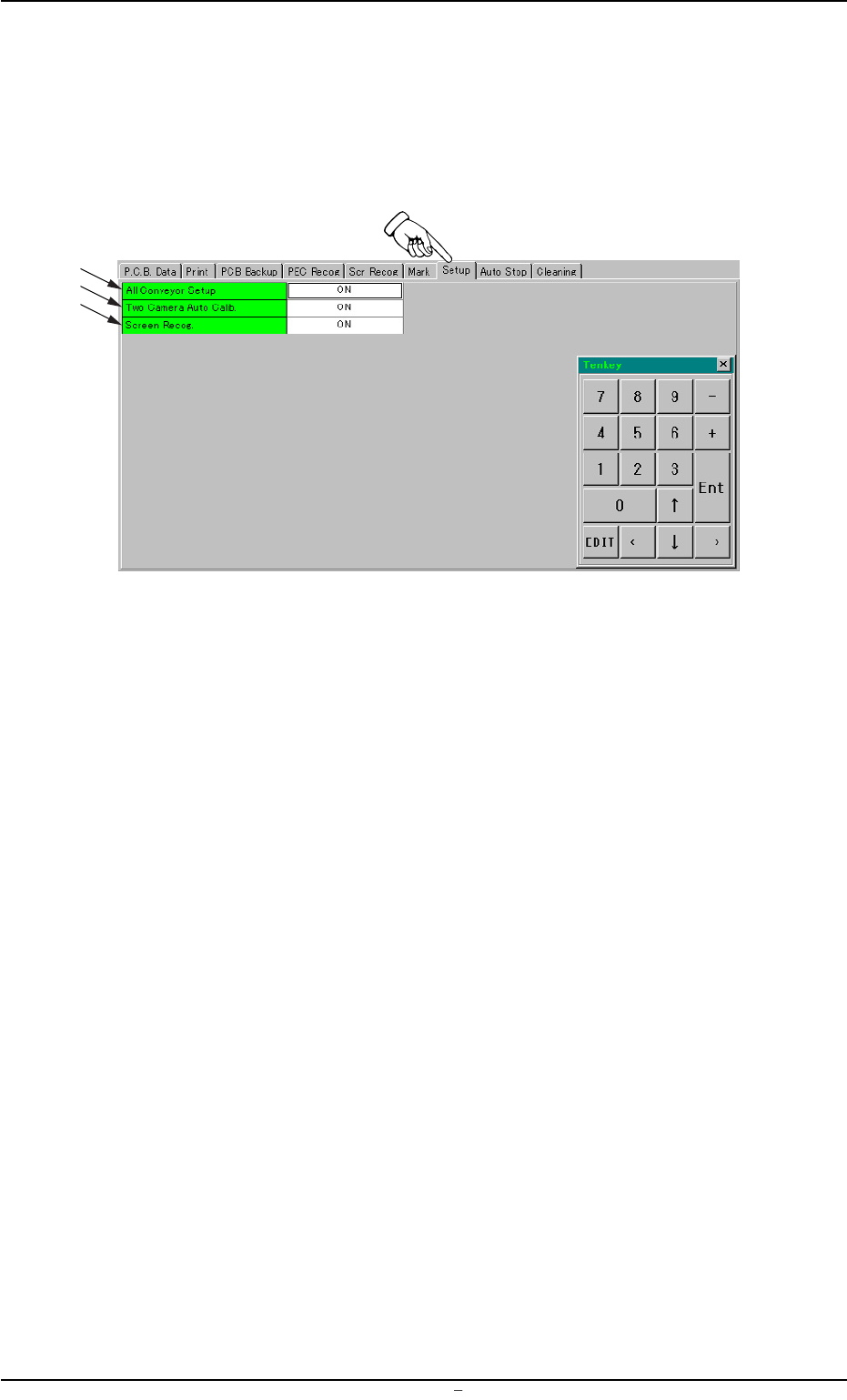
When you push "Setup" tab in the "Pattern Program" edit window,
the following tab sheet appears.
Fig. 3B92 "Setup" Tab Sheet
• Sheet Composition
*1 All Conveyor Setup
Push the text box twice. The text box changes to a combo box.
Push the down arrow to open the drop-down list. Select "OFF" or
"ON" from the drop-down list.
*2 Two Camera Auto Calib.
Push the text box twice. The text box changes to a combo box.
Push the down arrow to open the drop-down list. Select "’OFF" or
"ON" from the drop-down list.
*3 Screen Recog.
Push the text box twice. The text box changes to a combo box.
Push the down arrow to open the drop-down list. Select "’OFF" or
"ON" from the drop-down list.
2.8 “Setup” Tab
0004-001 Chapter 1 2 45 AFU01EDTP
*1
*2
*3
2.9 "Auto Stop" Tab
• Sheet Layout
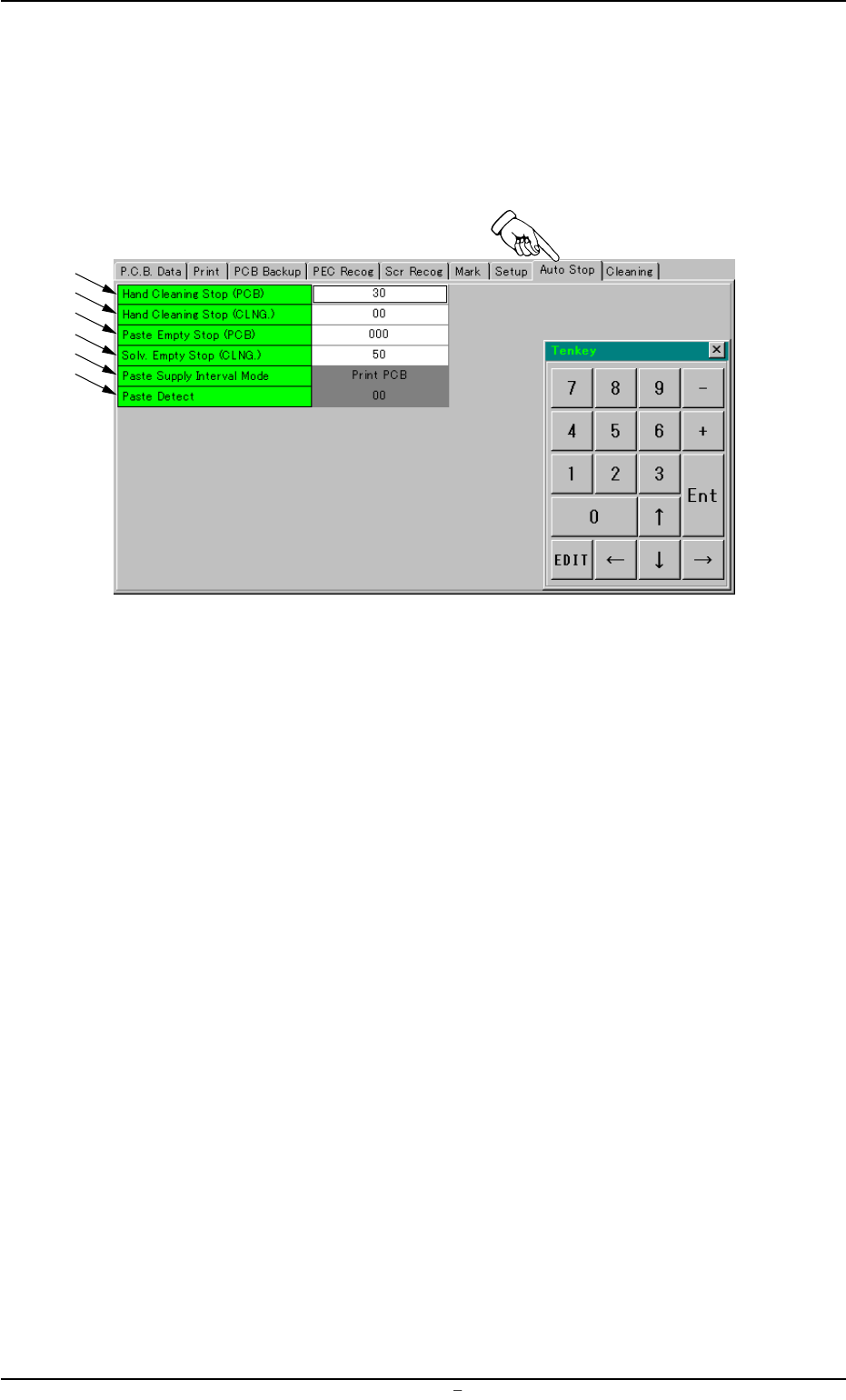
When you push "Auto Stop" tab in the "Pattern Program" edit win-
dow, the following tab sheet appears.
Fig. 3B93 "Auto Stop" Tab Sheet
• Sheet Composition
*1 Hand Cleaning Stop (PCB)
Make the tenkey window appear and enter a value in the text box.
*2 Hand Cleaning Stop (CLNG.)
Make the tenkey window appear and enter a value in the text box.
*3 Paste Empty Stop (PCB)
Make the tenkey window appear and enter a value in the text box.
*4 Solv. Empty Stop (CLNG.)
Make the tenkey window appear and enter a value in the text box.
*5 Paste Supply Interval Mode
Push the text box twice. The text box changes to a combo box.
Push the down arrow to open the drop-down list. Select "Paste
Detect" or "Print PCB" from the drop-down list.
0106-002 Chapter 1 2 46 AFU01EDTP
2.9 “Auto Stop” Tab
*1
*2
*3
*4
*5
*6