2OM-1104-001.pdf - 第58页
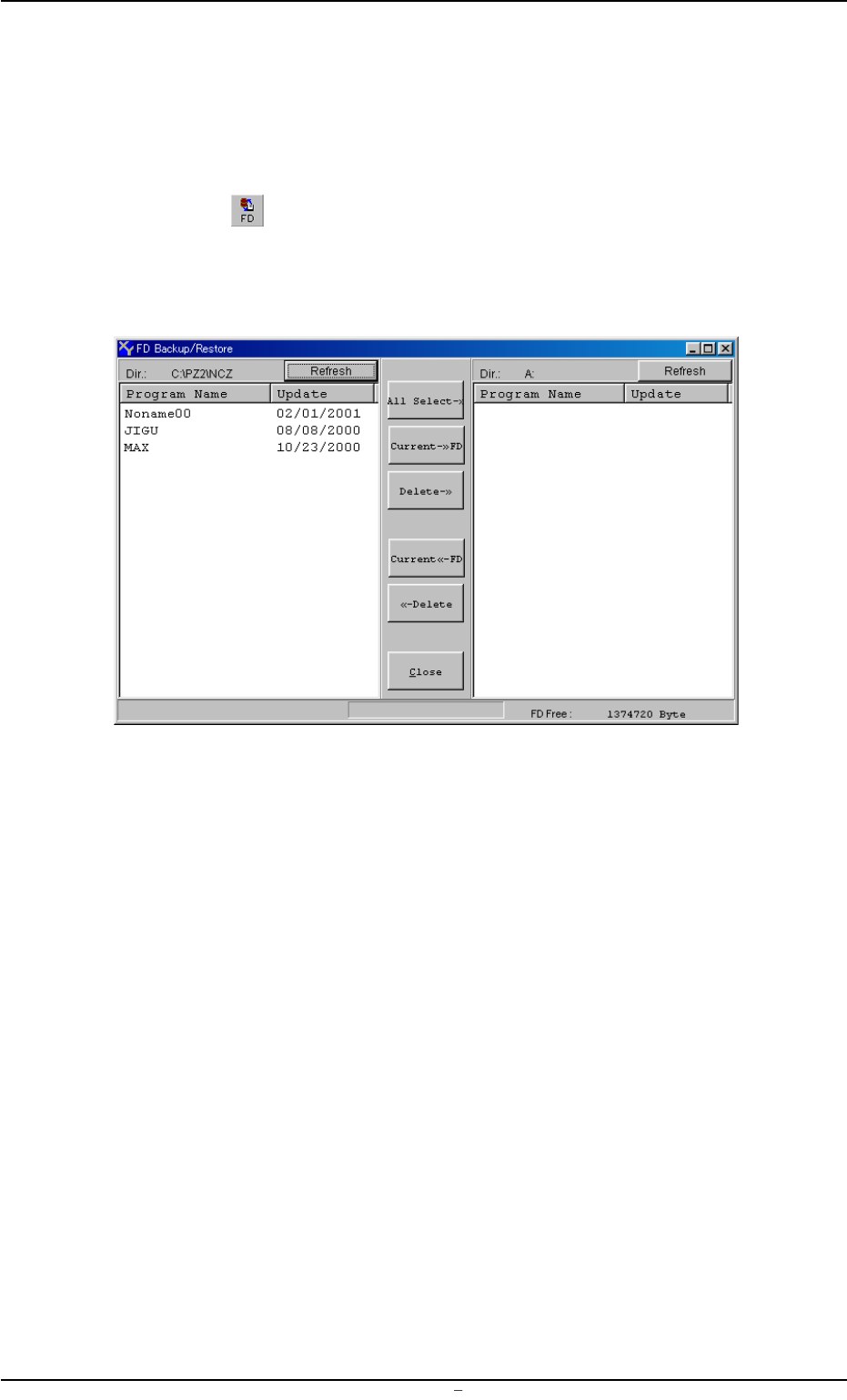
• When you select a pattern program(s) from the right pane and press the [Current <<- FD] button, the pattern program(s) is restored from the FD (floppy disk) onto the hard disk of the machine. • When you select a …
2.1.4 FD Backup/Restore
The pattern programs stored on the built-in HDD (hard disk drive) of
this machine can be saved on FDs (floppy disks) or the data on an FD
(floppy disk) can be restored onto the hard disk of the machine.
Select the
icon on the toolbar of the "Pattern Program" edit window
or "Tool" on the menu bar. When you push "Tool" on the menu bar, the
pull-down menu opens. Select "FD Backup..." from the pull-down menu.
The following "FD Backup/Restore" window opens.
Fig. 3B85 "FD Backup/Restore" Window
Working with "FD Backup/Restore" Window
• The left pane displays a list of the pattern programs saved on the hard
disk of the machine.
• The right pane displays a list of the pattern programs saved on an FD
(floppy disk) inserted into the FDD (floppy disk drive) of the machine.
• When you press the [All Select->] button, all pattern programs on the
FD (floppy disk) are selected.
• When you select a pattern program(s) from the left pane and press
the [Current ->> FD] button, the selected pattern program(s) is saved
on the FD (floppy disk).
• When you select a pattern program(s) from the right pane and press
the [Delete ->>] button, the pattern program(s) is deleted from the
FD (floppy disk).
0106-002 Chapter 1 2 33 AFU01EDTP
2.1 Navigations in “Pattern Program” Edit Window

• When you select a pattern program(s) from the right pane and press
the [Current <<- FD] button, the pattern program(s) is restored from
the FD (floppy disk) onto the hard disk of the machine.
• When you select a pattern program(s) from the left pane and press
the [Delete <<-] button, the pattern program(s) is deleted from the
built-in HDD (hard disk drive) of the machine.
• When you push the [Close] button, the “FD Backup/Restore” window
closes.
0106-002 Chapter 1 2 34 AFU01EDTP
2.1 Navigations in “Pattern Program” Edit Window
2.2 "P.C.B. Data" Tab
• Sheet Layout
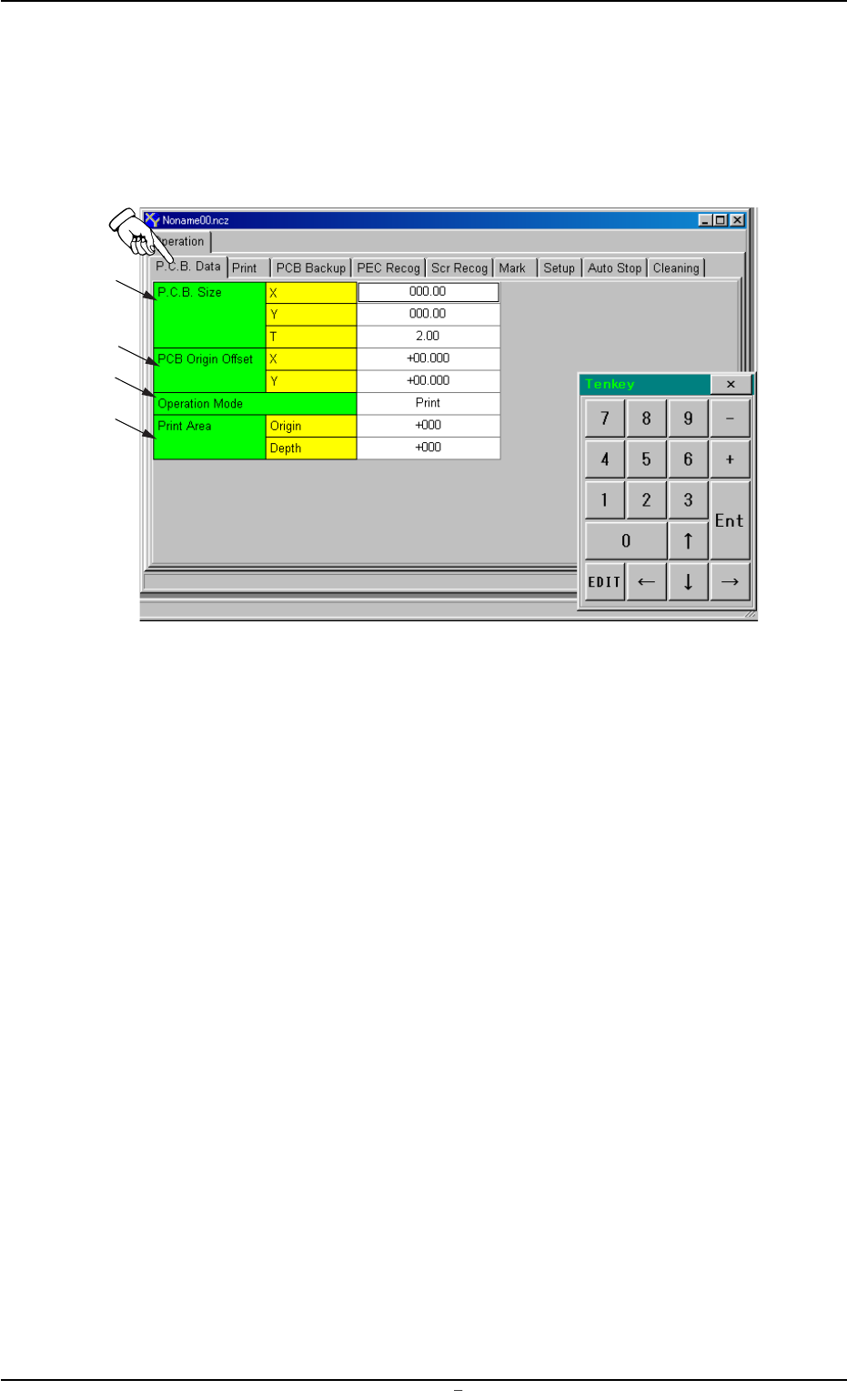
When you push the "P.C.B. Data" tab in the "Pattern Program" edit
window, the following tab sheet appears.
Fig. 3B86 "P.C.B. Data" Tab Sheet
• Sheet Composition
*1 P.C.B. Size
Make the ten-key window appear and enter values in the "X (hori-
zontal)", "Y (vertical)", and "T (thickness)" text boxes.
*2 P.C.B. Origin Offset
Make the ten-key window appear and enter values in the "X (hori-
zontal)" and "Y (vertical)" text boxes.
*3 Operation Mode
Push the text box twice. The text box changes to a combo box.
Push the down arrow to open the drop-down list box and select
"Print" or "Pass".
*4 Print Area
Make the ten-key window appear and enter values in the "Origin"
and "Depth" text boxes.
0106-002 Chapter 1 2 35 AFU01EDTP
2.2 “P.C.B. Data” Tab
*1
*2
*3
*4