2OM-1104-001.pdf - 第206页
Error ID Item Description 1319000 Conveyor Stopper P .C.B. was took on output conveyor . Interlock (Cause 1) A P .C.B. is still on the output conveyor . (Cause 2) The P .C.B. arrival and passage check sensors (BPH044 and…

Error ID Item Description
1314000 P.C.B. Transfer 2 P.C.B. was on table.
Interlock
(Cause 1) The overlapped P.C.B.'s were transferred.
(Cause 2) Two P.C.B.'s were transferred in succession.
(Cause 3) The overlapped P.C.B. detection sensor (BPH072) section is not adjusted
correctly.
(Remedy 1) Remove the P.C.B.'s and re-start the operation.
(Remedy 2) Remove the P.C.B.'s and re-start the operation.
(Remedy 3) Contact our service personnel for details.
1315000 Table Section P.E.C Recog-X Axis was running.
Stopper Interlock
1316000 Table Section P.E.C Recog-Y Axis was running.
Stopper Interlock
(Cause 1) Self-Diagnostics Error Message
(Remedy 1) Shut down the power of the machine once and power up the machine
again. After that, restart the operation.
When the same error still occurs, contact our service personnel for de-
tails.
1317000 Table Section P.C.B. was on table.
Stopper Interlock
(Cause 1) The stopper was moved down when a P.C.B. is still on the table.
(during the manual operation)
(Cause 2) The P.C.B. check sensor (BPH071) is defective.
(Remedy 1) Remove the P.C.B. and re-start the operation.
(Remedy 2) Check how the sensor is working in "Device Check" window (submenu).
When the sensor is not working, it is required to replace the sensor with
a new one. Contact our service personnel for details.
1318000 Conveyor Stopper Output conveyor motor was running.
Interlock
(Cause 1) Self-Diagnostics Error Message
(Remedy 1) Shut down the power of the machine once and power up the machine
again. After that, restart the operation. When the same error still occurs,
contact our service personnel for details.
2.3 Error IDs and Remedial Procedures
0106-001 Chapter 2 2 50 AFU01ETRP
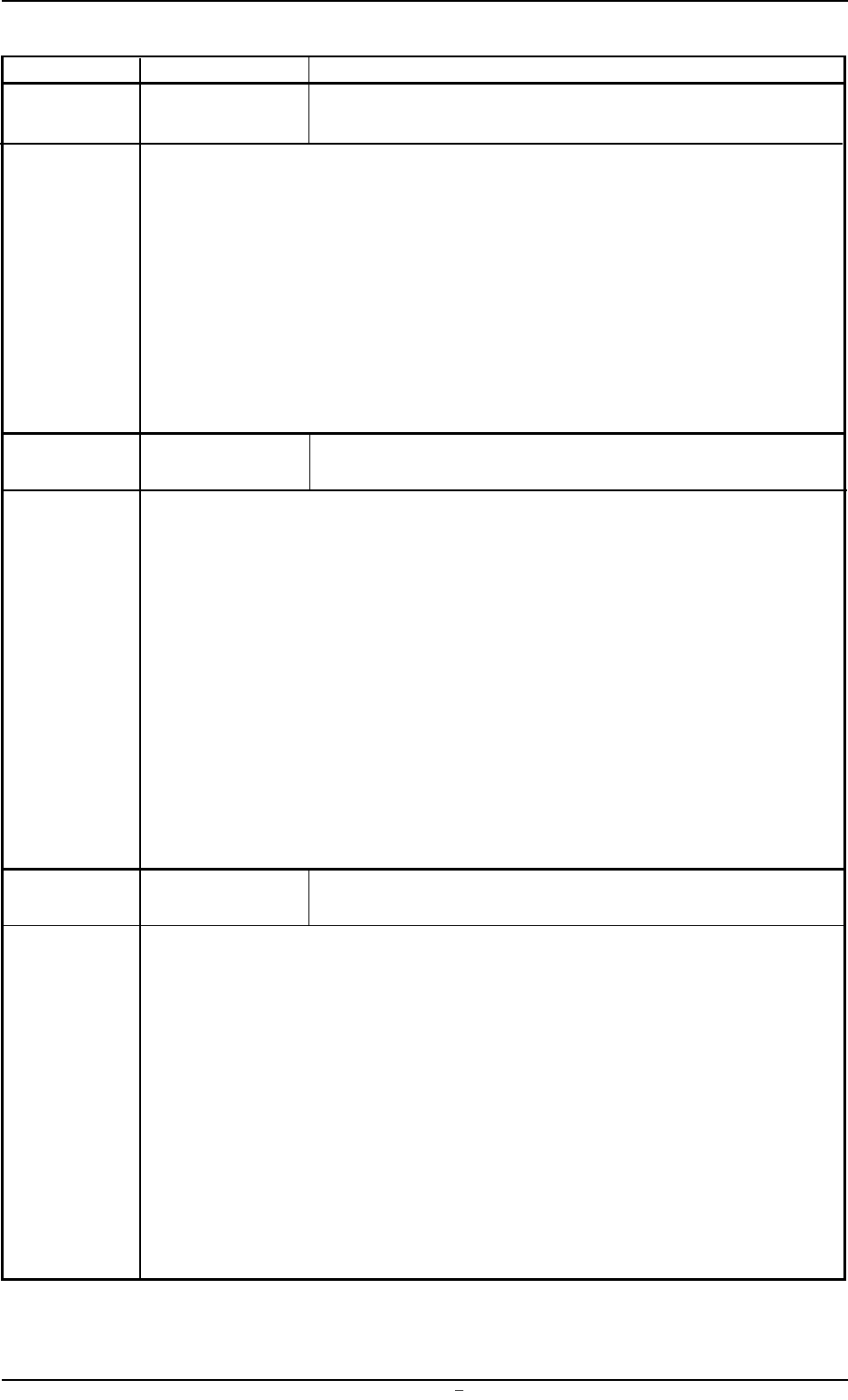
Error ID Item Description
1319000 Conveyor Stopper P.C.B. was took on output conveyor.
Interlock
(Cause 1) A P.C.B. is still on the output conveyor.
(Cause 2) The P.C.B. arrival and passage check sensors (BPH044 and BPH045) are
defective.
(Remedy 1) Remove the P.C.B. and re-start the operation.
(Remedy 2) Check how the sensors are working in "Device Check" window (submenu).
When the sensors are not working, it is required to replace the sensors
with new ones. Contact our service personnel for details.
1320000 Table Section P.C.B. stopper error
Stopper
(Cause 1) The position of the upper limit sensor (BPS070) is shifted from the correct
one.
(Cause 2) The upper limit sensor is defective.
(Cause 3) The stopper cylinder is malfunctioning.
(Remedy 1) Readjust the sensor position.
(Refer to the separately attached paper.)
(Remedy 2) Check how the sensor is working in "Device Check" window (submenu).
When the sensor is not working, it is required to replace the sensor with
a new one. Contact our service personnel for details.
(Remedy 3) Contact our service personnel for details.
1321000 P.C.B. Chuck P.C.B. chuck missed.
(Cause 1) The P.C.B. had come off when the P.C.B. was clamped.
(Cause 2) The P.C.B. clamping forward limit sensor (BPH050) is defective.
(Remedy 1) Adjust the P.C.B. clamping pressure.
Set a parameter (deceleration value) in the "Aft.Clamp Bkup Spd." text
box of "PCB Clamp Offset" in the "PCB Backup" tab sheet.
(Remedy 2) Check how the sensor is working in "Device Check" window (submenu).
When the sensor is not working, it is required to replace the sensor with
a new one. Contact our service personnel for details.
2.3 Error IDs and Remedial Procedures
0106-001 Chapter 2 2 51 AFU01ETRP
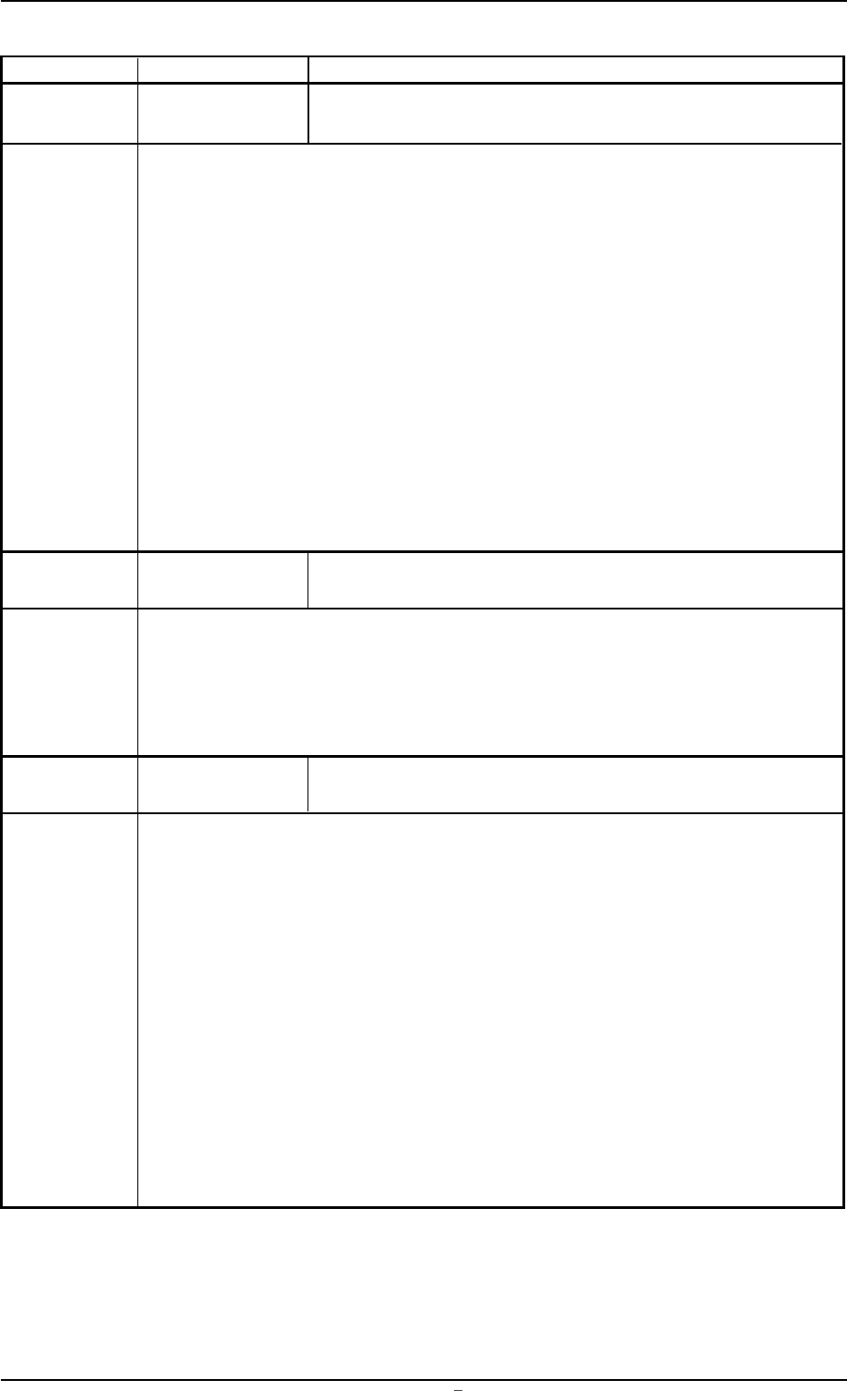
Error ID Item Description
1323000 P.C.B. Chuck P.C.B. clamp move error
When the P.C.B. horizontal clamping function was manually activated, the P.C.B. clamp-
ing forward limit sensor (BPH050) was not turned ON within the specified time.
Even if an error occurs when this manual operation is performed with the P.C.B. set in
the table section, it is not regarded as an error.
(Cause 1) The P.C.B. clamping pressure is too low.
(Cause 2) The P.C.B. clamping forward limit sensor is defective.
(Remedy 1) Adjust the P.C.B. clamping pressure.
(Remedy 2) Check how the sensor is working in "Device Check" window (submenu).
When the sensor is not working, it is required to replace the sensor with
a new one. Contact our service personnel for details.
1401000 Squeegee Table-Z Axis is not at print pos.
Up/Down Axis
(Cause 1) The table has not moved up yet. (during the manual operation)
(Remedy 1) Move up the table and re-start the operation.
1402000 Squeegee Squeegee Up/Down cylinder moving error
Up/Down Axis
(Cause 1) The position of the upper limit sensors (BPS060 and BPS062) is shifted
from the correct one.
(Cause 2) The upper limit sensor is defective.
(Cause 3) The squeegee cylinder is malfunctioning.
(Remedy 1) Adjust the cylinder sensor position.
(Remedy 2) Check how the sensors are working in "Device Check" window (submenu).
When the sensors are not working, it is required to replace the sensors
with new ones. Contact our service personnel for details.
(Remedy 3) Contact our service personnel for details.
2.3 Error IDs and Remedial Procedures
0106-001 Chapter 2 2 52