CAN Bus Workshop_Version 03__06-2008_EN.pdf - 第117页
CACCIA Manual 1 Caccia Student Guide Issue 04/2007 EN 25 1.4 Moving the Axes 1.4.1 General Note The axis re ference run and m ovement of the axes may only be perform ed by spe cially traine d per- sonnel. 1 → Click on th…

1 Caccia Student Guide CACCIA Manual
Issue 04/2007 EN
24
ATTENTION
The Caccia operator is responsible for his personell Safety
and the functional safety of the entire
machine (Safety circuit closed Z-Axis up ... )! 1
1
CACCIA Manual 1 Caccia Student Guide
Issue 04/2007 EN
25
1.4 Moving the Axes
1.4.1 General
Note
The axis reference run and movement of the axes may only be performed by specially trained per-
sonnel. 1
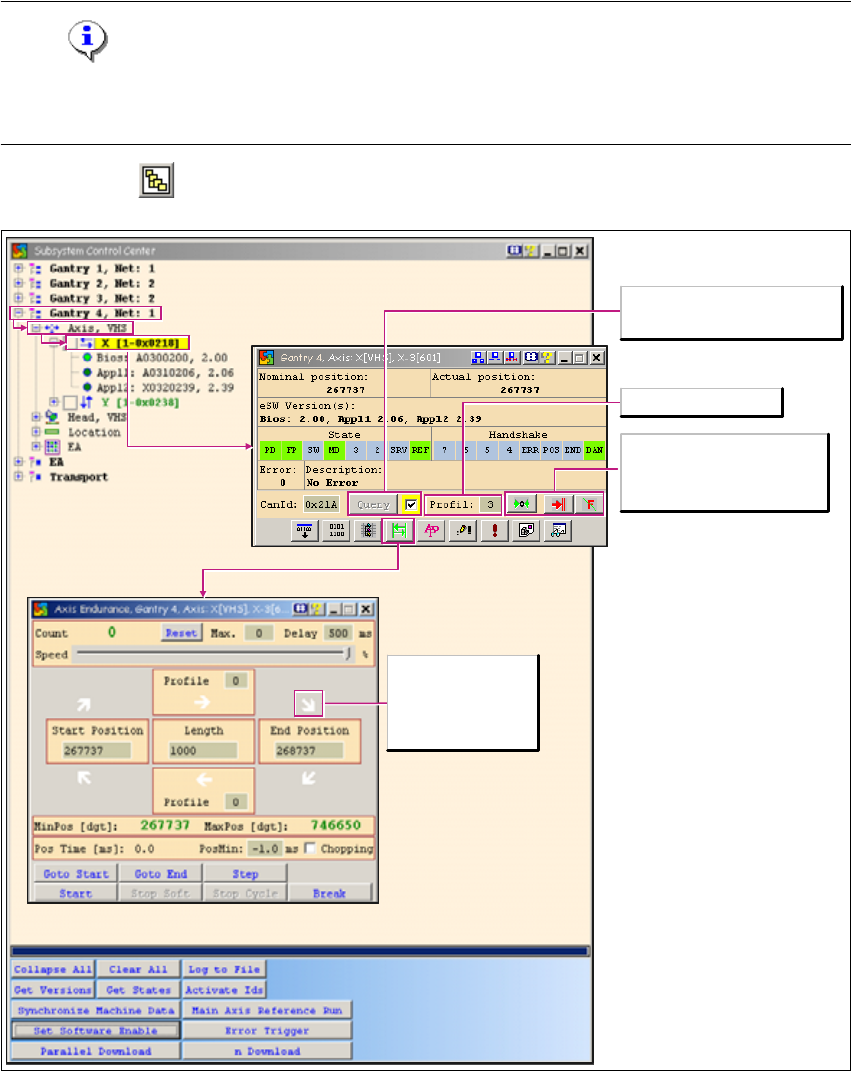
→ Click on the button to open the Subsystem Control Center dialog box:
1
Fig. 1 - 13 Moving the axes
Issues a new status request for
the axis.
Select the travel profile
Starts the axis reference run
Cancels the function
currently started
Acknowledges errors
White arrow: No
action has been
started.

1 Caccia Student Guide CACCIA Manual
Issue 04/2007 EN
26
ATTENTION
The Caccia operator is responsible for the entire machine (Z-axis up pos.; Y park position; multiple
operation)! 1
1
1
Tab. 1 - 7 Tape cutter dialog box functions
1
→ The Axis dialog box allows you to start a query or an axis reference run.
→ The Endurance button opens the Axis Endurance dialog box.
→ The Axis Endurance dialog box allows you to position the axes.
Button Description / Action
Gantry Opens the gantry to be moved. Gantry 4 is opened in the example.
Axis VHS Opens the axis to be moved (e.g. main axis with C&P20 head).
X-Axis
Allows you to select the axis required with a doubleclick. The X-axis
is selected in the example. The Axis dialog box will open.