CAN Bus Workshop_Version 03__06-2008_EN.pdf - 第121页
CACCIA Manual 1 Caccia Student Guide Issue 04/2007 EN 29 1.4.3 Axis Endurance T est Dialog Box There are thre e operating st ates for the Axis Endurance dialog box: 1 1 T ab. 1 - 8 Axis endurance dialog box functions The…
1 Caccia Student Guide CACCIA Manual
Issue 04/2007 EN
28
1
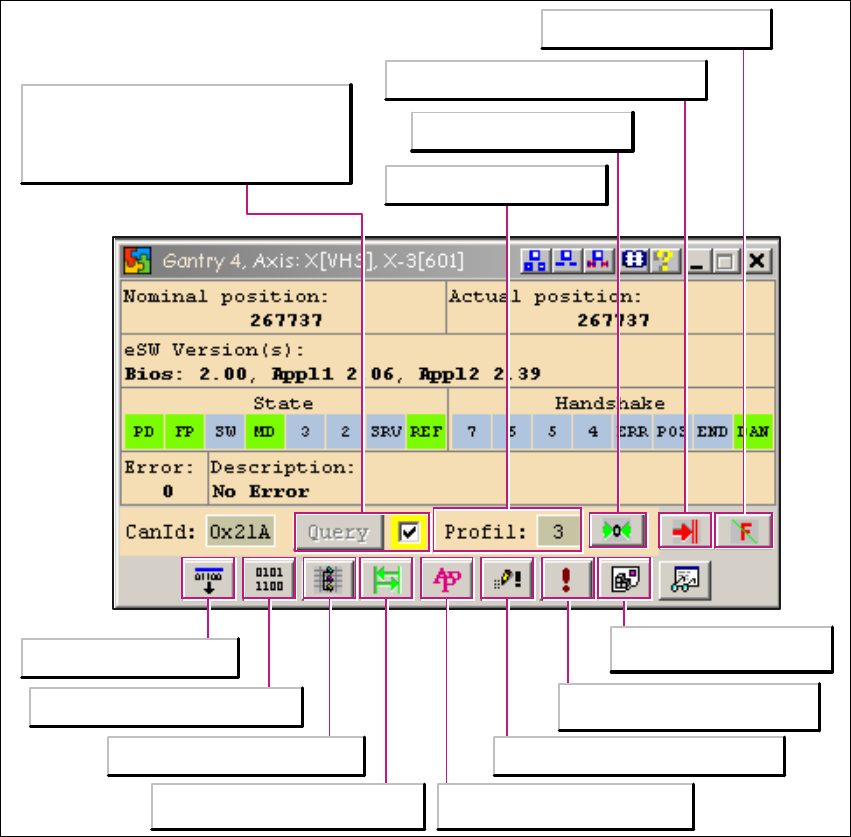
Fig. 1 - 15 Moving the X and Y gantry axes
Starts the reference run
Issues a new status request for the
subsystem. If you wish to continuously
update the status request, place a tick
next to the Query button .
Cancels the function currently started
Acknowledges errors
Grafical axis trace
display (Developer)
Starts an external program
(Developer)
Command dialog box (Developer)
Axis Performance Protocol
dialog box (Developer)
Axis Trace (Developer)
Axis Endurance Test dialog box
Download
Load machine data (Developer)
Selects the travel profile
CACCIA Manual 1 Caccia Student Guide
Issue 04/2007 EN
29
1.4.3 Axis Endurance Test Dialog Box
There are three operating states for the Axis Endurance dialog box: 1
1
Tab. 1 - 8 Axis endurance dialog box functions
There are two operating states for the Axis Endurance dialog box: 1
– Endurance test for linear axes
– Endurance test for rotary axes
The following operating elements are the same in both states: 1
1
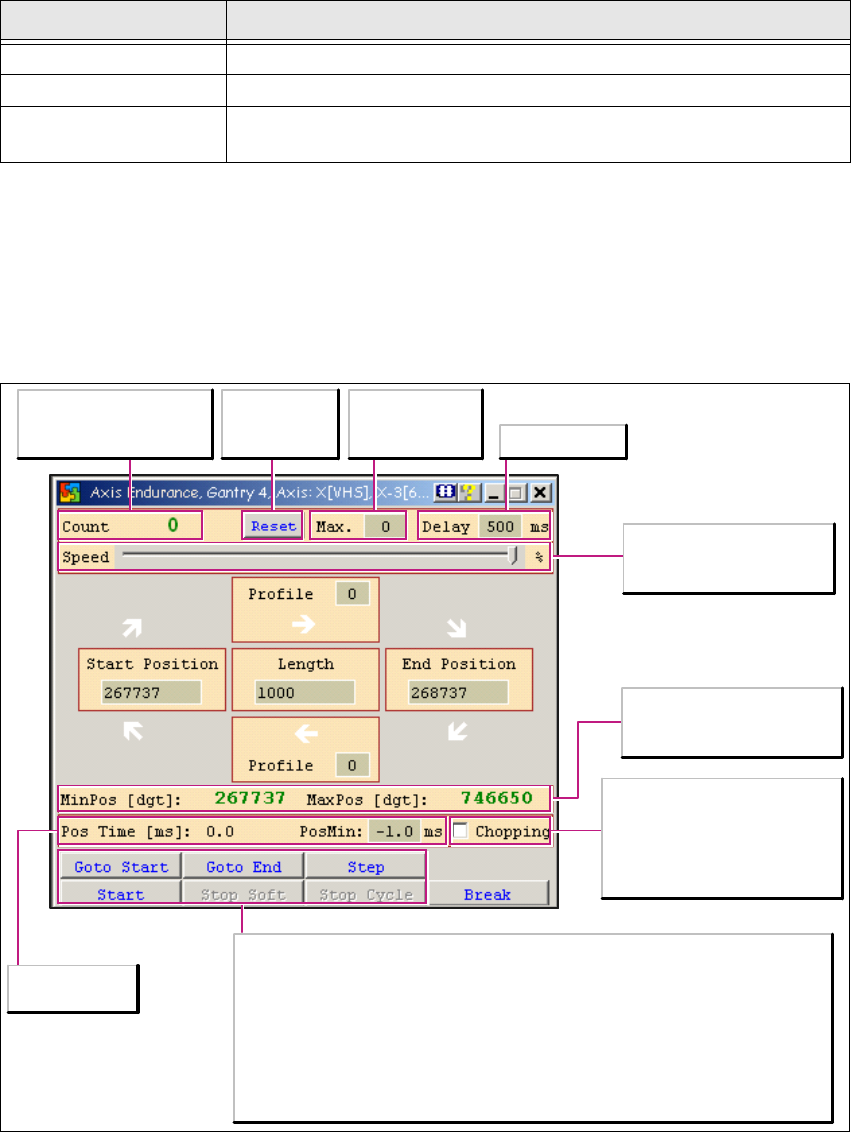
Fig. 1 - 16 Axis endurance dialog box functions
Button Description / Action
White arrow No action has been started
Yellow arrow Positioning in progress
Red arrow
Either an error has occurred (you may need to acknowledge the error
and perform a ref. run) or the axis has been stopped by the operator.
Maximum
number of
positioning runs
Shows how many
positioning runs have
already been performed
Waiting period
Set the axis traveling
speed in % here
(Default = 100%)
Shows the minimum/
maximum position which
the axis may travel to
Shows the
positioning time
deactivated:
Endurance test for linear axes
activated:
Endurance test for rotary axes
Goto Start
The axis moves to the start position
Goto End
The axis moves to the end position
Step
The axis moves in single steps
from the end position to the start
position or vice versa
Start
Starts the endurance test. The selected
axis travels continuously between the
specified start and end positions, in line
with the set parameters
Stop Soft and Stop Cycle
Stop buttons for the started endurance
test.
Resets the
value in the
Count field

1 Caccia Student Guide CACCIA Manual
Issue 04/2007 EN
30
1.4.3.1 1. Operating Mode: Endurance Test for Linear Axes (From Top Left to Bottom Right)
This mode is active when Chopping has not been ticked. 1
This mode also has the following special operating elements: 1
1
Fig. 1 - 17 1. operating mode: operating elements
Enter the travel profile for
the axis path (go).
Starting position plus
length gives end position
or
Starting position plus end
position gives positioning
length
Enter the travel profile for
the axis path (return).
Operating mode:
Endurance test for linear
Axes