CAN Bus Workshop_Version 03__06-2008_EN.pdf - 第157页
CACCIA Manual 1 Caccia Student Guide Issue 04/2007 EN 65 1.8.3 Conveyor System - Board Dat a 1 Fig. 1 - 42 Conveyor system - board da ta Boar d O pti ons Read : R eads out t he i nst all ed special options ( e.g. PC B ba…
1 Caccia Student Guide CACCIA Manual
Issue 04/2007 EN
64
1.8.2 Conveyor System - Control Functions
1
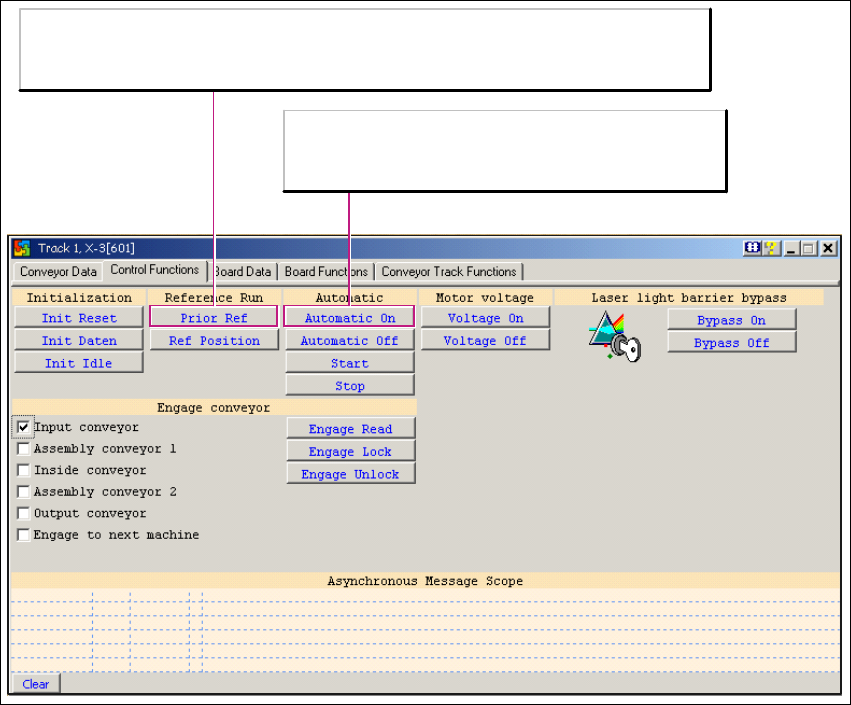
Fig. 1 - 41 Conveyor system - control functions
Prior Ref
- Issues the message TrackX PUBLIC_M_INIT(01) when control voltage is missing.
- Issues the message TrackX PUBLIC_M_INIT(0) when control voltage is on.
Automatic On
A board has been recognized in the light barrier and a
PCB has been transported to the output conveyor.

CACCIA Manual 1 Caccia Student Guide
Issue 04/2007 EN
65
1.8.3 Conveyor System - Board Data
1
Fig. 1 - 42 Conveyor system - board data
Board Options
Read: Reads out the installed special options (e.g. PCB barcode reader).
Board holding position(s)
Read: Shows the PCB stopper positions of a PCB conveyor band for the placement area.
- Position 0 is the LASER stopper position.
- Position 1 is the position of the mechanical stopper for "long board" application
(always 160 mm behind the LASER).

1 Caccia Student Guide CACCIA Manual
Issue 04/2007 EN
66
1.8.4 Conveyor System - Board Functions
1
Fig. 1 - 43 Conveyor system - board functions
1
EF clamp (lift table up/down):
Processes PCB clamping for conveyor in selected placement
area (this example shown PA1).
Query: Requests lifting table position.
Open: Lowers the table.
Close: Raises the table.
Toggle: Switches back and forth, between the two positions.
EF Test Stop (Stopper/Laser barrier):
Status
Status of LASER stopper.
Test
Enables/disables the LASER stopper
for the selected placement area.