CAN Bus Workshop_Version 03__06-2008_EN.pdf - 第178页
1 Caccia Student Guide CACCIA Manual Issue 04/2007 EN 86 2. Function Control with CAN Bus Commands 1 Open and close the nozzle chan ger Preparation: see subsystem queries. – Open the network window . – (1) Select the add…
CACCIA Manual 1 Caccia Student Guide
Issue 04/2007 EN
85
1.11.2.2 Function Control with Caccia
Nozzle changer used as example:
In addition to the SITEST program, there are two other options for testing the function of the nozzle
changer.
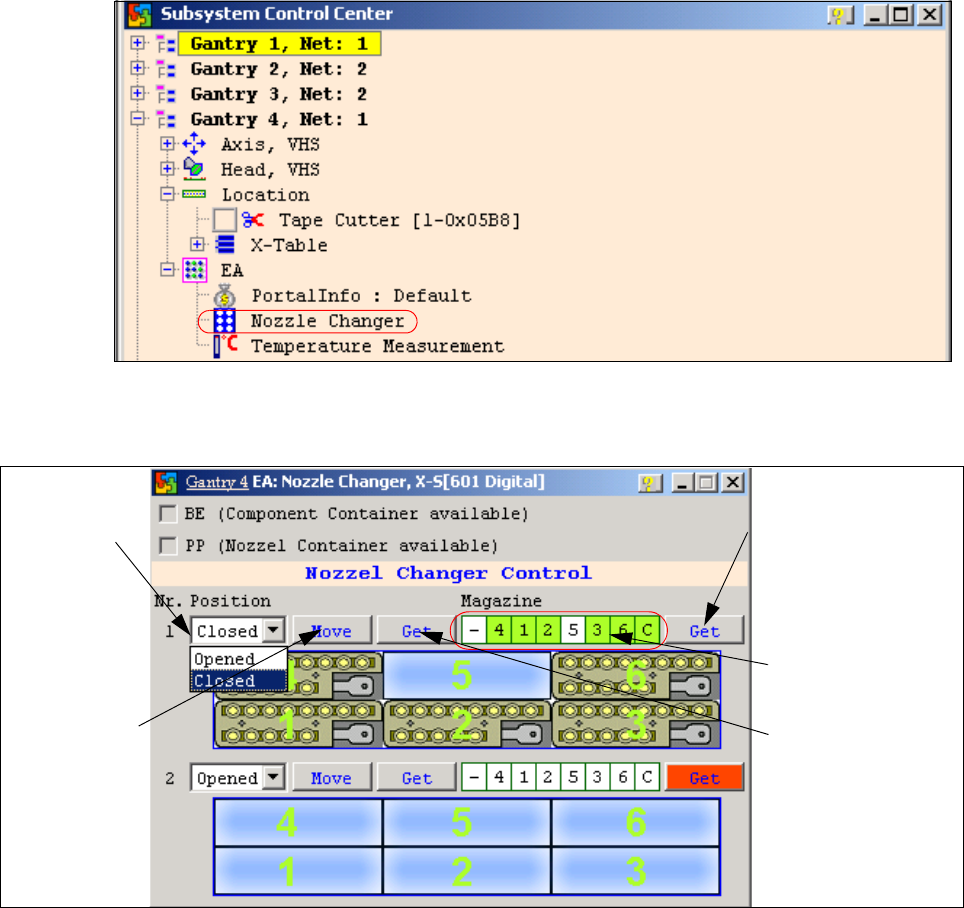
1. NC menu 1
– Open the IO directory of the relevant location in the subsystem control center.
– Doubleclick on Nozzle Changer.
Fig. 1 - 61 Subsystem control center (nozzle changer)
– the following menu will appear:
Fig. 1 - 62 I/O nozzle changer
Status query maga-
zine (micro switch un-
der the magazine)
Selection win-
dow, open/
close NC row
1
Status display
magazine
Performs the
selected func-
tion
Status display
NC opened / closed

1 Caccia Student Guide CACCIA Manual
Issue 04/2007 EN
86
2. Function Control with CAN Bus Commands 1
Open and close the nozzle changer
Preparation: see subsystem queries.
– Open the network window.
– (1) Select the address area "Add All", the current range field will show 0-7ff.
– (2) Enter the CAN ID for the relevant CAN bus path.
Placement area 1 07d0
Placement area 2 07c0
– (3) Enter the command 70 04 01 00 with spaces:
70 --> Move command
04 --> Gantry 4
01 --> NC row 1
00 --> Open (open NC) / 01 --> Close (close NC)
– (4) Click on the "Send" button.
The relevant NC should now open or close, as required.
Fig. 1 - 63 Can scope NET 1 1MBaud
1
2
4
3

CACCIA Manual 1 Caccia Student Guide
Issue 04/2007 EN
87
Note
Direct CAN bus commands should only be used by specially trained and qualified service techni-
cans. 1
3. CAN Bus Commands for the status NC open/close 1
Preparation: see Subsystem query
– Open the network window (see Fig. 1 - 63)
– Select the address area "Add All", the current range field will show 0-7ff.
– Enter the CAN ID for the relevant CAN bus path.
Placement area 1 07d0
Placement area 2 07c0
– Enter the command with spaces:
6a30 --> status query command
04 --> Gantry 4
01 --> NC row 1
Click on the "Send" button.
The answer in the network window appears with the same command and the answer.
– 6a 00 01
– 6a --> repeat the command
– 00 --> command understanding
– 01 --> NC is closed / 00 --> NC is opened
4. CAN Bus Commands for the status nozzle changer magazines present for C&P20 1
– command: 6a 33 04 01
6a 33 --> command for status nc magazines
04 --> gantry 4
01 --> NC row 1
- Click on the "Send" button.
– Acknowledge: 6a 00 7f --> all magazines present
6a 00 xx --> one or more magazines are missing