CAN Bus Workshop_Version 03__06-2008_EN.pdf - 第46页
1 - 20 S tudent Gu ide CAN BUS Wor kshop 2 Commun icatio n and C ontrol Editio n 06/200 8 20 2.2.7.3 CAN Bus cont rolled f unction on t he T win Head The CAN-Bu s Pr ocesso r-board i s no l onger on each T win se gment i…
1 - 19
Student Guide CAN BUS Workshop
Edition 06/2008 2 Communication and Control
19
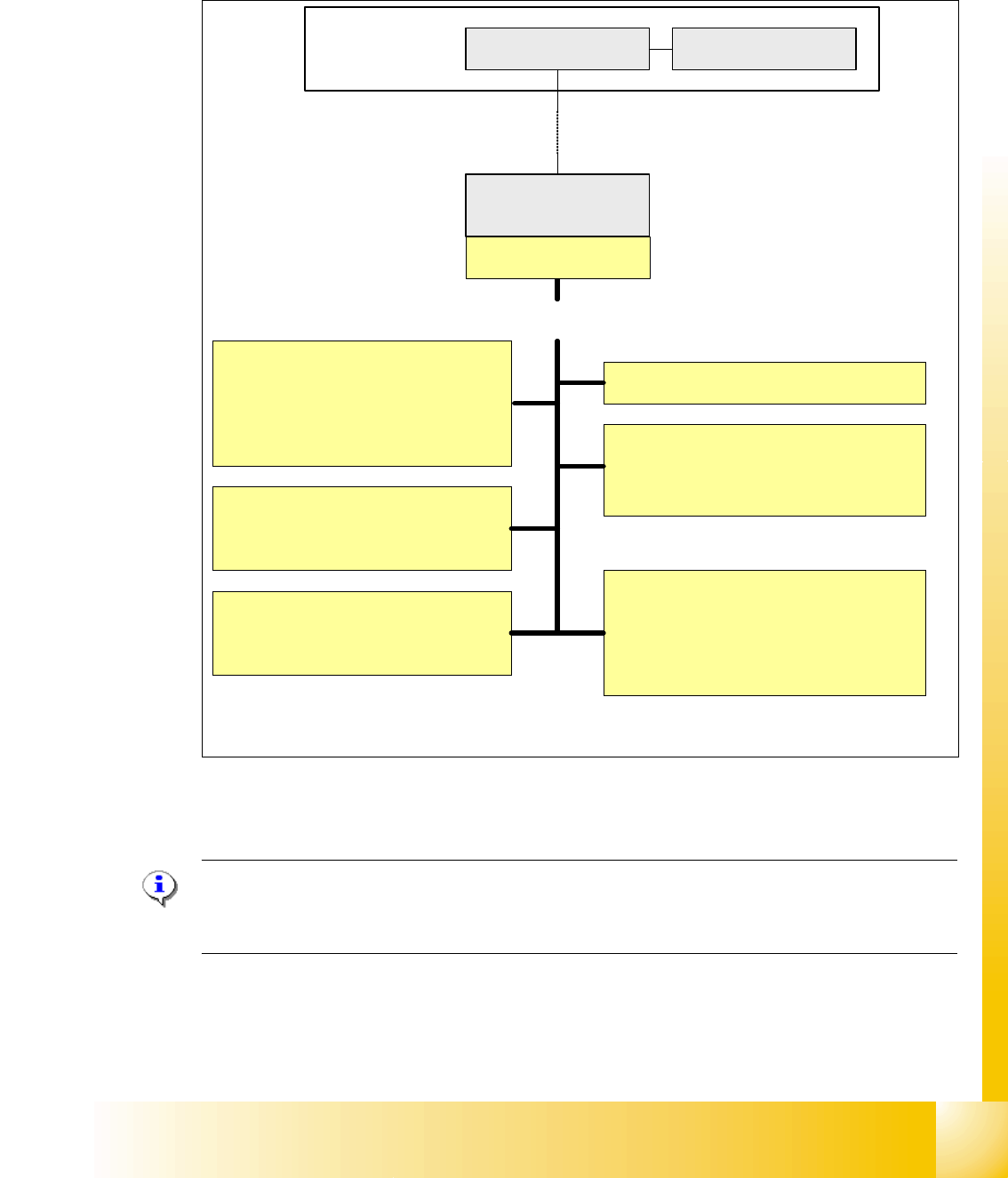
2.2.7.2 CAN-Bus controlled function on C&P 20 Kopf
The following overview shows various head functions, controlled by the CAN system. Thus, the
CAN bus controls the actuators and sensors of the C&P Head.
Fig. 2.2 - 17 Communication TQM Modul on the C&P 20 head
NOTE:
The status of the 16 Bit PROCESSOR BOARD is indicated on the 7-segment display.
Normal status on the diplay is: Display shows slowly flashed " . "
Pick up/Placement position
1. Adjust vacuum/air kiss
2. Measurement vacuum/air kiss
3. Reject function
Holding circuit
1. Monitoring vacuum
2. Measurement vacuum
Component Sensors
1. Initialization
2. Calibration
EEPROM
1. Zero point correction Z-axis
2. Zero point correction Star-axis
3. other head specific data
Computer Unit
COM Board
Machine- CAN Bus
(1MBit/s)
MC
Head processor
C500
TQM-module
Light barrier bottom
1. Activate the light barrier
Function control light barrier bottom
directly on the axis controller A363
Control Head-Can Bus
Control of the following functions
Function control component
sensor directly on the axis
controller A363
TQM = TQ Company name
M = module
TQM = 16 bit processor
1 - 20
Student Guide CAN BUS Workshop
2 Communication and Control Edition 06/2008
20
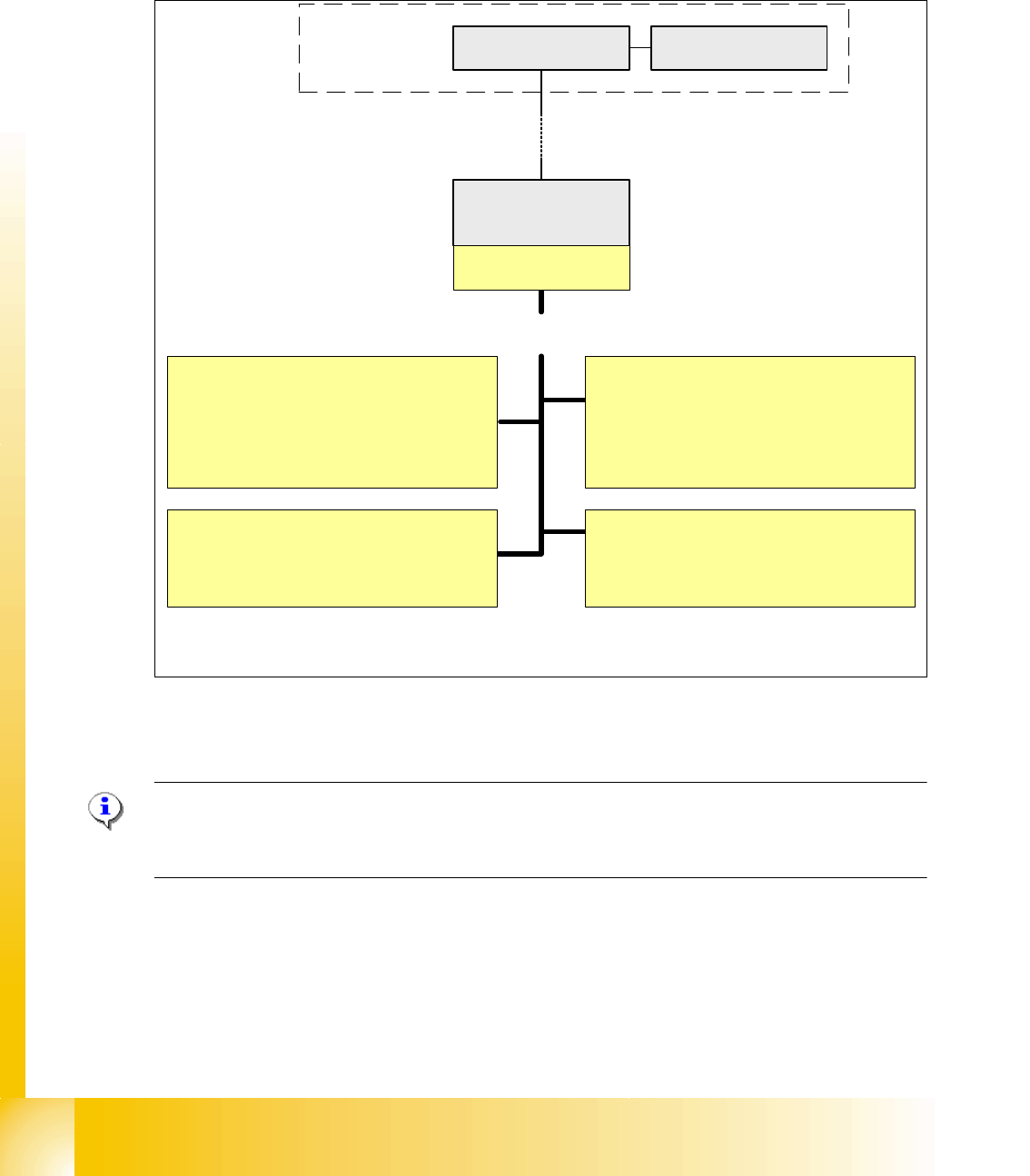
2.2.7.3 CAN Bus controlled function on the Twin Head
The CAN-Bus Processor-board is no longer on each Twin segment installed. Now, the Twin seg-
ment got a new board and the processor board (TQM) is installed on the head board C500. The
reason is, that we have a defined interface for head modularity.
Fig. 2.2 - 18 Function on the Can Bus Processor Twin Head
NOTE:
The status of the 16 bit PROCESSOR BOARD is indicated on the 7-segment display.
Normal status on the diplay is: " . " flashed
Vacuum/Air kiss generator Segment 1
1. Adjust vacuum/air kiss
2. Measurement vacuum/air kiss
3. Reject function
Computer Unit
COM Board
Machine- CAN Bus
(1MBit/s)
Control of the following functions
MC
Head processor
C500
TQM-module
Force measurement board Segment 1
1. Activation
Function control force measurement
directly on the axis controller A363
Vacuum/Air kiss generator Segment 2
1. Adjust vacuum/air kiss
2. Measurement vacuum/air kiss
3. Reject function
Force measurement board Segment 2
1. Activation
Function control force measurement
directly on the axis controller A363
1 - 21
Student Guide CAN BUS Workshop
Edition 06/2008 2 Communication and Control
21
2.2.8 CAN I/O Module (SLIO) Siplace X
SIPLACE X machines use 2 CAN I/O modules. Both modules are absolutely identical and are lo-
cated in sectors 2 (main distributor) and 4 (subdistributor). The introduction of the one wire bus
system means that there is now an additional board plugged into the I/O module (Interface 1-Wire
CAT5 / Interface 1-Wire CAN 2 used for WPC-option with SW 605).
– Micro controller with integrated CAN controller
–Data memory
– Program memory (flash)
– CAN interface with 9 pin connector and address alignment
– 16 digital Output 24 V with status LED
– 24 digital Input 24 V with status LED
– Download interface
– Power supply 24V
The board on the I/O module "Interface 1-Wire CAT5" [03041578-xx] needs to be replaced with
the "Interface 1-Wire CAN2" [03065805-xx] board for the WPC option.
Attention: two different kind of CAN I/O modul 00355051-01/02 with an additional RS232 bridge
and 00355051-03 with integrated RS232 bridge for HF-machine. (TI 2005-08E03)
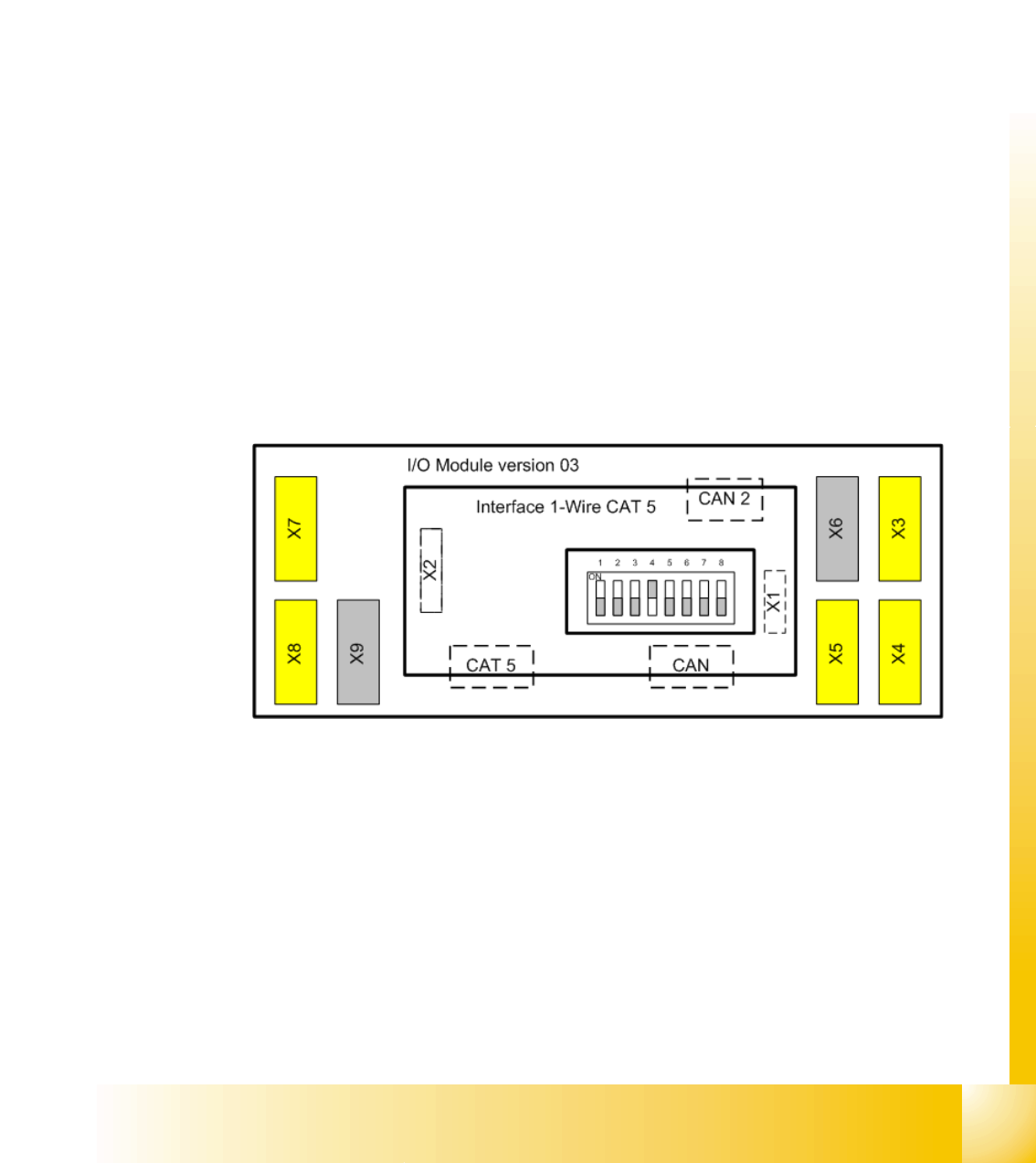
Fig. 2.2 - 19 Overview CAN I/O module
Legend
X1 CAN-Interface from the Interface to the
I/O module
X2 Connector for the RS232 Interface to supply
the ONE Wire
CAT 5: connecter for the one wire CAN connector for the machine CAN Bus
CAN 2 only available if you have the option WPC
X3, X4, X5 digital inputs 24V X6/X9 power supply 5V,24V,GND
X7, X8 digital outputs 24V DIP Switch is on the I/O module