CAN Bus Workshop_Version 03__06-2008_EN.pdf - 第147页
CACCIA Manual 1 Caccia Student Guide Issue 04/2007 EN 55 Str u ct u r e Fig. 1 - 31 Connection of servic e laptop with adapter card A364 → Connect the adapte r card with the corre- sponding axis card. → Connect the ser v…
1 Caccia Student Guide CACCIA Manual
Issue 04/2007 EN
54
1.6.7.2 Requirements:
– A service laptop with CACCIA version 14.0.97 or higher.
– Adaptercard for A364 [3051220-02] or a special adapter card for A362/A363/A364
– Serial cable e.g. CAN bus testing cable [00349679-03]
– Current BIOS version on the service-laptop or on memory stick
1.6.7.3 BIOS Download via V24-Interface
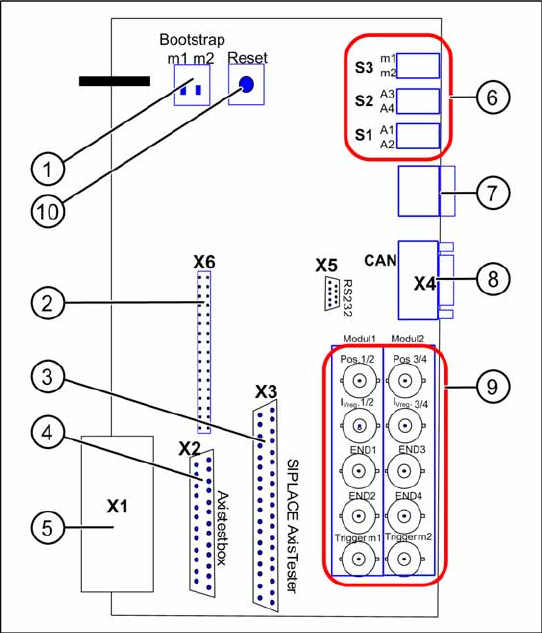
Adapter card for A364
Fig. 1 - 30 Adapter card for axis card A364
Functional Principle:
The axis controller card A364 works with 2
processors, which control 4 Axis of a
placement machine.
Key
1. Switch for Bootstrap-Download to the
processors m1/m2
2. Diagnostics connector (unused / not
connected)
3. Connection for SIPLACE Axis Tester
4. Connection for Axis test box
5. V24 Interface (RS232)
connection for BIOS download via
Bootstrap Loader
6. S3 Switch for 7-segment display for
processor m1 or m2 S2 Switch for axis
dynamic signals A3 or A4 of processor m2
(at right BNC-connectors) S1 Switch for
axis dynamic signals A1 or A2 of processor
m1 (at left BNC-connectors)
7. Diagnostics display for the processors m1
resp. m2
8. CAN-Bus connector (9pole Sub-D)
9. BNC connections for the axis signals
10. Reset switch for both processors
CACCIA Manual 1 Caccia Student Guide
Issue 04/2007 EN
55
Structure
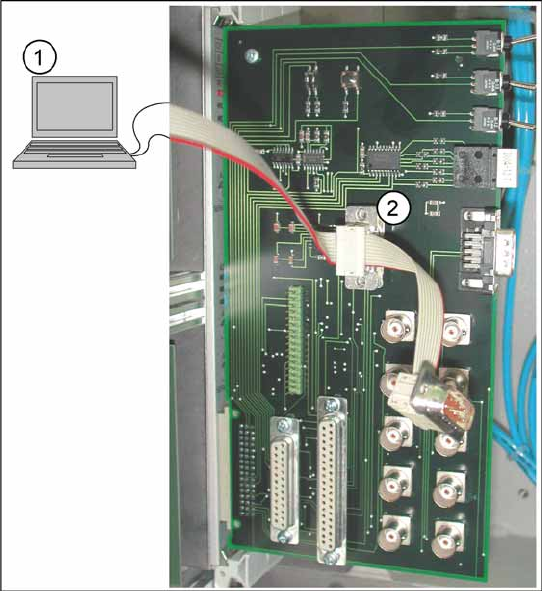
Fig. 1 - 31 Connection of service laptop with adapter card A364
→ Connect the adapter card with the corre-
sponding axis card.
→ Connect the service laptop (1) via serial in-
terface V24/RS232 with the adapter card
(2).
→ Start the CACCIA program.
1 Caccia Student Guide CACCIA Manual
Issue 04/2007 EN
56
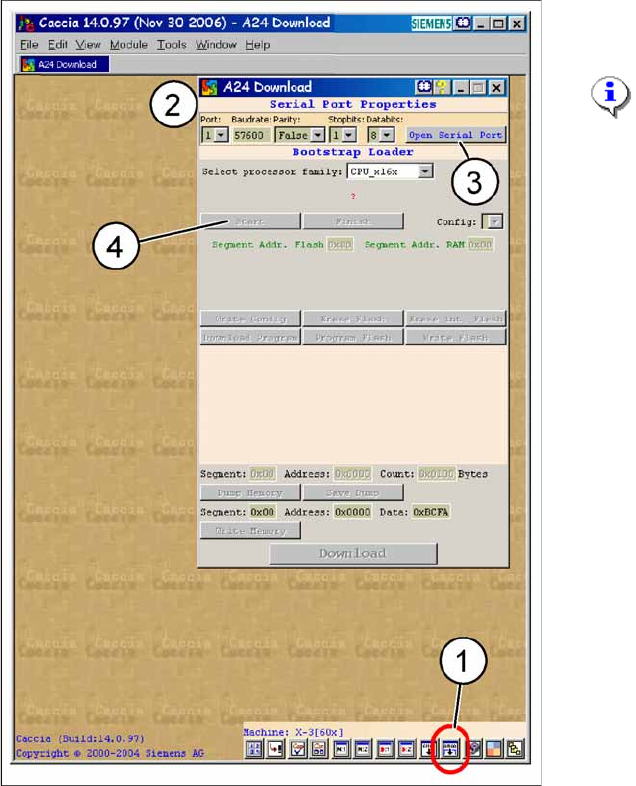
Fig. 1 - 32 A24-Download
→ Click on
Serial Firmware Download.
→ The A24 Download dialog appears.
NOTE:
For
Serial Port Properties
no
settings are necessary. The default
settings can be accepted.
Key
1. Icon
Serial Firmware Download
2. A24-Download-dialog
3. Button
Open Serial Port
4. Button
Start