CAN Bus Workshop_Version 03__06-2008_EN.pdf - 第195页
CACCIA Manual 1 Caccia Student Guide Issue 04/2007 EN 103 Fig. 1 - 77 Read the board type ID Head interface (1) R educe the ra nge of CAN ID‘s. - Write under "Affected Range" a small area of CAN ID‘s, to redu c…

1 Caccia Student Guide CACCIA Manual
Issue 04/2007 EN
102
Note
Please use always the ID‘s, which you get if you press the Button " GET VERSION or ACTIVATE
ID‘s" in the Subsystem Control window.
e.g. Head Processor: Portal 1 --> 300
Portal 2 --> 308
Portal 3 --> 310
Portal 4 --> 318
Exception: If you don‘t received a message from a subsystem, so you can try to work with "Stan-
dard ID‘s" e.g.Head processor: Gantry 1 --> 304 / Gantry 2 --> 30C / Gantry 3 --> 314 / Gantry 4
--> 31C 1
– If you want to write Board type ID‘s with CAN commands, it is necessary, that the TQM module
is running with the BIOS only!
– At first, carry out the BIOS download on the TQM module, thus you are sure that the TQM mod-
ule is running in the BIOS only.
– Open the network 1 for PA 1 and network 2 to for PA 2.
– With the right CAN ID and the CAN commands you can write the correct ID in the EEPROM.
CACCIA Manual 1 Caccia Student Guide
Issue 04/2007 EN
103
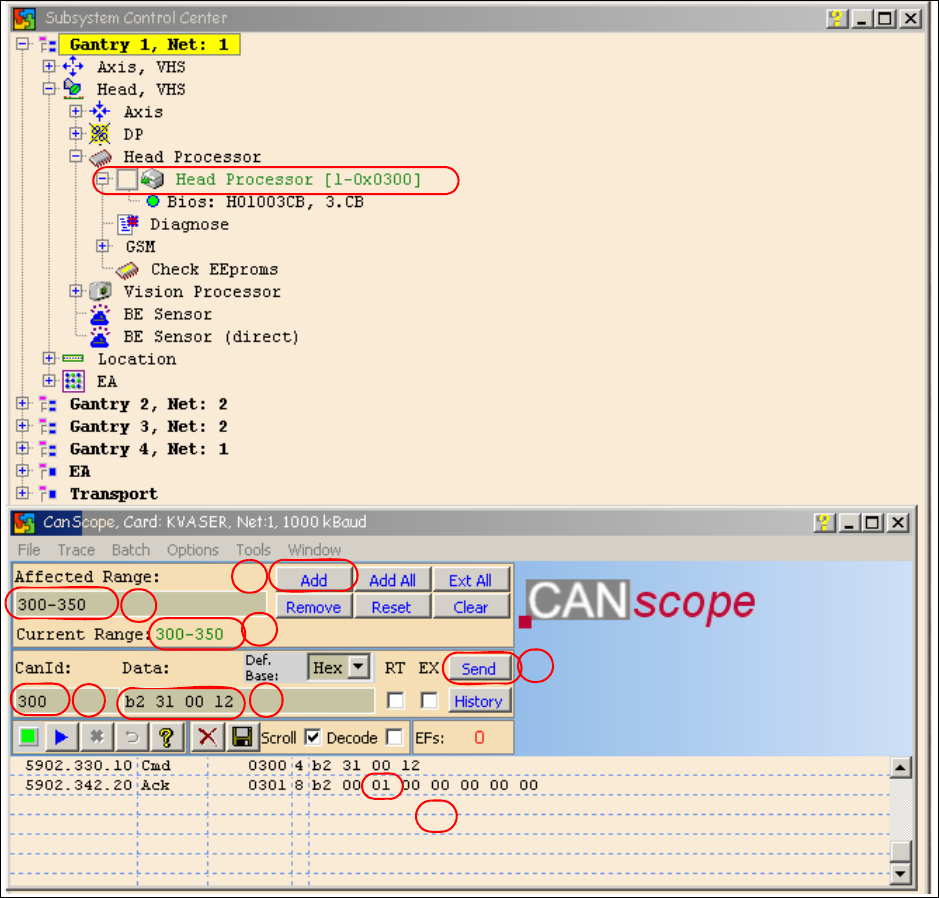
Fig. 1 - 77 Read the board type ID Head interface
(1) Reduce the range of CAN ID‘s.
- Write under "Affected Range" a small area of CAN ID‘s, to reduce the counter of CAN Bus
commands which appears in the network window.
- Confirm with "Add"
- The CAN ID Range will be show under "Current Range".
(2) Write the "Can ID" in the field "CanId".
(3) Write under "Data" the CAN Command.
e.g. b2 31 00 120 b2 --> read EEPROM
31 --> read from headinterface
1a
1b
1c
2
3
4
5
1 Caccia Student Guide CACCIA Manual
Issue 04/2007 EN
104
12 --> memory place in the memory (hex).
(4) Press "Send".
(5) Command appears in the Netzwork window again and an answer (Acknowledge) will be send
Ack b2 00 01 00 00 00 00 00 --> the memory place 12 is 01 = Board type ID Head interface.
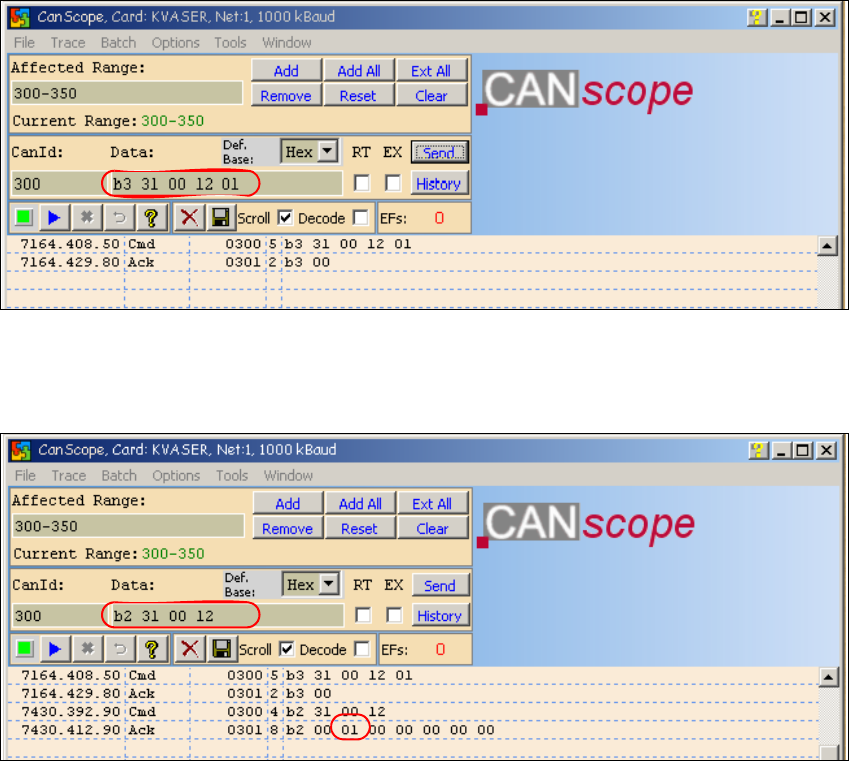
(6) Write the correct board type ID with command b3 31 00 12 01
b3 --> Write in the EEPROM
31 --> Head interface
12 --> memory place in the EEPROM
01 --> board type ID for the head interface
Acknowledege: b3 00 command OK
Fig. 1 - 78 CAN Command board type ID to write in the head interface
(7) Check the board type ID after you written the ID in the EEPROM
Fig. 1 - 79 Check the written board type ID
– Download the applications software on the TQM module.
– After the download the TQM module should running without error messages.