CAN Bus Workshop_Version 03__06-2008_EN.pdf - 第95页
CACCIA Manual 1 Caccia Student Guide Issue 04/2007 EN 3 1 C accia S tudent Guide 1.1 CACCIA Functions Caccia SIPLACE control concept in mach ines 1 Key Notes from th e Programmer Caccia is a R&D tool without restrict…
CACCIA Manual Content
Issue 04/2007 EN
2
1.8 Conveyor System. . . . . . . . . . . . . . . . . . . . . . . . . . . . . . . . . . . . . . . . . . . . . . . . . . . . . . . . . . . . . . .63
1.8.1 Conveyor System - Conveyor Data. . . . . . . . . . . . . . . . . . . . . . . . . . . . . . . . . . . . .63
1.8.2 Conveyor System - Control Functions. . . . . . . . . . . . . . . . . . . . . . . . . . . . . . . . . . .64
1.8.3 Conveyor System - Board Data. . . . . . . . . . . . . . . . . . . . . . . . . . . . . . . . . . . . . . . .65
1.8.4 Conveyor System - Board Functions. . . . . . . . . . . . . . . . . . . . . . . . . . . . . . . . . . . .66
1.9 File Comparison Menu. . . . . . . . . . . . . . . . . . . . . . . . . . . . . . . . . . . . . . . . . . . . . . . . . . . . . . . . . . .67
1.10 Trace Menu . . . . . . . . . . . . . . . . . . . . . . . . . . . . . . . . . . . . . . . . . . . . . . . . . . . . . . . . . . . . . . . . . . .69
1.11 One Wire Bus. . . . . . . . . . . . . . . . . . . . . . . . . . . . . . . . . . . . . . . . . . . . . . . . . . . . . . . . . . . . . . . . . .72
1.11.1 One Wire Bus - Structure . . . . . . . . . . . . . . . . . . . . . . . . . . . . . . . . . . . . . . . . . . . .72
1.11.1.1 Basic Structure . . . . . . . . . . . . . . . . . . . . . . . . . . . . . . . . . . . . . . . . . . . . . . . . . . . .73
1.11.1.2 One Wire Bus in the HF Machines . . . . . . . . . . . . . . . . . . . . . . . . . . . . . . . . . . . . .74
1.11.1.3 One Wire Bus in the Siplace X . . . . . . . . . . . . . . . . . . . . . . . . . . . . . . . . . . . . . . . .75
1.11.2 Function Control and Troubleshooting for Service Work. . . . . . . . . . . . . . . . . . . . .81
1.11.2.1 Subsystem Query in PA1 . . . . . . . . . . . . . . . . . . . . . . . . . . . . . . . . . . . . . . . . . . . .81
1.11.2.2 Function Control with Caccia. . . . . . . . . . . . . . . . . . . . . . . . . . . . . . . . . . . . . . . . . .85
1.11.3 One wire Bus Siplace X machine . . . . . . . . . . . . . . . . . . . . . . . . . . . . . . . . . . . . . .89
1.11.3.1 Communication One Wire . . . . . . . . . . . . . . . . . . . . . . . . . . . . . . . . . . . . . . . . . . . .90
1.11.3.2 Overview Initialization of the One Wire Bus . . . . . . . . . . . . . . . . . . . . . . . . . . . . . .91
1.12 Board type recognition. . . . . . . . . . . . . . . . . . . . . . . . . . . . . . . . . . . . . . . . . . . . . . . . . . . . . . . . . . .93
1.12.1 What does it mean board type recognition? . . . . . . . . . . . . . . . . . . . . . . . . . . . . . .93
1.12.1.1 Why we integrate the board type recognition? . . . . . . . . . . . . . . . . . . . . . . . . . . . .93
1.12.1.2 Functional description . . . . . . . . . . . . . . . . . . . . . . . . . . . . . . . . . . . . . . . . . . . . . . .93
1.12.1.3 Error description . . . . . . . . . . . . . . . . . . . . . . . . . . . . . . . . . . . . . . . . . . . . . . . . . . .93
1.12.1.4 PCB‘s with board type ID‘s . . . . . . . . . . . . . . . . . . . . . . . . . . . . . . . . . . . . . . . . . . .95
1.12.2 Check and write of the board type ID‘s on the EEPROM . . . . . . . . . . . . . . . . . . . .96
1.12.2.1 Read out the Board type ID via the menu Gripper . . . . . . . . . . . . . . . . . . . . . . . . .96
1.12.2.2 Read and write the Board type ID with CAN commands. . . . . . . . . . . . . . . . . . . .101
1.12.3 Troubleshooting, if are missing two board type ID‘s . . . . . . . . . . . . . . . . . . . . . . .105
1.12.4 CAN commands to read and write the board type ID‘s . . . . . . . . . . . . . . . . . . . . .105
1.12.4.1 Error messages TQM Modul . . . . . . . . . . . . . . . . . . . . . . . . . . . . . . . . . . . . . . . . .107

CACCIA Manual 1 Caccia Student Guide
Issue 04/2007 EN
3
1 Caccia Student Guide
1.1 CACCIA Functions
Caccia SIPLACE control concept in machines 1
Key Notes from the Programmer
Caccia is a R&D tool without restrictions. It supports a wide range of settings and functions. As
the Caccia user, you are personally responsible for the safe operation of software tools on the
placement machine. Do not change any parameters or functions if you are unsure of the results.1
1
Caccia has been developed in English. German texts are available in part but are not a fully sup-
ported feature. 1
Texts from databases or MA data files may be in English or German. Caccia has no influence on
these or on the language they are shown in. 1
1 Caccia Student Guide CACCIA Manual
Issue 04/2007 EN
4
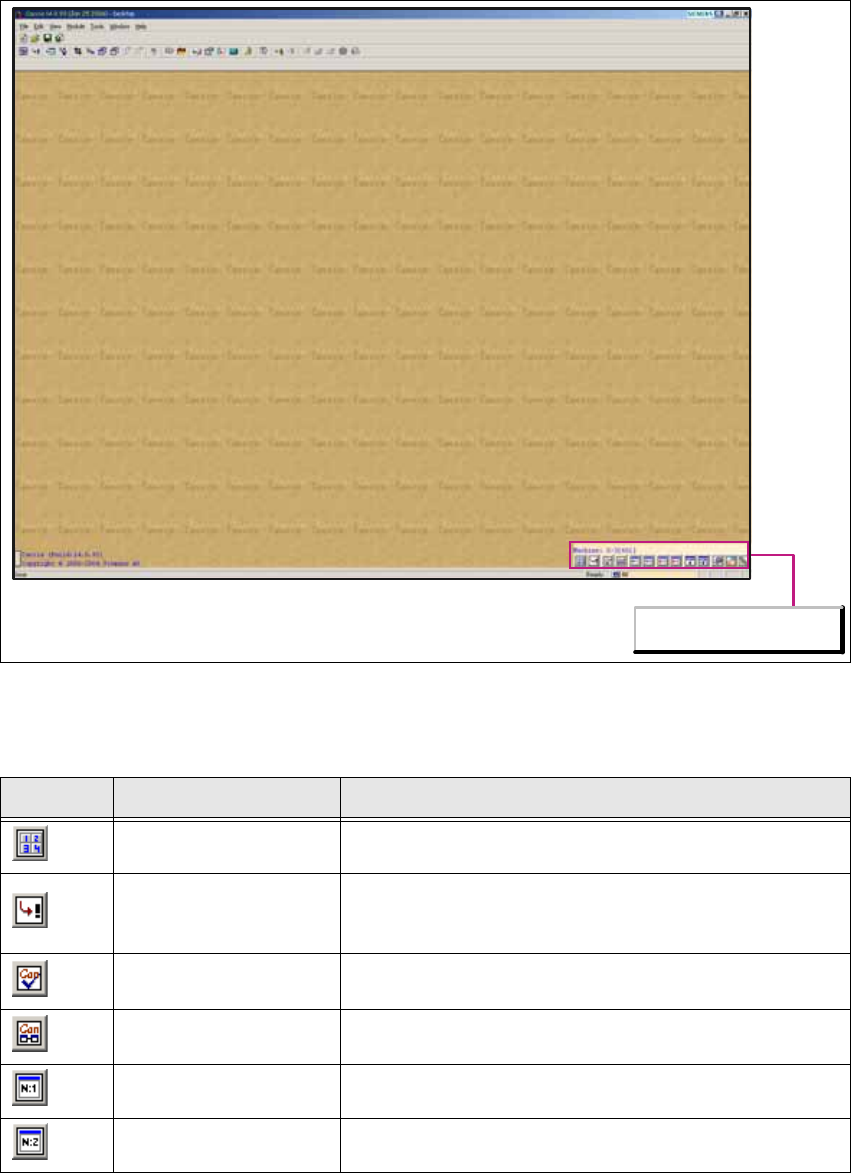
1.1.1 Configuration Toolbar Icons
1
Fig. 1 - 1 Caccia main view with configuration toolbar
1
1
Icon Designation Task
Calculator Opens the Calculator dialog box.
Base Converter
Opens the Base Converter dialog box, in which values
can be converted into various number systems. Binary,
hex, oct and decimal figures can be converted here.
CAN Self test
Opens the CAN Self test dialog box, in which a Caccia
self-test can be initiated.
CAN Analyzer Opens the CAN Analyzer dialog box for Net 1 or Net 2.
Can Scope Net 1 Opens the Can Scope dialog box for Net 1.
Can Scope Net 2 Opens the Can Scope dialog box for Net 2.
Configurations Toolbar