CAN Bus Workshop_Version 03__06-2008_EN.pdf - 第181页
CACCIA Manual 1 Caccia Student Guide Issue 04/2007 EN 89 1 1 -->temprature sensor on bottom of the head plate(17) - Click on the "Send" button. – Acknowledge: 6e 00 1d 4b 6e 00 --> command OK 1d --> te…
1 Caccia Student Guide CACCIA Manual
Issue 04/2007 EN
88
5. CAN Bus Commands for the status reject box components 1
– command: 6a 31 04
6a 31 --> command for status reject box components
04 --> gantry 4
- Click on the "Send" button.
– Acknowledge: 6a 00 00 --> reject box is present
6a 00 01 --> reject box not present
6. CAN Bus Commands for the status reject box nozzles 1
– command: 6a 32 04
6a 32 --> command for status reject box nozzles
04 --> gantry 4
- Click on the "Send" button.
– Acknowledge: 6a 00 00 --> reject box is present
6a 00 01 --> reject box not present
Note
The reject boxes will check via the message loop. That mean, at first you have to close the whole
securitey loop (table, cover,...) before the software check the state of the message loop.
(the image on the station after you press the start button), (e.g.missing reject bins). 1
7.CAN Bus Commands to check both temperature sensors 1
– command: 6e 11 01 01 28 10
6e 11 --> command
01 --> not def.
01 --> Gantry 1
28 --> subsystem temperature
10 -->temperatuer sensor on top of the headplate(16)
- Click on the "Send" button.
– Acknowledge: 6e 00 1c 4b
6e 00 --> command OK
1c --> temperature 1c hex-->28°C
– command: 6e 11 01 01 28 11
6e 11 --> command
01 --> not. def.
01 --> Gantry 1
28 --> Subsystem temperature
CACCIA Manual 1 Caccia Student Guide
Issue 04/2007 EN
89
11 -->temprature sensor on bottom of the headplate(17)
- Click on the "Send" button.
– Acknowledge: 6e 00 1d 4b
6e 00 --> command OK
1d --> temperature 1d hex-->29°C
8. CAN Bus Commands for initialization the one wire bus 1
– command: 3d 01
3d 01 --> command for initialization
- Click on the "Send" button.
– Acknowledge: 3d 00 01 Initialization successful
1.11.3 One wire Bus Siplace X machine
The structure of the One Wire Bus Siplace X was changed in opposite the HF/HF3 machine.
With the new hardware structur of the bus system the allocation of subsystems to the hardware
components is different (see table).
Attention: New Application on the I/O moduls necessary! (BIOS E0100323, Application E0110350
or higher)
During the initialization procedure all subsystems send a message via the public byte by yourself.
The public byte comes from each subsystem of the machine via the CAN ID +3hex. If the state of
a subsystem changes, the subsystem reports automatically and without request of the application.
1 Caccia Student Guide CACCIA Manual
Issue 04/2007 EN
90
1.11.3.1 Communication One Wire
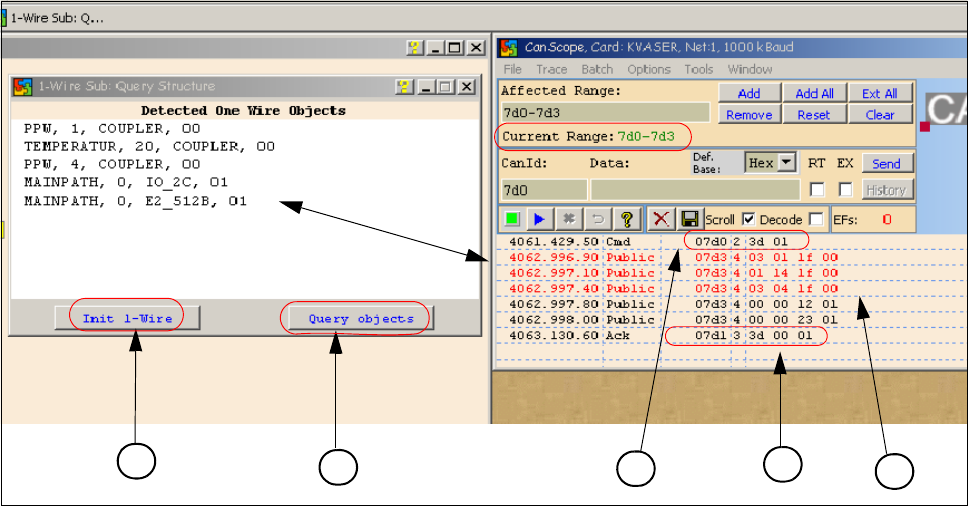
Fig. 1 - 64 Communication with the one wire Interface RS232 on the I/O module
(1)"Init 1 Wire" send the command via the CAN ID 7d0 for PA1.
(2)Query objects shows the decoded Public Bytes.
(3)Net window: 07d0 3d 01 command Initialization of the One Wire Bus.
(4) 5 Public bytes from the Subsystem RS232 Interface on the I/O module
1. 03 01 1f 00 --> 03 Subsystem NC / 01 Gantry / 1f Coupler
2. 01 14 1f 00 --> 01 Subsystem Temperature Gantry(1/4) / 14 1k EEPROM / 1f Coupler
3. 03 04 1f 00 --> 03 Subsystem NC / 04 Gantry / 1f Coupler
4. 00 00 12 01 --> 12 I/O component and EEPROM
5. 00 00 23 01 --> 23 4k EEPROM
(5)Acknowledge (Answer) Command CAN ID +1hex --> 3d 00 01
1
2
4
3
5