CAN Bus Workshop_Version 03__06-2008_EN.pdf - 第139页
CACCIA Manual 1 Caccia Student Guide Issue 04/2007 EN 47 → In the Download dialog box, click on the Load File button. → The Open dialog box will open. → Select the correct file in the Search in: dialog box. → Select the …
1 Caccia Student Guide CACCIA Manual
Issue 04/2007 EN
46
1.6.1 Multiple Downloads
To perform multiple downloads, select the required subsystems in the Subsystem Control Cen-
ter and then click on n Download. 1
1.6.2 Selecting the Firmware to be Loaded
Note
In the Change Properties - Advanced Subsystem Configuration dialog box, select the option
Allow suitable download file only. This ensures that you will only be shown suitable targets
(BIOS, Appl1 or Appl2) for selection of the download files. 1
1
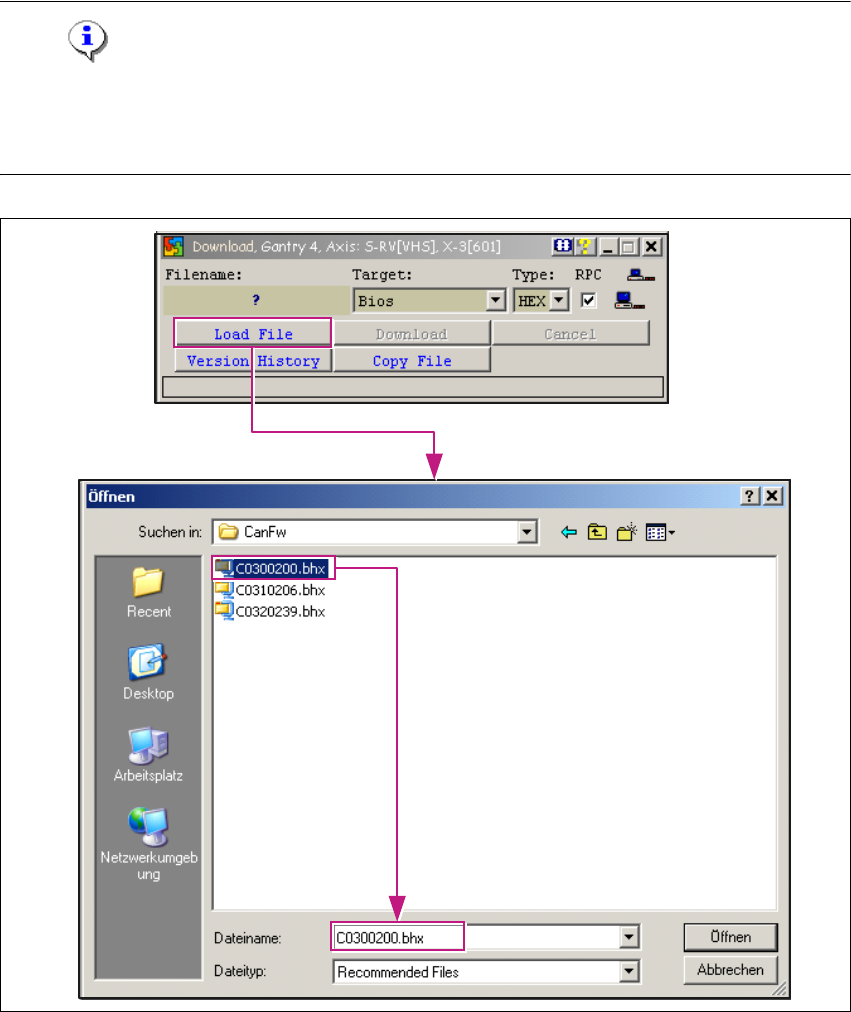
Fig. 1 - 26 Selecting the firmware to be loaded

CACCIA Manual 1 Caccia Student Guide
Issue 04/2007 EN
47
→ In the Download dialog box, click on the Load File button.
→ The Open dialog box will open.
→ Select the correct file in the Search in: dialog box.
→ Select the SW file for the selected subsystem and click on the Öffnen button.
1.6.3 Starting the Download
1
Fig. 1 - 27 Starting the download
Click on the Download button to start the download. After all downloads have been performed
successfully, you will need to restart the machine. 1
Starting the Download
Download performed successfully
1 Caccia Student Guide CACCIA Manual
Issue 04/2007 EN
48
1.6.4 Download - File Code
The download files have a fixed structure. 1
The following example illustrates the file naming convention: 1
B011031B.hex 1
1
Tab. 1 - 16 File name structure
1
The Name indicates the subsystem type: 1
1
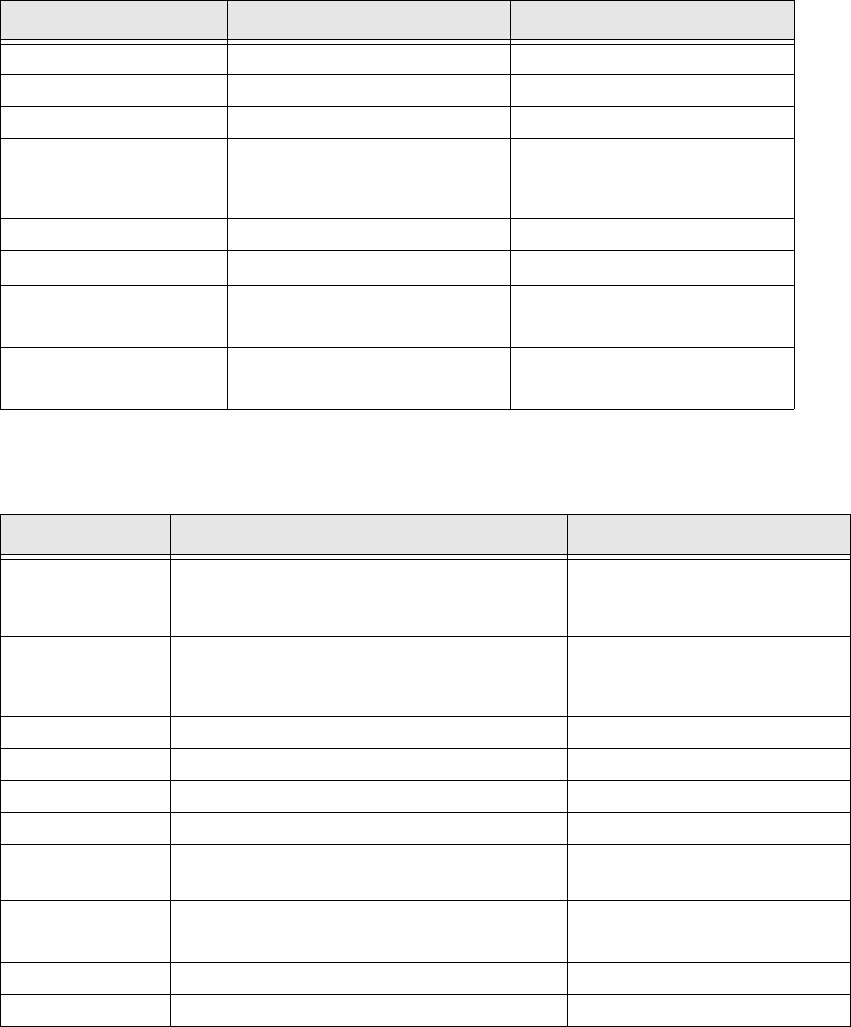
File name Category Meaning
BName CO table file
0 Variant ID No variant (0)
1 Hardware ID 1 Hardware state 1 1
1Target
0 would mean BIOS
1 mean Application 1
2 would mean Application 2
03 Version Version 003
1B Release
Release 27 (1B
H
→ 27
D
)
.
Separator 1 Separator between file name
and file extension 1
HEX
File type 1 File extension, file format
HEX file 1
Name Meaning Comments
A
Axis controller in General
The description is valid for sepatrated axis
types too)
01 for Axis controller A362
03 for Axis controller 363
04 for Axis controller 364
B Controller on CO table
01 for HM/HS machines
02 for HF machines
04 for X machines
C Star axes, C&P20
D D axes, DLM2 heads 11
E I/O module controller
F Axis controller, free axis
G Tape cutter
01 for HS machines
02 for HF machines
H
Head functions, C&P20 1 Head processor
(TQM module) 1
I Twin head (segment 1 or 2) 11
J DP axes (master), C&P20 11