CAN Bus Workshop_Version 03__06-2008_EN.pdf - 第148页
1 Caccia Student Guide CACCIA Manual Issue 04/2007 EN 56 Fig. 1 - 32 A24- Download → Click on Serial Firmware Download. → The A24 Download d ialog appears. NOTE: For Serial Port Properties no settings are n ecessary. The…
CACCIA Manual 1 Caccia Student Guide
Issue 04/2007 EN
55
Structure
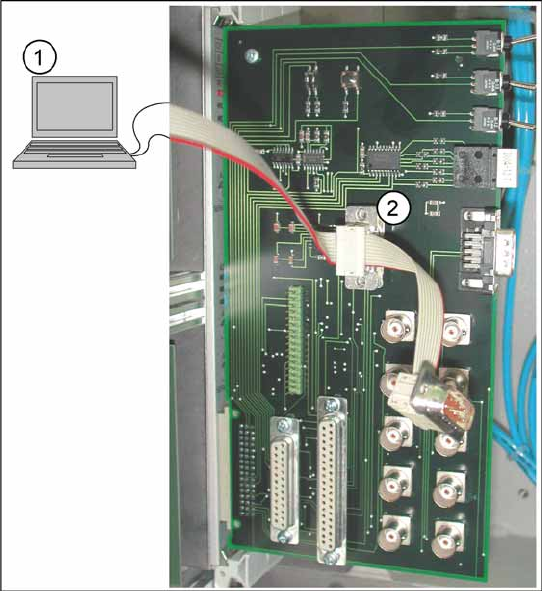
Fig. 1 - 31 Connection of service laptop with adapter card A364
→ Connect the adapter card with the corre-
sponding axis card.
→ Connect the service laptop (1) via serial in-
terface V24/RS232 with the adapter card
(2).
→ Start the CACCIA program.
1 Caccia Student Guide CACCIA Manual
Issue 04/2007 EN
56
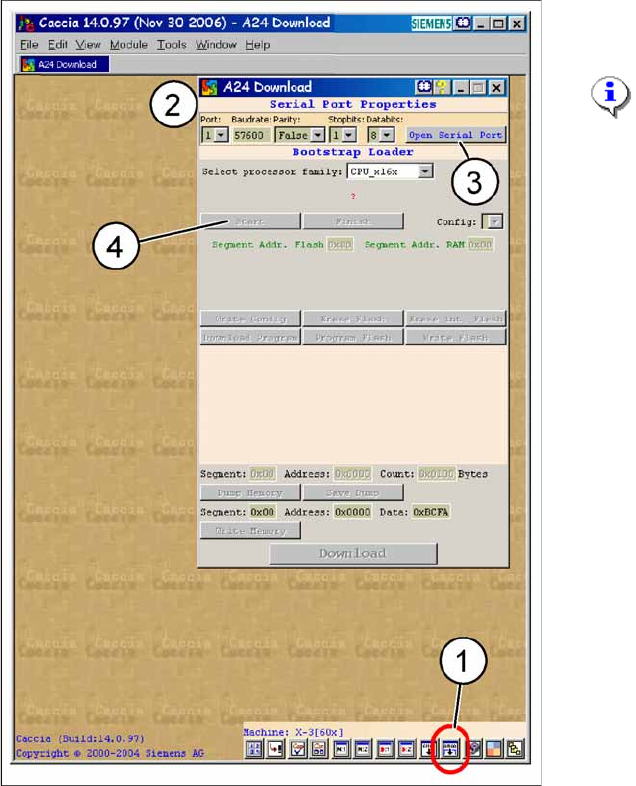
Fig. 1 - 32 A24-Download
→ Click on
Serial Firmware Download.
→ The A24 Download dialog appears.
NOTE:
For
Serial Port Properties
no
settings are necessary. The default
settings can be accepted.
Key
1. Icon
Serial Firmware Download
2. A24-Download-dialog
3. Button
Open Serial Port
4. Button
Start
CACCIA Manual 1 Caccia Student Guide
Issue 04/2007 EN
57
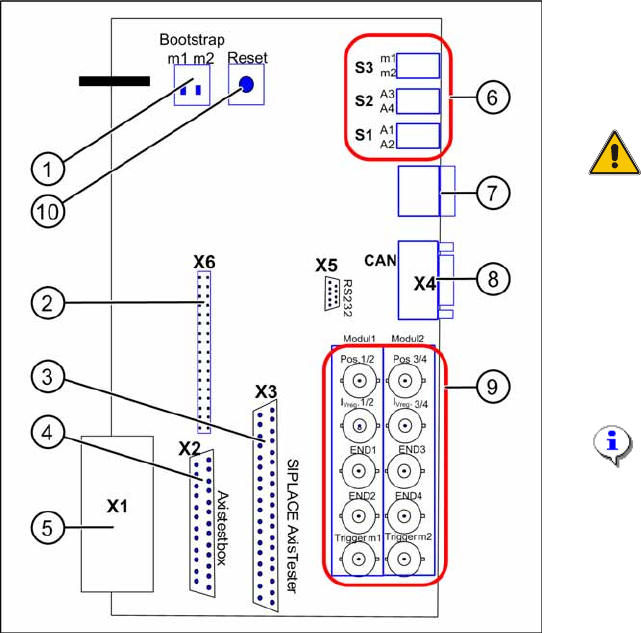
Fig. 1 - 33 Adapter card for axis card A364
→ Switch on the bootstrap switch 1 resp. 2 to
ON. See (1) - switch 1 for both axes
above (A1, A2) and switch 2 for both axes
below (A3, A4).
ATTENTION:
Only one of the switches must be
set to ON, that means bootstrap
switch 1 for A1/A2 or switch 2 for
the axes A3/A4.
→ Press the reset switch. Both processors
will be reset.
→ Click in CACCIA on the button
Open Se-
rial Port
and subsequenty the button
Start
.
NOTE:
The activation of the reset-switch
and the button
Open Serial Port
and
Start
must follow within
10 sec., otherwise no
communication will be established.