CAN Bus Workshop_Version 03__06-2008_EN.pdf - 第176页
1 Caccia Student Guide CACCIA Manual Issue 04/2007 EN 84 PPW --> Nozzle Changer (NC) T emperature, 4, E2_512B, 81 T emperature, 4, E2_32B, 01 T emperature, 4, E2_512B, 61 T emperature, 4, temperature, 10 T emperature,…

CACCIA Manual 1 Caccia Student Guide
Issue 04/2007 EN
83
Fig. 1 - 60 1 wire sub query structure
Click on the "Query objects" button to display all PA1 subsystems.
The function "Init 1wire" is not required, as the one wire bus system is initialized when the machine
is switched on. (If initialization is necessary, you may need to click on the button 2 or 3 times.)
Allocation of subsystems to the hardware components
Example of PA1 on HF/HF3
Subsystem Hardware components Comments
Temperature, 1, coupler, 00 PCB:1 wire trailing interface Trailing interface gantry 1
Temperature, 4, coupler, 00
CB:1 wire trailing interface
Trailing interface gantry 4
PPW, 4, coupler, 00 1 wire hub for NC Hub for NC at location 4 for NC row 1/2
PPW, 1, coupler, 00 1 wire hub for NC Hub for NC at location 1 for NC row 1/2
Mainpath, 0, IO_2C, 01
Mainpath, 0, E2_512B, 01
1 wire RS232 bridge I/O module board (to be later integrated
into I/O module)
Temperature, 1, E2_512B, 81
Temperature, 1, E2_32B, 01
Temperature, 1, E2_512B, 61
Temperature, 1, temperature, 10
Temperature, 1, temperature, 11
Temperature, 1, IO_2C,01
Temperature sensors
gantry 1
The two temperature sensors form a unit
and can only be replaced as a set. The
part for the gantry recognition can not
change.

1 Caccia Student Guide CACCIA Manual
Issue 04/2007 EN
84
PPW --> Nozzle Changer (NC)
Temperature, 4, E2_512B, 81
Temperature, 4, E2_32B, 01
Temperature, 4, E2_512B, 61
Temperature, 4, temperature, 10
Temperature, 4, temperature, 11
Temperature, 4, IO_2C,01
Temperature sensors
gantry 4
The two temperature sensors form a unit
and can only be replaced as a set. The
part for the gantry recognition can not
change.
PPW, 4, E2 32B, 81
PPW, 4, AD, 03
PPW, 4, AD, 15
PPW, 4, AD, 16
1 wire hub for NC at location
4
Shows that the 1 wire hub is connected.
PPW, 4, E2_32, 01
PPW, 4, AD, 01
PPW, 4, IO_8C, 01
Control board in NC
gantry 4, in C&P20 NC only
Control board of NC row 1.
PPW, 4, E2_32, 02
PPW, 4, AD, 02
PPW, 4, IO_8C, 02
Control board in NC
gantry 4, in C&P20 NC only
Control board of NC row 2.
PPW, 1, E2_32B, 81
PPW, 1, AD, 03
PPW, 1, AD, 15
PPW, 1, AD, 16
1 wire hub for NC at location1 Shows that the 1 wire hub is connected.
PPW, 1, E2_32B, 01
PPW, 1, AD, 01
PPW, 1, IO_8C, 01
Control board in NC
gantry 1, in C&P20 NC only
Control board of NC row 1.
PPW, 1, E2_32B, 02
PPW, 1, AD, 02
PPW, 1, IO_8C, 02
Control board in NC
gantry 1, in C&P20 NC only
Control board of NC row 2.
CACCIA Manual 1 Caccia Student Guide
Issue 04/2007 EN
85
1.11.2.2 Function Control with Caccia
Nozzle changer used as example:
In addition to the SITEST program, there are two other options for testing the function of the nozzle
changer.
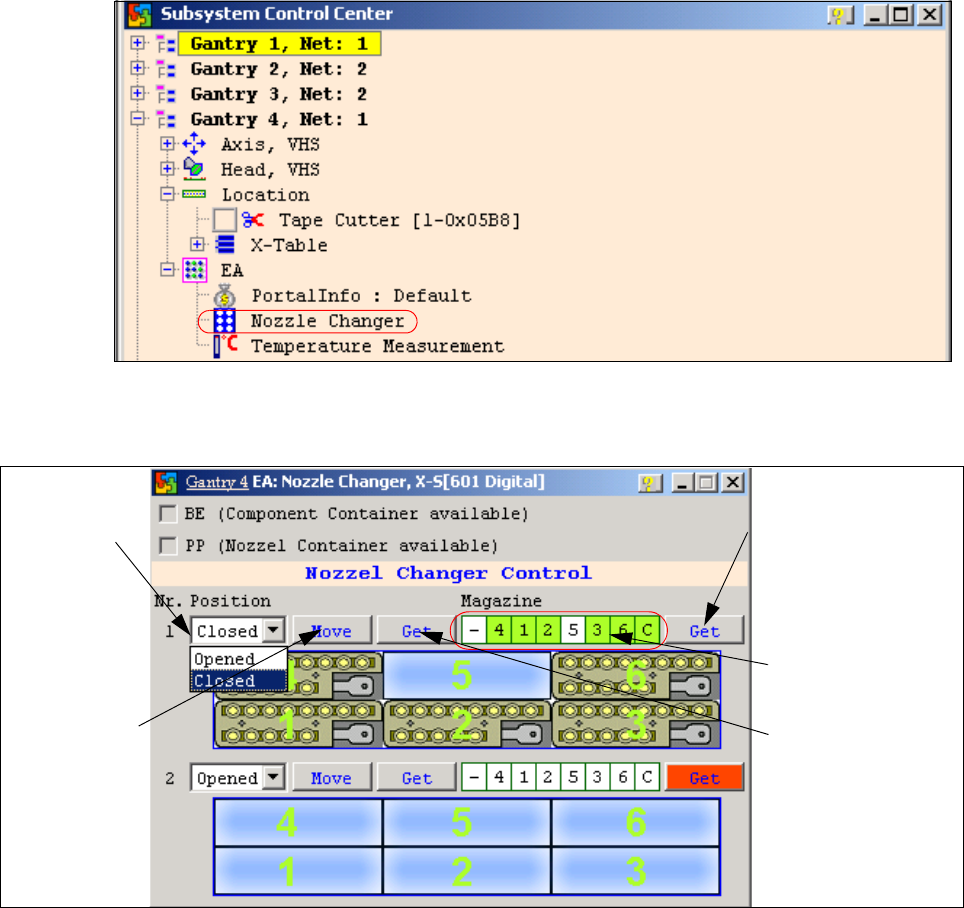
1. NC menu 1
– Open the IO directory of the relevant location in the subsystem control center.
– Doubleclick on Nozzle Changer.
Fig. 1 - 61 Subsystem control center (nozzle changer)
– the following menu will appear:
Fig. 1 - 62 I/O nozzle changer
Status query maga-
zine (micro switch un-
der the magazine)
Selection win-
dow, open/
close NC row
1
Status display
magazine
Performs the
selected func-
tion
Status display
NC opened / closed