CAN Bus Workshop_Version 03__06-2008_EN.pdf - 第118页
1 Caccia Student Guide CACCIA Manual Issue 04/2007 EN 26 A TTENTION The Caccia opera tor is responsible for the entire ma chine (Z-axis up pos.; Y park position; multiple operation)! 1 1 1 T ab. 1 - 7 T ape cutter dialog…
CACCIA Manual 1 Caccia Student Guide
Issue 04/2007 EN
25
1.4 Moving the Axes
1.4.1 General
Note
The axis reference run and movement of the axes may only be performed by specially trained per-
sonnel. 1
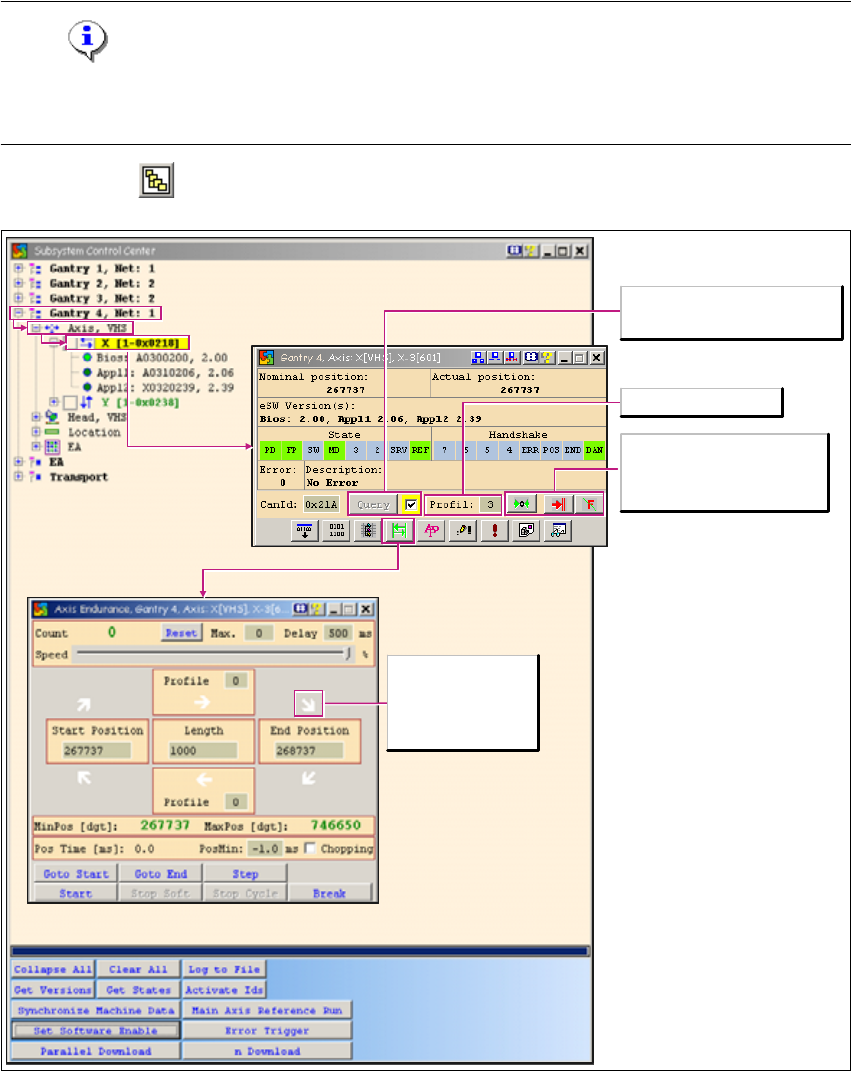
→ Click on the button to open the Subsystem Control Center dialog box:
1
Fig. 1 - 13 Moving the axes
Issues a new status request for
the axis.
Select the travel profile
Starts the axis reference run
Cancels the function
currently started
Acknowledges errors
White arrow: No
action has been
started.

1 Caccia Student Guide CACCIA Manual
Issue 04/2007 EN
26
ATTENTION
The Caccia operator is responsible for the entire machine (Z-axis up pos.; Y park position; multiple
operation)! 1
1
1
Tab. 1 - 7 Tape cutter dialog box functions
1
→ The Axis dialog box allows you to start a query or an axis reference run.
→ The Endurance button opens the Axis Endurance dialog box.
→ The Axis Endurance dialog box allows you to position the axes.
Button Description / Action
Gantry Opens the gantry to be moved. Gantry 4 is opened in the example.
Axis VHS Opens the axis to be moved (e.g. main axis with C&P20 head).
X-Axis
Allows you to select the axis required with a doubleclick. The X-axis
is selected in the example. The Axis dialog box will open.

CACCIA Manual 1 Caccia Student Guide
Issue 04/2007 EN
27
1.4.2 Moving the X and Y Gantry Axes
1
Fig. 1 - 14 Moving the X and Y gantry axes
Note
The software release can be seen on the SSK (the top green LED must shine). 1
1
Nominal axis position
State
PD Positioning data
FP Travel profile data
SW Software enabled
MD Machine data
SRV Servo active (green)
REF Reference run
Buttons with numbers are reserved.
Actual axis position
Shows the actual AC
Firmware
Handshake
Err Error
POS Position deviation
END End message
DAN Data IN
Buttons with numbers are reserved.