CAN Bus Workshop_Version 03__06-2008_EN.pdf - 第150页
1 Caccia Student Guide CACCIA Manual Issue 04/2007 EN 58 Fig. 1 - 34 A24 d ownload dialog: Connection to axis card is OK In case of a succesful connection the adjoined window is displayed. → Click on button Write Conf ig…
CACCIA Manual 1 Caccia Student Guide
Issue 04/2007 EN
57
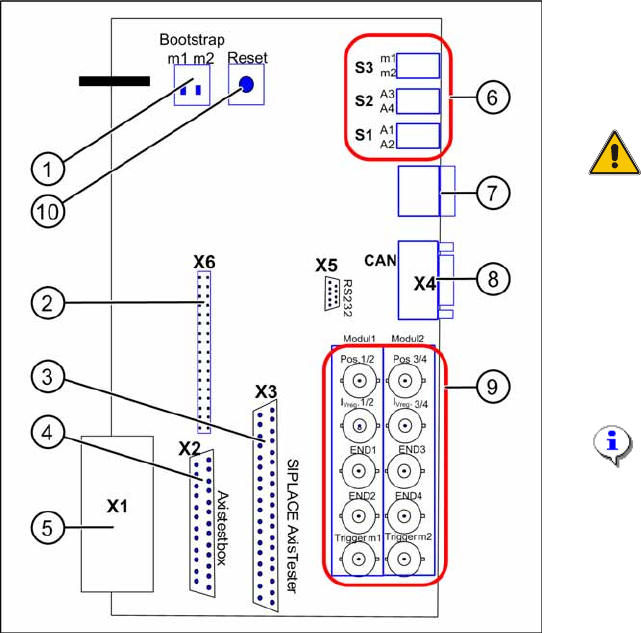
Fig. 1 - 33 Adapter card for axis card A364
→ Switch on the bootstrap switch 1 resp. 2 to
ON. See (1) - switch 1 for both axes
above (A1, A2) and switch 2 for both axes
below (A3, A4).
ATTENTION:
Only one of the switches must be
set to ON, that means bootstrap
switch 1 for A1/A2 or switch 2 for
the axes A3/A4.
→ Press the reset switch. Both processors
will be reset.
→ Click in CACCIA on the button
Open Se-
rial Port
and subsequenty the button
Start
.
NOTE:
The activation of the reset-switch
and the button
Open Serial Port
and
Start
must follow within
10 sec., otherwise no
communication will be established.
1 Caccia Student Guide CACCIA Manual
Issue 04/2007 EN
58
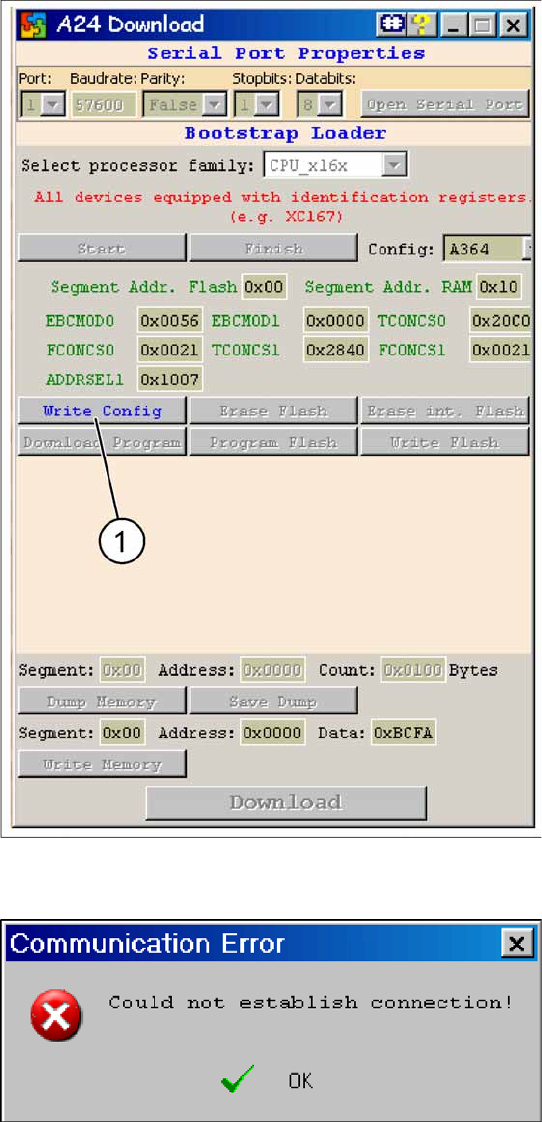
Fig. 1 - 34 A24 download dialog: Connection to axis card is OK
In case of a succesful connection the
adjoined window is displayed.
→ Click on button
Write Config
(1).
Fig. 1 - 35 Error message during establishing V24 connection
In case of a connection failure the adjoined
error message is shown.
→ In this case repeat the sequence descri-
bed above.
→ Close the window and reopen it.
→ Press reset switch on the adapter card.
→ Cick in CACCIA on the button
Open Se-
rial Port
and subsequently on the button
Start
.

CACCIA Manual 1 Caccia Student Guide
Issue 04/2007 EN
59
Fig. 1 - 36 Download-sequence
After the activation of the button
Write Con-
fig
the buttons should be active as shown in
the adjoined screenshot.
→ Erase the flash memory by pressing on
the buttons
Erase Flash
(1) (approx.
15 sec.) and
Erase int. Flash
(2) (ap-
prox. 2 sec.).
After this the flash is erased completely
and the BIOS can be downloaded again.
→ Click on the button
Download
Program
(3).
An Explorer dialog opens where the cor-
rect BIOS must be selected and opened.
→ Click on the button
Program Flash
(4)
(approx. 3 sec.).
→ Finally click on the button
Finish
(5).