CAN Bus Workshop_Version 03__06-2008_EN.pdf - 第126页
1 Caccia Student Guide CACCIA Manual Issue 04/2007 EN 34 1 Fig. 1 - 19 Loading axis machine data (read only) A TTENTION These ar e develop f unctions w hich could de stroy the a xis data record if used inco rrectly . 1 N…
CACCIA Manual 1 Caccia Student Guide
Issue 04/2007 EN
33
1
The data can be written to the following targets: 1
1
1
1.4.4.1 Loading Axis Machine Data (Read Only)
Note
The axis reference run and editing of the axes may only be performed by specially trained person-
nel. 1
1
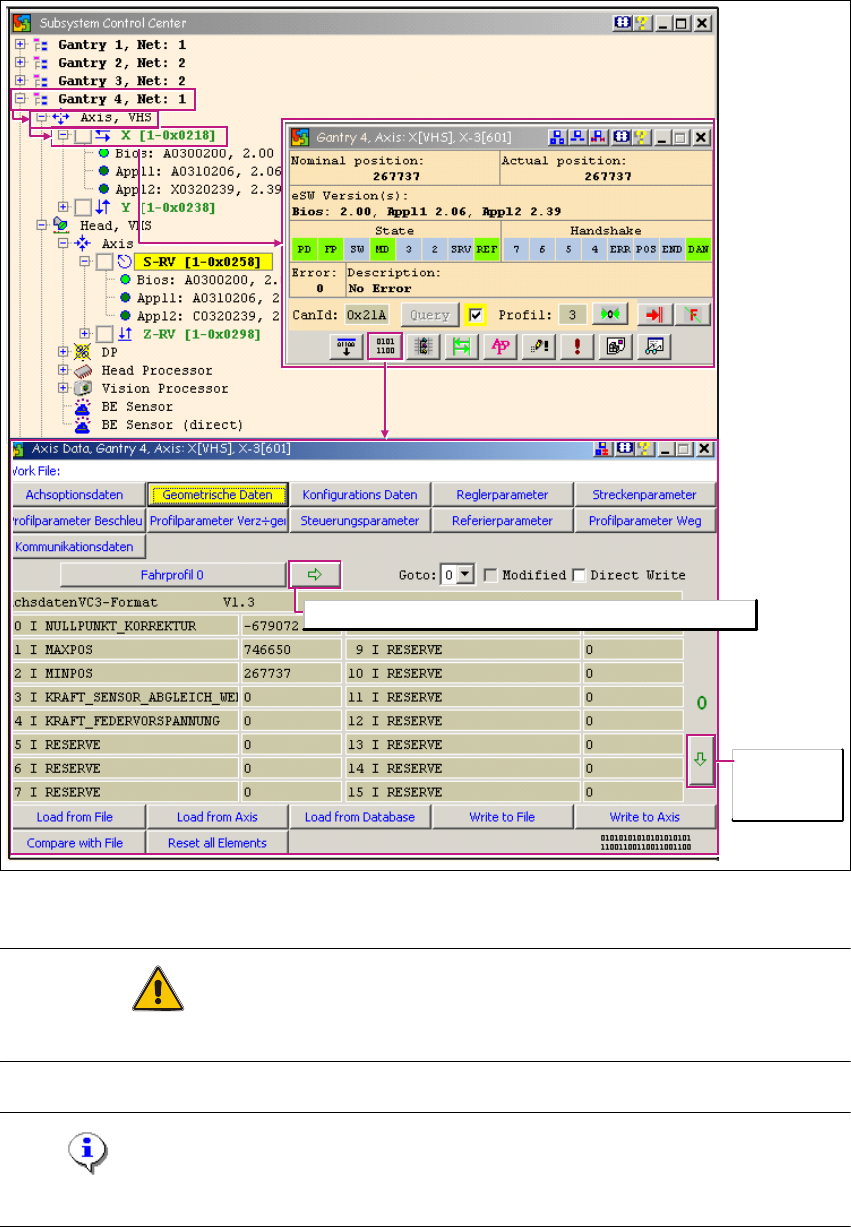
→ Click on the button to open the Subsystem Control Center dialog box:
Load from DataBase
Loads an AXIS MA database (previously copied to the service
laptop) valid for the machine SW. 1
Important: make sure you enter the currently valid zero point
corrections for the S/Z axes beforehand. 1
Write to File Writes the data in a file.
Write to Axis Writes the data in the axis controller.
Compare with File Compares the axis controller data with the contents of a file.
Reset all Elements Resets the axis controller data.
1 Caccia Student Guide CACCIA Manual
Issue 04/2007 EN
34
1
Fig. 1 - 19 Loading axis machine data (read only)
ATTENTION
These are develop functions which could destroy the axis data record if used incorrectly. 1
Note
These labels are always in German. 1
Browse to
further data
sheets
Copy current travel profile to travel profile with index 0

CACCIA Manual 1 Caccia Student Guide
Issue 04/2007 EN
35
1.4.5 Axis Function Check
1.4.5.1 S-Axis Function Check
Due to the intermediate circuit voltage, this function will only be available if the SW release has
been issued and the START button pressed. 1
1
→ Click on the button to open the Subsystem Control Center dialog box:
1
Fig. 1 - 20 S-axis function check
Shows the 0 -18000 digit (18°) segment to segment endurance run of the star axis. 1
Operating mode:
Endurance test for rotary axes