CAN Bus Workshop_Version 03__06-2008_EN.pdf - 第80页
1 - 18 S tudent Gu ide CAN BUS Wor kshop 3 CAN BU S Editio n 06/200 8 18 30 D at um 0 6 / 20 08 V er s io n 0 3 C AN B u s W o rk sh o p Mat hia s Mi c hel SIPL ACE Cam p us Auto matio n and Dr ives 4. Über b lick C AN B…
1 - 17
Student Guide CAN BUS Workshop
Edition 06/2008 3 CAN BUS
17
29Datum06/2008 Version 03 CAN Bus Workshop Mathias Michel
SIPLACE Campus
Automation and Drives
3. Mögliche Fehlerquellen
3. The following Error message appears:
COM Unit 168: Error message CAN Card MC (COM 168) FM_CAN_FIRMWARE_VERSION
Æ 3524 Falsche CAN Firmware-Version (Info 1: Firmware-Version / Info 2: Release-Nr.)
Æ 3524 wrong CAN Firmware-Version (Info 1: Firmware-Version / Info 2: Release-Nr.)
Solution Download the correct version to the COM 168
Note: The correct firmware should be storage on the MC after you start the MC Distributor
Check the Application on the CAN COM 168 Siplace X:
• Attention please disconnect the CAN Bus cable from the COM Board and Switch ON the machine!
• Switch to the MC and change to the console with F4
• Change to drive D (cd d:)
• Change to the folder fw_dl (cd fw_dl)
• Query version enter the command D:\FW_DL >ver_c168
Download the Application on the CAN COM 168 Siplace X:
• Start the Download with the command e.g. pcidown.386 FW113.HEX
(at first search the newest application file and for help look to sc d: FW_DL unter read me .txt)
• Note: At first appears the current version
• After few seconds you see the new version on the display automatically.
• Switch OFF and ON the machine!
3. Source of errors
1 - 18
Student Guide CAN BUS Workshop
3 CAN BUS Edition 06/2008
18
30Datum06/2008 Version 03 CAN Bus Workshop Mathias Michel
SIPLACE Campus
Automation and Drives
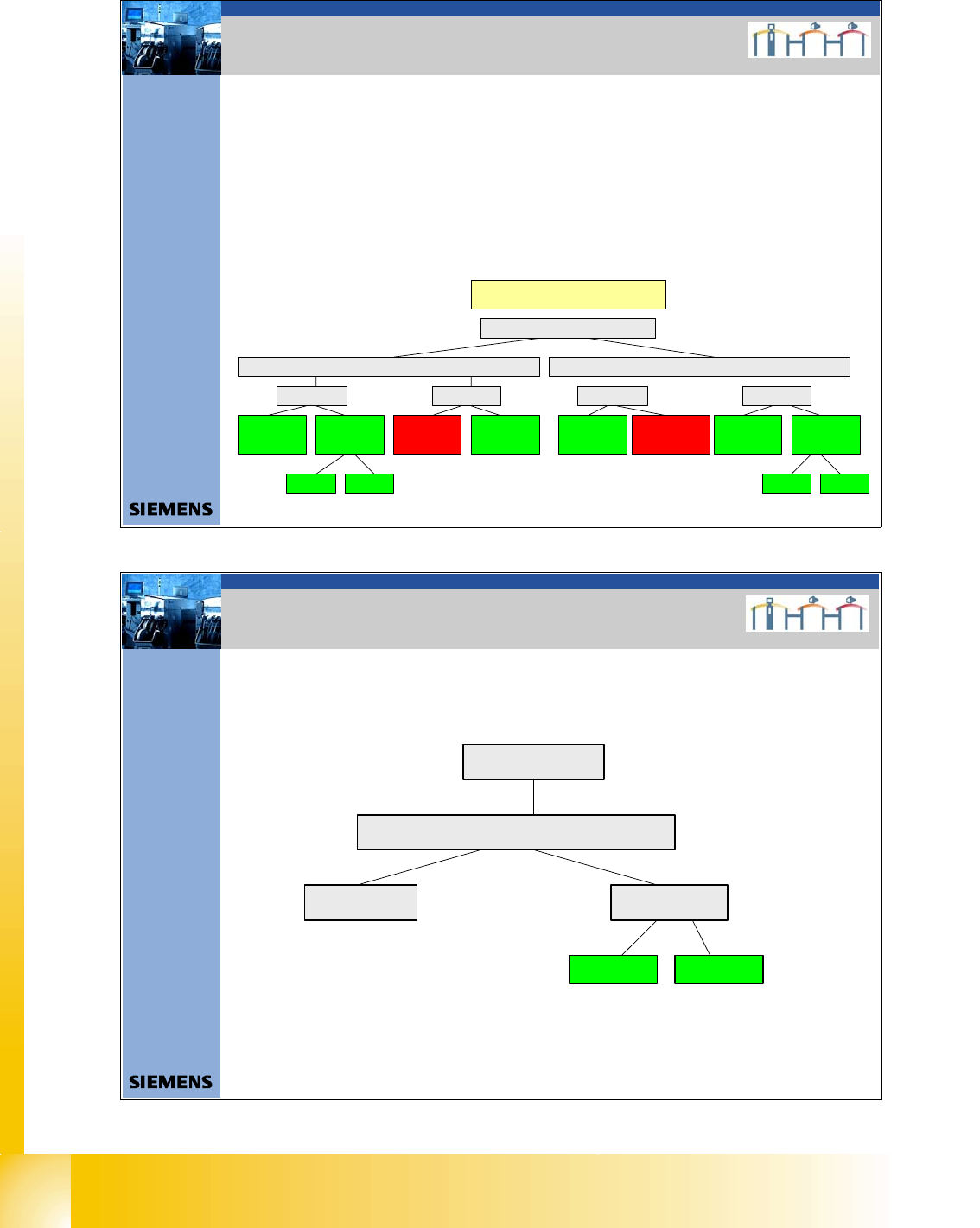
4. Überblick CAN Bus Struktur Siplace HF
4. CAN BUS Structure Siplace HF
The HF machines will have the following differences:
- Communication unit 2x KSP 352 or one KSP 354
- HF machines with one CAN BUS for both placement areas are only supported by
station software versions 504.xx
- HF machines from station software version 505.xx only support the CAN bus structure with
one CAN bus per placement area.
- A difference is made between old and (new) universal cable harnesses.
CAN Bus Structures
HF
Universal cable harnessOld cable harness
COM KSP354COM KSP 352
SW 504 One
CAN b us per
ma chi ne
SW 505 One
CAN bus per
plac ement area
Version 01 Version 02
SW 504 One
CAN bus per
machine (was
not avail abl e)
SW 505 One
CAN bus per
placement area
COM KSP354COM KSP 352
SW 504 One
CAN bus per
ma ch in e
SW 505 One CAN
bus per placemen t
area (was not
available)
SW 505 One
CAN b us pe r
placement area
SW 504 One
CAN bus per
ma ch ine
Version 01 Version 02
31Dat um06/2008 Version 03 CAN Bus Workshop Mathias Michel
SIPLACE Campus
Automation and Drives
4. Überblick CAN Bus Struktur Siplace HF/3
4. CAN BUS Structure Siplace HF3
HF/3
COM KSP 352 COM KSP354
Universal cable harnes
Version 02Version 01
1 - 19
Student Guide CAN BUS Workshop
Edition 06/2008 3 CAN BUS
19
32Datum06/2008 Version 03 CAN Bus Workshop Mathias Michel
SIPLACE Campus
Automation and Drives
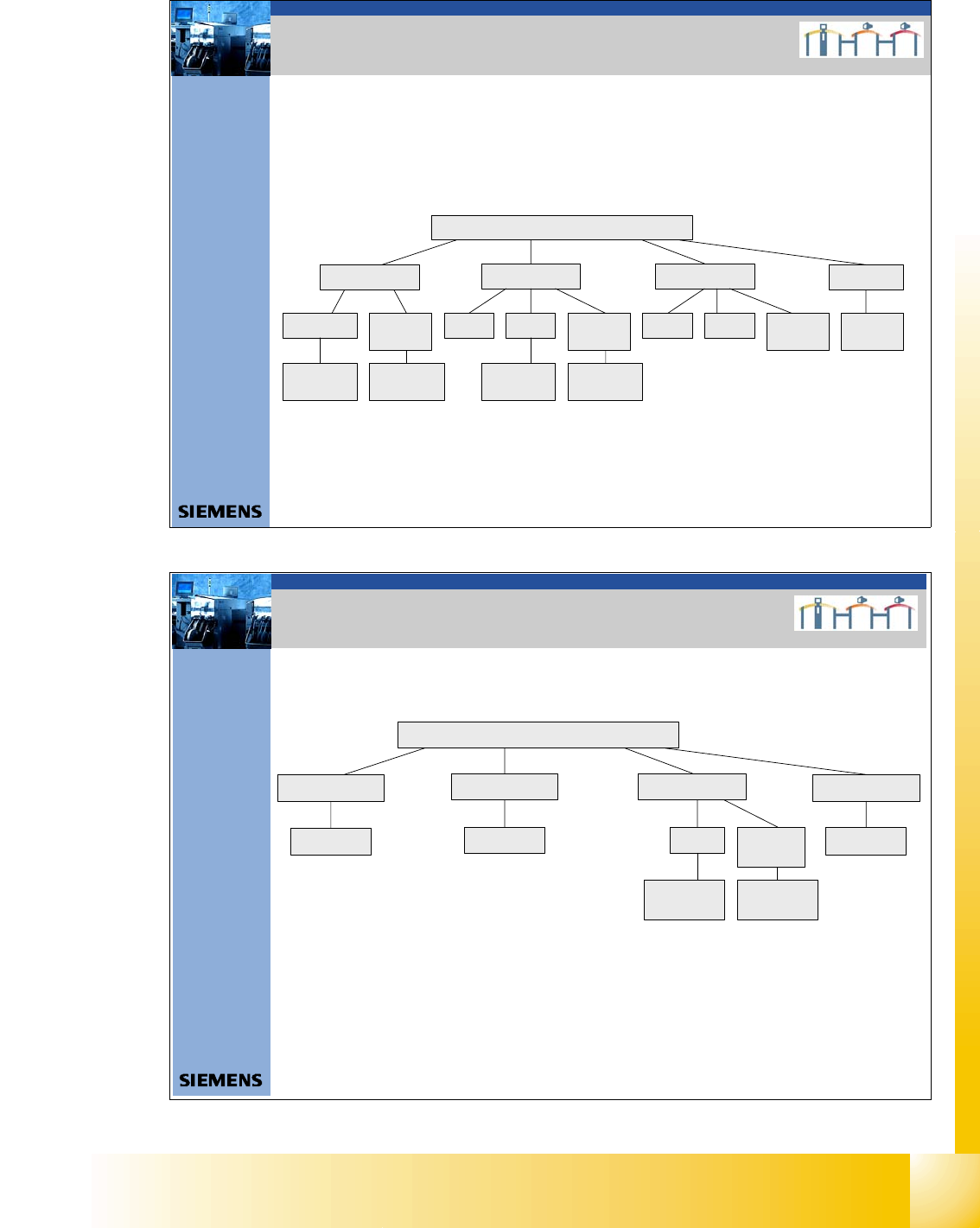
4. Überblick CAN Bus Struktur Siplace X
4. CAN BUS Structure Siplace X
On the Siplace X2 is
only the version 2 in the
field.
With the new stationary cameras, the vision control unit is implemented. Therefore you need an additional
CAN BUS connector for the stationary cameras. So you have new CAN Bus structure depend on the
position of cameras (Location 1, 2, 3 or 4), Head configuration and machine type.
With the SW605 there is the option WPC 4 on the X2 and X3 machine possible. This option required a new
Board on the I/O module Æ Interface 1-Wire CAN 2
X-serie
X2
X3 X4
Variant 1 Variant 2 Variant 1 Variant 2Only Vari ant 2
Variant 3
with CAN
Node
Variant 3 and
WPC 4
Variant 3 and
WPC 4
X4I
Variant 3
with CAN
Node
Variant 3
with CAN
Node
Variant 3
wi th CAN
Node
Variant 2 and
WPC 4
Variant 2 and
WPC 4
33Datum06/2008 Version 03 CAN Bus Workshop Mathias Michel
SIPLACE Campus
Automation and Drives
4. Überblick CAN Bus Struktur D-Serie
4. CAN BUS Structure D-Serie
D-serie
D1
D2 D3 (X3)
Variant 1
Variant 1
D4
Variant 1
Variant 2
Variant 3 and
WPC 4
Variant 3
with CAN
Node
Variant 2 and
WPC 4