00191413-01.pdf - 第112页
4 Data Management User Manu al Line Computer UNIX 4.1 Introduction Software Version 501.xx 01/99 Issue 4 - 2 CAUTION ! The line computer softw are make s it pos sible to modify ex isting master and j ob data , or to crea…

User Manual Line Computer UNIX 4 Data Management
Software Version 501.xx 01/99 Issue 4.1 Introduction
4 - 1
4 Data Management
4.1 Introduction
4.1.1 User Data Structure
The user data are categorized into two types:
- Source Data
These are entered by the user.
The source data contain the description of the line including all its placement stations and all data of
the PCB types to be assembled, including the related components, package forms etc. required.
- Process Data
These are generated by the post-processors in a machine-readable form with the source data serving
as the basis.
The process data contain the control data for the line computer and the placement stations.
In addition, the user data are grouped into master data and job data:
- Master Data
They contain all product, set-up and machine data required for the assembly of PCBs on the stations
of the line and are categorized as follows:
Line data (contained in the "Anlagen" directory,
see section 4.3, Fig. 4.3.2)
Station data (contained in the "Stationen" directory)
PCB data (contained in the "Leiterplatten" directory)
Station library (contained in the "ST-Bibliothek" directory)
Fiducial library (contained in the "M10-Bibliothek" or MVS-
Bibliothek" directory)
Component library (contained in the "BE-Bibliothek" directory)
Package Form library (contained in the "GF-Bibliothek" directory)
Adhesive pattern library (contained in the "DS-Bibliothek" directory)
Set-Up Information library (contained in the "RI-Bibliothek" directory)
- Job Data
These contain additional job-related data required for the assembly of PCB types.
4 Data Management User Manual Line Computer UNIX
4.1 Introduction Software Version 501.xx 01/99 Issue
4 - 2
CAUTION !
The line computer software makes it possible to modify existing master and job data, or to create new
ones. It is strongly recommended that the user, with the aid of the Data Manager (see section 4.3) make
backup copies of the data to magnetic tape at regular intervals due to the possibility of accidental loss (e.g.
grave operator mistakes, infection by viruses or external damage to the computer system).
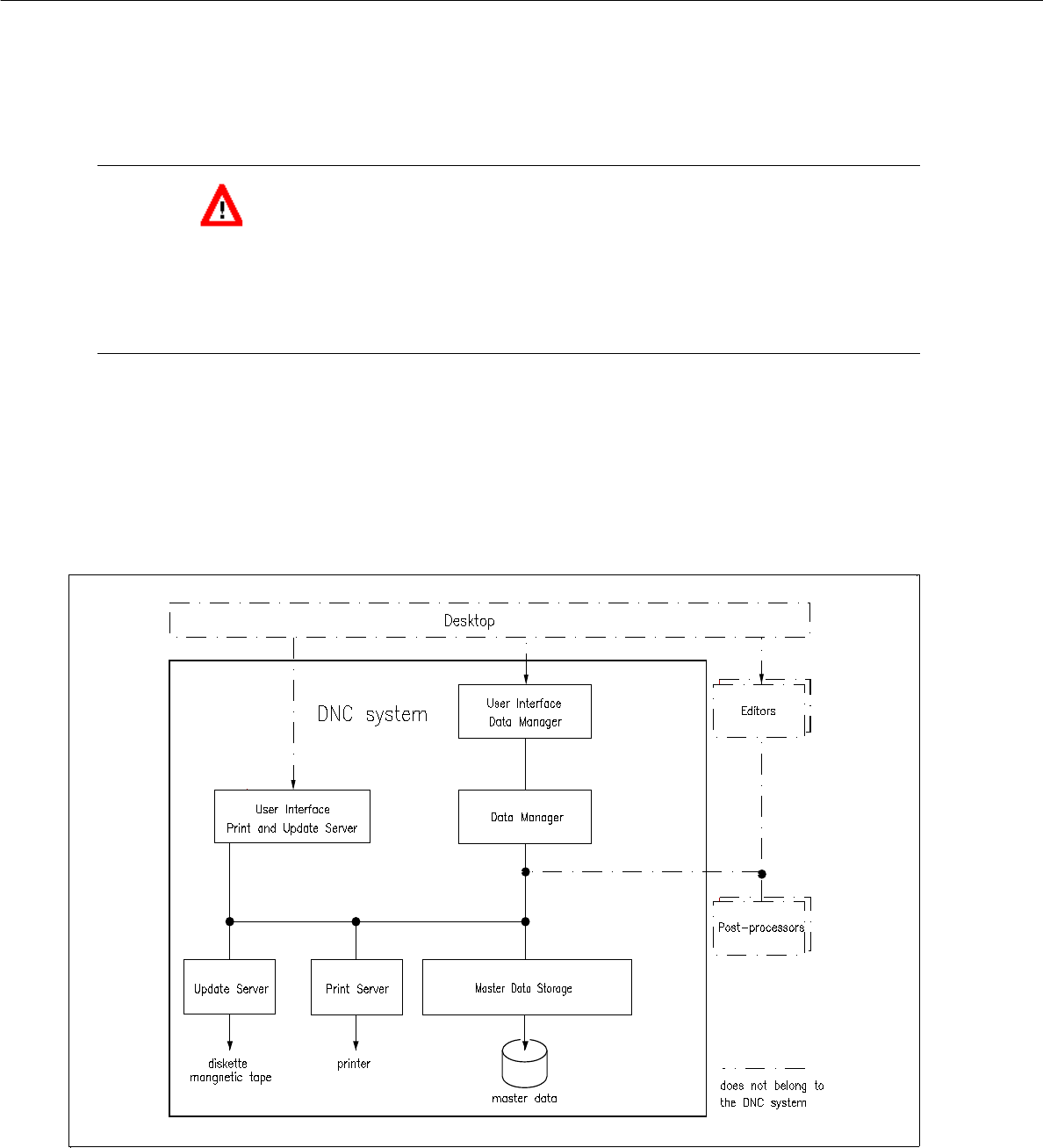
4.1.2 Structure and Function of the DNC System (Data Administration)
The DNC system is designed to hierarchically store and maintain the user data.
Moreover, it provides the possibility to output files on printers or I/O-devices (tape and diskette drives) upon
request by a user.
Fig. 4.1.1 Structure "DNC System"

User Manual Line Computer UNIX 4 Data Management
Software Version 501.xx 01/99 Issue 4.1 Introduction
4 - 3
4.1.2.1 Modules of the DNC System
- Data Manager User Interface
The user interface of the Data Manager (see section 4.3) enables the manipulation of files and
directoriies.
- Print and Update Server User Interface
The user interface of the Print and Update Server (see section 4.4) enables the devices which are
physically available in the LC system, such as printers, diskette and tape drives, to be logged on to
(activated) or logged off (deactivated) the user system and to prepare data carriers for data saving
procededures.
- Print Server
Upon the request by a user (e.g. the Data Manager), the Print Server outputs files, directories and
directory structures on the printer.
- Update Server
Upon the request by a user (e.g. the Data Manager) the Update Server enables files and directories
to be copied to external data carriers such as diskettes and streaming tapes.
- Master Data Storage
The Master Data Storage manages data, attributes and user-specific information. Upon request it
makes available stored data, or receives new data.