00191413-01.pdf - 第356页
11 Production Tools / Optimization User Manual Line Computer UNIX 11.4 Optimization Dial og Software Version 501.xx 01/99 Issue 11 - 36 - Number cycles : indicate s the n umber of c ycles pe r place ment he ad and the to…
User Manual Line Computer UNIX 11 Production Tools / Optimization
Software Version 501.xx 01/99 Issue 11.4 Optimization Dialog
11 - 35
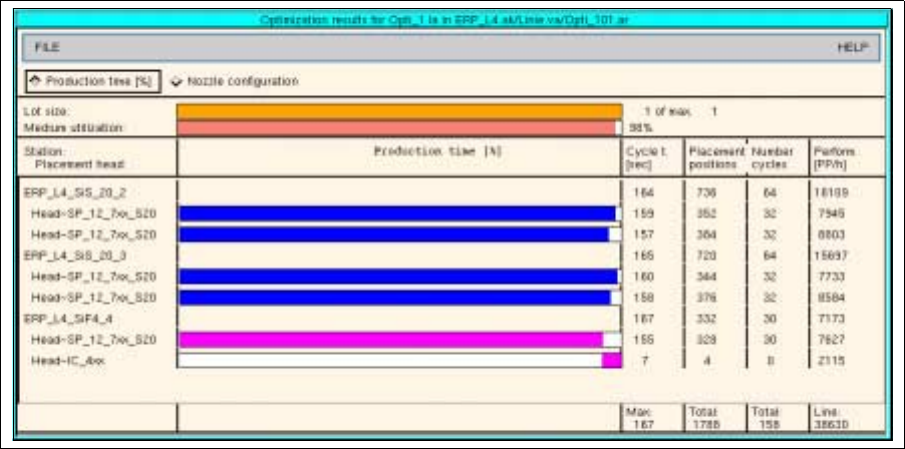
Fig. 11.4.4 „Optimization results xx.la" for a job
In the „Optimization results for xx.la“ window, the following results can be called up:
General results
- Lot size: indicates the relation of the lot size of the selected PCB to the maximum lot size within the
lot file.
- Medium utilization: indicates the mean value of the placement times per head in relation to the
placement time of the slowest placement head.
Utilization Chart
For each station, each placement head and the entire line, the results of the optimization process are
displayed in the following columns. The green and blue bars represent the production times of the individual
heads, and the red and pink bars indicate which placement head determines the cycle time in each case.
- Production time [%]: represents the production time for each placement head in the form of a bar.
The red bar indicates the placement heads with the longest production time.
- Cycle t. [sec]: indicates the cycle time for each placement head and the total cycle time for each sta-
tion in seconds. The total cycle time of the line additionally comprises all waiting and transport times.
- Placement positions: indicates the number of placement positions per placement head and the total
number of placement positions for each station and for the entire line.

11 Production Tools / Optimization User Manual Line Computer UNIX
11.4 Optimization Dialog Software Version 501.xx 01/99 Issue
11 - 36
- Number cycles: indicates the number of cycles per placement head and the total number of cycles
for each station and for the entire line.
- Perform. [PP/h]: indicates the placement rate for each placement head and for each station. The total
placement rate of the line additionally comprises all waiting and transport times.
Displaying Results of Producibility Check
● for individual jobs
● Click on .
● Click on the lot file containing the job whose results are to be displayed.
The results of Optimization are displayed in the „Optimization results for xx.lose“ window.
● Click on the job in the „Jobs“ selection field.
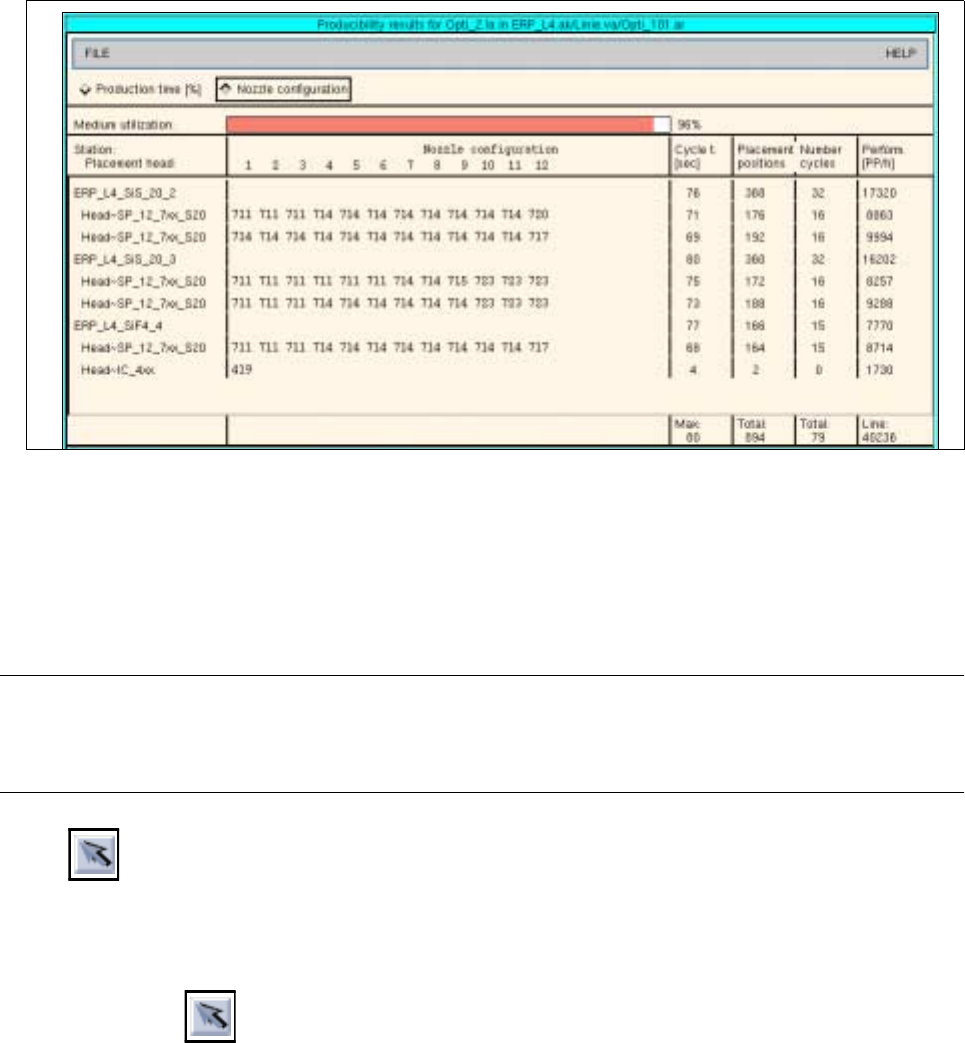
The results of the producibility check are displayed in the „Producibility results for xx.la“ window
(see Fig. 11.4.5).
● To obtain a printout: On the FILE menu click on the Print option.
The file will be printed on the printer connected.
The organization of the „Producibility results for xx.la“ window is identical to that of the „Optimization results
for xx.la“ window described further above.
During the producibility check, the nozzle configuration is determined and can be displayed in this window
for the current job. Clicking on the „Nozzle configuration“ button causes the nozzles required for each head
and for each segment to be displayed.
User Manual Line Computer UNIX 11 Production Tools / Optimization
Software Version 501.xx 01/99 Issue 11.4 Optimization Dialog
11 - 37
Fig. 11.4.5 „Producibility results for xx.la“ window for a job
11.4.5 Command Area „Edit“
In the command area, the icons are displayed by means of which lot files can be selected, created, edited and
displayed.
NOTE
Upon opening the Optimization Dialog, the "Select" icon is initially active. The latter remains active until
another icon is clicked on.
- Select
This icon allows the jobs and basic optimization data of a lot file to be displayed. Moreover, the
options of the SERVICES menu can be invoked for the selected lot file.
● Click on
● Click on a lot file in the "Lot file“ display area.
In the „Jobs“ display area the jobs are listed that are contained in the lot file that was clicked on.
In the „Basic optimization data“ field the associated basic optimization data are displayed.
● From the SERVICES menu click on an option for the selected lot file.
The appropriate windows are opened.