00191413-01.pdf - 第207页
User Manual Line Computer UNIX 6 Product / Package Form Software Version 501.xx 01/99 Issue 6.1 Package Form Editor 6 - 29 6.1. 2.10 Package Form Editor Selection Fields - "Handling data" Screen In the sel ecti…
6 Product / Package Form User Manual Line Computer UNIX
6.1 Package Form Editor Software Version 501.xx 01/99 Issue
6 - 28
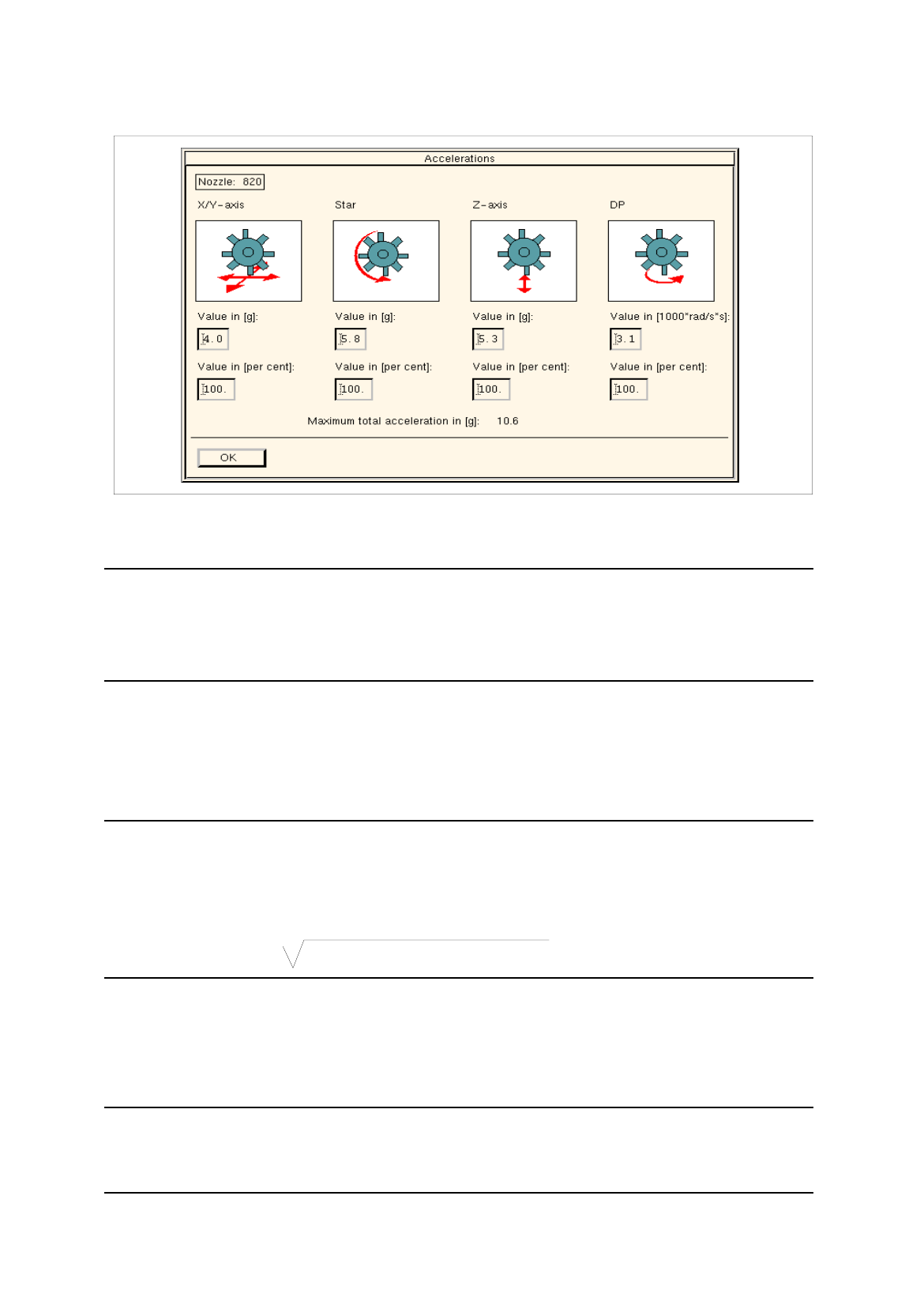
Fig. 6.1.11 Dialog Box for the Individual Setting of Acceleration Values for Each Axis
(applies only to nozzle types 4xx, 7xx and 8xx)
NOTE
The acceleration value can either be entered in [g] for the x/y, star and z-axes, or in
[1000 x rad/s
2
] for the dp-axis. Or else, a value corresponding to a percentage of the maximum acce-
leration of the axis at issue can be entered.
●
Click on the editing field of the desired axis.
●
Enter the value and press the RETURN key or click into a different field.
From the value entered for the acceleration, the percentage value or, conversely, the value in [g] or
[1000 x rad/s
2
] is calculated immediately and automatically entered in the appropriate editing field.
NOTE
The acceleration values for the x/y, star and z-axes can be changed in increments of 0.1, and for the
dp-axis in increments of 100.
The maximum overall acceleration calculated from the acceleration values for the x/y and star axes is
displayed in [g] below the editing fields.
Max. overall acceleration =
(
accel.
x +
accel.
star
)
2
+ accel. y
2
●
Confirm the entries by clicking on
OK
.
The dialog box closes.
The percentage value of the acceleration is displayed in the appropriate editing field in the view
area, provided the same value has been set for all axes.
NOTE
If the percentage value entered for the acceleration differs for one or more axes from the default
values (35%, 70% or 100%), the respective editing field only contains a broken line (----).

User Manual Line Computer UNIX 6 Product / Package Form
Software Version 501.xx 01/99 Issue 6.1 Package Form Editor
6 - 29
6.1.2.10 Package Form Editor Selection Fields - "Handling data" Screen
In the selection fields a button is located next to each "handling type" (see Fig. 6.1.4).
The required "handling type" can be activated or deactivated by clicking on the corresponding button.
Selection field "Handling instructions"
This field serves to define the type of handling a component type will be subjected to during the placement
cycle.
-
Vacuum test during pick-up
When the component is picked up sensors are used to
check whether the component has been picked up.
-
Vacuum test during placement
Prior to being placed, the component is interrogated by means
of sensors to verify that the component is still attached to the
nozzle.
-
Coplanarity check
The coplanarity laser module determines by means of co-
planarity measurement whether pins of the component
are bent and whether it may have to be discarded.
-
Good nozzle contact
In the case of cubic components, this setting provides
good nozzle contact by means of adequate vacuum supply.
Selection field "Centering"
This selection field serves to define the type of centering suited for the component type. For this purpose, the
setting "Centering in head" or "External centering" can be chosen from. Moreover, the centering procedure for
the particular centering type can be defined.
- Centering in head
The component is centered by means of the revolver head or the
placement head on the HS-180 if any one of the following three
options is selected in addition.
with H jaws
mech. centering by means of h-jaws (measuring jaws) of the
placement head of the HS-180.
with Z jaws
mech. centering by means of z-jaws of the placement head of
the HS-180.
with camera
optical centering by means of the component camera of the
revolver head.

6 Product / Package Form User Manual Line Computer UNIX
6.1 Package Form Editor Software Version 501.xx 01/99 Issue
6 - 30
- External Centering
The component is centered externally by means of appropriate
centering devices of an HS-180, or by means of the IC camera
or flip-chip camera of a SIPLACE 80F3/F
4
optical
The component is centered by means of the optical centering
station of an HS-180, or by means of the IC camera or flip-chip
camera of a SIPLACE 80F3/F
4
.
mechanical
The component is centered using the mechanical centering
station. (function is not currently used)
Rotate before centering
The component is turned into placement position prior to being
measured (centered) by means of the optical centering station of
an HS-180 or the IC camera of a SIPLACE 80F3/F
4
(by 90°, 180° or 270°)