00191413-01.pdf - 第486页
14 Control / Cont rol Modules User Manual Line Computer UNIX 14.4 Set-Up Modification Generator Software Version 501.xx 01/99 Issue 14 - 50 NOTE If during the crea tion of ch angeov er instru ctions f or a PCB -specific …

User Manual Line Computer UNIX 14 Control / Control Modules
Software Version 501.xx 01/99 Issue 14.4 Set-Up Modification Generator
14 - 49
14.4.4.2 Command Area
NOTE
The buttons in the command area cannot
be selected if Set-up or PCB-specific part of set-up has been
selected in the selection window.
In the following, the functions of the commands and the procedure for the execution of the commands are
explained with the "Siplace_2" station serving as an example:
- Viewing the initial set-up of the "Siplace_2" station
● From the selection field "Sublines" select the subline containing the desired "Siplace_2" station.
● Select station Siplace_2 from the "Stations" selection field.
● Click on button Initial set-up. The initial set-up for station "Siplace_2" is displayed in the display
area.
Only in cases where the changeover request originated from the station controller or the Data
Manager is this the current set-up, or when the operator has made his selection in the selection
window based on the current set-up.
- Viewing the follow-up set-up for the "Siplace_2" station
● Click on button Follow-up set-up.
The follow-up set-up for the "Siplace_2" station that was initíally selected from the FSB or created
by the Set-Up Modification Generator (see section 14.4.3.2) displayed.
- Viewing the Target set-up for a station
● Click on button Target set-up.
The target set-up for the "Siplace_2" station initially selected from the FSB (see section 14.4.3.2)
is displayed.
NOTE
The button Target set-up" can only be selected when Current set-up --> PCB-specific set-up or
Set-up --> PCB-specific set-up has been selected from the selection window, i.e. changeover
instructions for the production of a specific PCB type are to be generated.
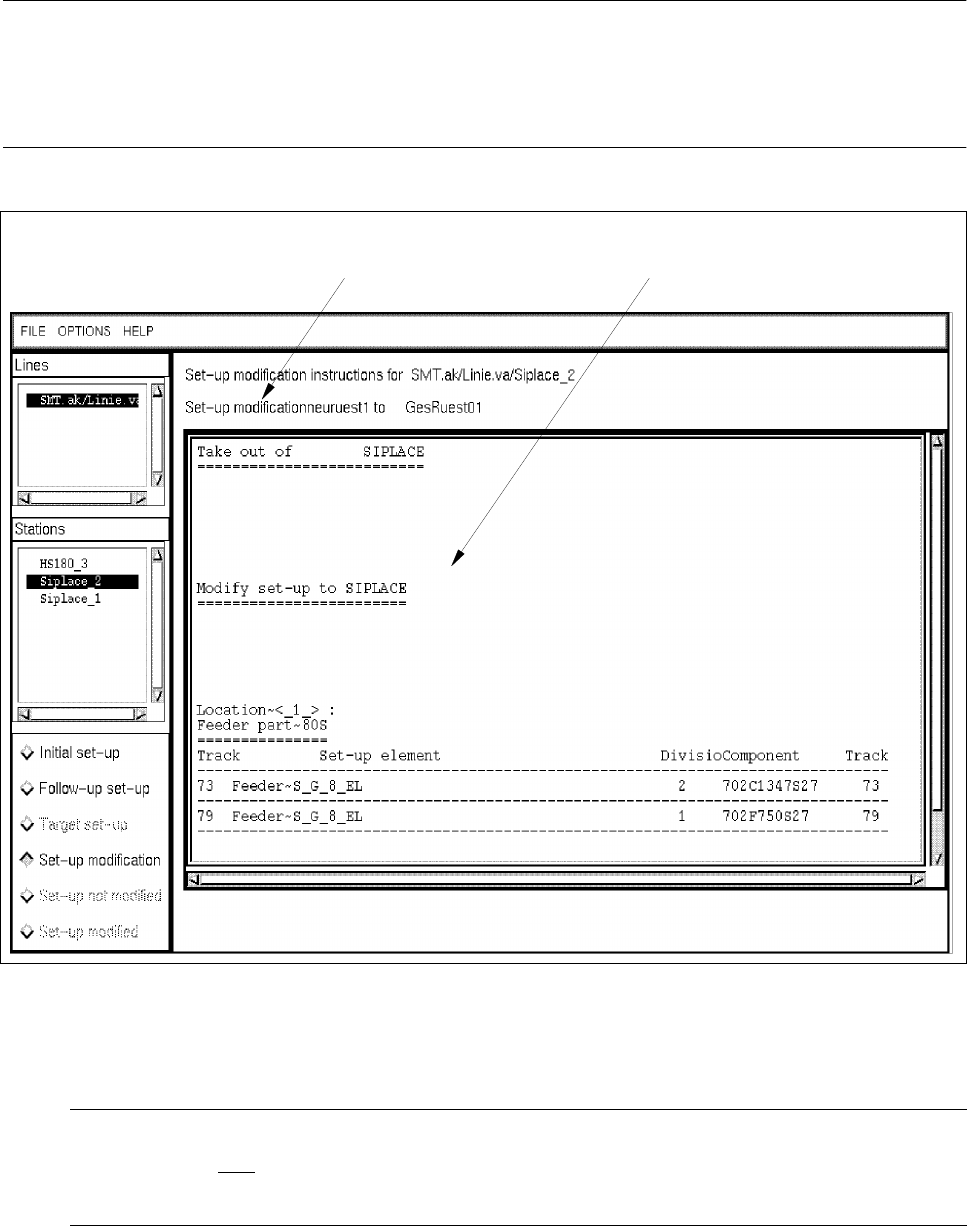
- Creating and viewing changeover instructions (Set-up modification) (see Fig. 14.4.3)
● Click on button Set-up modification.
Depending on the set-up changeover selection made from the selection window (see
Fig. 14.4.1), instructions for changeover - created by the Set-Up Modification Generator - from the
initial set-up to the selected set-up or a follow-up set-up created by the Set-Up Modification Gene-
rator (see section 14.4.3.2) are displayed for the "Siplace_2" station.
When the Set-Up Modification Generator was opened by a station controller, changeover instruc-
tions for the changeover from the current set-up on the station to the follow-up set-up are created
and displayed.
14 Control / Control Modules User Manual Line Computer UNIX
14.4 Set-Up Modification Generator Software Version 501.xx 01/99 Issue
14 - 50
NOTE
If during the creation of changeover instructions for a PCB-specific set-up one realizes that certain set-up
elements (e.g. components) are missing in the selected target set-up, an error message is displayed for each
of the missing elements.
Fig. 14.4.3 Display of Changeover Instructions for the Station "SIPLACE_2"
- Set-up not modified
NOTE
This button can only
be selected when the Set-Up Modification Generator was opened by a station
controller (initiated by a requesting program).
The operator clicks on this button when he was not able to physically modify the selected station for
any reason.
message line display area
User Manual Line Computer UNIX 14 Control / Control Modules
Software Version 501.xx 01/99 Issue 14.4 Set-Up Modification Generator
14 - 51
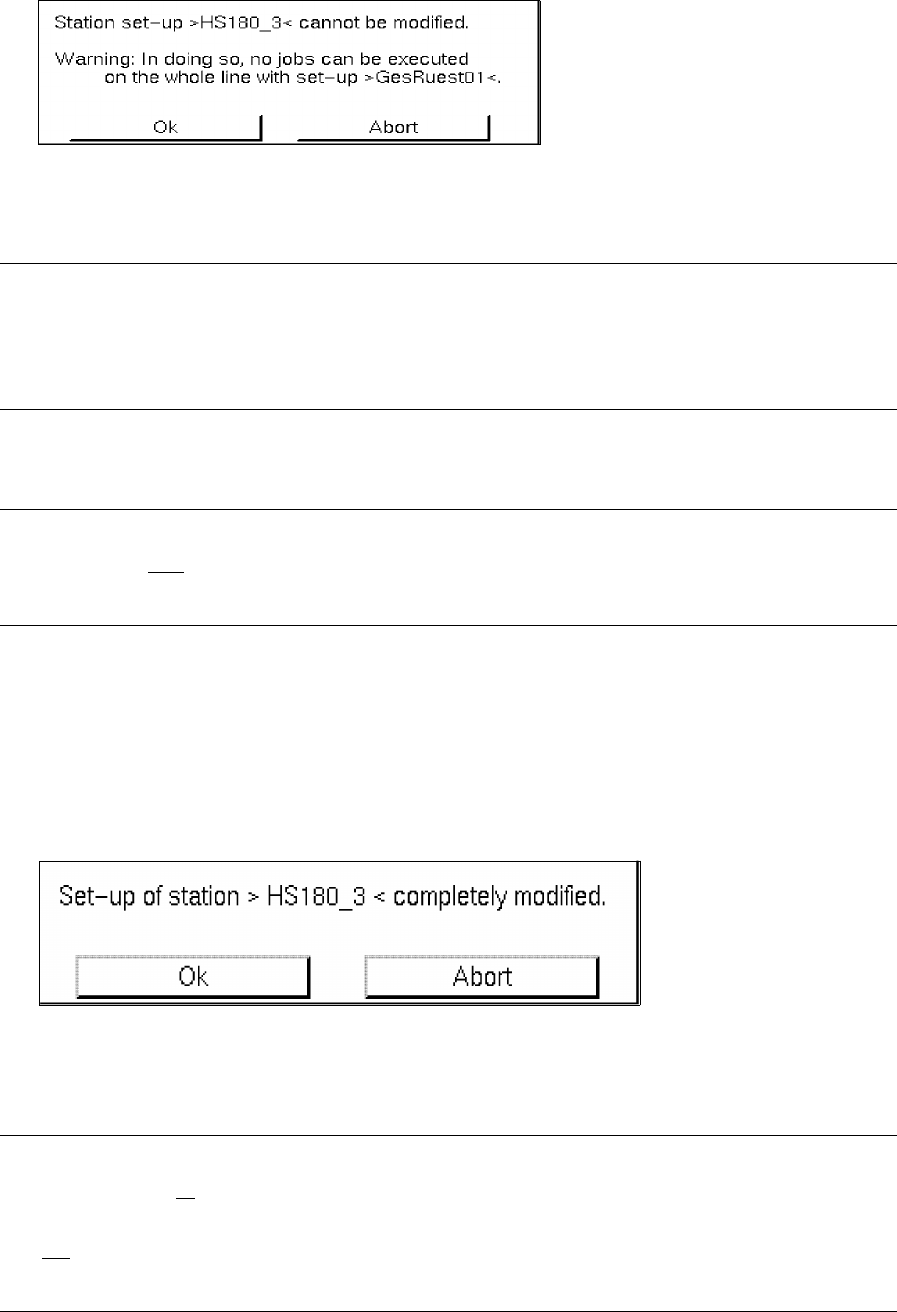
● Click on button Set-up not modified.
A dialog box containing the following warning message is displayed:
● Confirm the dialog box with Ok.
NOTE
If the set-up of only one station of the subline could not be changed over, it is not possible to produce
any PCB type on the entire subline for which the follow-up set-up displayed has been specified in the
job data for the production of this PCB type.
- Set-up modified
NOTE
This button can only
be selected when the Set-Up Modification Generator was opened by a station
controller (initated by a requesting program).
This enables the operator to confirm the physical set-up changeover of a station.
This button is clicked on whenever a station selected from the selection field "Stations" has been reset
in accordance with the corresponding changeover instructions.
● Click on button Set-up modified.
If no station was selected, a corresponding prompt requesting the selection of a station is dis-
played, otherwise the following dialog box is opened:
● Confirm the dialog box with Ok.
The dialog box is closed and the station where set-up changeover has been completed (confir-
med) is no longer displayed in the selection field "Stations".
NOTE
When the set-up of all
stations of the subline has been changed over and when the completed chan-
geover has been confirmed for each station, the Set-Up Modification Generator is automatically closed.
It is not
possible to prematurely close the Set-Up Modification Generator via the menu using menu
option Quit!