00191413-01.pdf - 第308页
10 Production Tools / Restrictions User Manual Line Computer UNIX 10.1 Restriction Editor Software Version 501.xx 01/99 Issue 10 - 2 10.1.1 Allocation Possibilities A produc tion job i s carried out on a giv en line. For…

User Manual Line Computer UNIX 10 Production Tools / Restrictions
Software Version 501.xx 01/99 Issue 10.1 Restriction Editor
10 - 1
10 Production Tools / Restrictions
10.1 Restriction Editor
The Restriction Editor is designed for the definition of temporary restrictions related to a given production job
(lot file). They are only valid for as long as the lot file exists.
To influence the results of the set-up optimization it is possible to define in the Restriction Editor restrictions for
the allocations of package form/component --> feeder --> machine. These restrictions are entered in the form
of "bindings" and exclusions. These are based on the long-term allocations that were specified with the aid of
the Feeder Editor (see chapt. 9).
The definitions specified in the Restriction Editor are stored in the ".rs" restriction file of Job data/Losplanung.
The ".rs" file is deleted when the lot file is returned to the job list. These short-term allocations are not
required
for optimization processes.

10 Production Tools / Restrictions User Manual Line Computer UNIX
10.1 Restriction Editor Software Version 501.xx 01/99 Issue
10 - 2
10.1.1 Allocation Possibilities
A production job is carried out on a given line. For set-up optimization purposes it is possible to define allocations
relating to this job. The possibilities that can be chosen from are described below:
- It is possible to specify where and how often a component is to be set up on the line, and
where it must not be set up under any circumstances.
Binding ---> The component must
be set up on the particular "individual". In addition,
the binding can define how often the component is to be set up and which
feeder or waffle-pack tray is to be used. If no feeder or waffle-pack tray is
stated, the feeding unit (feeder/waffle-pack tray) defined in the ".ri"-file is used.
The component can also be "bound" to the complete line.
Exclusion ---> The component must not
be set up on the particular "individual" specified.
- The default feeder defined in the ".ri"-file (see chapt. 9) with respect to a component/machine
combination may (in connection with a specific production job) be replaced by an alternative
feeder.
It is thus possible to appropriately respond to short-term temporary situations such as a different form
of component supply, for a limited period of time.
10.1.2 Starting the Restriction Editor
- In the "programming mode", the Restriction Editor is activated by clicking on the Restrictions icon on
the desktop, or via the Data Manager (see chapt. 4).
- If the LC program was installed for the "control mode", the Restriction Editor can be started via the
desktop menu "PRODUCTION TOOLS", or via the Data Manager.
● Click on the Restrictions icon on the desktop (or the menu option "Restriction Editor" on the menu
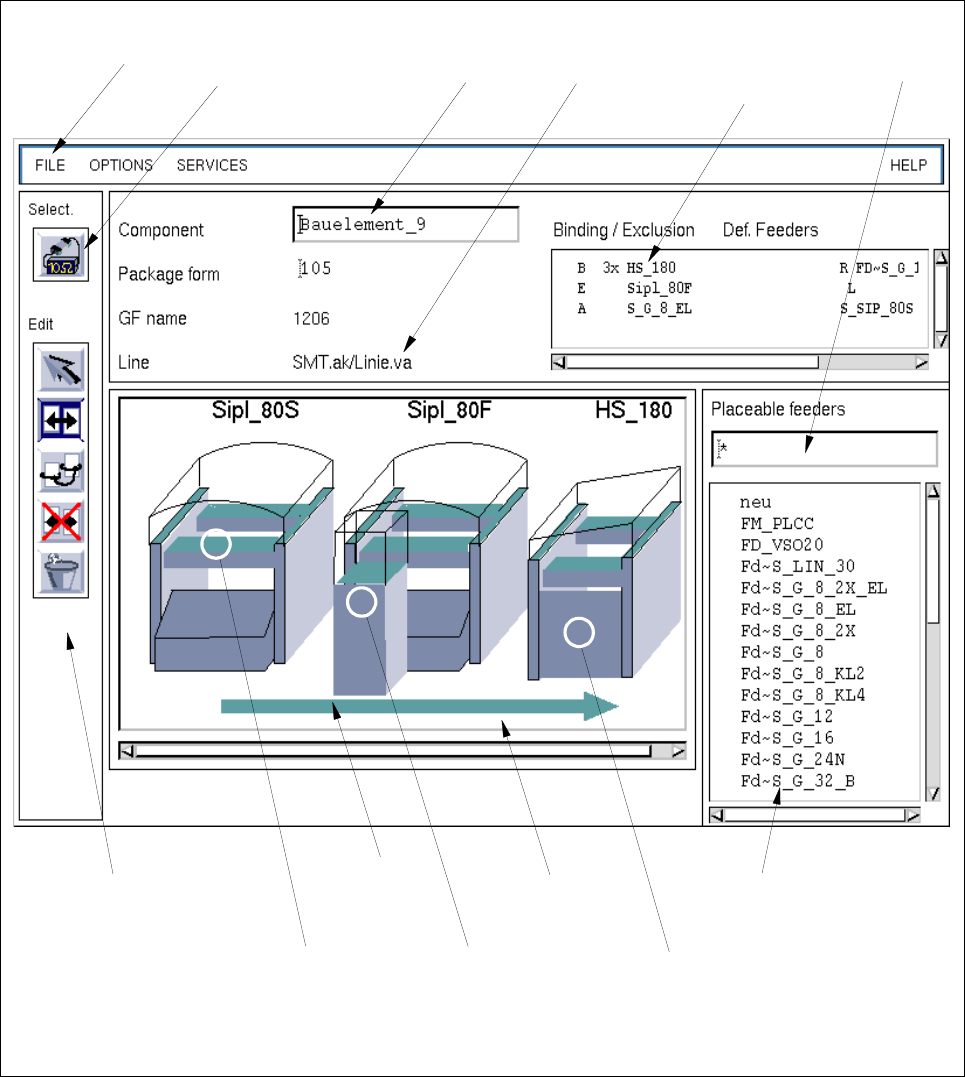
"PRODUCTION TOOLS"). The main window of the Restriction Editor is opened (see Fig. 10.1.1).
NOTE
Moreover, the Restriction Editor can be started via the user interface of the Data Manager by
selecting the ".rs" restriction file in the path "Job data/Losplanung/xx.lose/*". The procedure to be
followed for starting the Restriction Editor via the user interface of the Data Manager is described in
chapt. 4, section 4.3.4 of this manual.
User Manual Line Computer UNIX 10 Production Tools / Restrictions
Software Version 501.xx 01/99 Issue 10.1 Restriction Editor
10 - 3
10.1.3 Main Window of Restriction Editor
The areas of the main window and their functions are explained in the following.
Fig. 10.1.1 Main Window "Restriction Editor"
selection field
"Placeable feeders"
display area
command area
menu bar editing field
"Component"
selection field
"Restrictions/
filter field
selection area
"Component"
name of the
line
Allocations"
selection:
complete
machine type
selection:
WPC trolley
(SIPLACE 80F)
selection:
complete line
selection:
feeder part on
the right
machine side