00191413-01.pdf - 第21页
User Manual Line Computer UNIX 1 Hardware / Software Install ation Software Version 501.xx 01/99 Issue 1.1 Hardware Installation 1 - 3 1.1.3 Uninterruptible Power Supply UPS The UPS is designe d to co mpensate for line l…

1 Hardware / Software Installation User Manual Line Computer UNIX
1.1 Hardware Installation Software Version 501.xx 01/99 Issue
1 - 2
1.1.2 Monitor
1.1.2.1 Connections and Settings
NOTE
For details on connections and settings please refer to the manual supplied with the monitor.
When making the necessary adjustments on your monitor, please note that brightness and contrast have
been factory-adjusted to low or medium values, which will significantly increase the life of the screen.
1.1.2.2 Cleaning the Monitor
- The monitor should only be cleaned in the switched off condition using a soft cloth.
- The interior of the cabinet may only be opened and cleaned by a service technician.
● Prior to cleaning disconnect plug from UPS.
● Wipe monitor enclosure using a soft cloth.
In the case of persistent stains, moisten cloth with a mild cleaning agent.
● Clean screen using a soft, non-linting cotton cloth or lens tissue.
CAUTION !
- No cleaning sprays, wax or compressed air are to be used on the enclosure (see also instructions
supplied with the monitor).
- Ensure that no alcohol comes into contact with the enclosure.
- Never use any strong solvents such as thinners or benzine or abrasive cleaning agents as these
would cause damage to the enclosure.
- When cleaning the monitor with a moist cloth it must be ensured that no moisture can enter the
interior of the cabinet.
- Do not place any objects onto the unit.
- Be sure that the ventilation louvers are not covered.
User Manual Line Computer UNIX 1 Hardware / Software Installation
Software Version 501.xx 01/99 Issue 1.1 Hardware Installation
1 - 3
1.1.3 Uninterruptible Power Supply UPS
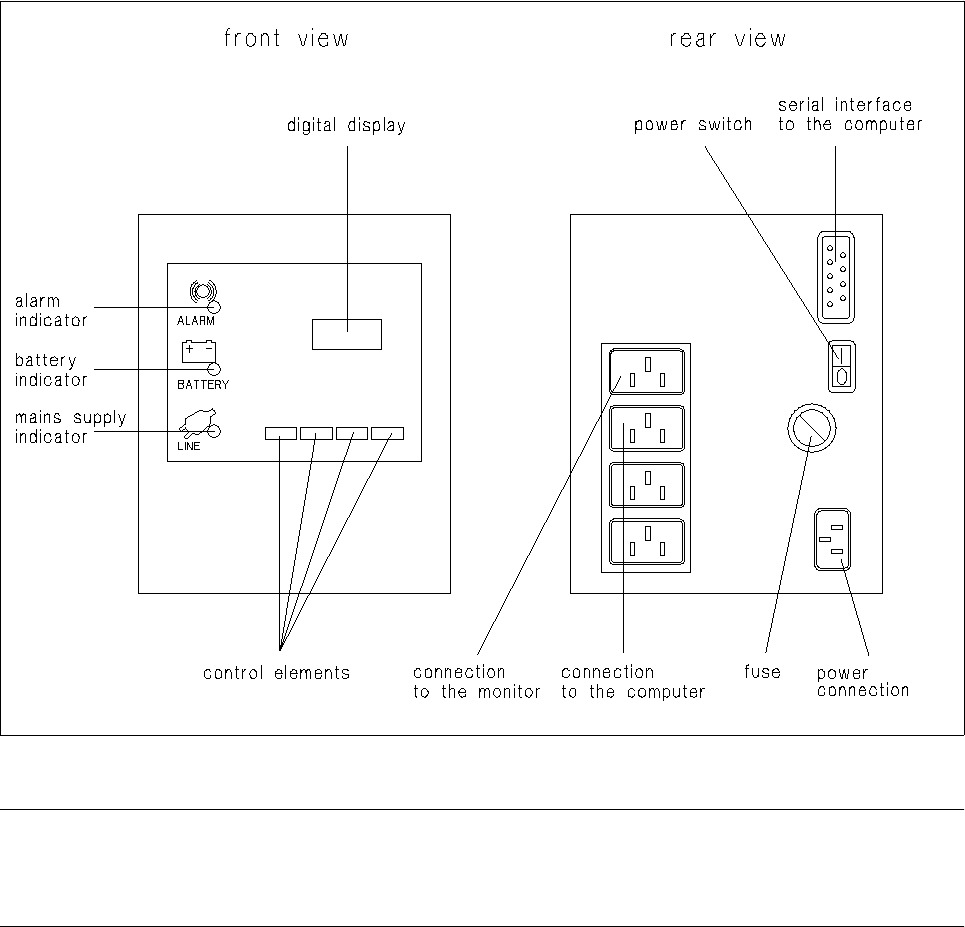
The UPS is designed to compensate for line losses and to act as emergency power supply system in the event
of electrical power failures. It can therefore be ensured that the connected equipment can continue to operate
without interruption even in the event of power failures, and it allows you to shut down the computer safely.
Fig. 1.1.1 UPS - connections, indicators, control elements
NOTE
Prior to using the UPS for the first time it must (owing to loss of capacity during storing) be charged for approx.
24 hours to be able to guarantee safe operation of the line computer system.
1 Hardware / Software Installation User Manual Line Computer UNIX
1.1 Hardware Installation Software Version 501.xx 01/99 Issue
1 - 4
1.1.3.1 UPS Operating States
Operation During Normal Power Supply
- Under normal operating conditions, the UPS supplies the equipment with power from the mains. The
green mains power-on indicator light is on, the yellow battery operation indicator light, the red alarm
indicator and the digital display are off.
Operation in the Case of Insufficient Power Supply
- In the event of mains voltage drops the UPS serves as output voltage stabilizer. In this operating state
the green mains supply indicator light flashes and, simultaneously, the yellow battery operation indica-
tor light is illuminated. After a short time the yellow battery operation indicator goes off and the green
mains supply indicator light continues to flash.
Operation During Power Failure
- In the event of a power failure, the green mains supply indicator light goes off and the yellow battery
operation indicator is illuminated.
In this operating state the connected equipment is supplied by the accumulator of the UPS.
The digital readout displays the back-up time remaining, and a short acoustic warning signal sounds
at fairly long intervals.
- After the UPS has supplied battery power for a given period of time, the battery capacity is exhausted.
The red alarm indicator starts to flash, the yellow battery operation indicator continues to light and the
USP emits the acoustic alarm signal at shorter intervals.
In this operating state the UPS supplies power from the battery for another few minutes. The back-up
time still remaining can be read off the digital display.
● The computer is now to be shut down if this is not performed automatically by the UPS.
● Turn off the UPS and wait until power has been restored.