00191413-01.pdf - 第121页
User Manual Line Computer UNIX 4 Data Management Software Version 501.xx 01/99 Issue 4.3 User Interface of the Data Manager 4 - 11 Icon Designation Meaning Master da ta = contains a ll produ ct, se t-up and machine d ata…
4 Data Management User Manual Line Computer UNIX
4.3 User Interface of the Data Manager Software Version 501.xx 01/99 Issue
4 - 10
4.3.3 Main Window of Data Manager
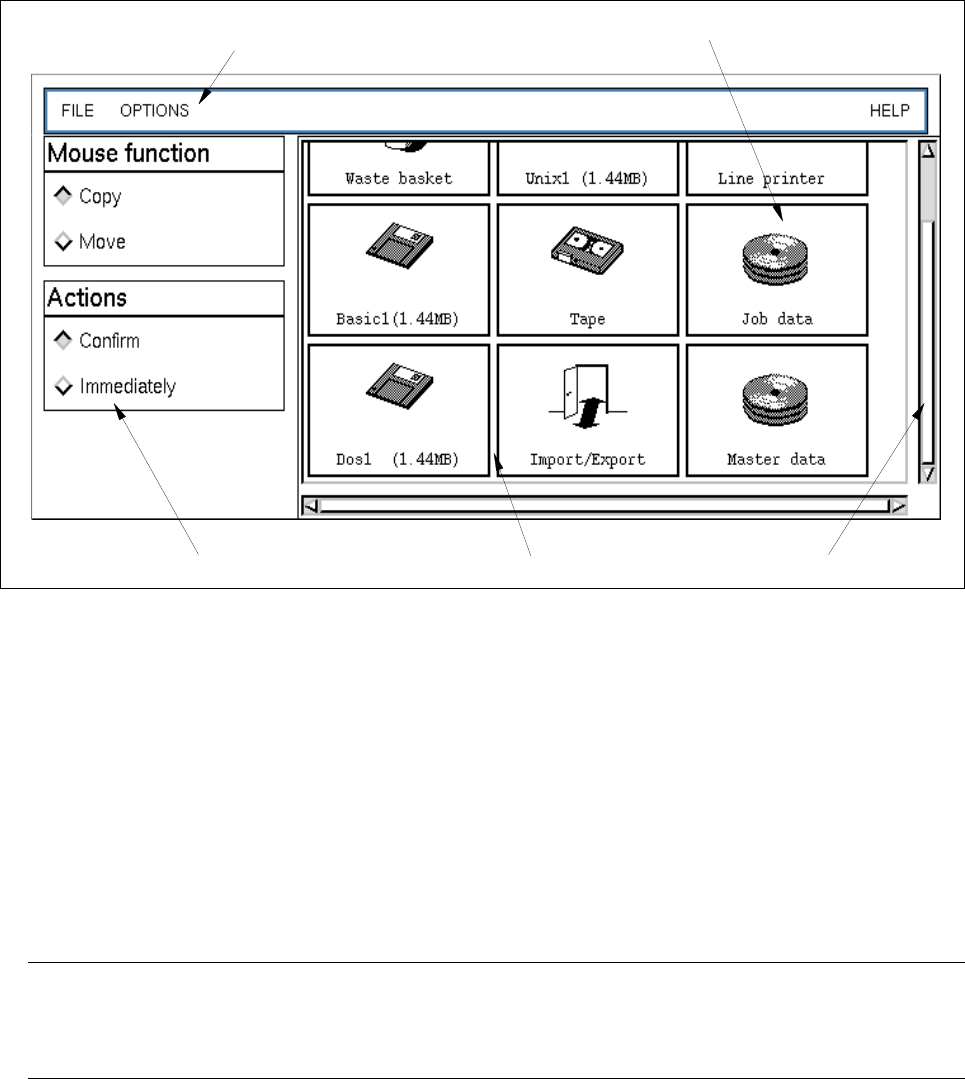
Fig. 4.3.1 Main window of "Data Manager"
The main window is subdivided into the following areas:
- Menu bar
- Display area
- Command area
Menu Bar
The menu bar contains the menus "FILE", "OPTIONS" and "HELP".
The menu functions are described in the section 4.3.3.1 and section 4.3.4.3.
NOTE
Since the functions and operation of the "FILE" menu are identical to those in other application programs
of the line computer, they are described comprehensively in chapt. 2 of this manual.
Display Area
In the display area the data partners are shown which have been logged on in the Data Manager and can thus
be called up.
The data partners can be opened by double-clicking or via the menu. Upon opening a data partner a new
window (see Fig. 4.3.2) is created on the screen showing the contents of the data partner.
In the following, a brief explanation of the meaning of the data partners "DP" is contained:
data partner
menu bar
scroll bardisplay areacommand area

User Manual Line Computer UNIX 4 Data Management
Software Version 501.xx 01/99 Issue 4.3 User Interface of the Data Manager
4 - 11
Icon Designation Meaning
Master data = contains all product, set-up and machine data required or the
assembly of PCBs
Job data = contains job-specific data that are required, in addition to the
master data, for the production of PCB types
Import/Export = This DP, with the aid of the "Copy" action, permits files and directories
to be imported from other DPs (e.g. "Master Data", "Unix1 (1.44MB)",
etc.) in any hierarchy desired, and from there to be exported again to
other DPs.
NOTE
In the "Import/Export" data partner it is only possible to copy data to and from it or to delete data.
CD-ROM = CD-ROM
Basic1 (1.44MB) = DOS (HP-UX) formatted 3
1
/
2
" floppy disk
Dos1 (1.44MB) = DOS formatted 3
1
/
2
" floppy disk
Unix1 (1.44MB) = UNIX formatted 3
1
/
2
" floppy disk
Tape = streamer tape
Line printer =line printer
Waste basket = serves to delete files and directories
NOTE
If files or directories are copied or moved from a DP to the icon "Waste basket", they are deleted
(after a verification query) from the DP.

4 Data Management User Manual Line Computer UNIX
4.3 User Interface of the Data Manager Software Version 501.xx 01/99 Issue
4 - 12
Command Area
The command area comprises the following components:
- Mouse function
Here you can define the mouse handling conventions and their meanings.
A selection can be made between copying and moving/renaming.
● Click on, for example, the Copy button. The files/directories selected by clicking the mouse
button are copied.
- Actions
This serves to specify whether actions are to be executed immediately
following the selection (e.g,
FILE --> Delete) or only after having been confirmed in a dialog box associated to the action to be
performed.
NOTE
The "Delete" action is always executed after
the verification query has been confirmed, even if the
button "Immediately" in the command area is activated.
● Click on, for example, the Confirm button.
Prior to the execution of an action involving selected "Files/directories", a dialog box associated to
the action to be performed is displayed where the action is to be confirmed.
● Click on OK in the dialog box.
The dialog box is closed and the action is executed.