00191413-01.pdf - 第22页
1 Hardware / Software Installati on User Manu al Line Computer UNIX 1.1 Hardware Installation Software Version 501.xx 01/99 Issue 1 - 4 1.1.3.1 UPS Operating Stat es Operation During Normal Power Supply - Under no rmal o…
User Manual Line Computer UNIX 1 Hardware / Software Installation
Software Version 501.xx 01/99 Issue 1.1 Hardware Installation
1 - 3
1.1.3 Uninterruptible Power Supply UPS
The UPS is designed to compensate for line losses and to act as emergency power supply system in the event
of electrical power failures. It can therefore be ensured that the connected equipment can continue to operate
without interruption even in the event of power failures, and it allows you to shut down the computer safely.
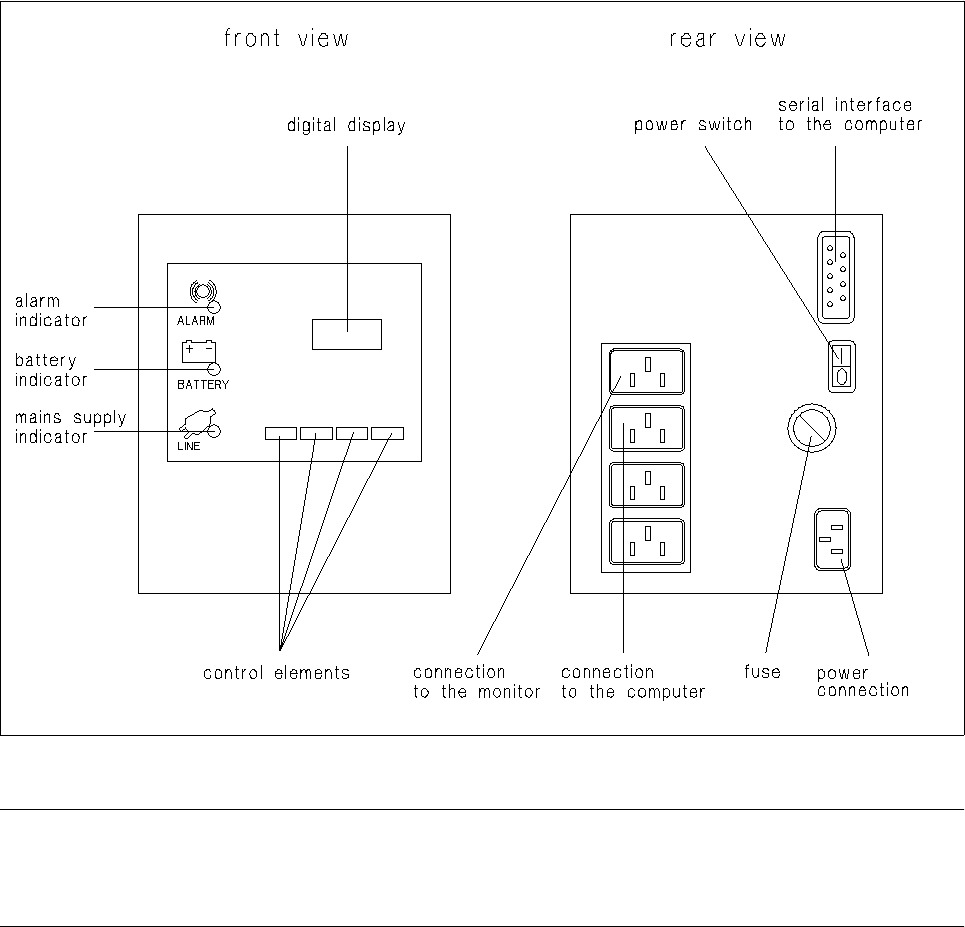
Fig. 1.1.1 UPS - connections, indicators, control elements
NOTE
Prior to using the UPS for the first time it must (owing to loss of capacity during storing) be charged for approx.
24 hours to be able to guarantee safe operation of the line computer system.
1 Hardware / Software Installation User Manual Line Computer UNIX
1.1 Hardware Installation Software Version 501.xx 01/99 Issue
1 - 4
1.1.3.1 UPS Operating States
Operation During Normal Power Supply
- Under normal operating conditions, the UPS supplies the equipment with power from the mains. The
green mains power-on indicator light is on, the yellow battery operation indicator light, the red alarm
indicator and the digital display are off.
Operation in the Case of Insufficient Power Supply
- In the event of mains voltage drops the UPS serves as output voltage stabilizer. In this operating state
the green mains supply indicator light flashes and, simultaneously, the yellow battery operation indica-
tor light is illuminated. After a short time the yellow battery operation indicator goes off and the green
mains supply indicator light continues to flash.
Operation During Power Failure
- In the event of a power failure, the green mains supply indicator light goes off and the yellow battery
operation indicator is illuminated.
In this operating state the connected equipment is supplied by the accumulator of the UPS.
The digital readout displays the back-up time remaining, and a short acoustic warning signal sounds
at fairly long intervals.
- After the UPS has supplied battery power for a given period of time, the battery capacity is exhausted.
The red alarm indicator starts to flash, the yellow battery operation indicator continues to light and the
USP emits the acoustic alarm signal at shorter intervals.
In this operating state the UPS supplies power from the battery for another few minutes. The back-up
time still remaining can be read off the digital display.
● The computer is now to be shut down if this is not performed automatically by the UPS.
● Turn off the UPS and wait until power has been restored.

User Manual Line Computer UNIX 1 Hardware / Software Installation
Software Version 501.xx 01/99 Issue 1.1 Hardware Installation
1 - 5
1.1.4 Preparatory Work Prior to Putting the Line Computer Into Service
NOTE
To prevent the UNIX system and the LC software from being destroyed in the event of a power failure while
the computer is in operation, the power switch provided on the SIPLACE tower has been deactivated so that
the computer can only be switched on via the UPS. Therefore, all connections to the UPS (see Fig. 1.1.1)
must be completed prior to operating the computer.
PROCEDURE
● Prior to the initial operation of the devices, check that the setting of the mains voltage selector
switch located on the rear of the computer corresponds to the line voltage prevailing at the site
and, if required, adjust the switch to the correct line voltage.
● Plug power cable into UPS (see Fig. 1.1.1) and connect to mains.
● Switch on UPS at power switch (see Fig. 1.1.1) and allow unit to be charged for 24 hours, if requi-
red (see note, page 1 - 3).
● Switch off UPS.
● Connect keyboard and mouse to computer.
● Connect computer and UPS with power cable.
● Connect monitor and UPS with power cable.
● Connect monitor and computer by means of video cable.
● Switch on UPS using power switch.
● Switch on monitor using power switch.
CAUTION !
The computer should only be switched on if an LC software has already been installed or if the installation of
the LC software will be carried out immediately afterwards (see section 1.2.3) since a proper ’shutdown’ will
not be possible without the "root password".