00191413-01.pdf - 第115页
User Manual Line Computer UNIX 4 Data Management Software Version 501.xx 01/99 Issue 4.2 Data Storage 4 - 5 4.2 Data Stor age 4.2. 1 Gen eral De scripti on The compu ter syst em of a pr oduction line may consi st of seve…

4 Data Management User Manual Line Computer UNIX
4.1 Introduction Software Version 501.xx 01/99 Issue
4 - 4

User Manual Line Computer UNIX 4 Data Management
Software Version 501.xx 01/99 Issue 4.2 Data Storage
4 - 5
4.2 Data Storage
4.2.1 General Description
The computer system of a production line may consist of several line computers and one central computer.
Every individual line computer has its own
local data storage
. The central computer is used for
central data
storage
. All line computers within the computer system can access this central data storage, provided, however,
that
- the network connections (NFS) from the local computers to the central computer already exist,
- the software versions use the exactly identical data format,
- the file and directory structures of the local computers correspond to that of the central computer.
This can be accomplished, for example, by copying the existing line computer data storage to the
central computer.
NOTE
When working with the central data storage, any changes made to the data are only
rewritten to the
central
data storage
, i.e. the
local data storage
is not updated.
However, in order to keep the local data storage up-to-date, it is therefore necessary that these data be regu-
larly (e.g. at the end of every working day) overwritten with the data from the central data storage. In the event
of a power failure, work can thus be continued using the updated data contained in local data storage.
Inside the Line selection button (see chapt. 3, Fig. 3.1.1), on the desktop, the currently active data storage mode
is indicated in front of the designation of the current line:
e.g. local: /Anlagen/xxx.ak) for local data storage
central: /Anlagen/xxx.ak) for central data storage.
4 Data Management User Manual Line Computer UNIX
4.2 Data Storage Software Version 501.xx 01/99 Issue
4 - 6
4.2.1.1 Switching Between Central and Local Data Storage
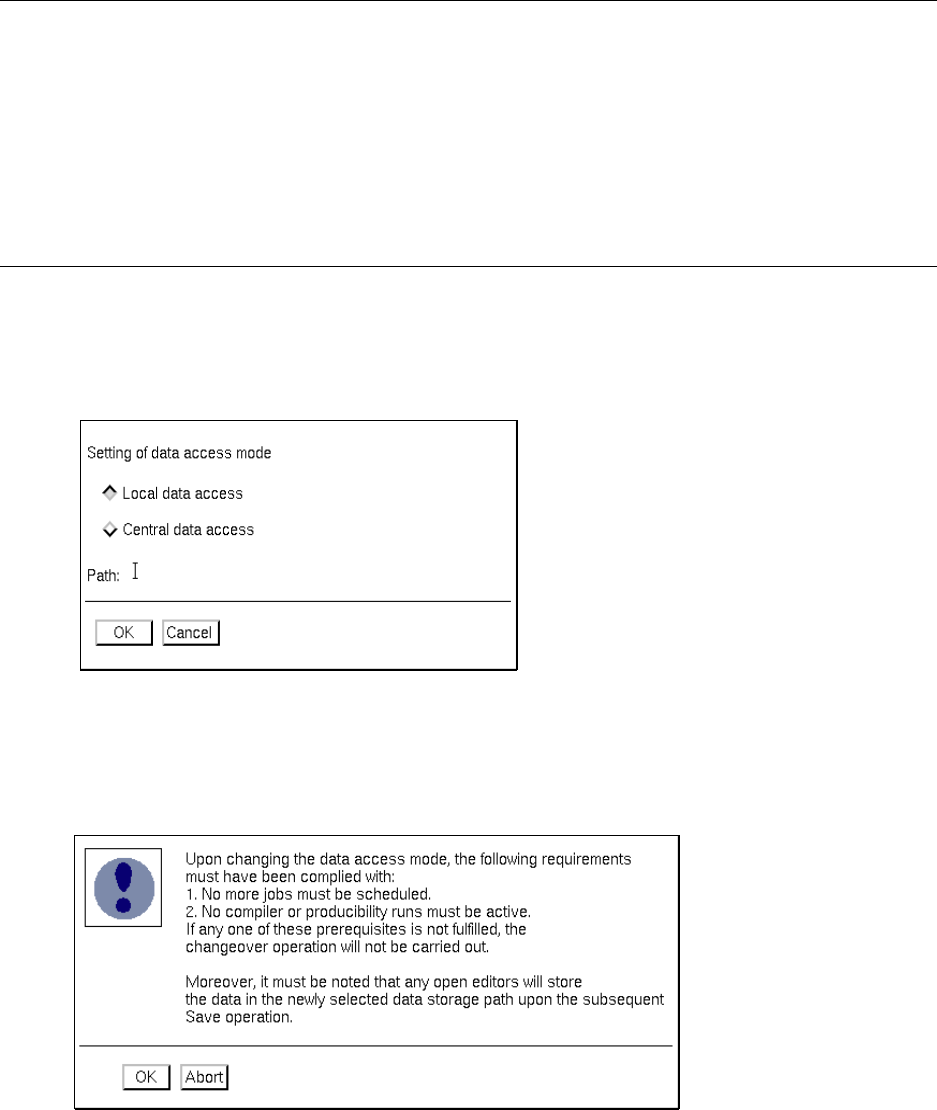
Switching between central and local data storage is effected via the "SERVICES" menu using the "Data storage"
menu option.
For the switch-over operation to be successful, the following points must be observed:
- No more jobs must be scheduled.
- No compiler or producibility check runs must be in progress.
NOTES
Following the switch-over operation the computers need not be re-booted.
If data are changed or entered in editors that may be open, these data will be stored to the newly selected
data storage upon saving.
It is possible to download data from the host computer to the local or central data storage at any time. This
takes place without any interruption of the ongoing production process.
Switching from central to local data storage:
● On the SERVICES desktop menu click on the Data storage menu option.
The "Data storage" window is opened.
● Click on the Local data access button.
The button is now highlighted in gray.
● Click on OK.
The following window is opened.
● If all conditions listed in the dialog box are met, click on the OK button.