00191413-01.pdf - 第327页
User Manual Line Computer UNIX 11 Production Tools / Optimization Software Version 501.xx 01/99 Issue 11.3 Setup Optimization 11 - 7 Fig. 11.3.1 Data access during optimization run 11.3.2.1 Starting the Optimiza tion Run…

11 Production Tools / Optimization User Manual Line Computer UNIX
11.3 Setup Optimization Software Version 501.xx 01/99 Issue
11 - 6
11.3 Setup Optimization
11.3.1 Prerequisites for Setup Optimization
In order to be able to have Setup Optimization create a setup, a lot file must be available which is passed to
the optimization processor. Such a lot file (xx.lose) contains the following data:
- name of the line
- name of the subline
- jobs (including PCB types and desired sizes)
- name of fixed setup (optional)
- Name of initial setup (optional)
NOTE
Lot files are stored in the path Job data/Losplanung/* with the suffix .lose. The generation of a lot file is
described in chapt. 14.
11.3.2 Data access during optimization run
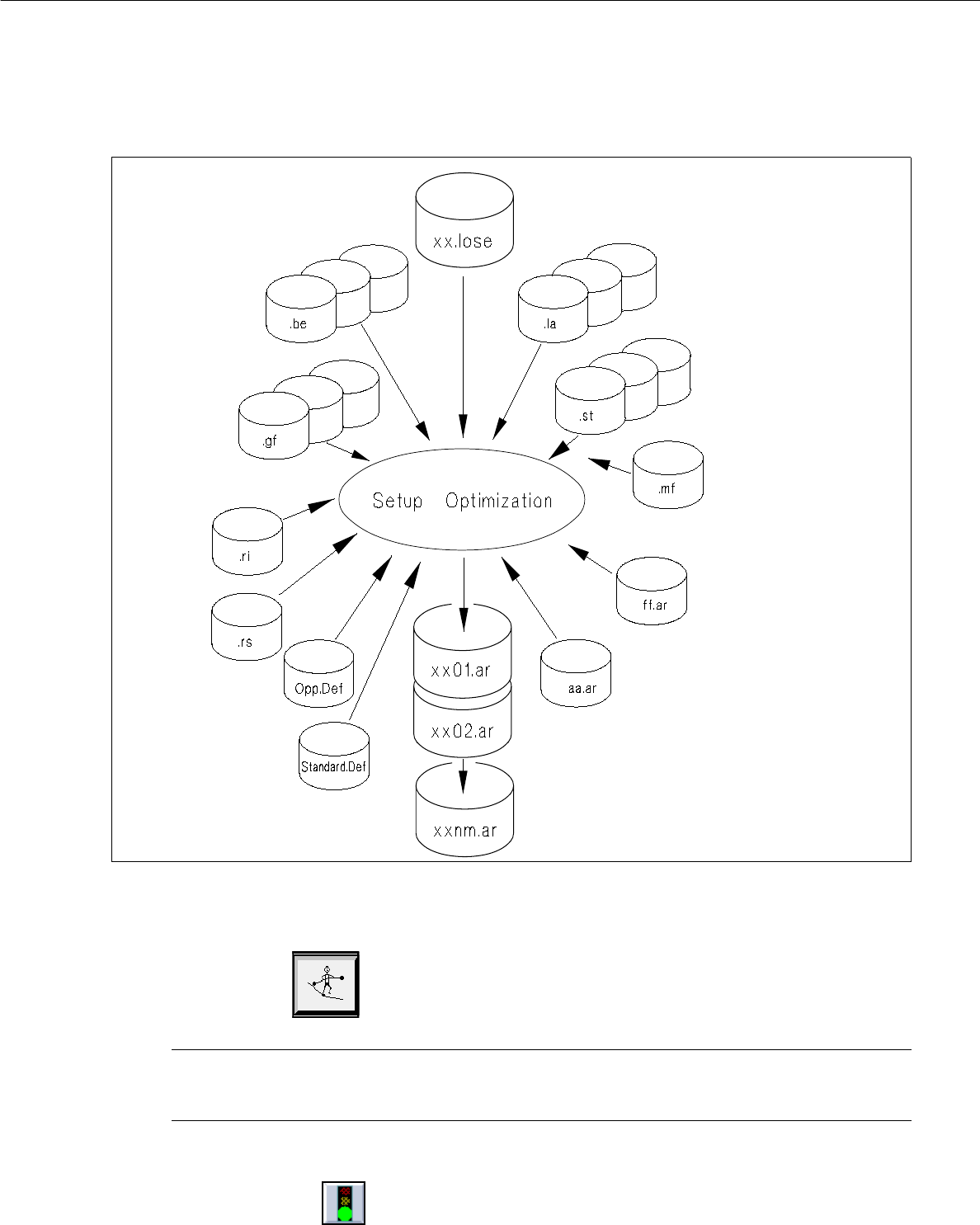
When the optimization run for Setup Optimization is started (see section 11.3.2.1), the Setup Optimization
processor accesses the data listed in the following (see also Fig. 11.3.1) and creates the optimized setup data
therefrom.
File name File contents
- Lot file xx.lose Jobs
- PCB data .la Description of the PCBs
- Component data .be Description of the components
- Package form data .gf Description of the package forms
- Station data .st Description of the station configurations
- Material flow list .mf Description of the station structure of the
subline
- Setup information data .ri Long-term (type-related) restrictions
- Restriction data (optional) .rs Short-term (individual machine-related)
restrictions
- Setup data (optional; only if a fixed .ar Description of a fixed or initial setup (initial
setup is preset) setups are only taken into account in
conjunction with clustering!) setup is preset)
- Parameter file OPP.Def Optimization parameters for the job
Standard.Def Standard parameter file
The setup data (= result of the setup optimization) created by the optimization processor are saved in the path
Anlagen/<Line>.ak/<Subline>.va/* in the file xx01.ar ("xx" stands for the name of the lot file). If more than
one setup is involved, the number 01 will be incremented in the file name, i.e. 02, 03, etc.
User Manual Line Computer UNIX 11 Production Tools / Optimization
Software Version 501.xx 01/99 Issue 11.3 Setup Optimization
11 - 7
Fig. 11.3.1 Data access during optimization run
11.3.2.1 Starting the Optimization Run
● Click on the Opimization icon on the desktop (only applies to the „programming mode“).
NOTE
The procedure to be followed in the "control mode" is described in section 11.4.1.
The main window of the Optimization dialog is opened (see Fig. 11.4.1).
● Click on the the "Start optimization icon" in the "Actions" command area.
● From the „Lot file“ selection field select the desired xx.lose lot file.
The optimization run is started (see section 11.4).

11 Production Tools / Optimization User Manual Line Computer UNIX
11.3 Setup Optimization Software Version 501.xx 01/99 Issue
11 - 8
Once the file has been successfully compiled, i.e. the setup data for one or several optimized setups have
been created, the lot file will be identified as „optimized“. If the lot file could not be compiled due to errors,
the lot file will be identified as „faulty“. An „.error“ error file will be created under the path of the lot file in
which the causes of the errors are displayed (see section 11.3.4).
NOTE
The file xx01.ar generated by the Setup Optimization is stored in the master data, in the path
Anlagen/<Line>.ak/<Subline>.va/*. The data can be viewed in the main window of the Setup Modification
Generator (see chapt. 14) and can be output to the printer.
11.3.3 Functions of the Setup Optimization
The subsections in the following provide an explanation of the parameters influencing Setup Optimization, or
which are taken into account for Setup Optimization.
11.3.3.1 Control of the Setup Optimization by the Operator
To control Setup Optimization, the operator can edit the following files by means of the appropriate editors and
thus influence the Setup Optimization program:
- Lot file xx.lose Fixed setup --> Initial setup --> PCBs --> line --> subline
(see chapt. 14)
- Setup info file .ri Type bindings (see chapt. 9)
(Feeder Editor) (The Setup info file contains the allocations of
Component -> Feeder -> Machine type,
Component -> Feeder,
Package form -> Machine type -> Feeder and
Package form -> Feeder).
- Restriction file .rs Individual bindings (see chapt. 10)
(The Restriction file contains, for example, information on
components "bound" to specific feeder parts).
- Parameter file Standard.Def to define the standard parameters
OPP.Def to define the job-specific optimization parameters
- Placement Position editor in the PCB EditorDefining a placement sequence by allocating
placement positions to different placement
levels (see chapt. 8)