00191413-01.pdf - 第298页
9 Production Tools / Feeders User Manu al Line Computer UNIX 9.1 Feeder Editor Software Version 501.xx 01/99 Issue 9 - 14 2. Creating customer-specific type "FM_PLCC" a nd editing waffle-pack tray data ● Activ …
User Manual Line Computer UNIX 9 Production Tools / Feeders
Software Version 501.xx 01/99 Issue 9.1 Feeder Editor
9 - 13
- (Delete)
When this icon is active, the editor is in the deletion mode. In this mode it is possible to delete allocati-
ons and "customer-specific types" from the selection fields.
NOTE
In the selection field "Placeable feeders" only
created "customer-specific types" (see ) can be deleted.
If an attempt is made to delete a SIEMENS-defined type (feeder or waffle-pack tray), a
corresponding error message is displayed.
● Click on icon in the command area.
● Select the allocation to be deleted in the selection field "Feeder", or the entry of a customer-speci-
fic type from the selection field "Placeable feeders". The selected entry is deleted from the se-lec-
tion field.
NOTE
If the customer-specific type in the ".ri"-file is still being used (i.e. it is still allocated to other compon-
ents or package forms), a message contained in a dialog box appears to inform the operator of this
fact. If the operator deletes the customer-specific type nevertheless, all
allocations to the customer-
specific type will be lost.
9.1.4 Creating Allocations
This section explains the procedure to be followed for the creation of allocations, on the basis of examples "A"
and "B".
Example "A" describes the allocation of "Package form --> Feeder" and
example "B" describes the allocation of "Component --> Feeder".
Example "A" for package form "704"
Task:
1. Components with the package form "704" are to be set up in the customer-specific type "FM_PLCC" (waffle-
pack tray) on the waffle-pack tray carrier"FT~S_Typ_1", on all feeder parts of the line where the customer-
specific type "FM_PLCC" can be set up.
Steps to be performed:
1. Setting the Feeder Editor for editing package form "704"
● Click on editing field "Package form", enter package form number 704 and complete the entry by
pressing RETURN.
The comment ("PLCC68") entered in the Package Form Editor is displayed in the "GF name" field.
9 Production Tools / Feeders User Manual Line Computer UNIX
9.1 Feeder Editor Software Version 501.xx 01/99 Issue
9 - 14
2. Creating customer-specific type "FM_PLCC" and editing waffle-pack tray data
● Activate icon or icon in the command area.
● Select entry FM~(1x1) for the waffle-pack tray in the selection field "Placeable feeders" by
double-clicking. The sub-editor "Waffle-Pack Tray" for the definition of the customer-specific type
is opened (name, dimensions, carrier).
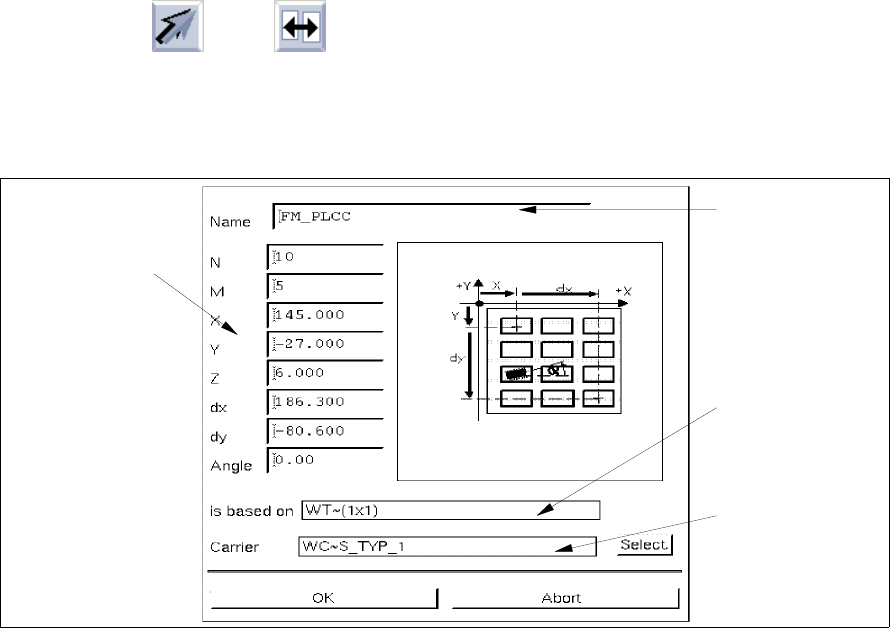
Fig. 9.1.3 Sub-Editor "Waffle-Pack Tray"
Meaning of the editing fields (see also chapt. 13)
- Name
Name of the customer-specific type
- N
Number of divisions in x-direction
- M
Number of divisions in y-direction
- X [mm]
Offset from the zero point of the WPT to the center of the first division in x-direction
- Y [mm]
Offset from the zero point of the WPT to the center of the first division in y-direction
Editing field
"Name"
Name of the
SIEMENS type
(default type)
Name of the
WPT carrier
Editing fields
"Dimensions of the
waffle-pack tray"
User Manual Line Computer UNIX 9 Production Tools / Feeders
Software Version 501.xx 01/99 Issue 9.1 Feeder Editor
9 - 15
- Z [mm]
Offset in z-direction from the support surface of the WP in the WPC to the bottom surface of the tray
compartment (= contact surface of the component)
- dx [mm]
Dimension (offset) from the center of the first division to the center of the last division in x-direction
- dy [mm]
Dimension (offset) from the center of the first division to the center of the last division in y-direction
- Angle [degree]
Angle of rotation of the component in the tray compartment (pick-up angle)
Editing waffle-pack tray data:
● Click on editing field Name and enter FM_PLCC for the name of the customer-specific type.
● Click on editing field N and enter 10.
● Click on editing field M and enter 5.
● Click on editing field X and enter 145.
● Click on editing field Y and enter -27.
● Click on editing field Z and enter 6.
● Click on editing field dx and enter 186.3.
● Click on editing field dy and enter -80.6.
● Click on editing field Angle and enter 0.
NOTE
In order to be able to immediately detect any invalid entries, the RETURN key should be pressed
after each
entry. If the current entry is incorrect, the corresponding editing field will be surrounded by a
red frame.
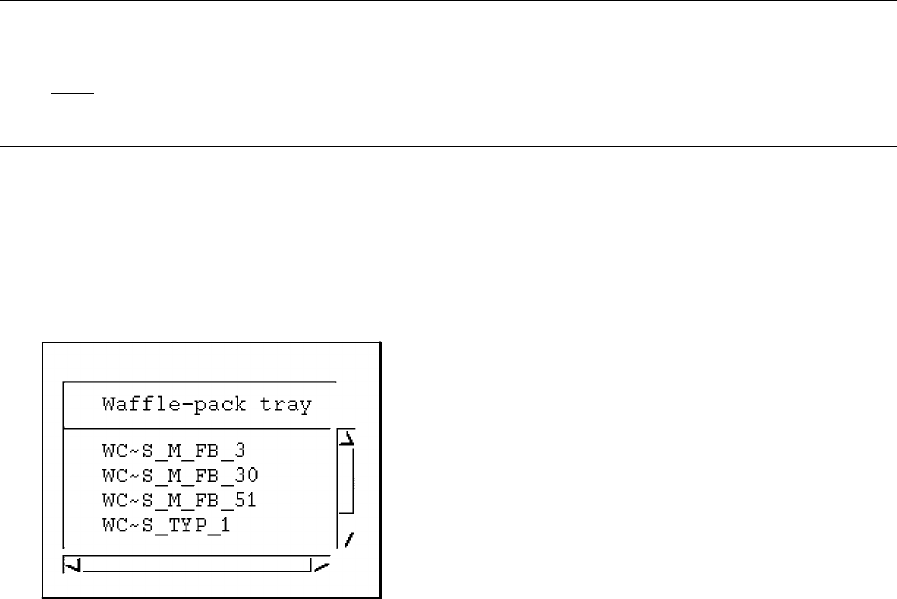
Selecting waffle-pack tray carriers (WTC):
● Click on button Select.
The selection box containing a list of the available WTCs is opened.