FlexTRAK OH Material Handler Manual.pdf - 第188页
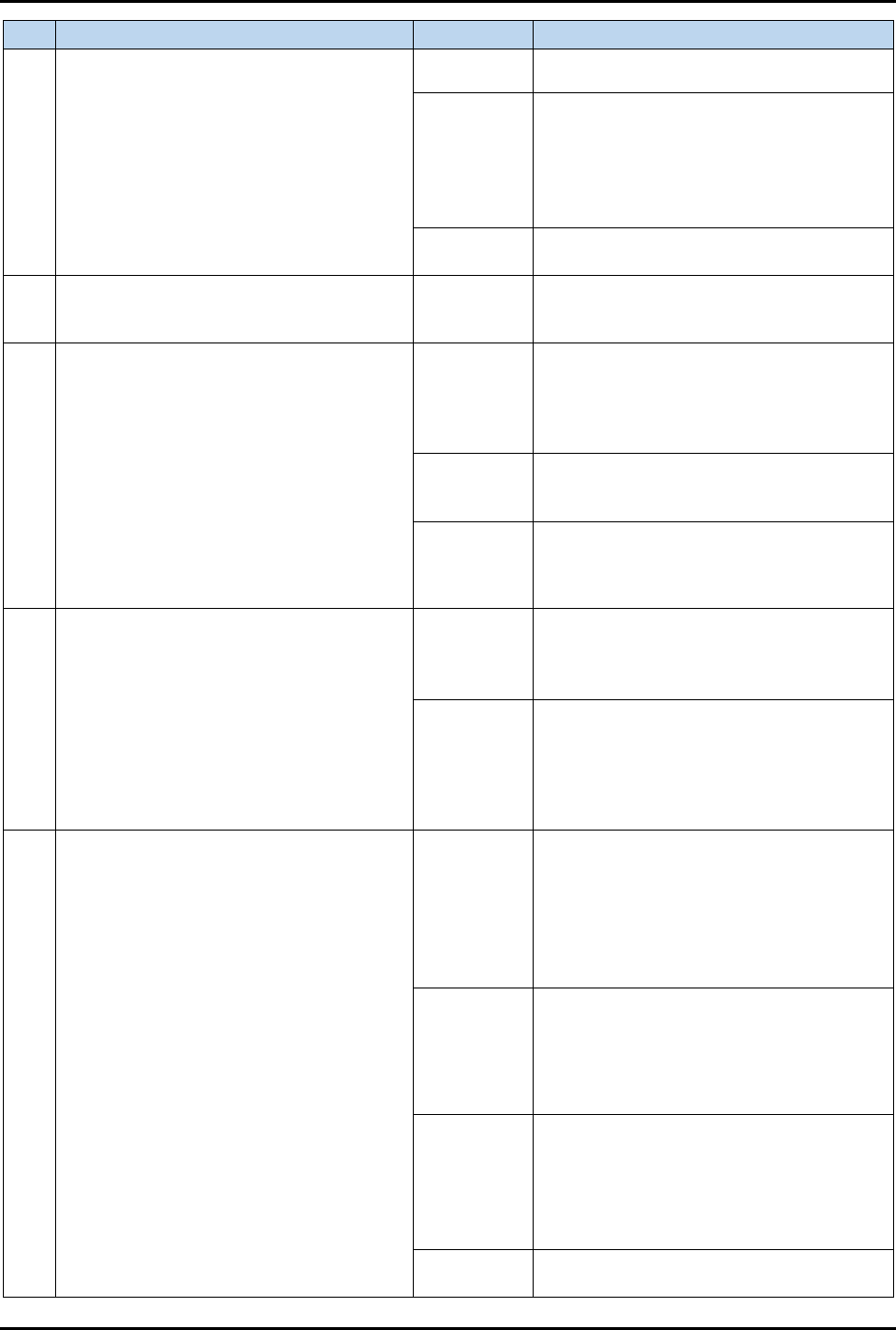
FlexTRAK-OH Material Handli ng System IOM Manual Troubleshoo ting 6-10 © 2023 Nordson C orporation No. Alarm Message Cause Recovery 28 STN20 Strip Missing / Kick Missed (co ntinued) Strip lane a) Ensure no obs truction a…
FlexTRAK-OH Material Handling System IOM Manual Troubleshooting
© 2023 Nordson Corporation 6-9
No. Alarm Message Cause Recovery
24
STN20 Strip Between Loader Pinch Wheel
And Magazine (continued)
c) Ensure the strip is clear from any
damage.
Y-axis
position
a) Ensure axis 1: Y-axis positions the
magazine at the center of the strip lane.
b) Ensure the strip is transferred at the
center of the lane.
c) Ensure the Y-axis components are
moving smoothly.
Pinch wheel
Ensure pinch wheel does not block the strip
movement.
25
STN20 Please Clear Elevator Magazine
Before AutoRun
Loader
elevator Z-
axis
Remove the magazine from elevator axis 2:
Z-axis.
26
STN20 Magazine Not Present On Gripper:
Loader Elevator
Magazine
a) Check the magazine axis 2: Z-axis
position gap.
b) Ensure the magazine outer sidewall
position is close to the elevator wall that
faces parallel with the magazine.
Magazine
present
sensor
Ensure the elevator magazine present
sensor is on.
Magazine
holding plate
– gripper
and loader
Ensure the base plate that holds the
magazine is free from damage and in good
alignment.
27
STN20 Gripper Grip Present Sensor Fault:
Loader Elevator
Gripper
detection
shaft
a) Identify the gripper shaft location at the
gripper detection shaft.
b) Ensure the detection shaft can reach
sensor slot without any obstruction.
Slot map
sensor
a) Ensure location and orientation of slot
sensor is correct.
b) Ensure the sensor window can sense the
presence of the gripper detection shaft
once the magazine gripper cylinder is
retracted.
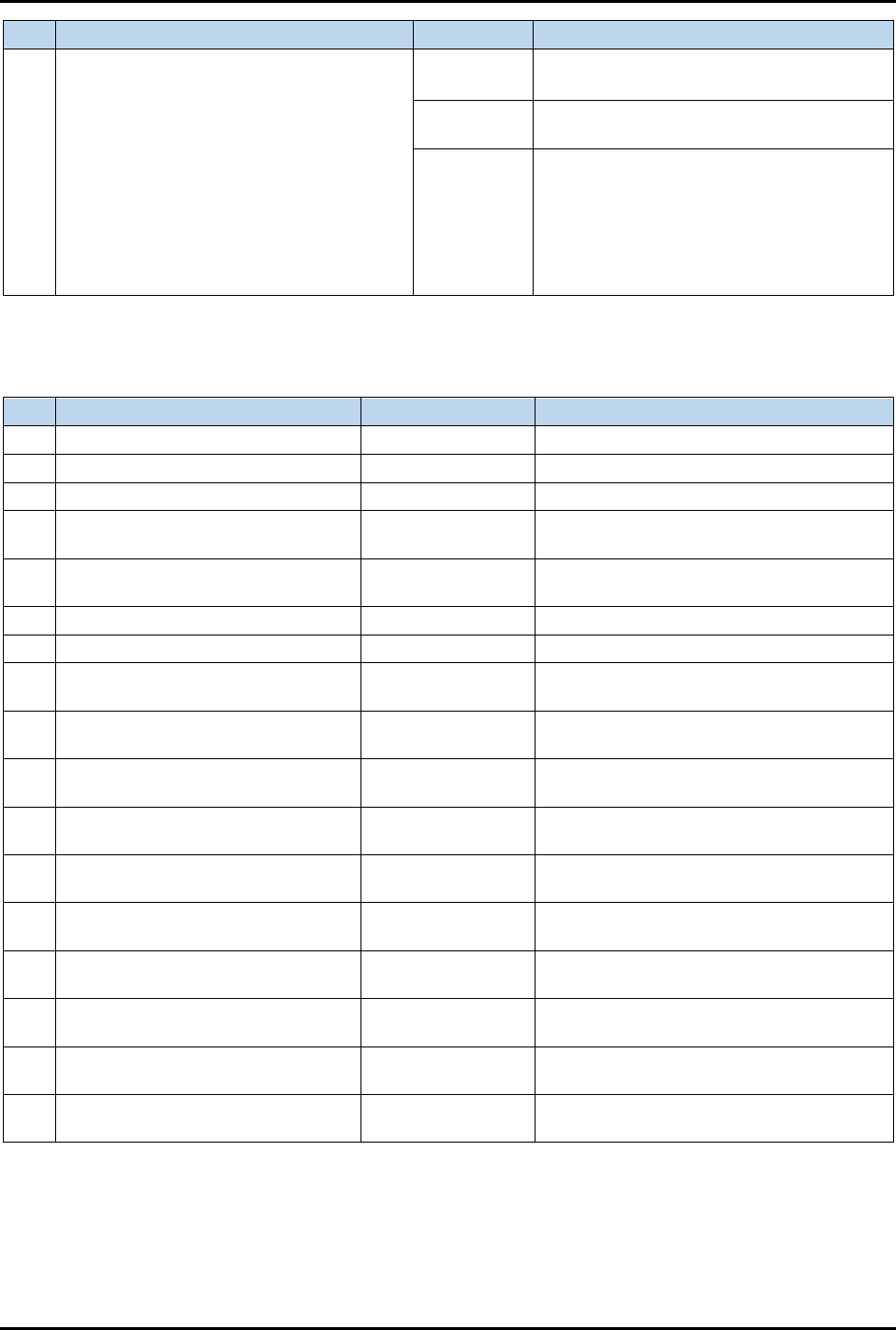
28
STN20 Strip Missing / Kick Missed
Strip
a) Identify jammed strip locations.
b) Ensure the strip is present in magazine
slot.
c) Rectify the jammed strip or clear any
obstruction.
d) Ensure the strip is moving and passes
both strip sensors.
Strip sensor
Strip present sensor does not turn on when
strip passes through the sensor. To solve
this, ensure strip sensor is present before
the pinch wheel position. When the kicker is
extended, strip should be transferred and
successfully detected.
Y-axis
position
a) Ensure axis 1: Y-axis positions the
magazine at the center of the strip lane.
b) Ensure the strip is transferred to the
center of the lane.
c) Ensure the Y-axis components are
moving smoothly.
Pinch wheel
Ensure the pinch wheel does not block the
strip movement.
FlexTRAK-OH Material Handling System IOM Manual Troubleshooting
6-10 © 2023 Nordson Corporation
No. Alarm Message Cause Recovery
28
STN20 Strip Missing / Kick Missed
(continued)
Strip lane
a) Ensure no obstruction along the lane.
b) Ensure correct lane conversion is used.
Strip claw
Ensure strip transfer in claw does not block
the strip.
Slot map
sensor
Slot map sensor detected a strip in
magazine, but physically there is no strip
present in the magazine. To solve this,
delete "extra" detected strip from plasma
HMI screen by selecting the kicker that is
kicking on that particular slot to continue
machine process.
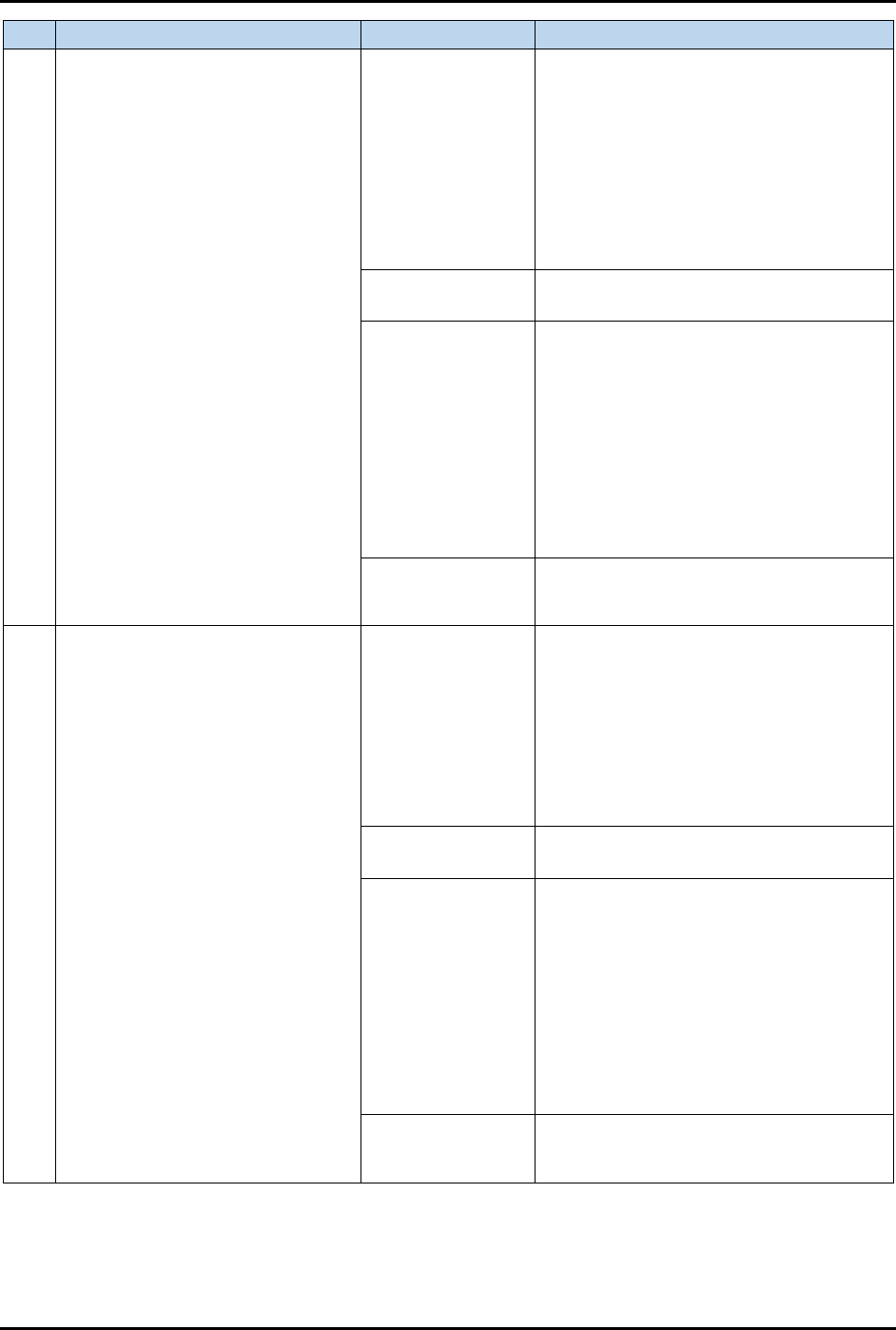
6.3.5 Station 30 – Alarm Error Message
Table 6-5 Station 30 – Alarm Error Message
No.
Alarm Message
Cause
Recovery
1 STN30 Machine Starved Time Out N/A See Table 6-2, Item 1(a).
2 STN30 Initialized Time Out N/A See Table 6-2, Item 1(b).
3 STN30 Axis 4 Fault: Claw Motor N/A See Table 6-2, Item 2.
4
STN30 Axis 4 Neg Limit Fault: Claw
Motor
N/A See Table 6-2, Item 3(a).
5
STN30 Axis 4 Pos Limit Fault: Claw
Motor
N/A See Table 6-2, Item 3(b).
6 CYL3001 Extend Jam: Loader Claw N/A See Table 6-2, Item 5(a).
7 CYL3001 Retract Jam: Loader Claw N/A See Table 6-2, Item 5(b).
8
CYL3002 Extend Jam: Unloader
Claw
N/A See Table 6-2, Item 5(a).
9
CYL3002 Retract Jam: Unloader
Claw
N/A See Table 6-2, Item 5(b).
10
CYL3003 Extend Jam: Input Buffer
Plate Up/Down
N/A See Table 6-2, Item 5(a).
11
CYL3003 Retract Jam: Input Buffer
Plate Up/Down
N/A See Table 6-2, Item 5(b).
12
CYL3004 Extend Jam: Input Buffer
Plate
N/A See Table 6-2, Item 5(a).
13
CYL3004 Retract Jam: Input Buffer
Plate
N/A See Table 6-2, Item 5(b).
14
CYL3005 Extend Jam: Output Buffer
Plate Up/Down
N/A See Table 6-2, Item 5(a).
15
CYL3005 Retract Jam: Output Buffer
Plate Up/Down
N/A See Table 6-2, Item 5(b).
16
CYL3006 Extend Jam: Output Buffer
Plate
N/A See Table 6-2, Item 5(a).
17
CYL3006 Retract Jam: Output Buffer
Plate
N/A See Table 6-2, Item 5(b).
FlexTRAK-OH Material Handling System IOM Manual Troubleshooting
© 2023 Nordson Corporation 6-11
No. Alarm Message Cause Recovery
18
STN30 Loader Claw 1 Pos Out
STN30 Loader Claw 2 Pos Out
STN30 Loader Claw 3 Pos Out
STN30 Loader Claw 4 Pos Out
STN30 Loader Claw 5 Pos Out
STN30 Loader Claw 6 Pos Out
STN30 Loader Claw 7 Pos Out
STN30 Loader Claw 8 Pos Out
Loader claw finger
a) Identify loader claw assembly.
b) Ensure loader finger can fully retract
when the claw is in the up position.
c) Ensure finger present switch (flag). is
mounted correctly, no bending or
damages.
d) Ensure a finger flag is present inside the
dedicated finger slot sensor.
e) Ensure the finger stopper position is
correctly set.
Finger linear guide
block
a) Ensure parts can move smoothly.
b) Ensure rail is free from any debris.
Claw up down
components
a) Ensure cylinder and claw mechanism
parts connection is present and correctly
mounted.
b) Ensure cylinder rod can fully extend and
retract.
c) Ensure the claw support bar can turn
smoothly.
d) Ensure the claw support bar and claw
lever pusher are tightened. This lever
should turn the support bar without any
grip loose.
Sensor
Check affected finger sensor function –
loader claw 1 until claw 6 limit sensor
(I007.00 until I007.05).
19
STN30 Unloader Claw 1 Pos Out
STN30 Unloader Claw 2 Pos Out
STN30 Unloader Claw 3 Pos Out
STN30 Unloader Claw 4 Pos Out
STN30 Unloader Claw 5 Pos Out
STN30 Unloader Claw 6 Pos Out
STN30 Unloader Claw 7 Pos Out
STN30 Unloader Claw 8 Pos Out
Loader claw finger
a) Identify unloader claw assembly.
b) Ensure unloader finger can fully retract
when the claw is in up position.
c) Ensure finger present switch (flag) is
mount correctly, no bending or damages.
d) Ensure a finger flag is present inside the
dedicated finger slot sensor.
e) Ensure the finger stopper position is
correctly set.
Finger linear guide
block
a) Ensure parts can move smoothly.
b) Ensure rail is free from any debris.
Claw up down
components
a) Ensure cylinder and claw mechanism
parts connection is present and correctly
mounted.
b) Ensure cylinder rod can fully extend and
retract.
c) Ensure the claw support bar can turn
smoothly.
d) Ensure the claw support bar and claw
lever pusher are tightened. This lever
should turn the support bar without any grip
loose.
Sensor
Check affected finger sensor function –
unloader claw 1 until claw 6 limit sensor
(I009.00 until I009.05).