FlexTRAK OH Material Handler Manual.pdf - 第94页
FlexTRAK-OH Material Handli ng System IOM Manual Material Handler Operation 4-6 © 2023 Nordson C orporation 4.7 Home Screen The Home screen ( Figu re 4-4 ) is displayed at sy stem startup. NOTE R efer to 4.6 HMI Data I…
FlexTRAK-OH Material Handling System IOM Manual Material Handler Operation
© 2023 Nordson Corporation 4-5
4.6.2 HMI Data Output Indicators
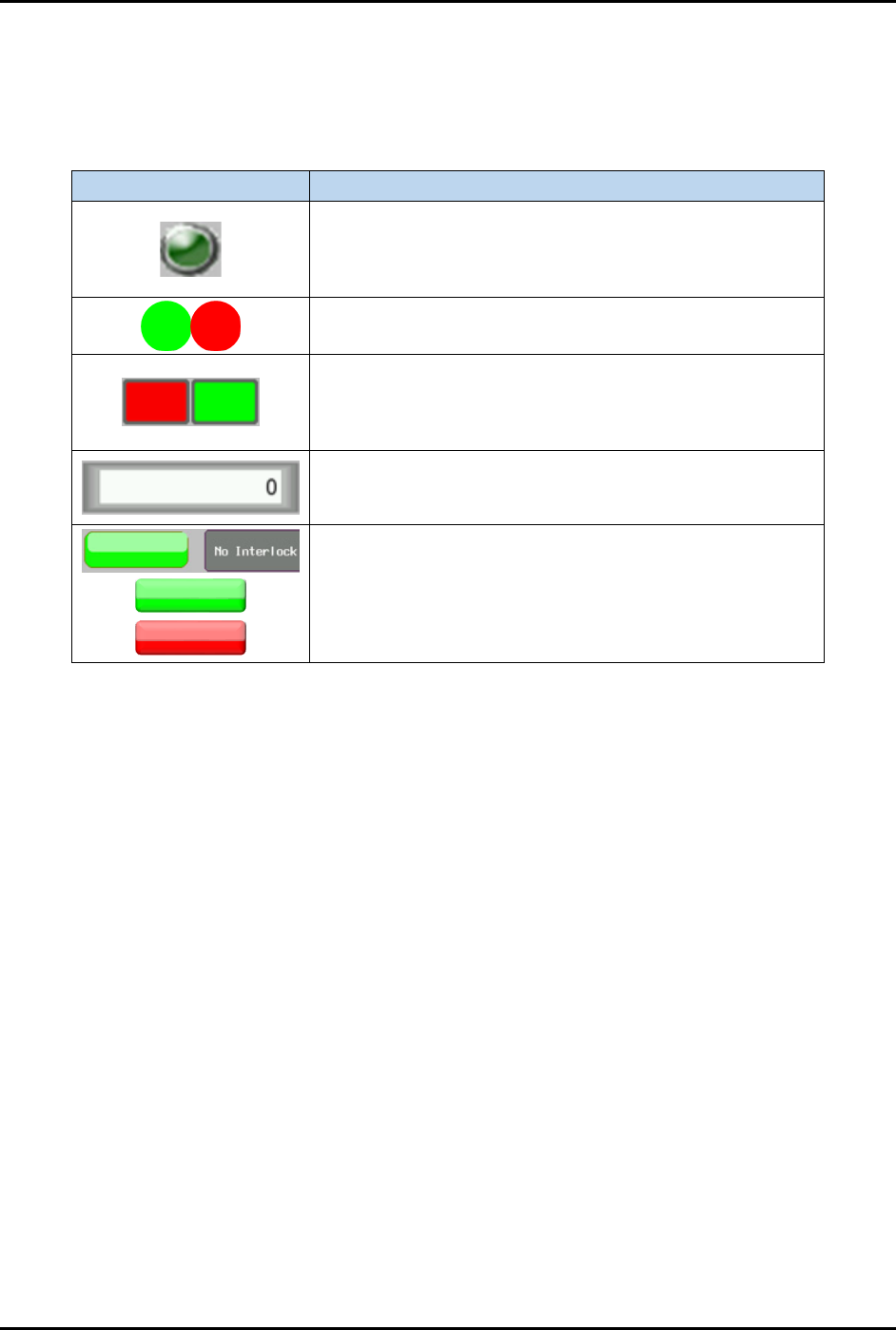
The HMI output indicator buttons display a specific machine process or component availability state. See
Table 4-4 for a detailed description of the HMI Output Indicator buttons.
Table 4-4 HMI Data Output Indicator
HMI Object
Description
Indicates specific motor actuation status as labeled beside
the indicator to show whether an axis control switch is
enabled (light green button) or disabled (dark green
button) to actuate a motor.
Enables (green button) or disables (red button) a specific
station I/O component function.
Enables (green button) or disables (red button) a specific
station process sequence status. Once the station process
sequence is complete, the indicator will be red (process
error) or green (good process).
Shows the current measured value/previously saved
parameter value. The data value type is labeled beside the
box.
Locks (red button) or unlocks (green button) the cylinder’s
switching interlock state.
FlexTRAK-OH Material Handling System IOM Manual Material Handler Operation
4-6 © 2023 Nordson Corporation
4.7 Home Screen
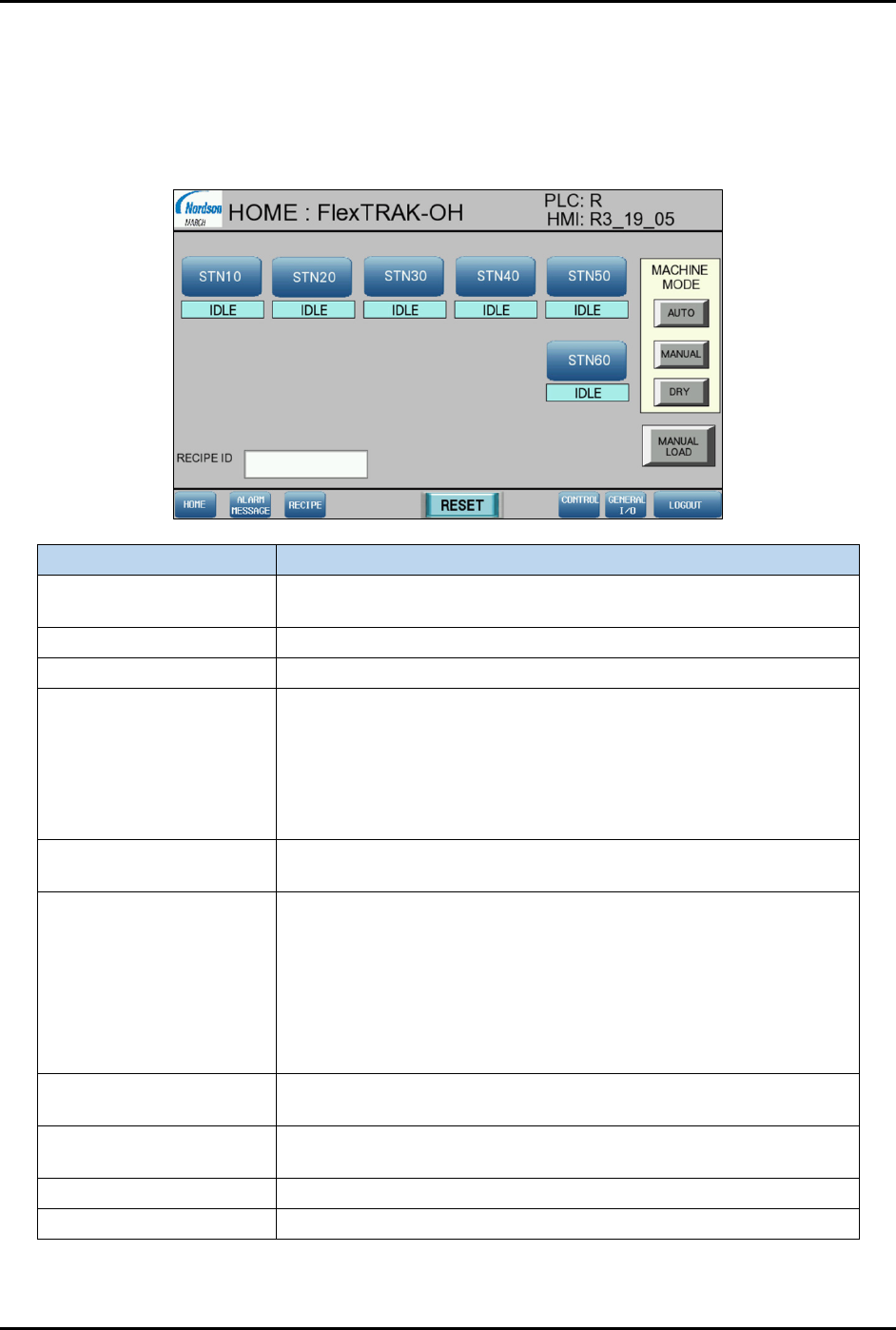
The Home screen (Figure 4-4) is displayed at system startup.
NOTE Refer to 4.6 HMI Data Input/Output Indicators for detailed information on screen
indicators.
Item
Description
STN10, 20, 30, 40, 50, 60
Shows the machine module control parameters and indicators at
stations 10, 20, 30, 40, 50, and 60.
Idle Indicates current process state.
Recipe ID Indicates current recipe.
Machine Mode
• Auto – Activates the auto mode for machine mechanism
process sequences control.
• Manual – Activates the manual mode for station component
configuration and individual triggering.
• Dry – Activates the mode for machine process sequences to
run without a workpiece present check.
Manual Load
Activates magazine manual loading and unloading ports in the
auto production mode.
Alarm Message
Opens the Alarm Message screen.
• Reset – Deletes the list of alarm messages on the Alarm
Message screen.
• Buzzer On/Off – Turns on/off the alarm sound from buzzer.
• Alarm History Button – Opens the Alarm History screen.
• Clear History – Deletes the list of alarm messages on the
Alarm History screen.
Recipe
Opens the Recipe screen. Refer to 4.8 Call Recipe Screen for
details.
Reset
Press Reset to allow the system to execute process sequences
after the alarm correction.
Control
Refer to 4.9 Control Screen for details.
General I/O
Refer to 4.10 General I/O Screen for details.
Figure 4-4 Home Screen
FlexTRAK-OH Material Handling System IOM Manual Material Handler Operation
© 2023 Nordson Corporation 4-7
4.8 Call Recipe Screen
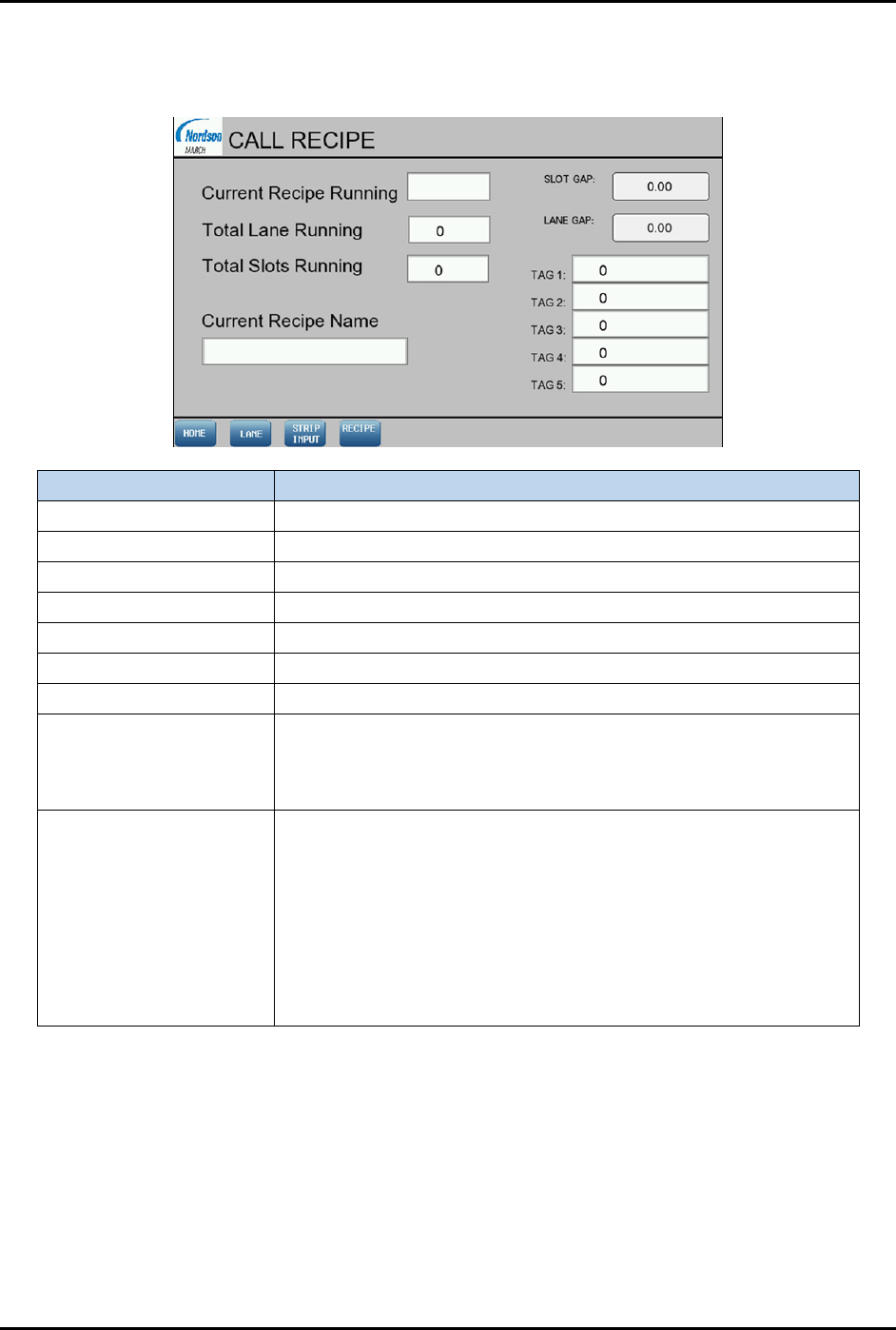
To open the Call Recipe screen (Figure 4-5), select the Recipe button on the Home screen (Figure 4-4).
Item Description
Current recipe running Displays the configured recipe number for production.
Total lane running Displays the lane quantity.
Total slots running Displays the magazine slot quantity.
Current recipe name Displays the configured recipe name for production.
Slot gap Displays the running slot gap value in mm.
Lane gap Displays the running lane gap value in mm.
Tag 1 to Tag 5 Displays the RFID tag ID.
Lane
Opens the Lane Enable/Disable screen. This screen is use to
enable or disable the strip handling process from Lane 1 to Lane 8.
Lane 1 is located at the rear of machine and Lane 8 is located at
the front of machine.
Strip Input
Opens the Strip In/Out Selection screen.
• Bottom to top – When this option is selected, the movement
of the strips into or out of the magazine slots will start from the
bottom slot of the magazine. The bottom slot will be
registered as slot number 1.
• Top to bottom – When this option is selected, the movement
of the strips into or out of the magazine slots will start from the
top of the magazine slot. The top slot will be registered as slot
number 1.
Figure 4-5 Call Recipe Screen Layout