FlexTRAK OH Material Handler Manual.pdf - 第38页
FlexTRAK-OH Material Handli ng System IOM Manual Safety 2-8 © 2023 Nordson C orporation 2.11 Emergency Shut down In the event of an emergency or malf unction, p ress the Emergency Mach ine Off (EMO) b utton ( large red b…
FlexTRAK-OH Material Handling System IOM Manual Safety
© 2023 Nordson Corporation 2-7
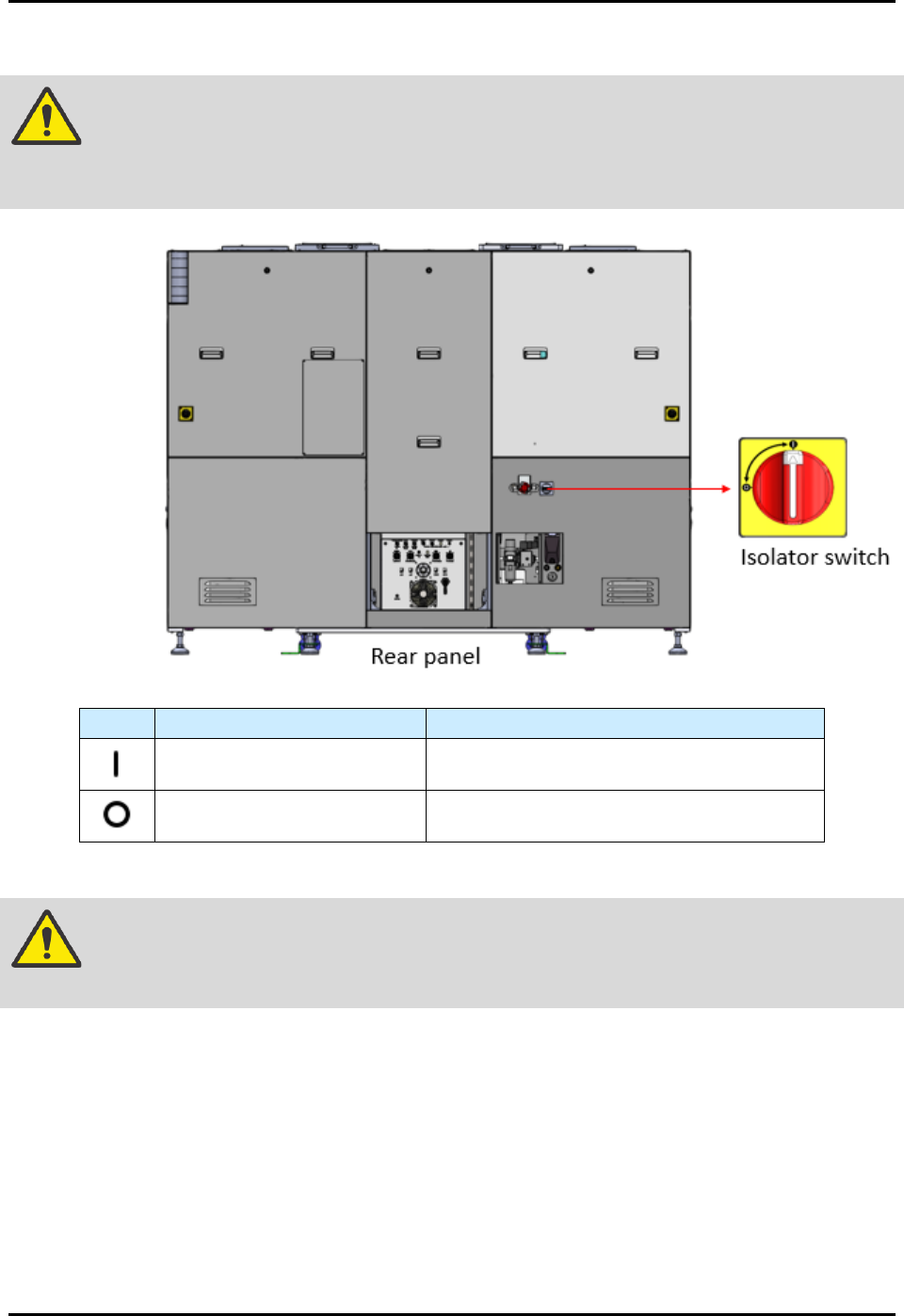
2.10 Isolator Switch
DANGER! The isolator switch (Figure 2-5) only isolates electrical energy from facilities to
connect with machine local electrical components. Electrical energy is still
present inside the isolator switch’s electrical input or incoming points.
Sign
Operation Mode
Description
Twist handle to the power on
position.
Energizes the machine's local electrical
components.
Twist handle to the power off
position.
Cuts off the electrical energy from the
facilities to the machine's local components.
Figure 2-5 Isolator Switch
WARNING! Always apply the LOTO kit to the isolator switch when electrical energy
isolation is in progress for maintenance or troubleshooting tasks.
FlexTRAK-OH Material Handling System IOM Manual Safety
2-8 © 2023 Nordson Corporation
2.11 Emergency Shutdown
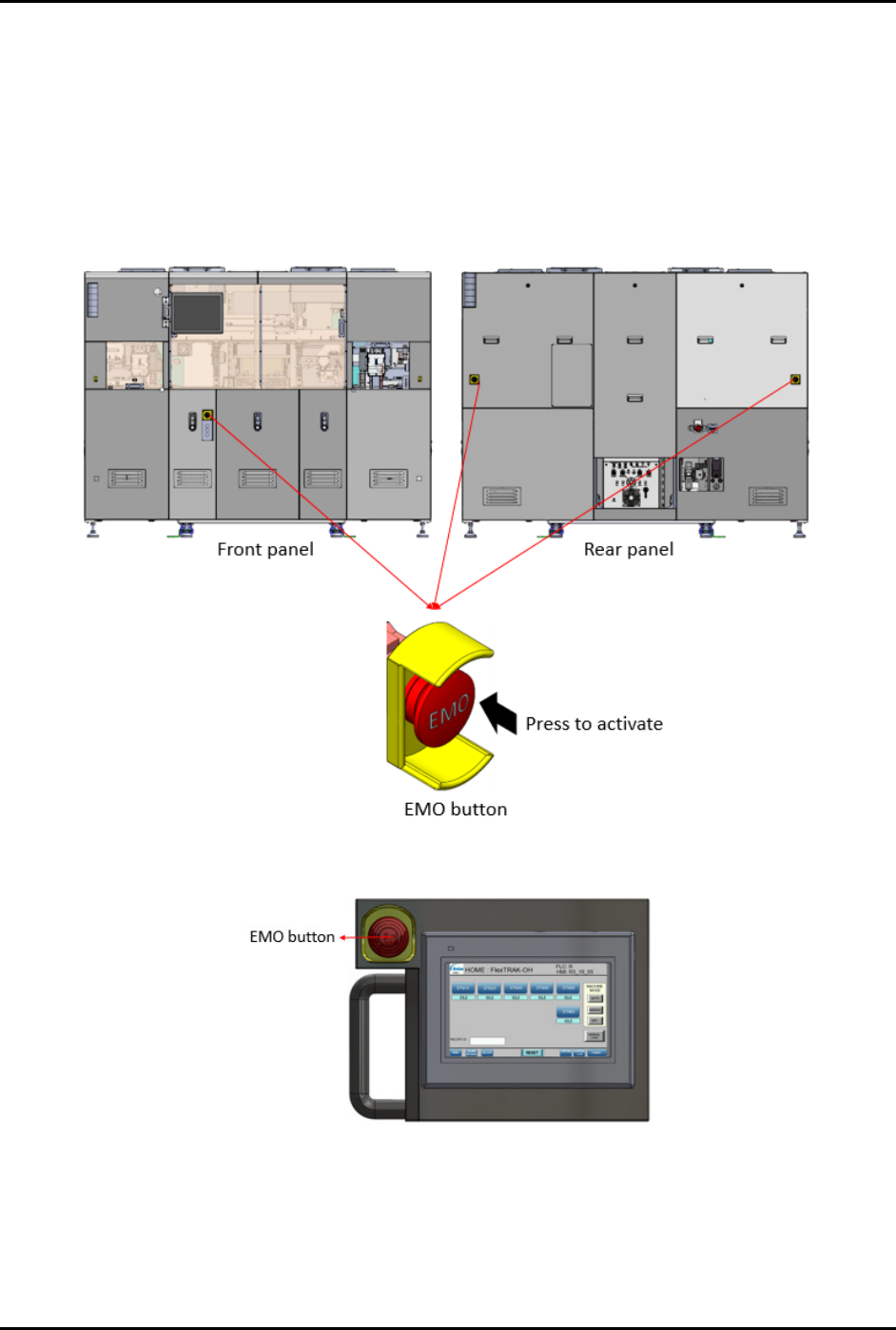
In the event of an emergency or malfunction, press the Emergency Machine Off (EMO) button (large red
button surrounded by yellow bezel).
There are four (4) EMO buttons on FlexTRAK-OH Material Handler (three (3) on the machine and
one (1) on the mobile control pendant). Pressing the EMO on the FlexTRAK-OH Material Handler
disables all material handler motors. Reset is not possible until the EMO button has been released
(Figure 2-6 and Figure 2-7).
Figure 2-6 Emergency Machine Off (EMO) On Machine
Figure 2-7 Emergency Machine Off (EMO) On Pendant

FlexTRAK-OH Material Handling System IOM Manual Safety
© 2023 Nordson Corporation 2-9
WARNING! In an emergency, failure to shut down power to the FlexTRAK-OH Material
Handler with the EMO can cause serious injury to the user and/or damage to the
system.
2.11.1 Emergency Shutdown Situations
As a minimum, activate the EMO in the following situations:
• If anyone is in immediate danger of being injured by moving parts, hazardous materials, or
electrical shock.
• If valuable components or the work pieces are in danger of being damaged.
To activate EMO:
1. Press the EMO button.
This will cause the machine contactors (KM1800, KM1801) to de-energize the machine
local components from the AC and DC power modules.
The AC to 24V DC power supply unit remains energized.
2. Once EMO button is pressed, the following components must be fully disconnected from
the power modules:
a. Electronic overload unit
b. E-Stop relays:
1) S5600
2) S5601
c. Guard switch relays:
1) S6000
2) S6001
3) S6200
4) S6201
d. Ethernet switch
e. Mobile control pendant
f. PLC input cards units
g. PLC units
h. FlexTRAK Plasma system
1) Note that the machine’s EMO status signal is only connected to the EMO input
wires of the plasma system.
2) All plasma local components (such as touch screen monitor and plasma chamber)
are guarded by their own EMO control rules.
3) Refer to the FlexTRAK
Series Plasma Systems Installation, Operation, and
Maintenance Manual for further details.