FlexTRAK OH Material Handler Manual.pdf - 第74页
FlexTRAK-OH Material Handli ng System IOM Manual Installation 3-24 © 2023 Nordson C orporation 3.7.5.3 Delay Timer Settings Table 3-6 Set Dela y Timer on Strip Sensor Step Action Display on screen 1 Long press MODE butto…
FlexTRAK-OH Material Handling System IOM Manual Installation
© 2023 Nordson Corporation 3-23
Step
Action
Display on screen
7
Long press SET button for 3 to 5
seconds.
Note: Ensure no strip present or
common background while doing
this step.
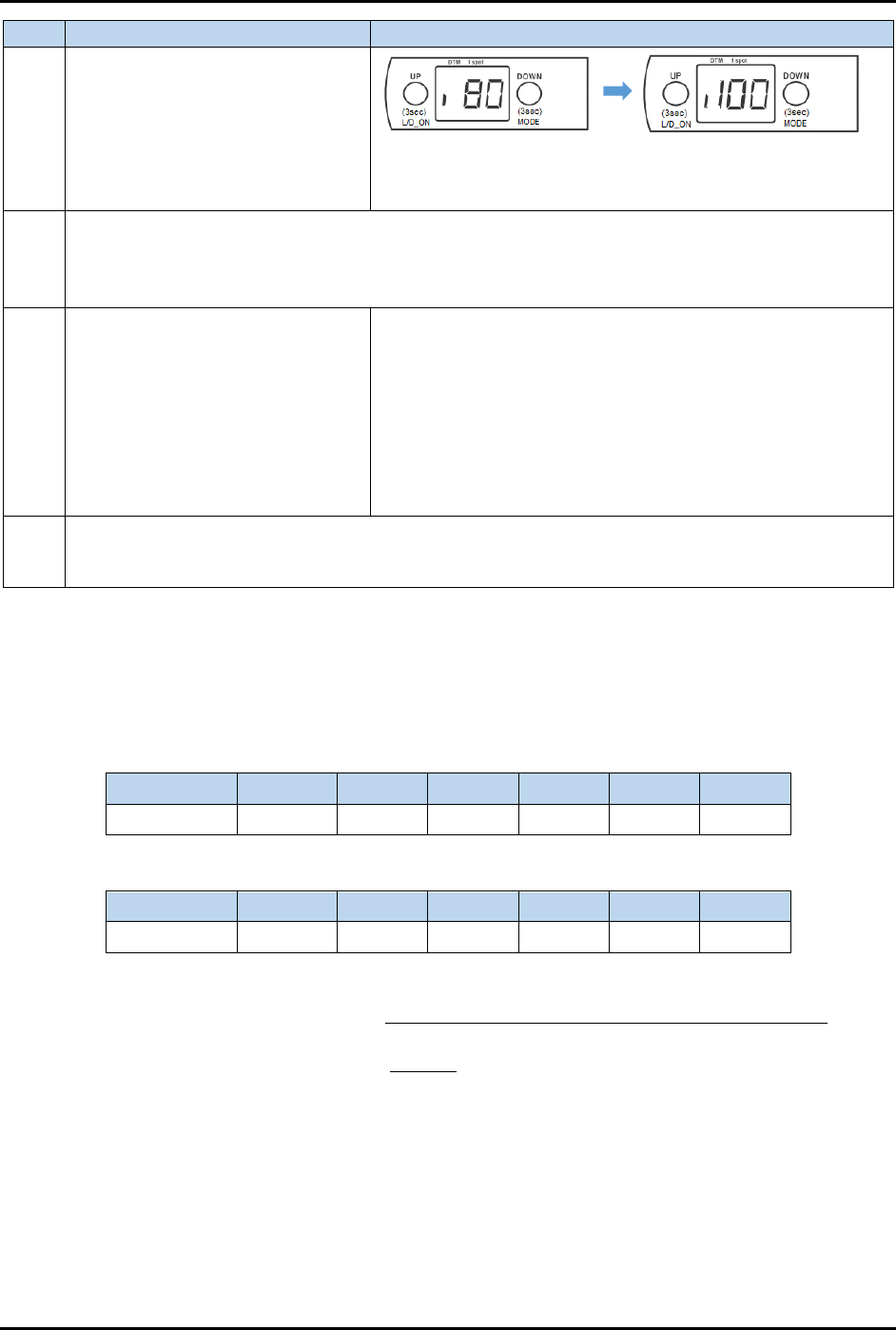
80 = Current threshold limit
Displays any value, and blinking. Example:
100 = actual optimum reading (without strip)
8
Step 6 and Step 7 above are for i-datum settings, after the small "i" has appeared on the screen
in step 5. When all settings are done, "DTM" and "1 spot" indicators will light up in Step 7.
DTM (orange light) stands for datum
1 spot (green light) stands for sensor stability
9
Press UP or DOWN button to
adjust the value.
If set value > display value in Step 7, press UP
If set value < display value in Step 7, press DOWN
After adjusting the value, the new value will blink and
immediately change on screen. It will be autosaved after a
while.
The LED indicator at the side will illuminate, which means
the signal is successfully detected in the machine.
See 3.7.5.2 How to Set Threshold Limit in Strip Sensor
for
further details.
10
Add off delay in sensor. The purpose of this setting is to prevent a false alarm signal from a
reflective die telling the system that the strip is absent. See 3.7.5.3 Delay Timer Settings for
further details.
3.7.5.2 How to Set Threshold Limit in Strip Sensor
The threshold limit decreases (zero or lower value) when the platform contains a strip and increases
(higher value) when there is no strip. Table 3-4 and Table 3-5 show the sample readings obtained in these
two modes.
Table 3-4 Sensor Reading Without Strip
Sensor No. Lane 1 Lane 2 Lane 3 Lane 4 Lane 5 Lane 6
1 100 90 96 84 80 90
Table 3-5 Sensor Reading With Strip
Sensor No. Lane 1 Lane 2 Lane 3 Lane 4 Lane 5 Lane 6
1 7 0 36 1 0 5
Threshold limit set in strip sensor =
(lowest value without strip + highest value with strip)
2
=
(80+36)
2
= 58
Follow Step 8 in Table 3-3 and press the UP or DOWN button on LR-ZB250 sensor to adjust the value
until "58" is displayed on the screen.
FlexTRAK-OH Material Handling System IOM Manual Installation
3-24 © 2023 Nordson Corporation
3.7.5.3 Delay Timer Settings
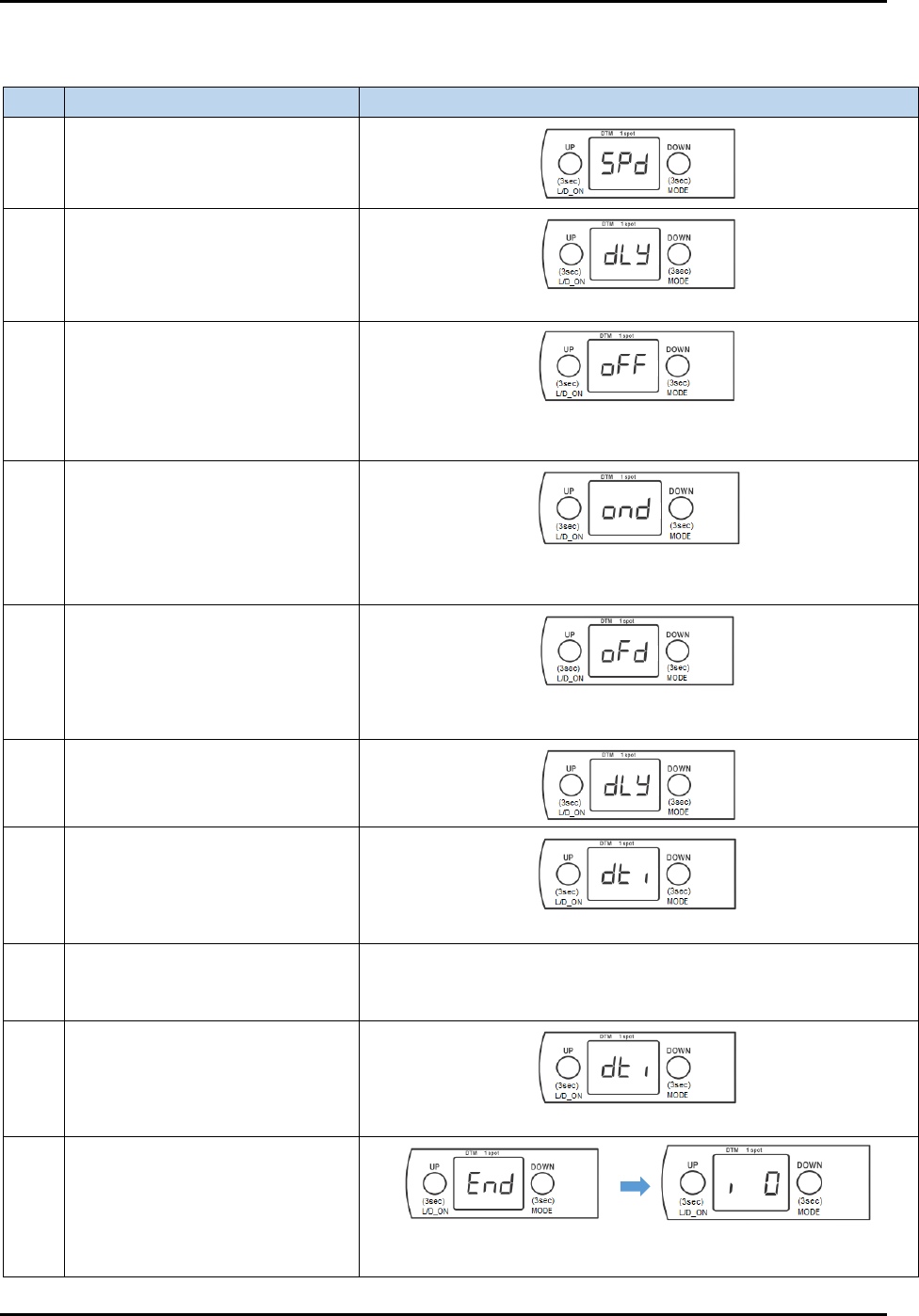
Table 3-6 Set Delay Timer on Strip Sensor
Step Action Display on screen
1
Long press MODE button for 3
to 5 seconds.
2 Press once on DOWN button.
(delay)
3 Press once on UP button.
(default setting – off)
*** blinking ***
4 Press once on UP button.
(on delay)
*** blinking ***
5 Press once on UP button.
(off delay)
*** blinking ***
6 Press once on DOWN button.
7 Press once on DOWN button.
(amount of time for timer)
8 Press once on UP button.
Displays timer (in milliseconds, e.g.: 10, 20, …100, 200), and
blinking. Selects desired value.
Press UP/DOWN consecutively to increase/decrease the value.
9 Press once on DOWN button.
*** blinking ***
10
Long press DOWN button for 3
to 5 seconds to save value.
Returns to original value
before step 1.
FlexTRAK-OH Material Handling System IOM Manual Installation
© 2023 Nordson Corporation 3-25
3.7.5.4 LR-ZH500 Series
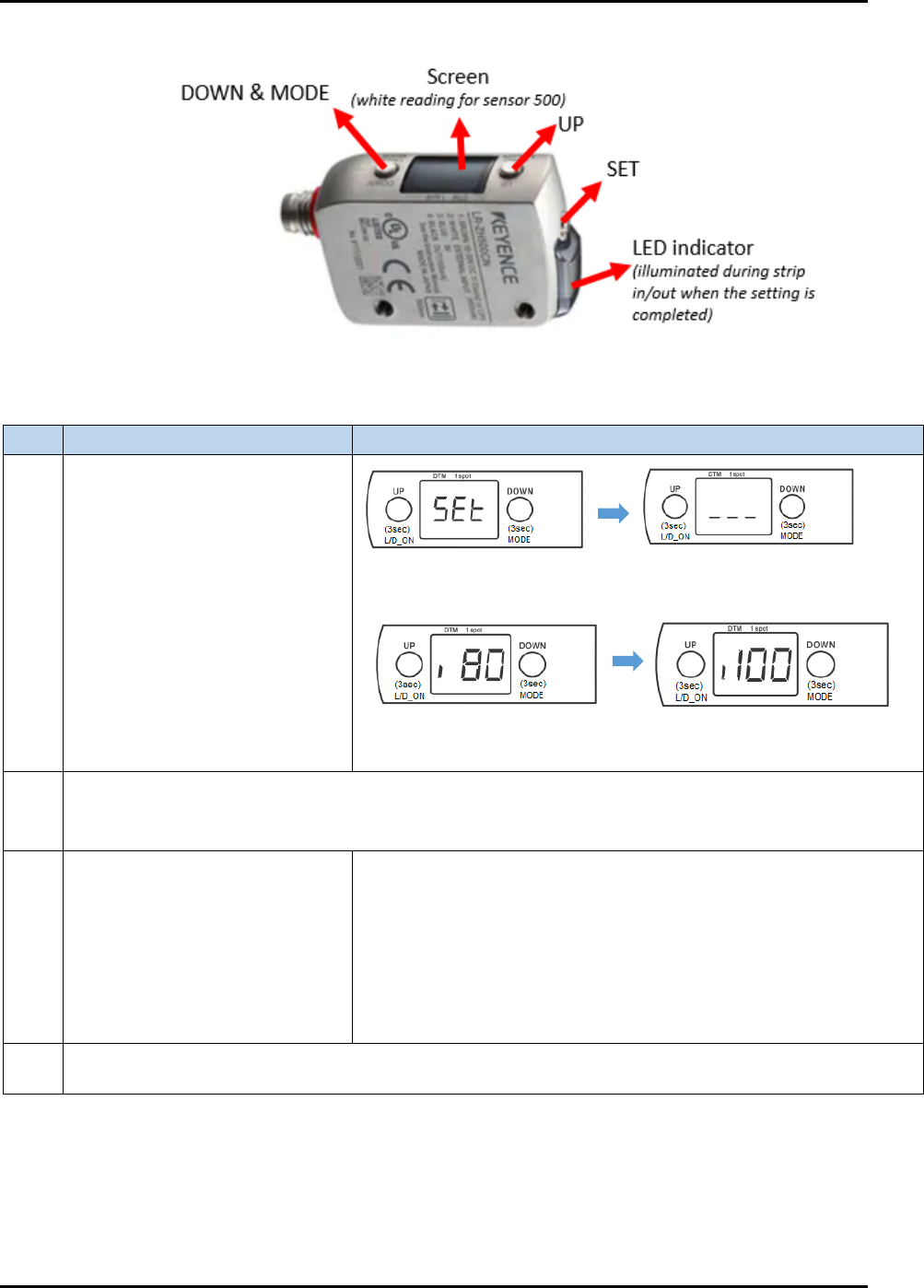
Figure 3-44 LR-ZH500 Series Strip Sensor
Table 3-7 Steps to Fine-tune LR-ZH500 Sensor
Step
Action
Display on screen
1
Simultaneously press once on
both UP and SET buttons.
Note: Ensure no strip is present
or common background while
doing this step.
Next, displays any value, and blinking. Example:
2
When all settings are done, "DTM" and "1 spot" indicators will light up in step 1.
DTM (orange light) stands for datum/universal change detection (UCD)
1 spot (green light) stands for sensor stability
3
Press UP or DOWN button to
adjust value.
If set value > display value in Step 1, press UP
If set value < display value in Step 1, press DOWN
After adjusting the value, new value will blink and immediately
change on screen. It will be autosaved after a while.
The LED indicator at the side will illuminate, which means the
signal is successfully detected in the machine.
See 3.7.5.2 How to Set Threshold Limit in Strip Sensor for further
details.
4
Add off delay in sensor. The purpose of this setting is to prevent a false alarm signal from a reflective
die telling the system that the strip is absent. See 3.7.5.3 Delay Timer Settings for further details.
***blinking***
80 = Current threshold limit
100 = actual optimum reading
(without strip)