FlexTRAK OH Material Handler Manual.pdf - 第96页
FlexTRAK-OH Material Handli ng System IOM Manual Material Handler Operation 4-8 © 2023 Nordson C orporation 4.8.1 Recipe 1 The Recipe 1 screen ( Fig ure 4-6) opens when the Recip e button is selected on the Call Recip e …
FlexTRAK-OH Material Handling System IOM Manual Material Handler Operation
© 2023 Nordson Corporation 4-7
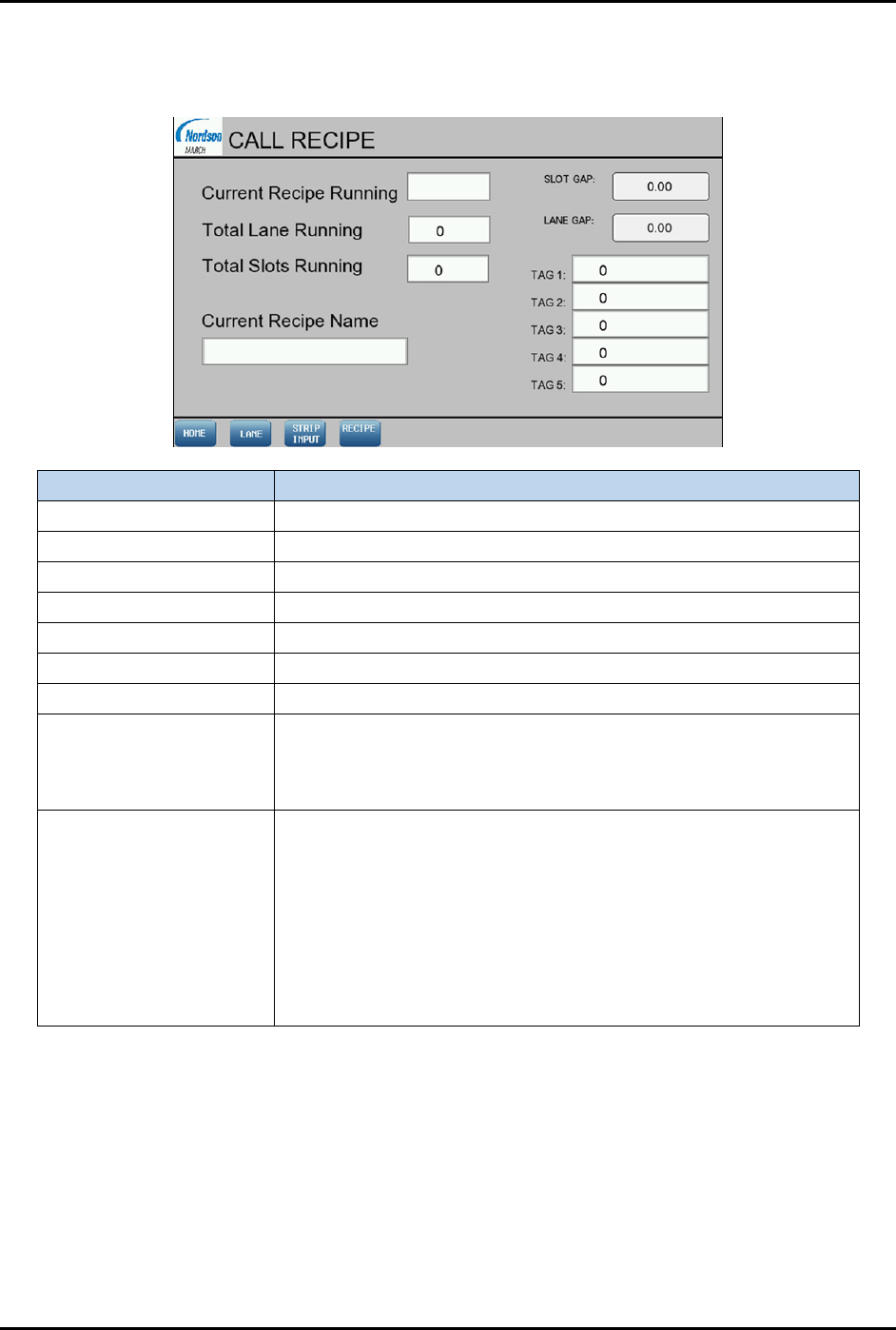
4.8 Call Recipe Screen
To open the Call Recipe screen (Figure 4-5), select the Recipe button on the Home screen (Figure 4-4).
Item Description
Current recipe running Displays the configured recipe number for production.
Total lane running Displays the lane quantity.
Total slots running Displays the magazine slot quantity.
Current recipe name Displays the configured recipe name for production.
Slot gap Displays the running slot gap value in mm.
Lane gap Displays the running lane gap value in mm.
Tag 1 to Tag 5 Displays the RFID tag ID.
Lane
Opens the Lane Enable/Disable screen. This screen is use to
enable or disable the strip handling process from Lane 1 to Lane 8.
Lane 1 is located at the rear of machine and Lane 8 is located at
the front of machine.
Strip Input
Opens the Strip In/Out Selection screen.
• Bottom to top – When this option is selected, the movement
of the strips into or out of the magazine slots will start from the
bottom slot of the magazine. The bottom slot will be
registered as slot number 1.
• Top to bottom – When this option is selected, the movement
of the strips into or out of the magazine slots will start from the
top of the magazine slot. The top slot will be registered as slot
number 1.
Figure 4-5 Call Recipe Screen Layout
FlexTRAK-OH Material Handling System IOM Manual Material Handler Operation
4-8 © 2023 Nordson Corporation
4.8.1 Recipe 1
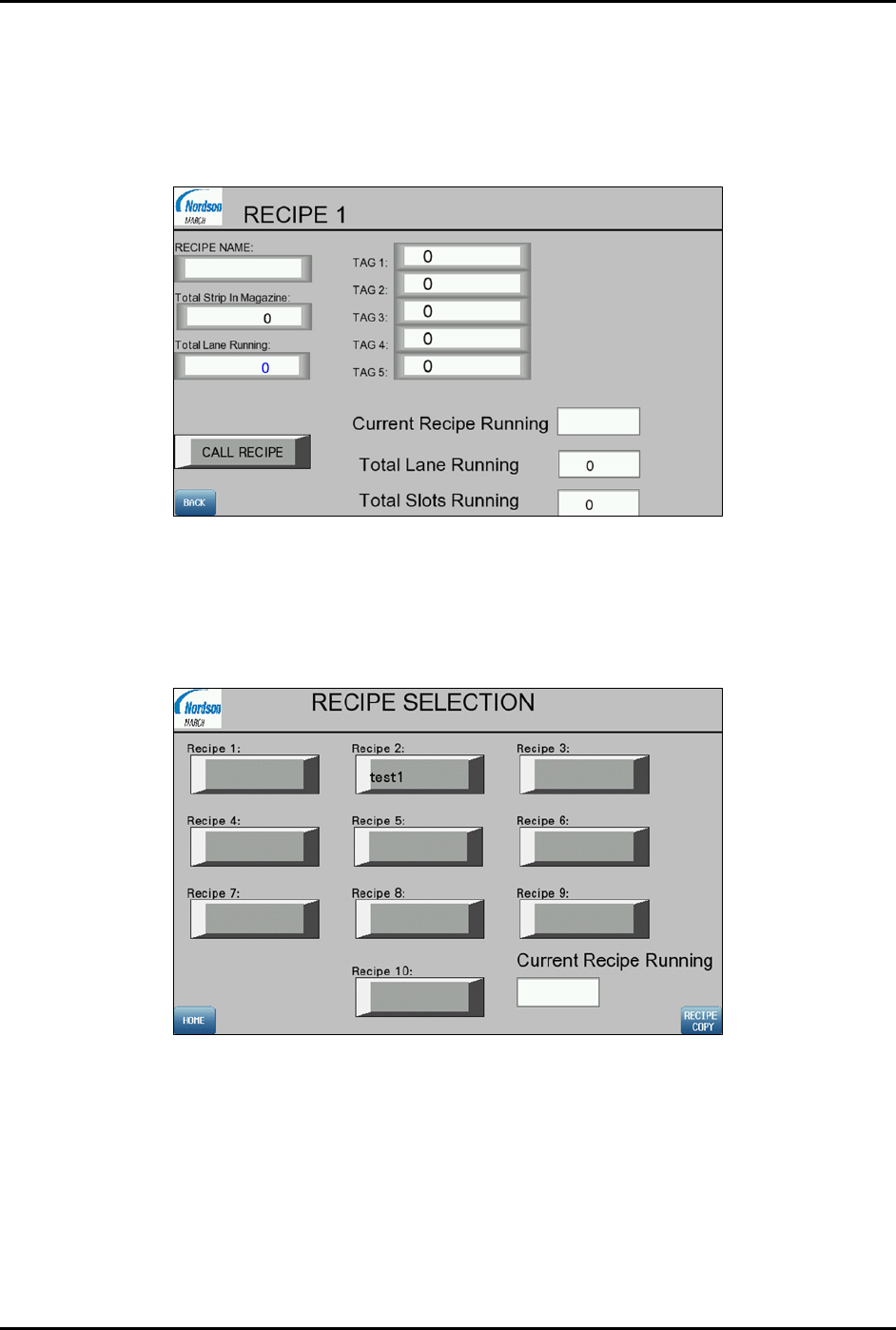
The Recipe 1 screen (Figure 4-6) opens when the Recipe button is selected on the Call Recipe screen
(Figure 4-5). Enter appropriate recipe name. The recipe name will then be reflected in the Recipe
Selection screen (Figure 4-7). The Total Strip in Magazine field indicates the strip quantity in the
magazine.
Figure 4-6 Recipe 1 Screen
4.8.2 Recipe Selection
The Recipe Selection screen (Figure 4-7) is displayed when the CALL RECIPE button is selected in
Recipe 1 screen. Select the desired recipe to load for production from this screen.
Figure 4-7 Recipe Selection Screen
FlexTRAK-OH Material Handling System IOM Manual Material Handler Operation
© 2023 Nordson Corporation 4-9
4.8.3 Recipe Copy
The Copy Recipe screen (Figure 4-8) is displayed when the RECIPE COPY button is selected on the
Recipe Selection screen. Select the desired recipe numbers in the
FROM RECIPE and TO RECIPE drop
down list, and then press the
COPY button (e.g., copy from Recipe 2 to Recipe 1 as shown in Figure 4-8).
This function will copy all parameters and setup values from one recipe to the other.
Figure 4-8 Copy Recipe Screen
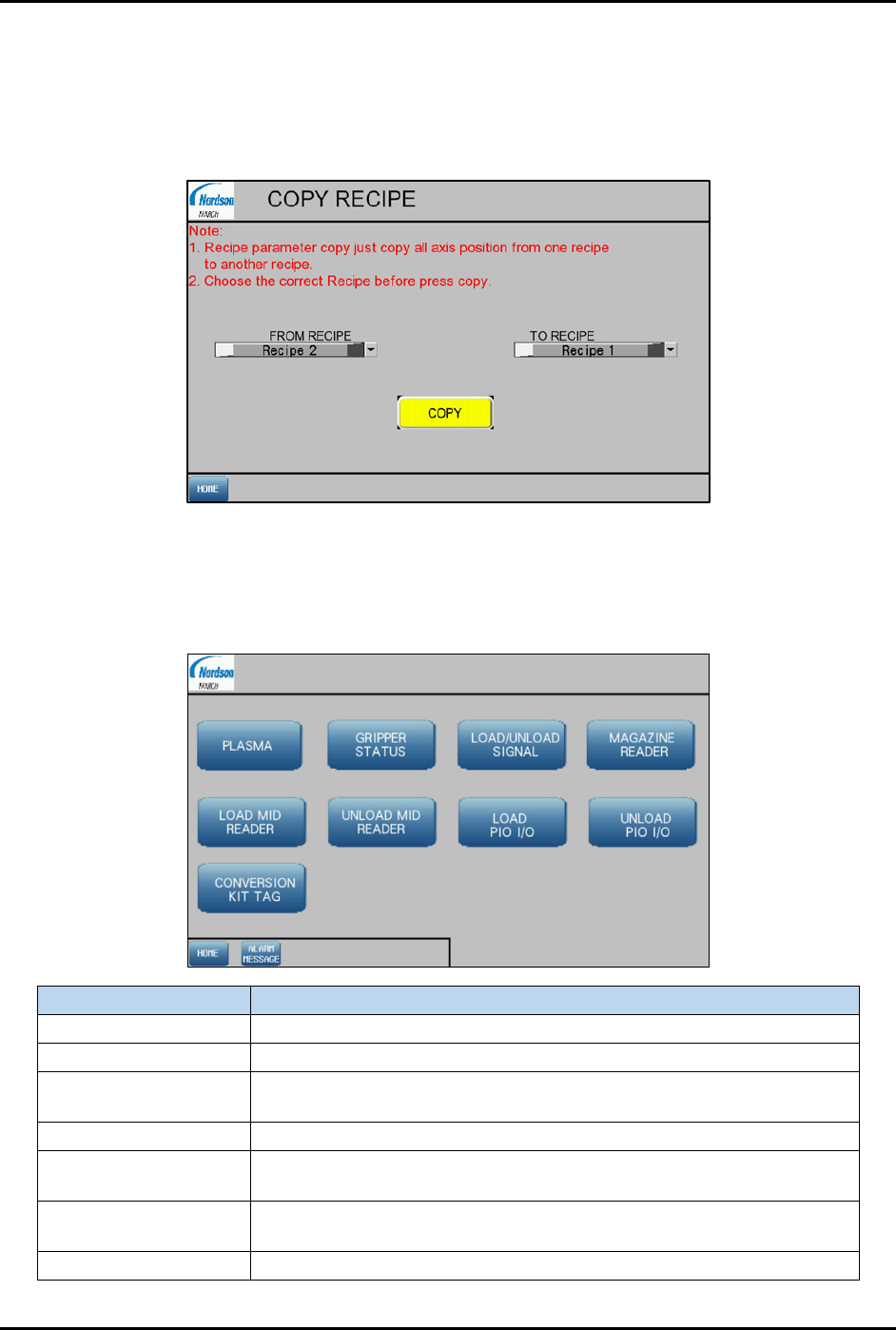
4.9 Control Screen
Select Control on the Home screen to access the Control screen (Figure 4-9).
Item
Description
Plasma Displays the plasma upstream and downstream signal state screen.
Gripper Status Displays the magazine gripper condition monitoring status screen .
Load/Unload Signal
Displays the overhead conveyor magazine feeding in and out status
screen.
Magazine Reader
Displays the magazine ID reading screen.
Load/Unload MID
(Magazine ID) Reader
Displays the magazine loading and unloading strip ID reading screen.
Load/Unload PIO
(Parallel IO) I/O
Displays the signal sending and receiving between PLC and PIO
Load/Unload Input and Output screens.
Conversion Kit Tag
Displays the conversion kit (lane and claw) ID tracking screen.
Figure 4-9 Control Screen