1OM-1064-002.pdf - 第143页
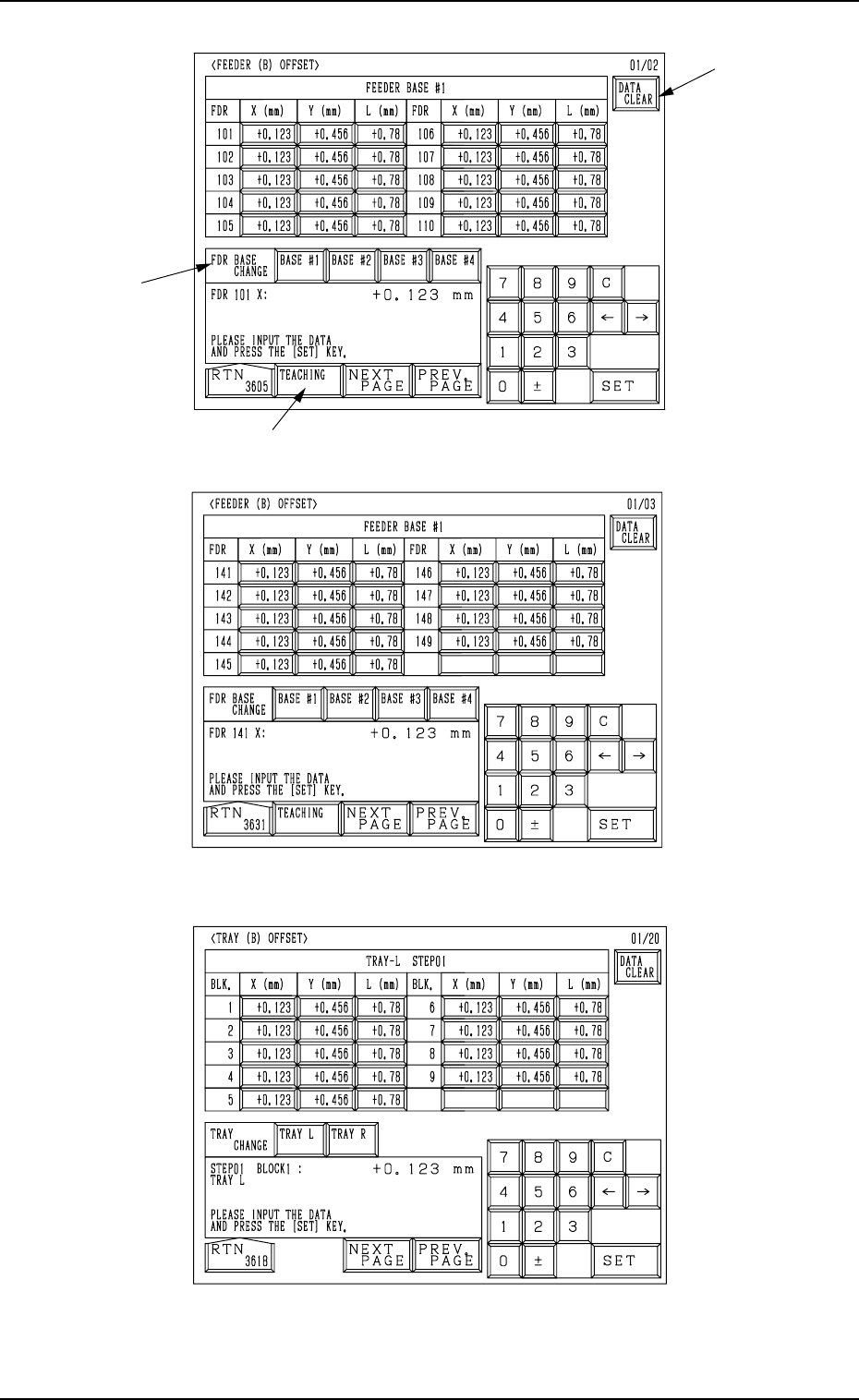
5. Preparation and Confirmation before Operation E F G D Operation Procedure (1) Select the line of offset parameters to be changed or deleted by pressing the corresponding “FDR.” key at the “FEEDER (B) OFFSET” display (…
5. Preparation and Confirmation before Operation
A
B
[Tape Feeders]
Fig. 2.27
[Vibratory Stick Feeders]
Fig. 2.28
[Tray Feeders] (Option)
Fig. 2.29
C
0004-002 2-44 Tg0246-PM-OP
5. Preparation and Confirmation before Operation
E
F
G
D
Operation Procedure
(1) Select the line of offset parameters to be changed or deleted by pressing
the corresponding “FDR.” key at the “FEEDER (B) OFFSET” display
(Fig. 2.27, 2.28, or 2.29).
Part of the display layout differs depending on the selected type of feed-
ers.
(2) Select how to change or clear the offset data.
• To change or clear the offset data individually
*1 Select the required key.
*2 Enter a parameter and press the [SET] key. The entered parameter is
defined.
• To clear the offset data individually (for each individual feeders) or all
the offset data at a time, proceed to Step (3).
(3) Press the [DATA CLEAR] key A at the “FEEDER (B) OFFSET” display.
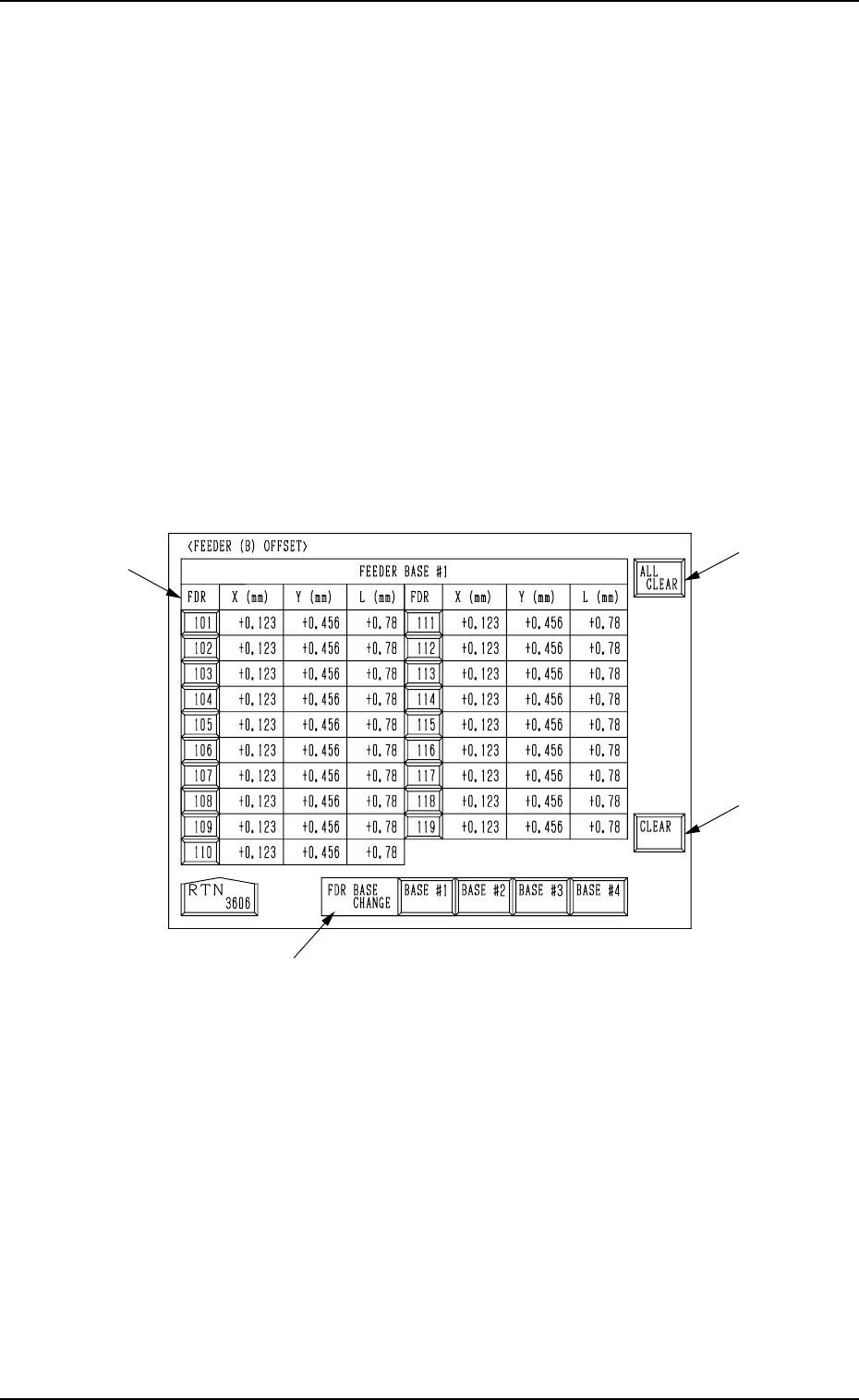
Another “FEEDER (B) OFFSET” display appears on the screen, enabling
you to clear the offset data.
0004-002 2-45 Tg0246-PM-OP
Fig. 2.30

5. Preparation and Confirmation before Operation
(4) Press the pertinent “FDR.” key or the [ALL CLEAR] key E to select the
objective parameters.
In the case of tray feeders (option), press each “BLK.” key.
• Select the feeder base where the data to be cleared belong by pressing
the [BASE #1], the [BASE #2], the [BASE #3], or the [BASE #4] key
D.
Ref.: The desired feeder base can be selected in the selection B at
the “FEEDER (B) OFFSET” display.
• Press the [ALL CLEAR] key to clear all the data.
When the [ALL CLEAR] key is pressed, it turns red and the “FDR.”
keys G turn blue.
• To clear each data individually, select the pertinent “FDR.” key G. The
selected “FDR.” key turns blue.
• To cancel the all data clear mode, press the [ALL CLEAR] key again
before the [CLEAR] key.
(The [ALL CLEAR] key in red turns normal.)
(5) Press the [CLEAR] key F. The offset data of the selected feeder is cleared
to “0” (zero).
Ref.: When the [TEACHING] key C is pressed, another “FEEDER (B) OFF-
SET” display appears on the screen for teaching operations.
Note: Never modify the parameters set at the “FEEDER (A) OFFSET” dis-
play described in “3. FEEDER (A) OFFSET and FEEDER (B) OFF-
SET Displays of Section 5 in Volume 2”.
This data is used independently for the machine. If the data is modified
carelessly, components may not be picked up from the feeders.
0004-002 2-46 Tg0246-PM-OP