1OM-1064-002.pdf - 第190页
5. Operation Mode B C A 5.2 OVERALL T ACT-TIME REDUCTION Display • The upper limit of the tact time specified in the component library data can be set in coordination with the working speed of each device (rate of sp…
5. Operation Mode
D
A
B
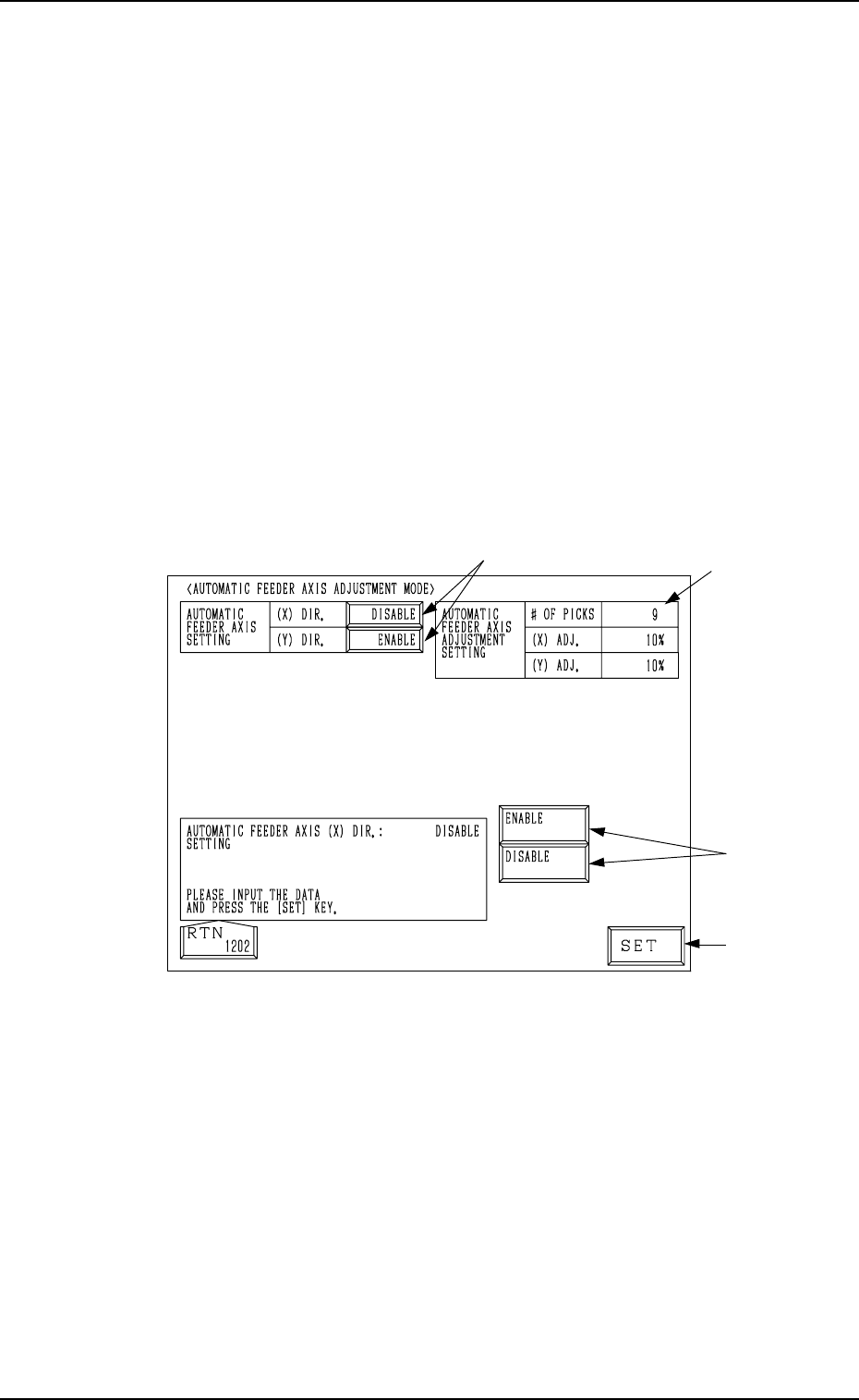
5.1 AUTOMATIC FEEDER AXIS ADJUSTMENT MODE
Display
• The difference between the nozzle and component center positions calcu-
lated at component recognition is corrected using statistical processing based
on the automatic feeder axis adjustment setting specified in the automatic
operation set-up data. This key enables the overall cancellation of the func-
tion to follow up and correct the feeder (B) offset data for all feeders.
• “ENABLE” or “DISABLE” can be set individually in the “AUTOMATIC
FEEDER AXIS SETTING (X) DIR.” and “AUTOMATIC FEEDER AXIS
SETTING (Y) DIR.” data boxes.
Note: Use the component library data to cancel the automatic feeder axis
adjustment function for the specific feeder.
When the [AUTOMATIC FEEDER AXIS ADJ. MODE] key is pressed at the
“OPERATION MODE” display, the following display appears on the screen.
Note: When the machine is set in the “RUN” or “WAIT” mode, the data save
operation (saving of changed setting) cannot be performed.
Fig. 3.7
Operation Procedure
(1) Select one of the data boxes A.
(2) Select either one of the option keys B and press the [SET] key C.
Note: The parameters set in the automatic operation set-up data appear
in the “AUTOMATIC FEEDER AXIS ADJUSTMENT SET-
TING” data boxes D.
C
0004-002 3-20 Tg0246-PM-OP
5. Operation Mode
B
C
A
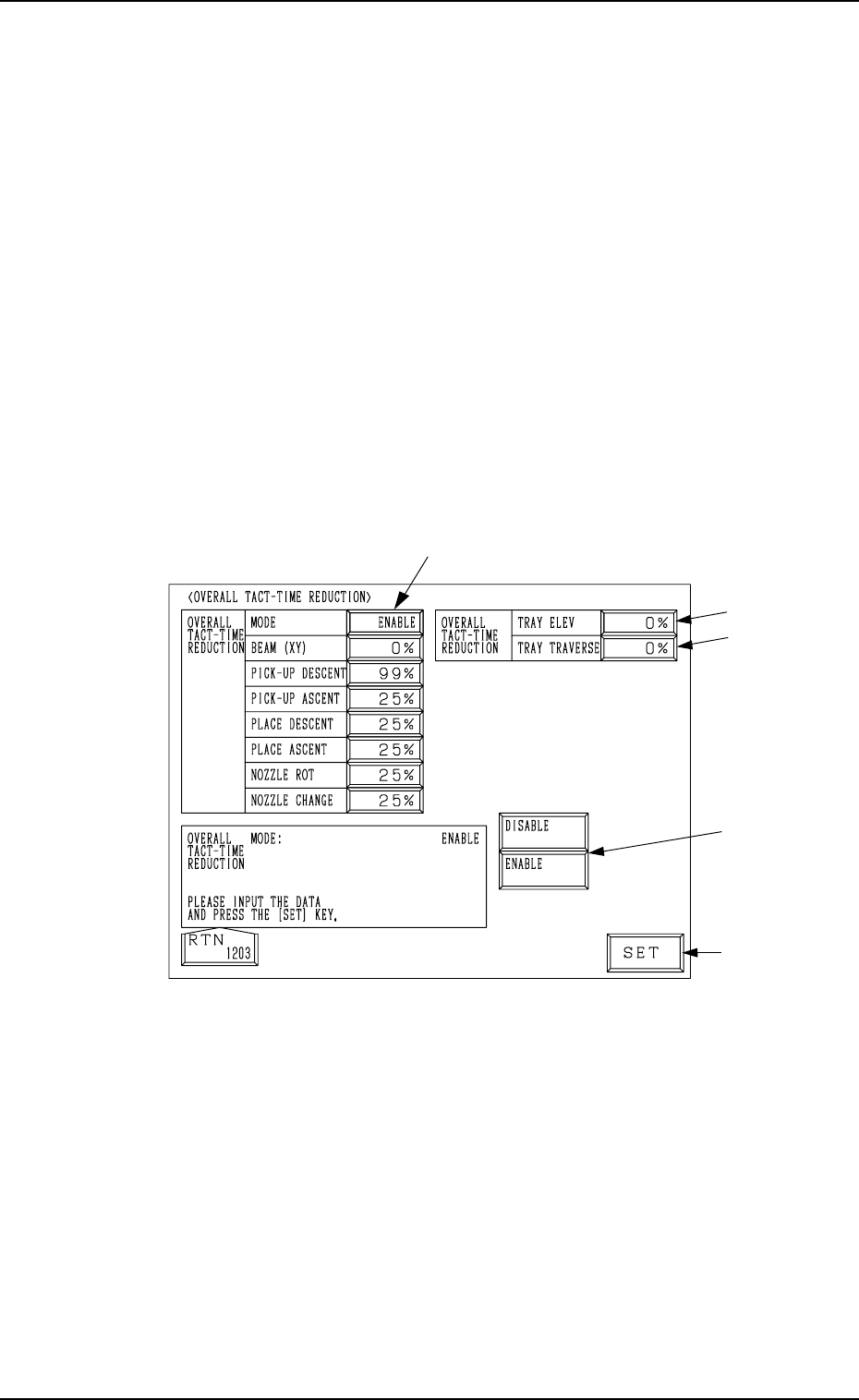
5.2 OVERALL TACT-TIME REDUCTION Display
• The upper limit of the tact time specified in the component library data can
be set in coordination with the working speed of each device (rate of speed
reduction based on the highest speed) specified in the component library
data.
• If a higher speed than that specified here is set in the component library
data, it is regulated to the specified upper limit for all components.
• If a lower speed than the upper limit is set in the component library data, it
becomes valid for such components.
• When there is still some room in the placement tact time according to the
line balance, the machine can be operated at a slow tact time with each
device movement slowed down.
When the [OVERALL TACT TIME REDUCTION] key is pressed at the “OP-
ERATION MODE” display, the following display appears on the screen.
Note: The -marked functions are optional.
Fig. 3.8
0004-002 3-21 Tg0246-PM-OP
5. Operation Mode
Operation Procedure
(1) Select one of the data boxes A.
(2) Select either one of the option keys B and press the [SET]
key C.
When each data box for speed reduction is selected, a ten-
key pad appears. Enter a numeric value using the ten-key
pad and press the [SET] key to specify the rate of speed
reduction.
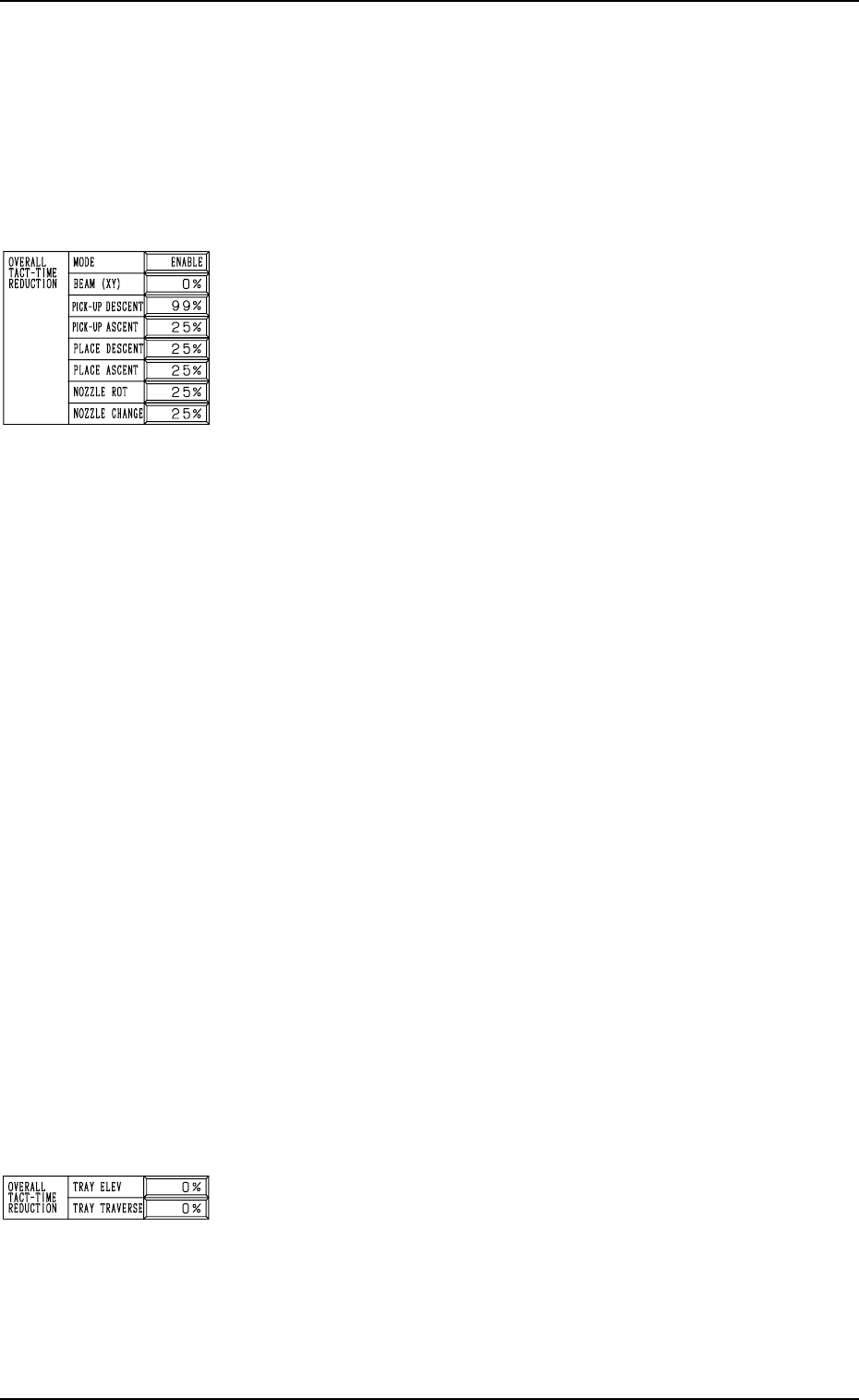
MODE
Set “ENABLE” or “DISABLE” in the data box. When “EN-
ABLE” is set, the set rate of speed reduction for each device
becomes valid.
BEAM (XY)
Set the rate of speed reduction in the data box for the X/Y
beam (Beams A and B).
PICK-UP DESCENT
Set the rate of speed reduction in the data box for the de-
scending movement of the nozzle (nozzle movement to pick
up a component from the feeder).
PICK-UP ASCENT
Set the rate of speed reduction in the data box for the as-
cending movement of the nozzle (nozzle movement after the
nozzle has picked up a component from the feeder).
PLACE DESCENT
Set the rate of speed reduction in the data box for the de-
scending movement of the nozzle (nozzle movement to place
a component on the P.C.B.).
PLACE ASCENT
Set the rate of speed reduction in the data box for the as-
cending movement of the nozzle (nozzle movement after the
nozzle has placed a component on the P.C.B.).
NOZZLE ROT
Set the rate of speed reduction in the data box for the nozzle
rotation.
NOZZLE CHANGE
Set the rate of speed reduction in the data box for a series of
operation performed when the nozzle is changed.
TRAY ELEV (Option)
Set the rate of speed reduction in the data box for the up and
down movement of the multi-layer tray feeder elevator.
TRAY TRAVERSE (Option)
Set the rate of speed reduction in the data box for the pull-
out/pushback actions of the pallet from or to the multi-layer
tray feeder.
0004-002 3-22 Tg0246-PM-OP