1OM-1064-002.pdf - 第74页
Picked Component Captured Im age on Recognition Monitor Placed Component View from Front Side of Machine View from Rear Side of Machine 3 2 4 1 2 3 1 4 1 4 2 3 1 4 2 3 2 3 1 4 1 4 2 3 • The recognition system (back light…
Recognition Method
Applicable Component Size
Image Scanning
Method
Lighting to be
Used
Small View Large View Maximum View
Front Lighting
1.0 × 0.5 to
23 × 15 mm
2.0 × 1.2 to
46 × 34 mm
2.0 × 1.2 to
46 × 46 mm
Batch
Back Lighting
1.0 × 0.5 to
23 × 15 mm
2.0 × 1.2 to
36 × 35 mm
2.0 × 1.2 to
36 × 36 mm
Divided Front Lighting
Max. 55 × 55 mm Max. 55 × 55 mm
Note
Max. 55 × 55 mm
Note
6. Outline of System Operation
9910-001 1-43 Tg0246-PM-OP
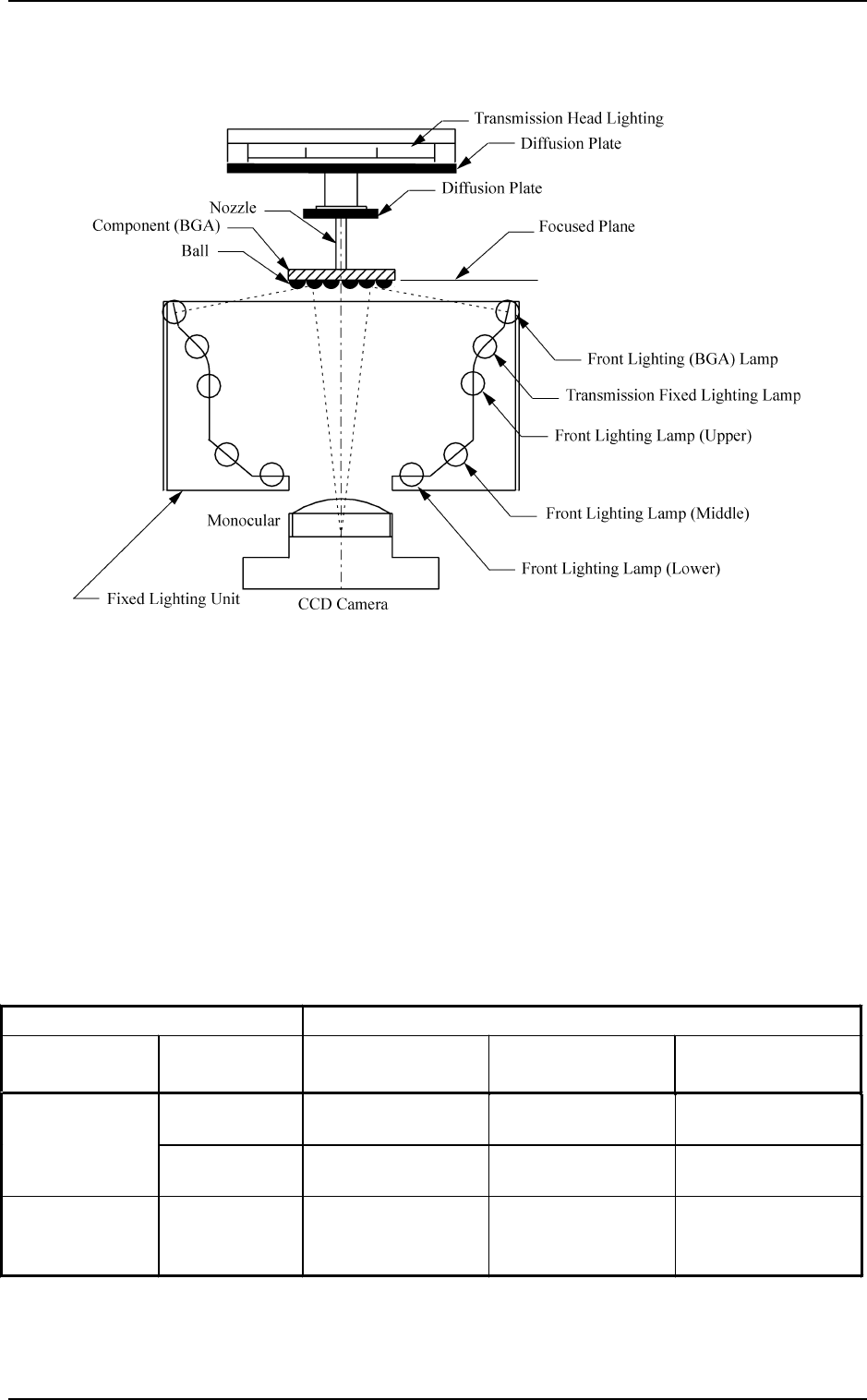
(3) Front Lighting (BGA) System
Fig. 1.20 shows the sectional view of the recognition unit and the flow of
the recognition light in the front lighting (BGA) system.
Fig. 1.20
The light emitted from the front lighting for BGA meets the balls, etc., on the
bottom of the BGA component. The reflected light enters into the CCD cam-
era through the monocular. The captured images look like doughnuts. That is,
the CCD camera can be used to detect where the BGA balls are located or
whether or not the balls exist.
Supplement:
• One of the three fields of view can be selected for the component recogni-
tion camera.
Two cameras are installed on each beam. (4 cameras in total)
As a standard combination of cameras, four large view cameras are recom-
mended.
Note: In the case of the connector, this recognition can be applied to Max.
150 × 26 mm.
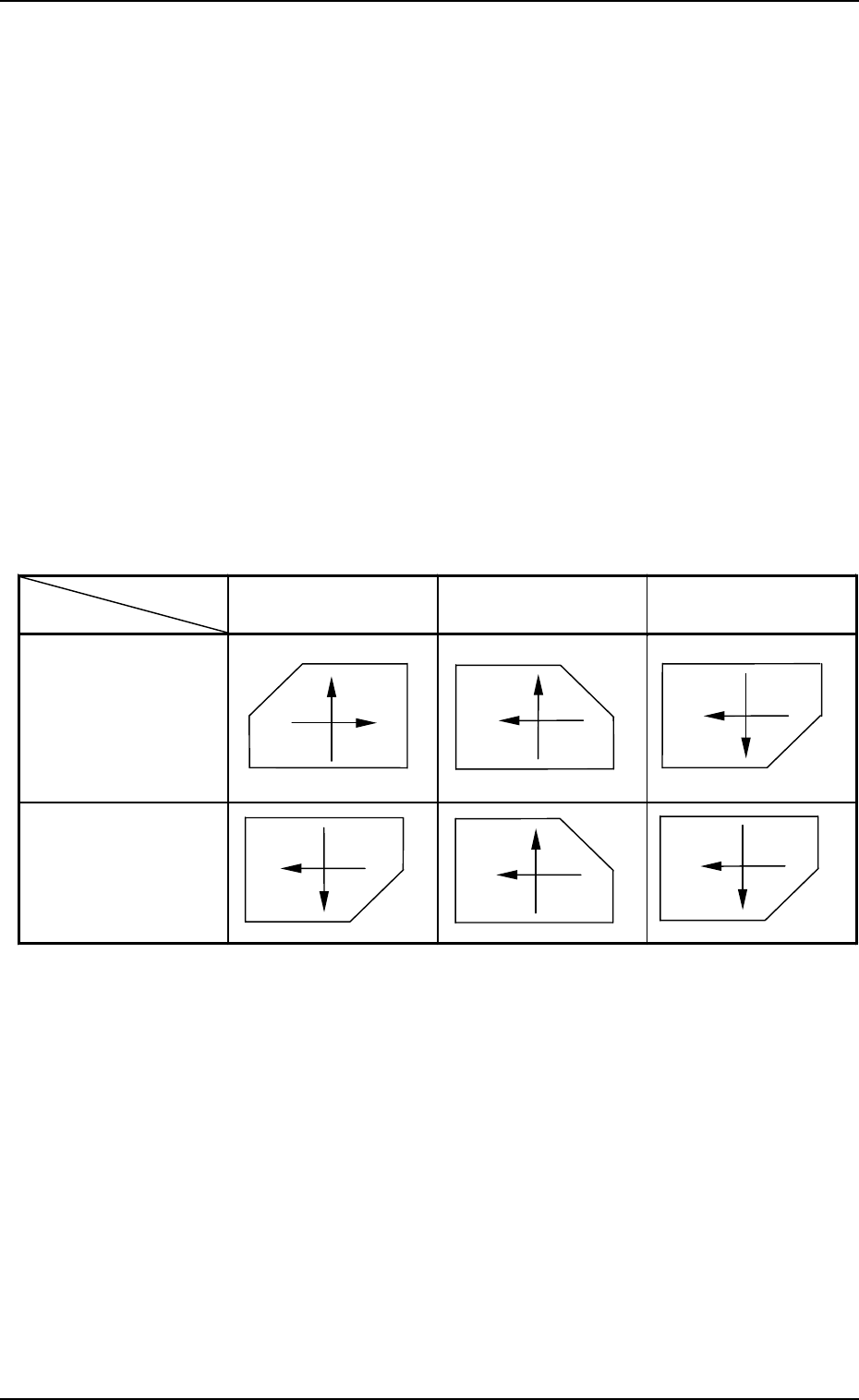
Table 1.5
Picked Component
Captured Image on
Recognition Monitor
Placed Component
View from Front Side
of Machine
View from Rear Side
of Machine
3
2
41
2
3
1
4
1
4
2
3
1
4
23
2
3
1
4
1
4
2
3
• The recognition system (back lighting, front lighting, or front lighting (BGA)
system) can automatically be selected according to the component library
data.
• Component Recognition Coordinates System
The image of the component (state of picked component based on the X/Y
beam movement) on the recognition monitor looks like those depicted be-
low.
View from Front Side of Machine:
The captured image of the picked component on the recognition
monitor is inverted horizontally, compared with the posture of the
picked component. Therefore, when the X/Y beam moves from left
to right, the image of the component moves from right to left on the
recognition monitor.
View from Rear Side of Machine:
The image of the component on the recognition monitor is inverted
vertically, compared with the posture of the picked component. There-
fore, when the X/Y beam advances from up (front side of machine)
to down (rear side of machine), the image of the component on the
recognition monitor moves up.
6. Outline of System Operation
9910-001 1-44 Tg0246-PM-OP
Table 1.6
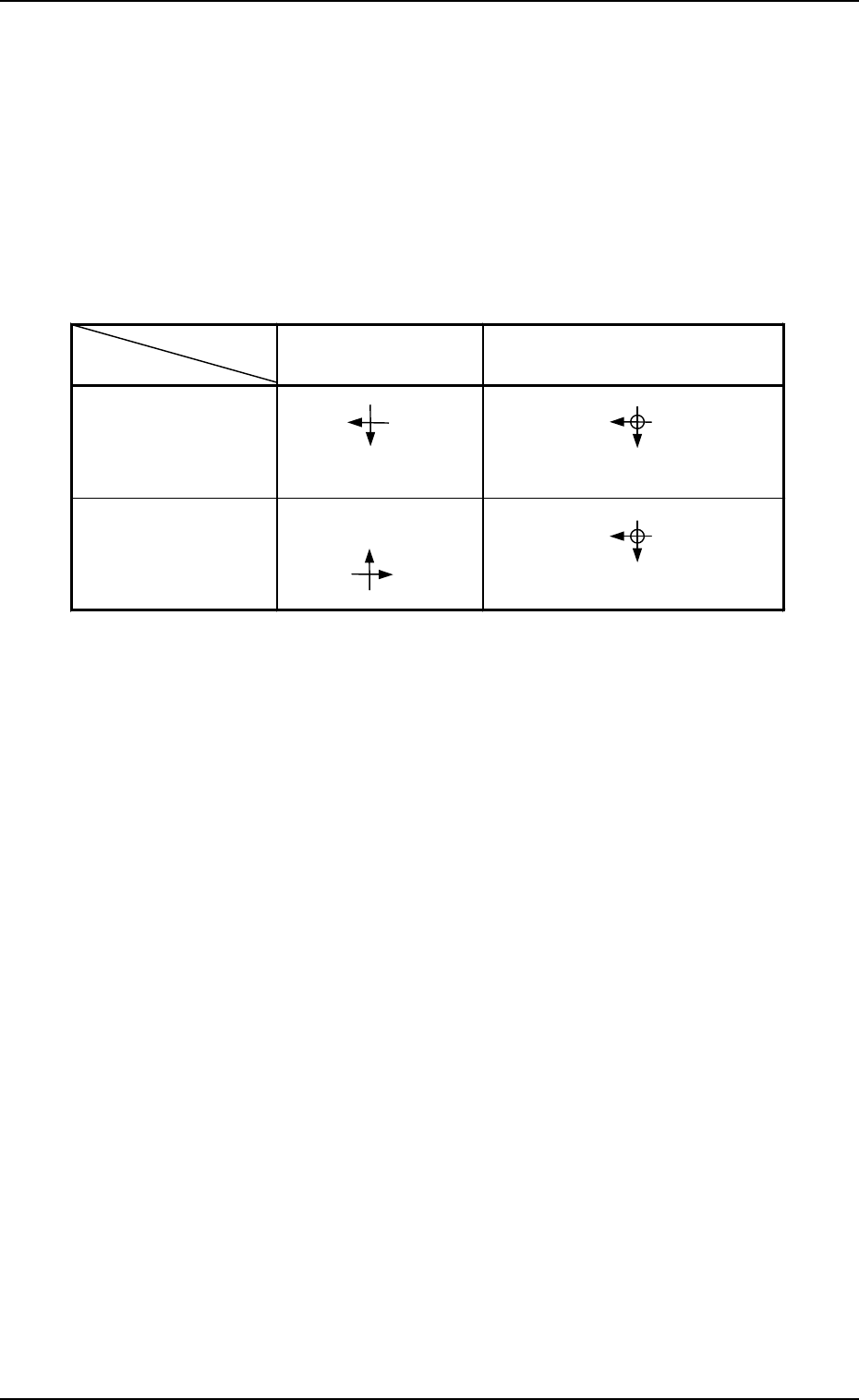
• P.E.C. Recognition Coordinates System
The posture of the placed component matches the image on the recognition
monitor.
Special attention is required to the direction keys for the screen movement
made when the manual axis operation is performed on the front side of the
machine because the CCD camera moves together with the X/Y beam.
The directions of the X/Y beam movement and the fiducial mark movement
on the recognition monitor are inverted (upside down, leftside right).
The directions are not inverted when the machine is operated on the beam A
side.
6. Outline of System Operation
9910-001 1-45 Tg0246-PM-OP
Direction of X/Y
Beam Movement
Direction of Mark Movement on
Recognition Monitor
Operation on Beam
A Side
Operation on Beam
B Side
X
Y
X
Y
X
Y
X
Y
6.2.3 Correction of Recognition
Theta (Angle) Correction
The picked component is adjusted to the angle (placement direction) of place-
ment specified in the pattern program by rotating the head.
At this time, the angular deviation (θ) detected through component recogni-
tion is also corrected.
Component Placement
(1) The X/Y beam moves.
The X/Y beam is moved to the coordinates (position on P.C.B.) specified
in the pattern program.
At this time, the measured positional deviation (X, Y) between the cen-
ters of the recognition camera and the component is corrected during the
X/Y beam movement.
(2) The placement Z correction is made.
The lowest limit in nozzle height is controlled based on the component
library data when components are placed.
(3) Vacuum turns off, air blows out from the nozzle, and components are
placed on the P.C.B.
Table 1.7