1OM-1064-002.pdf - 第229页
Fig. 4.7 [BEAM-A AIR SUPPL Y] Key When this key is selected and the [MOVE] button is pressed, the source blow pressure open/close solenoid valves (C(A)- YSV22) for LA1 and LA2 axis are turned ON or OFF . [BEAM-B AIR SUPP…

5. Zeroing Operation
Operation Procedure
(1) Select the device to be zeroed and press the [MOVE] button. The se-
lected device is zeroed.
(While the device is moving, the LED of the [MOVE] button illuminates.)
Ref.: Before the conveyor width set-up operation is initiated, each con-
veyor is automatically activated to check that no P.C.B. is located
at any irregular position.
(2) When the zeroing operation is completed, “” appears in the “STATUS”
text box.
(While the current position is being managed or indefinite, “-” appears in
the text box.)
Note: When a head is bypassed on each axis “Beam A” or “Beam B” or
the mechanical stopper of a beam is activated, nothing appears in
the text box, indicating that no axis can be selected.
• To zero all devices, select the [ALL] key and press the [MOVE] but-
ton.
All devices possible to be returned to their origins are zeroed.
Ref.: Pressing the [ZERO] button on the operation panel also zeroes all
devices.
Notes: (a) When the [OPERATION/SET UP] switch is set to the “SET
UP” side, the zeroing operation cannot be performed.
(b) The [CONVEYOR WIDTH] (conveyor width variable axis)
cannot be zeroed through the zeroing operation.
9910-001 4-12 Tg0246-PM-OP
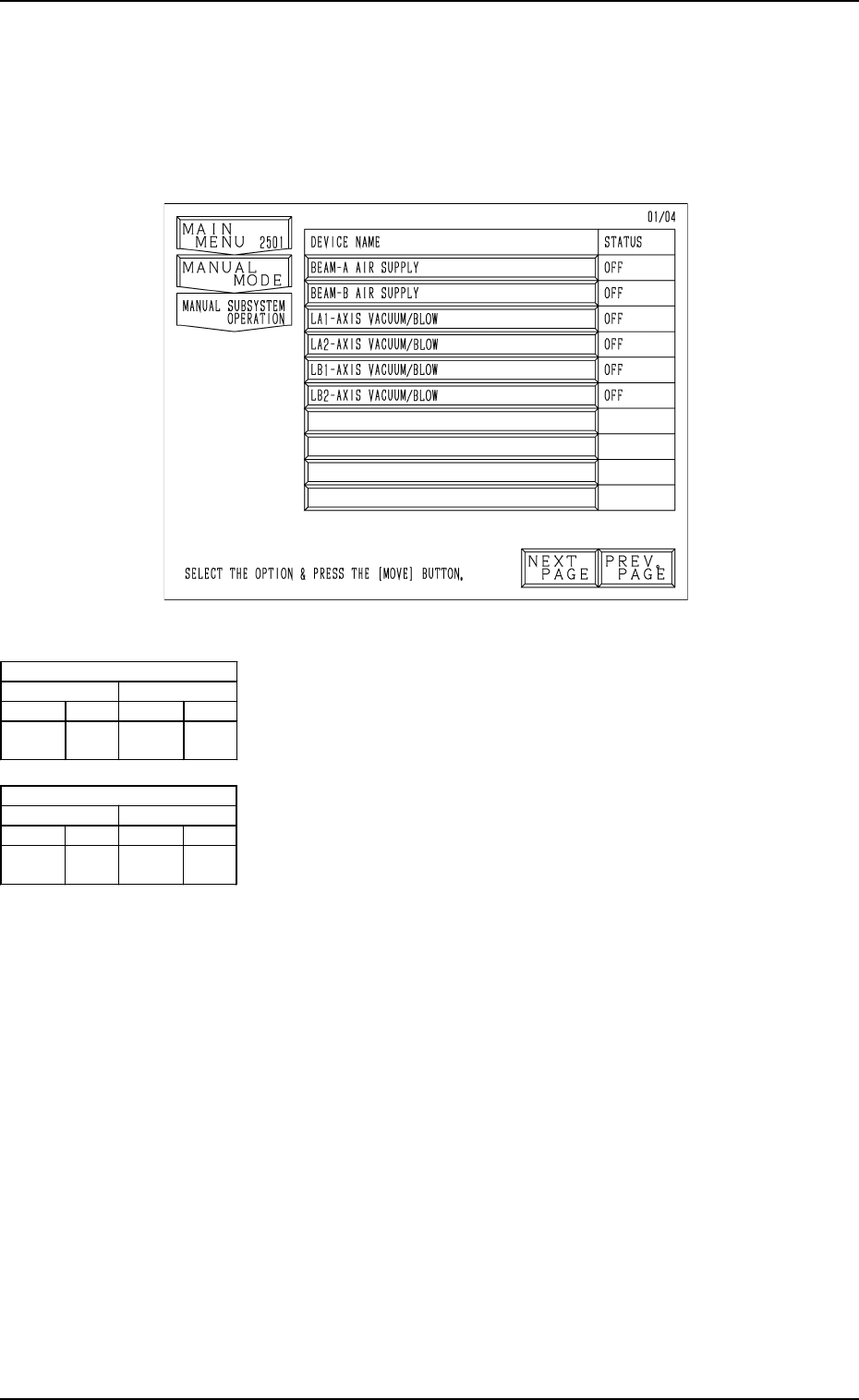
Fig. 4.7
[BEAM-A AIR SUPPLY] Key
When this key is selected and the [MOVE] button is pressed,
the source blow pressure open/close solenoid valves (C(A)-
YSV22) for LA1 and LA2 axis are turned ON or OFF.
[BEAM-B AIR SUPPLY] Key
When this key is selected and the [MOVE] button is pressed,
the source blow pressure open/close solenoid valves (C(B)-
YSV22) for LB1 and LB2 axis are turned ON or OFF.
[LA1-AXIS VACUUM/BLOW] Key
When this key is selected and the [MOVE] button is pressed,
the LA1-axis vacuum/blow solenoid valve (M(A1)-YSV21)
is turned ON or OFF.
[LA2-AXIS VACUUM/BLOW] Key
When this key is selected and the [MOVE] button is pressed,
the LA2-axis vacuum/blow solenoid valve (M(A2)-YSV21)
is turned ON or OFF.
[LB1-AXIS VACUUM/BLOW] Key
When this key is selected and the [MOVE] button is pressed,
the LB1-axis vacuum/blow solenoid valve (M(B1)-YSV21)
is turned ON or OFF.
[LB2-AXIS VACUUM/BLOW] Key
When this key is selected and the [MOVE] button is pressed,
the LB2-axis vacuum/blow solenoid valve (M(B2)-YSV21)
is turned ON or OFF.
Air Supply [OFF]
1 Axis 2 Axis
[OFF] [ON] [OFF] [ON]
No Pick-
Up/Blowing
Pick-
Up
No Pick-
Up/Blowing
Pick-
Up
Air Supply [ON]
1 Axis 2 Axis
[OFF] [ON] [OFF] [ON]
Blowing Pick-
Up
Blowing Pick-
Up
6. Manual Subsystem Operation
When the [MANUAL SUBSYSTEM OPERATION] key is pressed at the
“MANUAL MODE” display, the following display appears on the screen.
Each individual devices can be cycle-operated through manual operations at
this display.
6. Manual Subsystem Operation
9910-001 4-13 Tg0246-PM-OP
Second Page
First Page
Fig. 4.8-1
Fig. 4.8-2
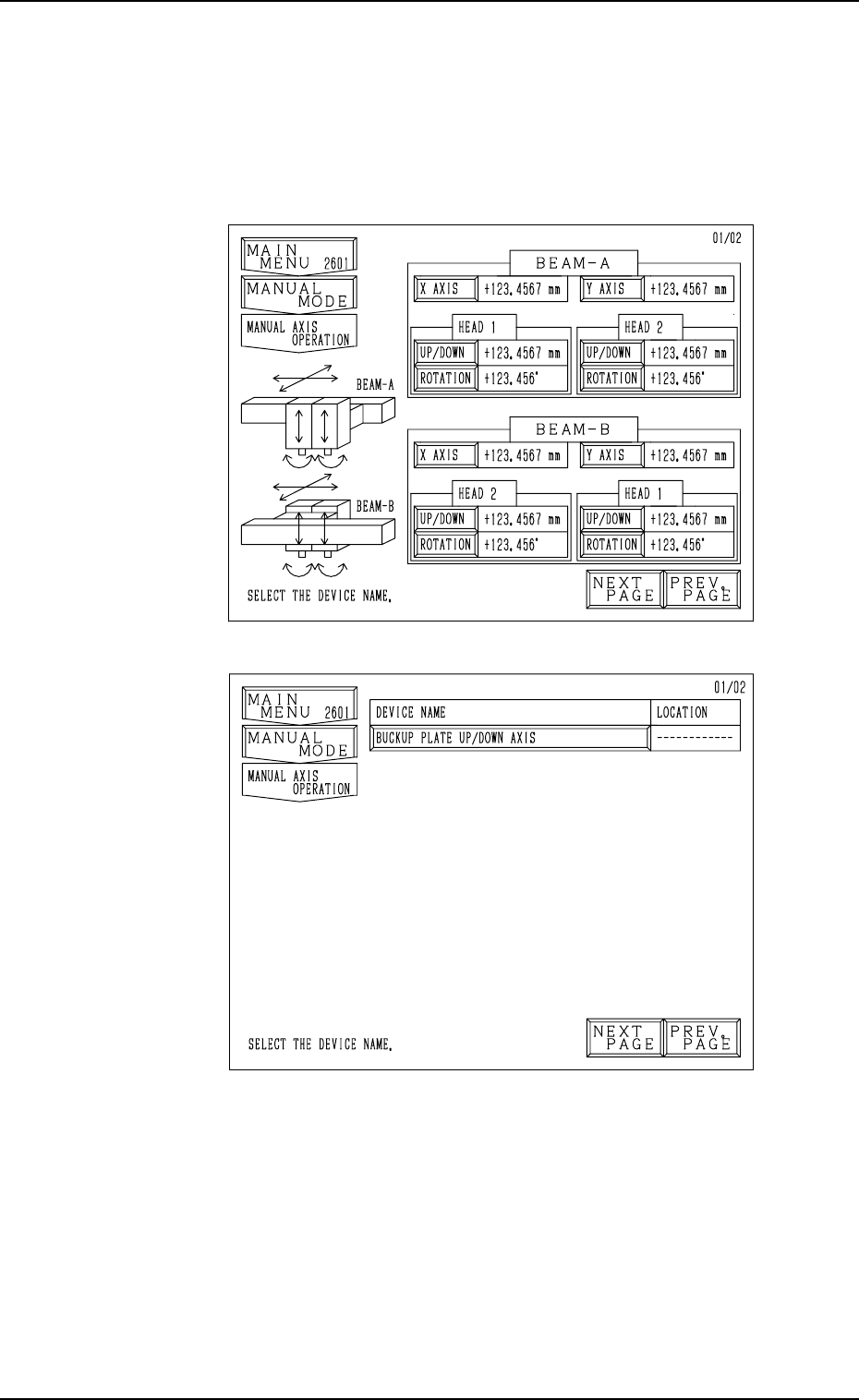
7. Manual Axis Operation
When the [MANUAL AXIS OPERATION] key is pressed at the “MANUAL
MODE” display, the following display appears on the screen.
Every time the [NEXT PAGE] or the [PREV. PAGE] key is pressed, another or
previous page appears on the screen.
• Select the device to be manually moved. The display for manual axis opera-
tion of the selected device appears on the screen.
Notes: (a) The [UP/DOWN] and [ROTATION] keys cannot be selected
when the head is bypassed (yellow).
Refer to “5. MANUAL BYPASS Display of Section 3 in Vol-
ume 4” for the detailed information on how to bypass a head
manually.
(b) The [X AXIS], [Y AXIS], [UP/DOWN], and [ROTATION] keys
cannot be selected when the X/Y beam is in the “ESCAPE”
mode (red).
7. Manual Axis Operation
9910-001 4-14 Tg0246-PM-OP