1OM-1064-002.pdf - 第222页
4. Product Change 4 . 1 Selection of Set-Up Menus and Overall Set-Up Op- eration When the [PRODUCT CHANGE] key is pressed at the “MANUAL MODE” display , the following display appears on the screen. When the [PRODUCT CHAN…
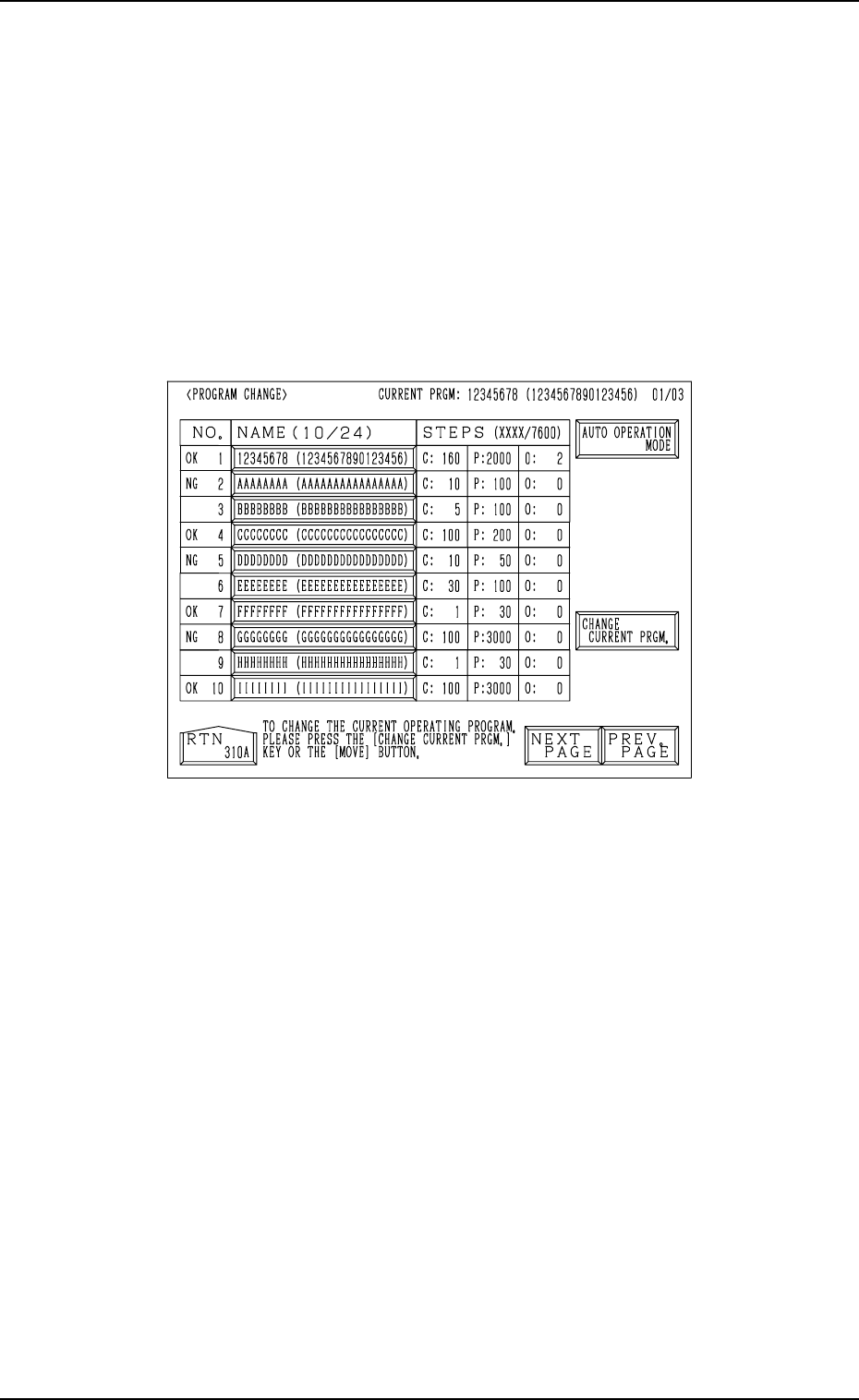
3. Program Change
3. Program Change
When the [PROGRAM CHANGE] key is pressed at the “MANUAL MODE”
display, the following display appears on the screen.
This display can also be opened from the “PATTERN PROGRAM”
display. (Hierarchical Sequence: “AUTO OPN MODE (PLACE-
MENT)” Display → “AUTO OPN. SUB-MENU” display → “PATTERN
PROGRAM” Display)
Note: This key can be selected only when the machine is in the “STOP”
mode.
Fig. 4.2
Refer to “5.2.1 Selection of Current Pattern Program (Program Change) of
Section 2” for details.
9910-001 4-5 Tg0246-PM-OP
4. Product Change
4.1 Selection of Set-Up Menus and Overall Set-Up Op-
eration
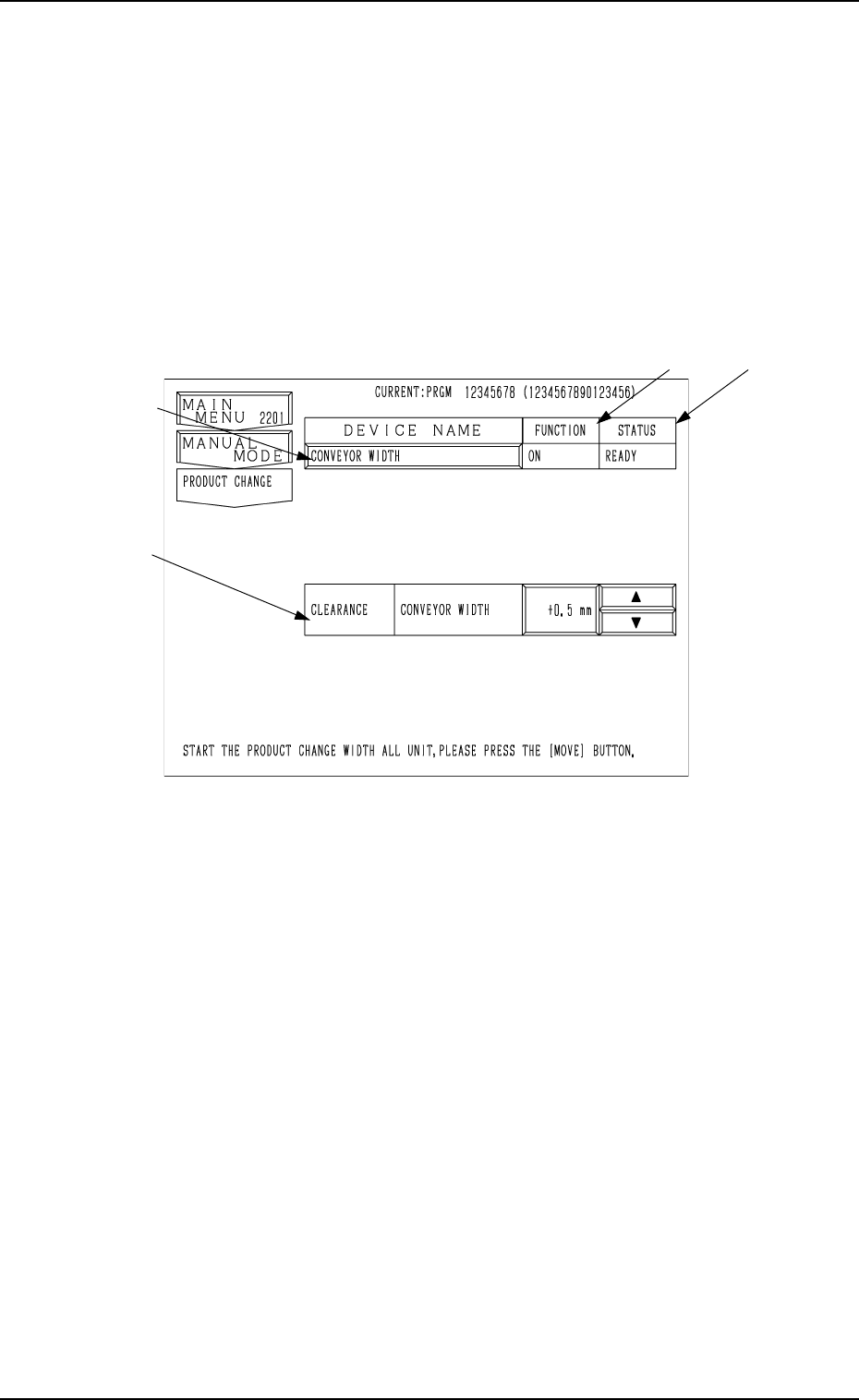
When the [PRODUCT CHANGE] key is pressed at the “MANUAL MODE”
display, the following display appears on the screen.
When the [PRODUCT CHANGE] key is pressed at the “AUTO OPN.
SUB-MENU” display, the same display appears on the screen.
*4
*3
*1
*2
9910-001 4-6 Tg0246-PM-OP
4. Product Change
Fig. 4.3
• When this display is active and the [MOVE] button is pressed, the machine
automatically sets up all the devices for which “ON” is set in the “MODE”
data boxes at the “SET-UP DATA” display. (Hierarchical Sequence: “DATA
EDIT” Display → “PATTERN PROGRAM” Display → “SET-UP DATA”
Display)
Note: When the [OPERATION/SET UP] switch is set to the “SET UP”
side, the set-up operation cannot be performed.
Ref.: Before the conveyor width set-up operation is initiated, each con-
veyor is automatically activated to check that no P.C.B. is located at
any irregular position.
*1 [CONVEYOR WIDTH] Key
When this key is pressed, the “CONVEYOR WIDTH” display appears on
the screen, enabling the manual set-up operation of each individual de-
vices.
*2 FUNCTION (“ON” or “OFF”)
Shown in the text box is the parameter set at the “SET-UP DATA” display.
(Hierarchical Sequence: “PATTERN PROGRAM” Display → “SET-UP
DATA” Display)

4. Product Change
*3 STATUS
“RUN” : The machine is performing the set-up operation.
“READY” : The set-up operation is completed.
“NOT READY” : The set-up operation is completed but the current posi-
tion is not located (managed).
“---” : The current position or program is indefinite.
“---” (Red) : “OFF” is set as set-up data.
*4 CLEARANCE
“CLEARANCE” is the data which gives some leeway (slightly wider than
P.C.B. size Y) to the conveyor width in the pattern program data.
• Data Input Range
-5.0 to +5.0 mm (Recommended Value: 0.5 mm)
The actual conveyor width becomes “P.C.B. Size Y + Clearance”.
Input Method of Clearance Data
• After selecting the key of the data to be set, press the [ ] key to increase
the value or the [ ] key to decrease in the increments of 0.1 mm.
• When the value is out of the input range, the buzzer in the touch screen
sounds but no change is made in the parameter.
Note: No data can be changed while a device is being activated.
9910-001 4-7 Tg0246-PM-OP