1OM-1064-002.pdf - 第220页
9910-001 4-4 Tg0246-PM-OP 2. MANUAL MODE Display *6 When this key is pressed, the “MANUAL TRANSFER OPERA TION” dis- play appears on the screen, enabling the manual P .C.B. input and output operations and the cycle operat…
*6
*1
*2
*3
*4
*5
*7
*8
2. MANUAL MODE Display
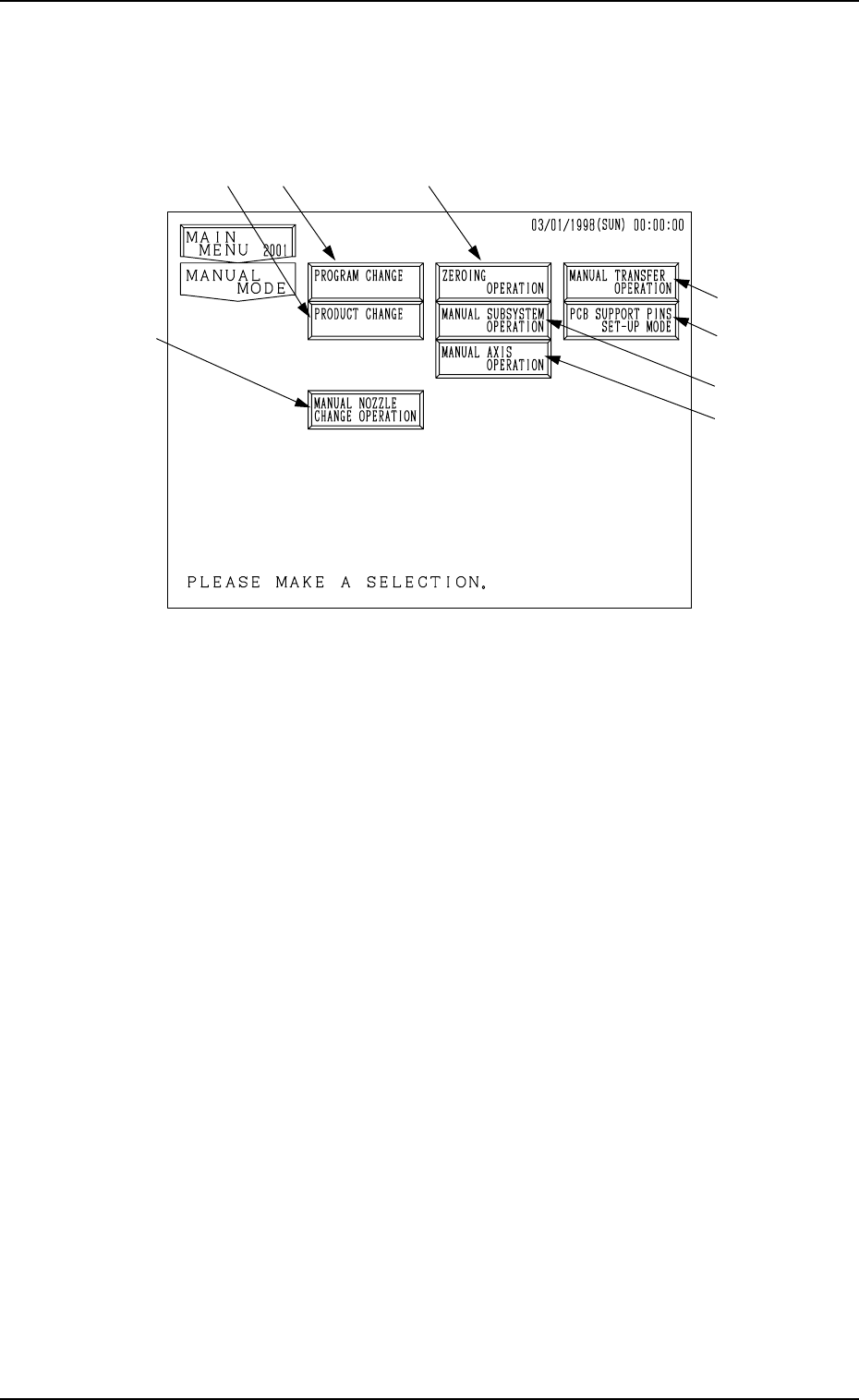
When the [MANUAL MODE] key is pressed at the “MAIN MENU” display,
the following display appears on the screen.
9910-001 4-3 Tg0246-PM-OP
2. MANUAL MODE Display
Fig. 4.1
*1 When this key is pressed, the “PROGRAM CHANGE” display appears on
the screen, enabling the program change operation.
• This key can be selected only when the machine is in the “STOP” mode.
*2 When this key is pressed, the “PRODUCT CHANGE” display appears on
the screen, enabling the automatic set-up operation for the conveyor width.
• This key can be selected only when the machine is in the “STOP” mode.
*3 When this key is pressed, the “ZEROING OPERATION” display appears
on the screen, enabling the zeroing operation of all or each individual de-
vices.
• This key can be selected only when the machine is in the “STOP” or
“PAUSE” mode.
*4 When this key is pressed, the “MANUAL SUBSYSTEM OPERATION”
display appears on the screen, enabling the cycle operation of each indi-
vidual devices.
• This key can be selected only when the machine is in the “STOP” mode.
*5 When this key is pressed, the “MANUAL AXIS OPERATION” display
appears on the screen, enabling the manual axis operation of each indi-
vidual devices.
• This key can be selected only when the machine is in the “STOP” mode.

9910-001 4-4 Tg0246-PM-OP
2. MANUAL MODE Display
*6 When this key is pressed, the “MANUAL TRANSFER OPERATION” dis-
play appears on the screen, enabling the manual P.C.B. input and output
operations and the cycle operation of each individual conveyors and P.C.B.
stoppers.
Note: This display can be opened only when the machine is in the “STOP”
mode.
*7 When this key is pressed, the “MANUAL NOZZLE CHANGE OPERA-
TION” display appears on the screen, enabling the cycle operation for open-
ing or closing the nozzle stocker and attaching or storing a vacuum nozzle
through manual operations.
*8 When this key is pressed, the “PCB SUPPORT PINS SET-UP MODE”
display appears on the screen, enabling the setting of the environmental
condition required to specify the position of the P.C.B. support pins.
3. Program Change
3. Program Change
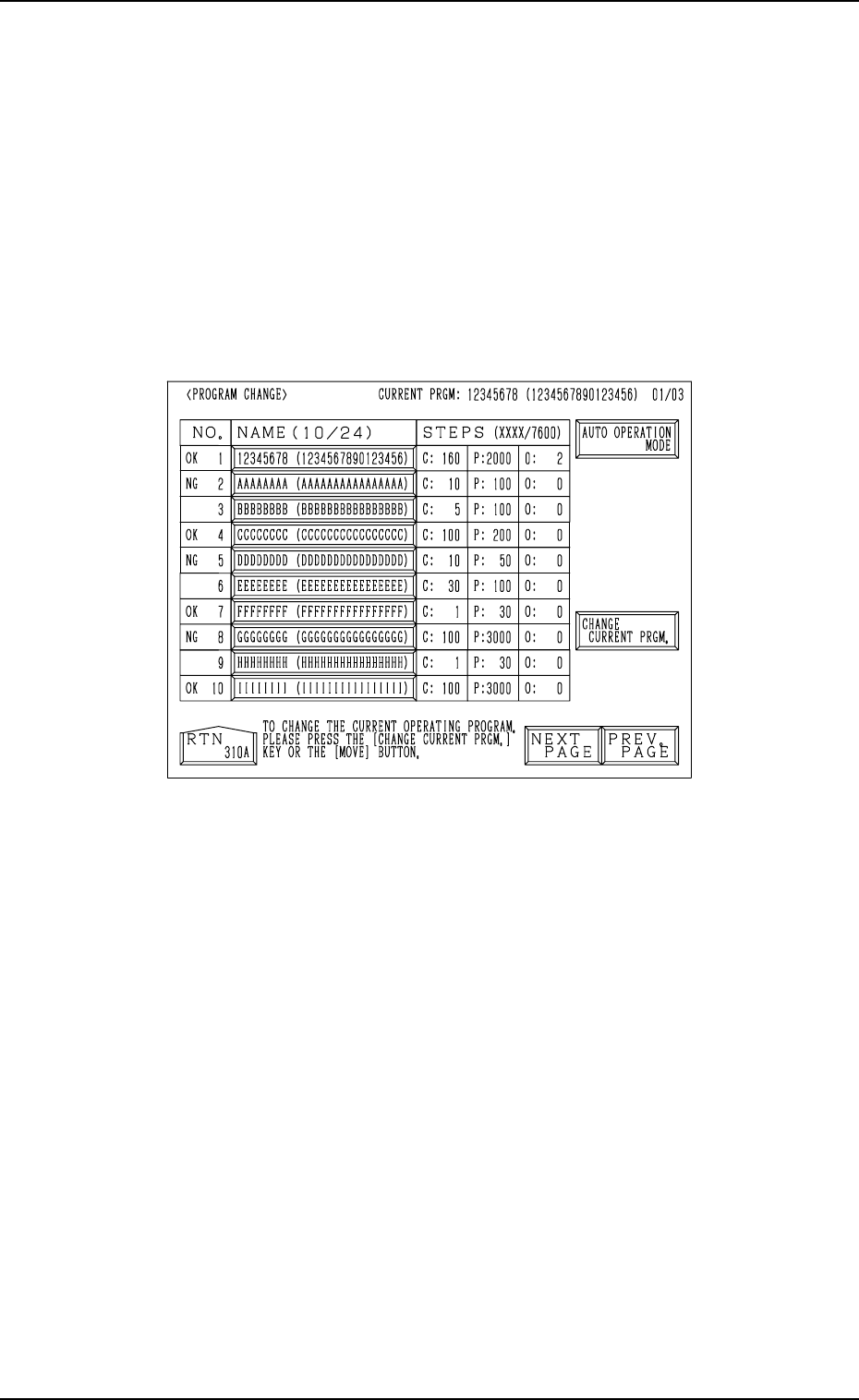
When the [PROGRAM CHANGE] key is pressed at the “MANUAL MODE”
display, the following display appears on the screen.
This display can also be opened from the “PATTERN PROGRAM”
display. (Hierarchical Sequence: “AUTO OPN MODE (PLACE-
MENT)” Display → “AUTO OPN. SUB-MENU” display → “PATTERN
PROGRAM” Display)
Note: This key can be selected only when the machine is in the “STOP”
mode.
Fig. 4.2
Refer to “5.2.1 Selection of Current Pattern Program (Program Change) of
Section 2” for details.
9910-001 4-5 Tg0246-PM-OP