1OM-1064-002.pdf - 第206页
6. RECOVERY OPN. TEACHING OPN. Display *5 *6 *4 *3 *2 *1 *7 *8 *10 *9 *1 1 Fig. 3.20-1 [SCREEN (XX/XX)] key Fig. 3.20-2 Fig. 3.20-3 9910-001 3-37 Tg0246-PM-OP Every time the [SCREEN (XX/XX)] key is pressed, another displ…
6. RECOVERY OPN. TEACHING OPN. Display
Fig. 3.20
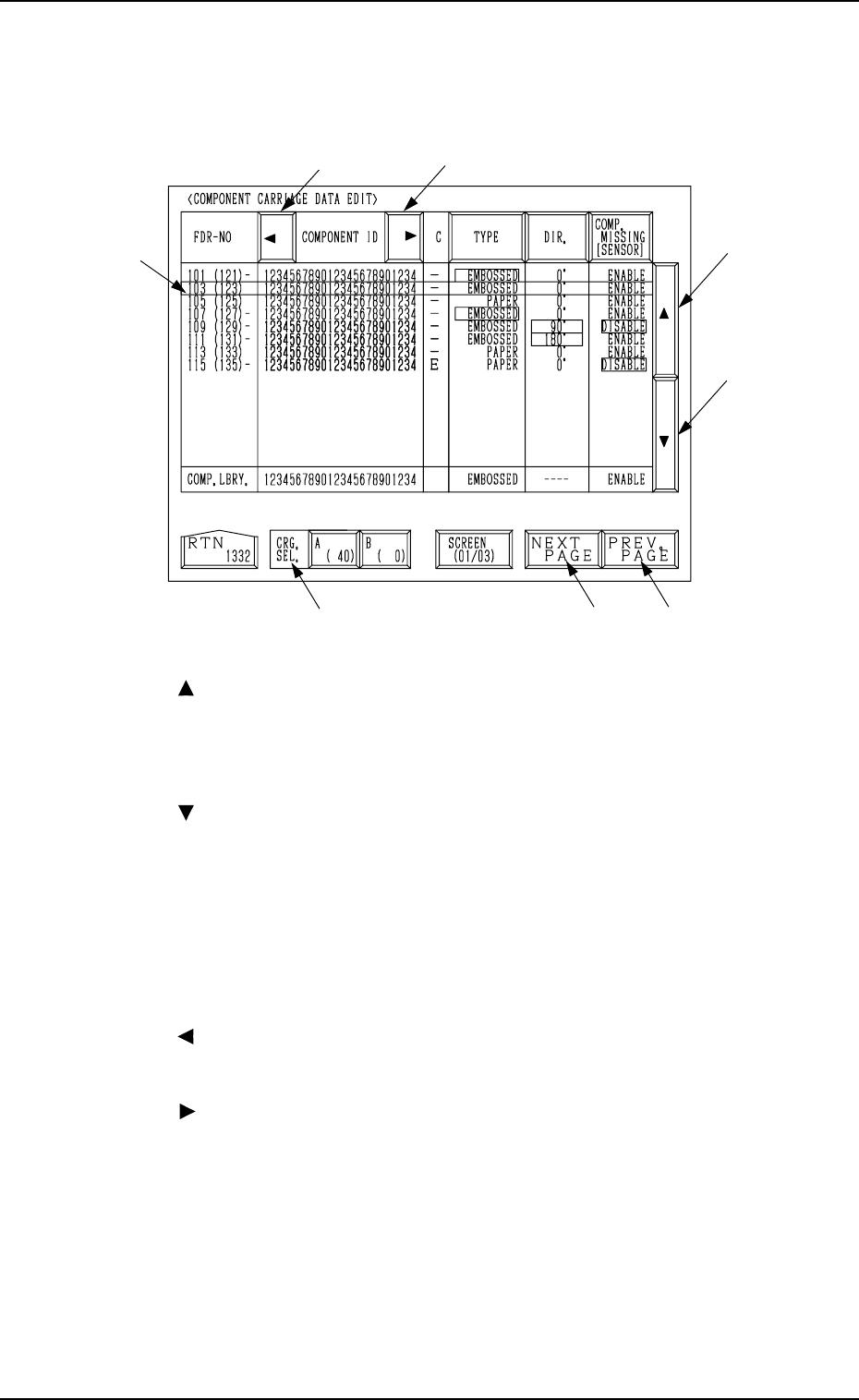
*1 Move the line cursor (blue), using the key *2 or *3.
*2 [ ] Key
Press this key to move the line cursor upward.
When the line cursor is located at the top and this key is pressed, the feeder
slot Nos. (FDR NO.) scroll up, making smaller Nos. appear one by one on
the screen.
*3 [ ] Key
Press this key to move the line cursor downward.
When the line cursor is located at the bottom and this key is pressed, the
feeder slot Nos. (FDR NO.) scroll down, making larger Nos. appear one by
one on the screen.
*4 [NEXT PAGE] Key
When this key is pressed, another list of component data is displayed.
*5 [PREV. PAGE] Key
When this key is pressed, previous list of component data is displayed.
*6 [ ] Key
When this key is pressed, the “COMPONENT ID” field shifts horizontally
to the left, enabling you to view the first part of component IDs.
*7 [ ] Key
When this key is pressed, the “COMPONENT ID” field shifts horizontally
to the right, enabling you to view the comments (comments entered in the
component library).
*8 CRG. SEL. [A (40)] and [B (0)] Keys
When one of these keys is pressed, the component carriage data related to
the selected feeder base unit appears on the screen.
When parameters are set in the component carriage data, the background
color is turned green.
The numbers in ( ) indicate the actual feeder slot Nos. where component
No. offset data is added.
*6
*7
*2
*3
*5*4
*8
*1
When the [TAPE A FDR101-139], the [TAPE B FDR201-239], the [VIB.
STICK A FDR141-199], the [VIB. STICK B FDR241-299], the [TRAY L
FDR301-599], or the [TRAY R FDR601-899] key is pressed, the display (Fig.
3.20) appears on the screen.
9910-001 3-36 Tg0246-PM-OP
6. RECOVERY OPN. TEACHING OPN. Display
*5 *6
*4*3
*2
*1
*7
*8
*10
*9
*11
Fig. 3.20-1
[SCREEN (XX/XX)] key
Fig. 3.20-2
Fig. 3.20-3
9910-001 3-37 Tg0246-PM-OP
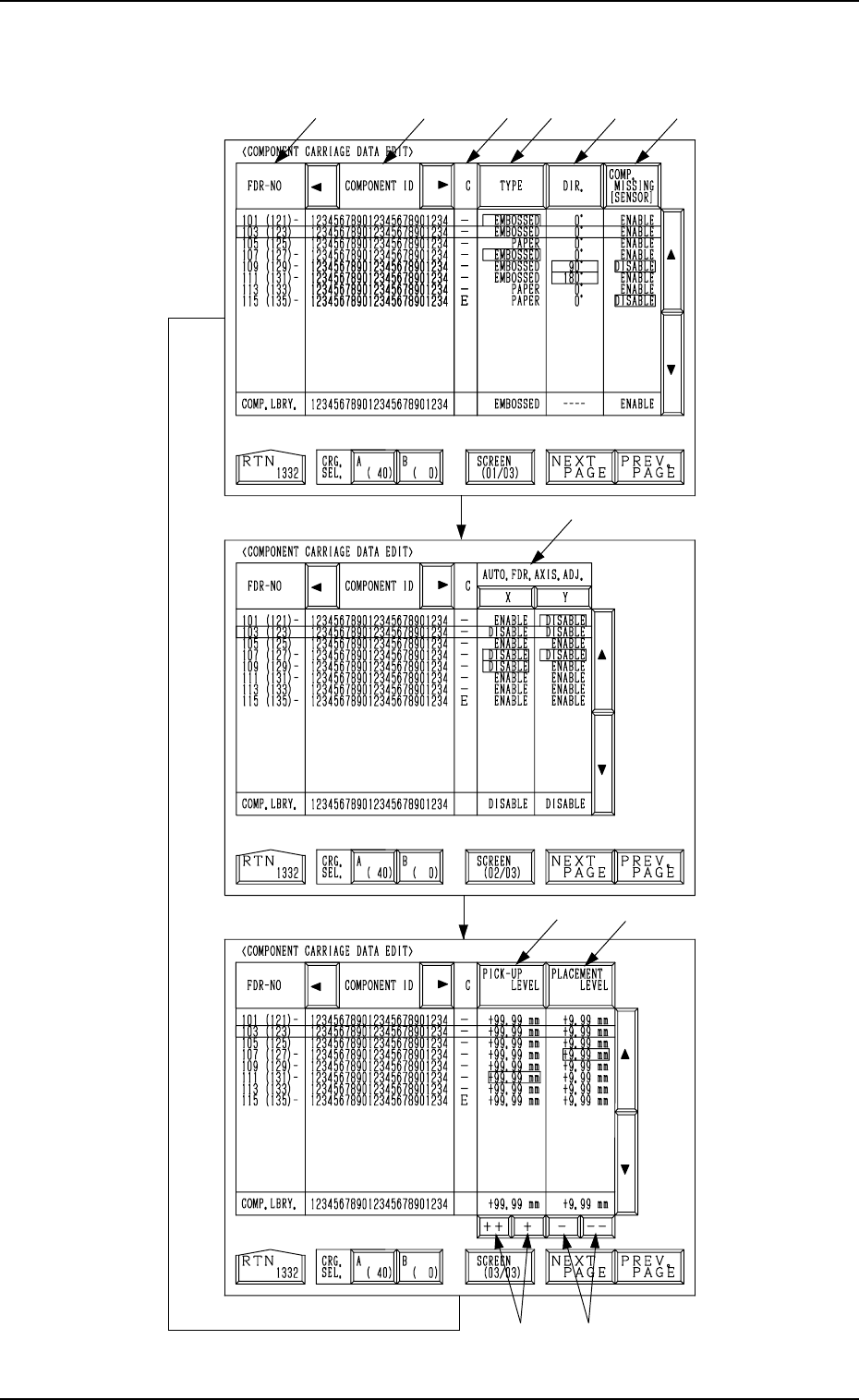
Every time the [SCREEN (XX/XX)] key is pressed, another display appears
on the screen.

6. RECOVERY OPN. TEACHING OPN. Display
*1 FDR-NO
This shows the feeder Nos. of the component data.
The numbers in ( ) show the actual feeder slot Nos.
The numbers in ( ) indicate the actual feeder slot Nos. where component
No. offset specified in the operation data is added.
In Fig. 3.16-1 (an example), “+20” is set as component No. offset.
Note: “- - -” appears in the “FDR-NO” field for the feeder slots where
feeders cannot be installed.
*2 COMPONENT ID
Component IDs are shown in the corresponding field.
*3 C
The control command is shown.
“-” : This command validates the steps as component data.
“S” : This command invalidates the steps specified as component data.
When component placement is specified for the invalid steps (FDR-
NO) in the placement data, the machine automatically omits the place-
ment operation for the step.
In this case, the background color of the “FDR” text field related to
the invalidated step turns red at the “PLACEMENT DATA” display,
indicating that the component placement is canceled.
“E” : This control command specifies the end of the component data.
(This step is handled as a valid step.)
“X” : This control command shows the end of component data and speci-
fies the step as an invalid step.
Remember this command as “X = S + E”.
*4 [TYPE] Key
Every time this key is pressed, the parameter at the line cursor position
changes in the order of “PAPER”, “EMBOSSED”, “ADHESIVE”, and
“BULK2”.
*5 [DIR.] Key
Every time this key is pressed, the parameter at the line cursor position
changes in the order of “0°”, “90°”, “180°”, and “270°”.
*6 [COMP. MISSING [SENSOR]] Key
When the vacuum is affected by the shape of components, etc., at compo-
nent picks and components cannot be detected normally by the vacuum
sensor, this key can be used to invalidate the component detection function
(component detection by vacuum sensor) at the “COMPONENT CAR-
RIAGE DATA EDIT” display.
“ENABLE” or “DISABLE” can be selected.
*7 AUTO. FDR. AXIS. ADJ. [X] and [Y] Keys
These keys can be used to cancel the automatic feeder axis adjustment
function for each individual components.
“DISABLE” is automatically set when the parameters set as the data for
automatic feeder axis adjustment at the “COMPONENT CARRIAGE
DATA EDIT” display exceed the limit for correction during pick-up posi-
tion correction.
9910-001 3-38 Tg0246-PM-OP