1OM-1064-002.pdf - 第62页
Switch Name Symbol Function POW ER ON -SPB01 (-HD50) • Supplies the power for operation. The red LED illuminates w hen only pow er for operation is supplied. The green LED illuminates when pow er for both operation and l…
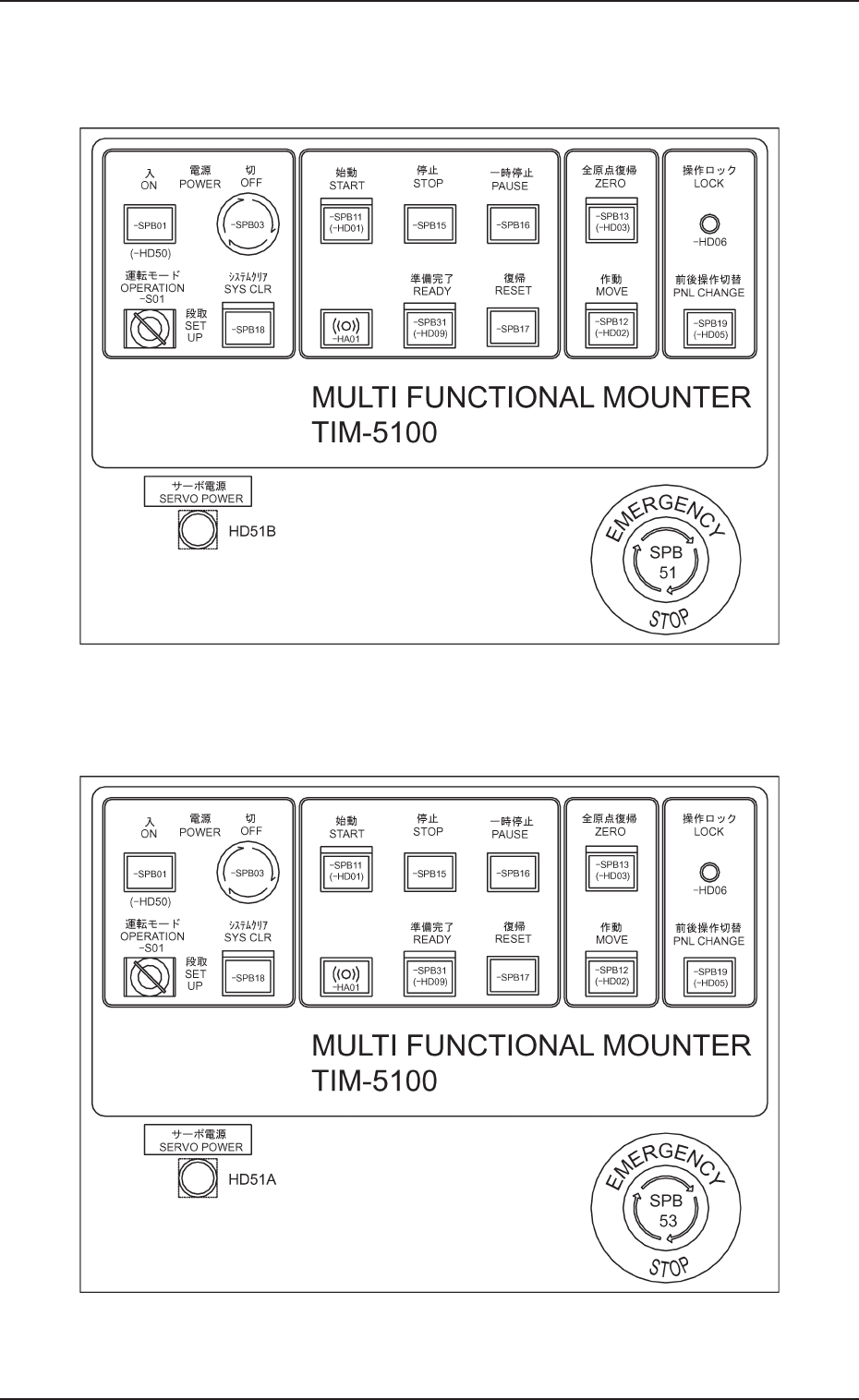
5. Operation Panel (Names and Functions)
0304-002 1-31 Tg0246-PM-OP
Fig. 1.10
5.2 Front and Rear Operation Panels
Front Panel
Rear Panel
Fig. 1.9
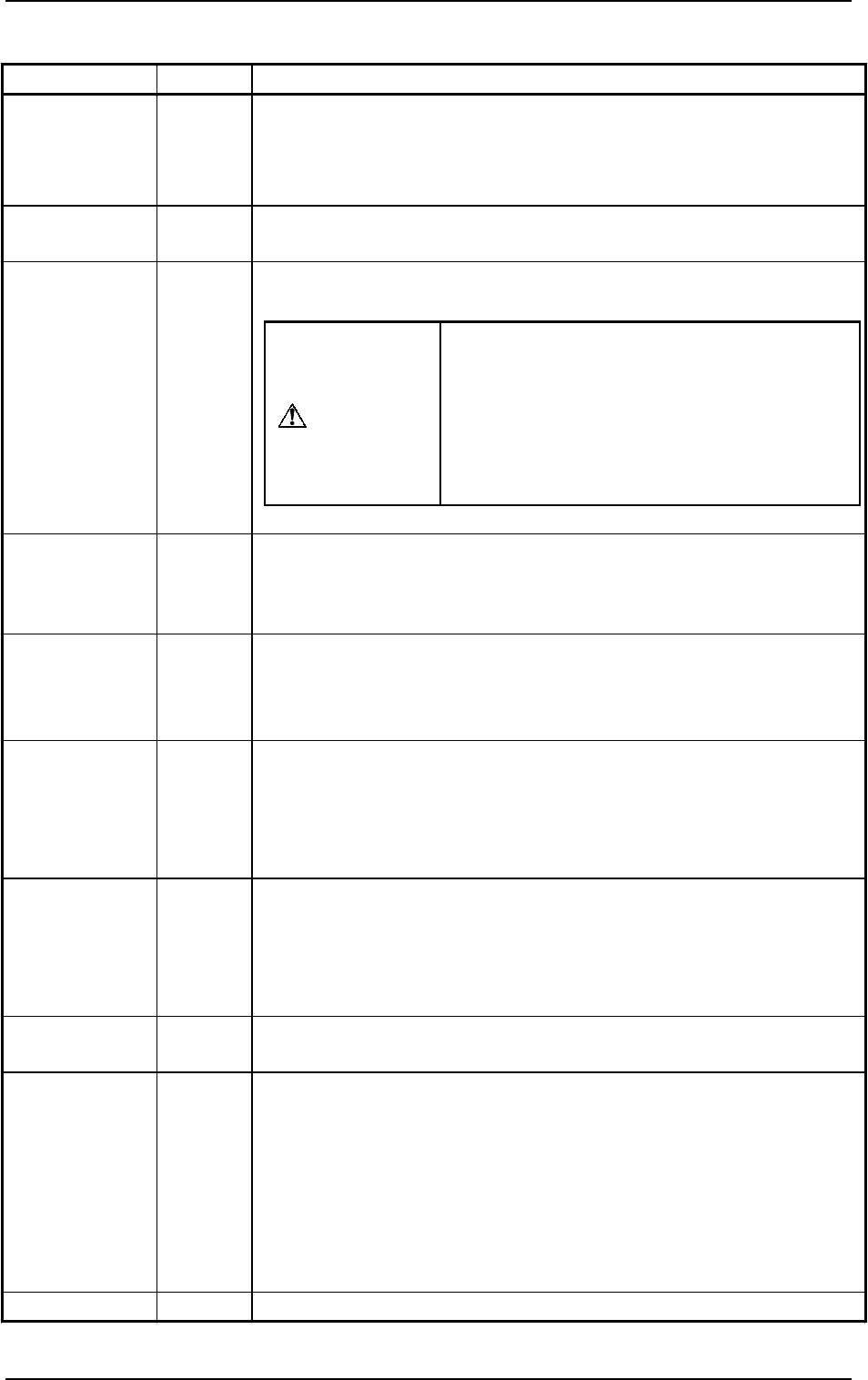
Switch Name
Symbol Function
POWER ON -SPB01
(-HD50)
•
Supplies the power for operation.
The red LED illuminates when only power for operation is supplied.
The green LED illuminates when power for both operation and loads is
supplied.
POWER OFF -SPB03
• Turns off the power for operation.
Turning the lock type switch clockwise shuts off the power.
OPERATION
SET UP
-S01
•
Changes over the switch from “OPERATION” to “SET UP” or vice
versa.
•
SYS CLR -SPB18
•
Clears the system to the initial setting or cancels an operation.
Note: When the [SYS CLR] button is pressed at the [OPERATION/SET
UP] switch set to the “SET UP” side, the system cannot be
cleared.
START -SPB11
(-HD01)
•
Starts automatic operation of the machine.
While the LED is ON, it indicates that the machine is running
automatically.
It extinguishes when the machine is stopped during operation.
STOP -SPB15
• Stops automatic operation of the machine.
It is possible to stop the automatic operation with this switch during
the X/Y beam test.
• When this button is pressed during zeroing operation, each individual
devices are stopped.
PAUSE -SPB16
• Stops automatic operation temporarily.
It is possible to temporarily stop the automatic operation with this
switch during the X/Y beam test.
• When this button is pressed during zeroing operation, each individual
devices are stopped temporarily.
RESET -SPB17
• Releases an error signal and resumes the power (Power ON) for the
servomotor driver.
READY -SPB31
(-HD09)
Front Operation Panel
This button is used to tell the machine that the feeders such as tape and
stick feeders on the front side (Side B) are ready for replacement.
• Refer to “5.5 [READY] Button of Section 1” for details.
Rear Operation Panel
• This button is used to tell the machine that the feeders such as tape and
stick feeders on the rear side (Side A) are ready for replacement.
• Refer to “5.5 [READY] Button of Section 1” for details.
BUZZER -HA01
• Sounds when an error occurs.
When the switch is changed to “SET UP”,
the interlock functions of the safety door,
etc., are deactivated.
Do not set this switch to “SET UP” except
for a set-up operation.
Refer to “1.2 [OPERATION/SET UP]
Switch of Section 2” for details.
WARNING
Table 1.2-1
9910-001 1-32 Tg0246-PM-OP
5. Operation Panel (Names and Functions)

5. Operation Panel (Names and Functions)
9910-001 1-33 Tg0246-PM-OP
Table 1.2-2
Switch Name Symbol Function
ZERO -SPB13
(-HD03)
•
Zeroes all devices possible to be zeroed.
While the LED is ON, it indicates that the devices are being zeroed.
Note: When the [ZERO] button is pressed with the [OPERATION/SET
UP] switch set to the "SET UP" side, each individual devices
cannot be zeroed.
MOVE -SPB12
(-HD02)
•
Executes the functions labeled on the touch screen.
While the LED is ON, it indicates that the selected function is being
activated..
PNL CHANGE -SPB19
(-HD05)
Front Operation Panel
•
Activates the front or rear operation panel.
While the LED (-HD05) is ON, functions can be implemented through
the front operation panel and the front touch screen.
•
When the button is pressed while the LED (-HD05) is ON (panel
activated), only the front panel becomes available (operation locked)
and the LEDs (operation lock -HD06) of both front and rear panels
illuminate.
•
To cancel the locked operation, press the button again.
Rear Operation Panel
•
Activates the front or rear operation panel.
While the LED (-HD05) is ON, functions can be implemented through
the rear operation panel and the rear touch screen.
•
When the button is pressed while the LED (-HD05) is ON (panel
activated), only the rear panel becomes available (operation locked)
and the LEDs (operation lock -HD06) of both front and rear panels
illuminate.
•
To cancel the locked operation, press the button again.
LOCK -HD06
•
While the LED is ON, the selected operation is locked.
SERVO
POWER
HD51B
HD51A
Front Operation Panel
•
Shows whether or not the load power for XB and YB axis (X/Y axis
on the front side) is supplied.
•
While the LED is ON, it indicates that power is supplied to the
servomotors for the XB and YB axis.
Rear Operation Panel
•
Shows whether or not the load power for XA and YA axis (X/Y axis
on the rear side) is supplied.
•
While the LED is ON, it indicates that power is supplied to the
servomotors for the XA and YA axis.
EMERGENCY
STOP
SPB52
(Front)
SPB53
(Rear)
•
Stops the automatic operation immediately in an emergency.