1OM-1064-002.pdf - 第215页
7. T ray Pick-Up Matrix (Option) 0103-001 3-45 Tg0246-PM-OP *3 [INIT .] This key initializes tray pick-up matrix data for the step to be initialized. After initialization, the selection of switches in the column for the …
7. Tray Pick-Up Matrix (Option)
0103-002 3-44 Tg0246-PM-OP
Tray Pick-Up Matrix Initialization
The tray pick-up matrix parameters are initialized all at once or for each
tray step.
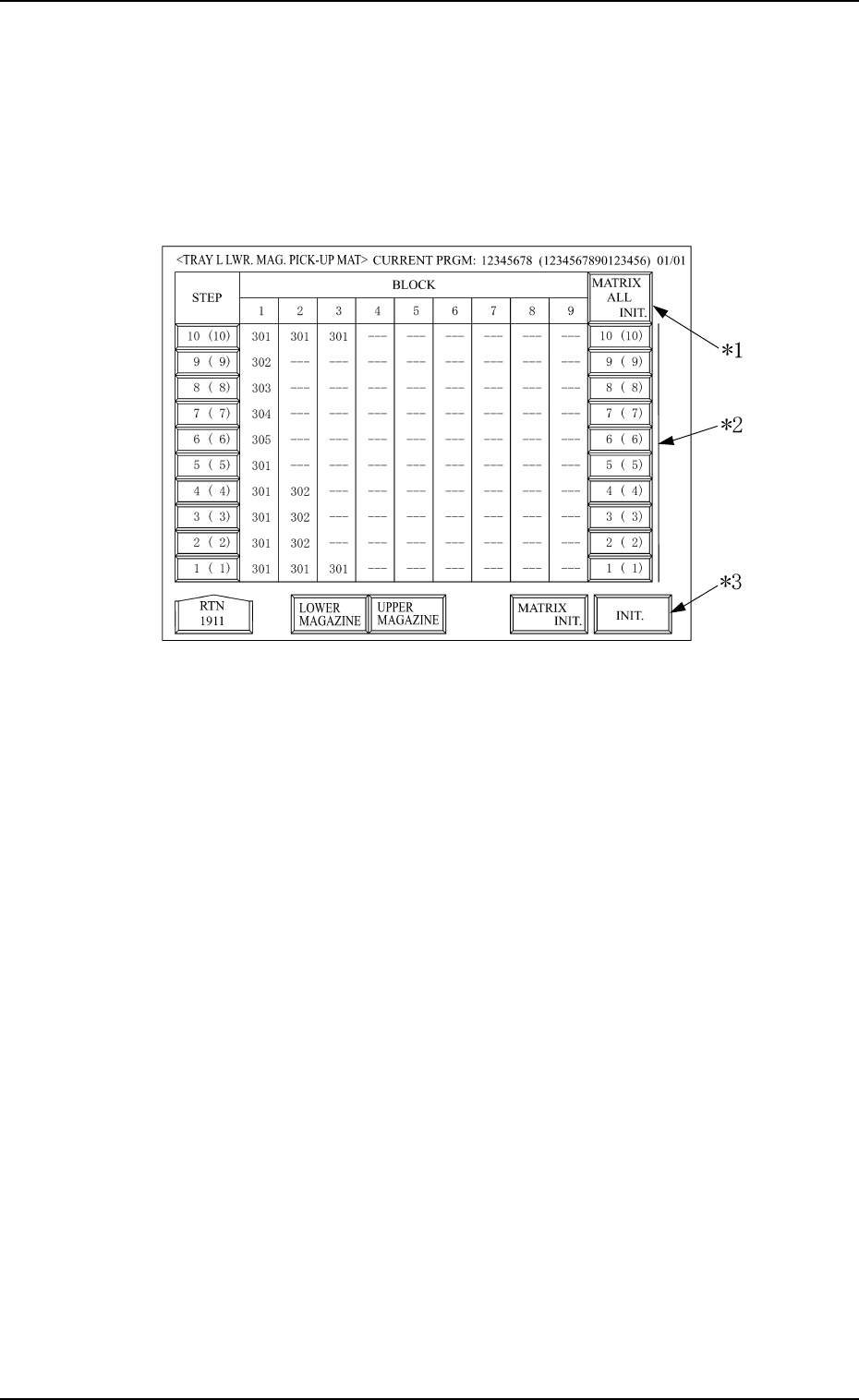
When the [MATRIX INIT.] key is pressed at the display shown in Fig. 3.24,
the display shown in Fig. 3.28 appears.
Fig. 3.28
*1 [MATRIX ALL INIT.]
With this key, all the step selection switches for the magazine matrix
initialization, indicated on the display, are selected, or the selection is
cancelled.
* When all or some of the selection switches in the same step column for
the tray to be initialized are not selected, and the [MATRIX ALL
INIT.] switch is selected, then all selection switches for the magazine
matrix initialization in the same step column, are selected.
* When all the selection switches in the same step column for the tray
which is to be initialized are selected and the [MATRIX ALL INIT.]
switch is also selected, then the selection is can celled for all the above
selection switches.
Note: The selection of all switches at once for the magazine initializa-
tion or cancellation is available only for the magazines indicated
on thedisplay. The conditions for switches not indicated at the
display are not changed.
*2 Step No. Key (Selection Switch for the step to be initialized)
The step of the upper or lower magazine, to be initialized, is selected. The
figure shows step No., but it is shown at step offset.
Therefore, the actual step No. is shown in the brackets.

7. Tray Pick-Up Matrix (Option)
0103-001 3-45 Tg0246-PM-OP
*3 [INIT.]
This key initializes tray pick-up matrix data for the step to be initialized.
After initialization, the selection of switches in the column for the step to
be initialized and the selection of the [MATRIX INIT.] are cancelled.
Note: Only the data for the blocks used in the current program, can be
initialized.
The data where the feeder No. is not set or the feeder No. is set
but not used in the current program, is not initialized.
7. Tray Pick-Up Matrix (Option)
• Case: The machine is in the “STOP” or the “PAUSE” mode.
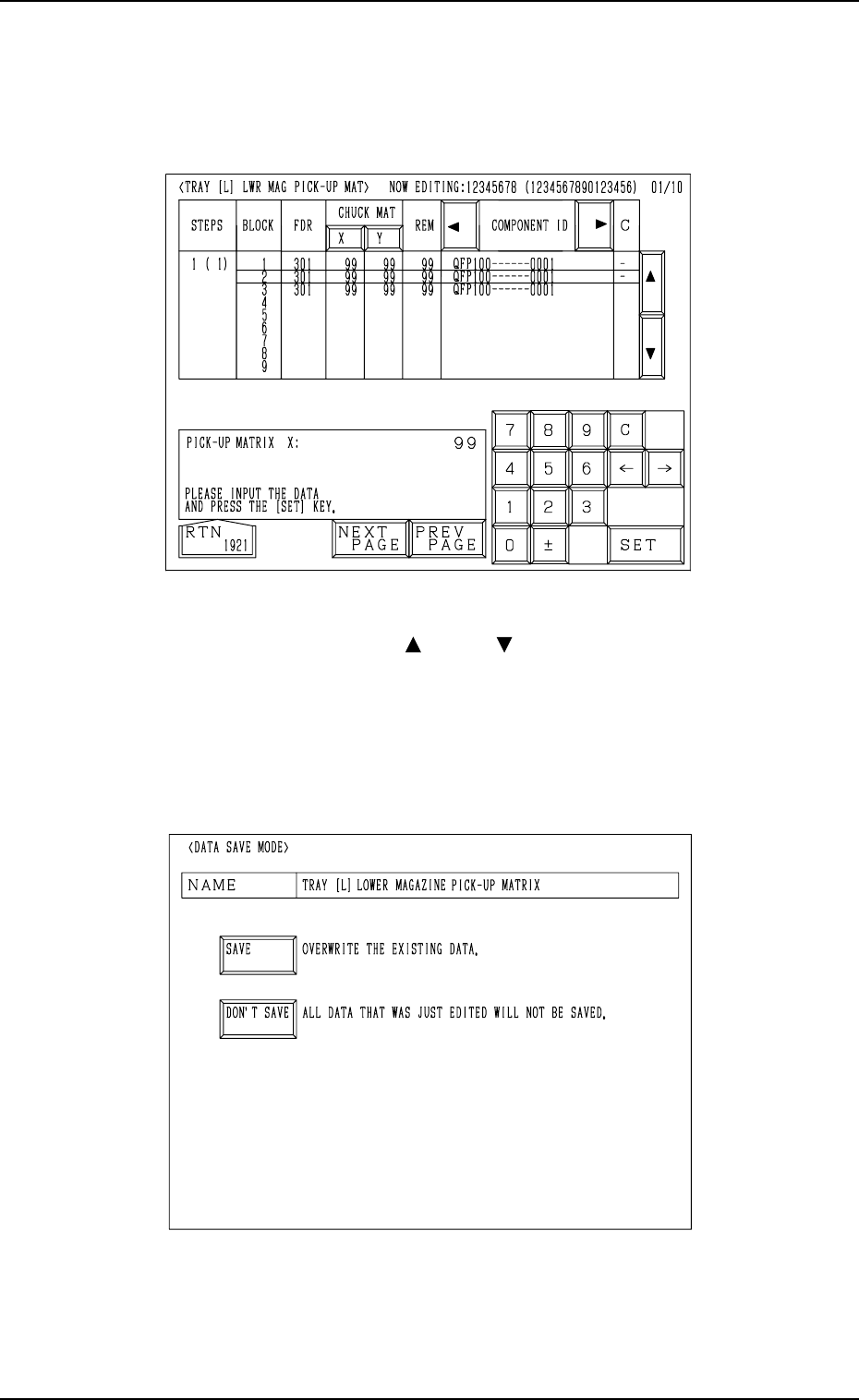
Shown are the matrix positions of the tray components to be picked up sub-
sequently. (Fig. 3.26)
The matrix can be changed while the machine is in the “STOP” or the
“PAUSE” mode.
9910-001 3-46 Tg0246-PM-OP
Fig. 3.26
To change the matrix, press the [ ] or the [ ] key to select the related block.
Select the [X] or the [Y] key, use the ten-key pad to specify the matrix posi-
tion, and press the [SET] key to define the parameters.
After the matrix position is defined, press the [RTN] key.
The “DATA SAVE MODE” display (Fig. 3.27) appears on the screen. To save
the changed matrix position, press the [SAVE] key. Otherwise, press the [DON’T
SAVE] key.
Fig. 3.27