1OM-1064-002.pdf - 第235页
First Page A P .C.B. can be transferred manually and the backup base can be cycle-oper- ated. [TRANSFER] Key When this key is selected and the [MOVE] button is pressed, a P .C.B. can be transferred or dischar ged. When t…
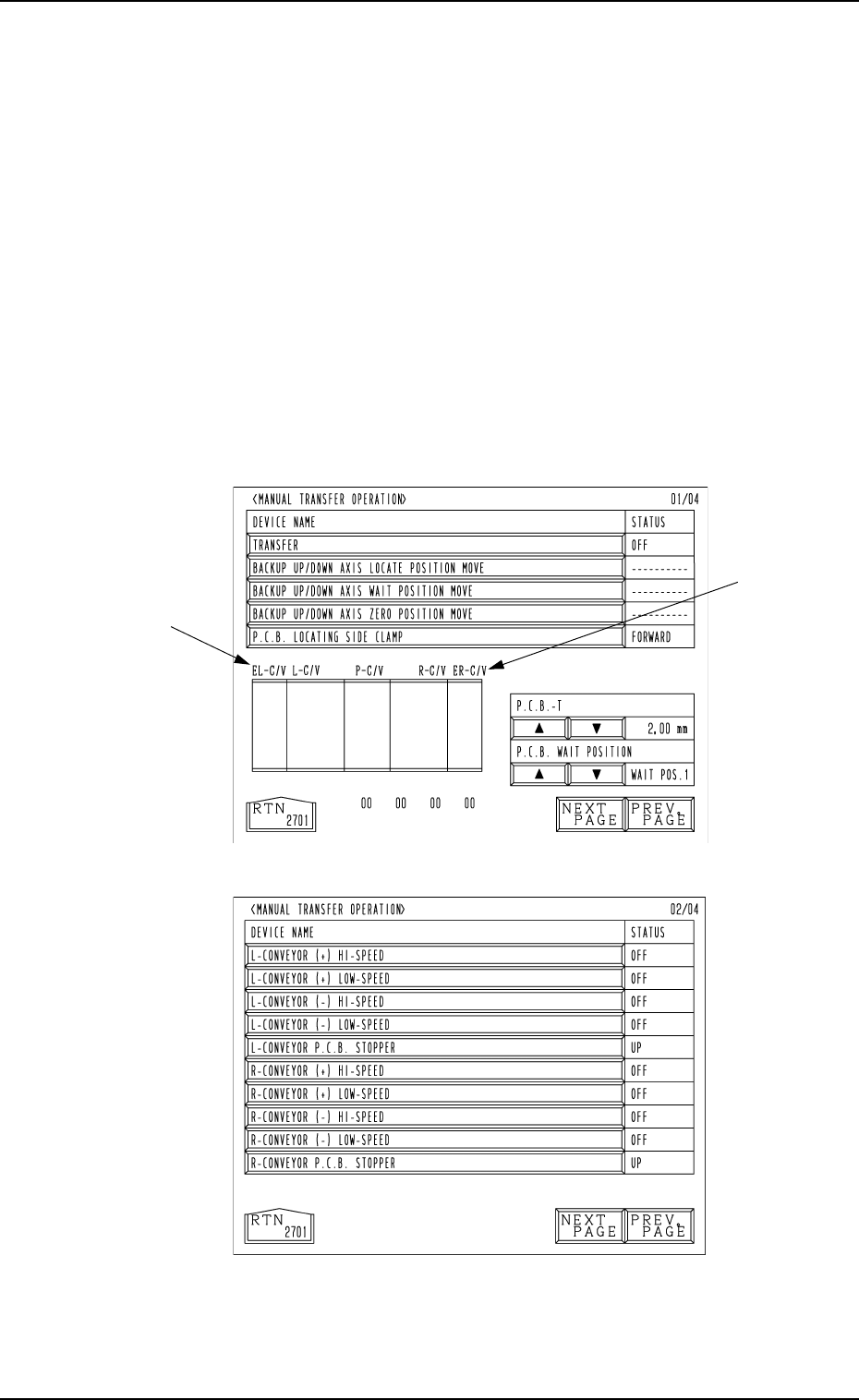
First Page
Fig. 4.11-1
Fig. 4.11-2
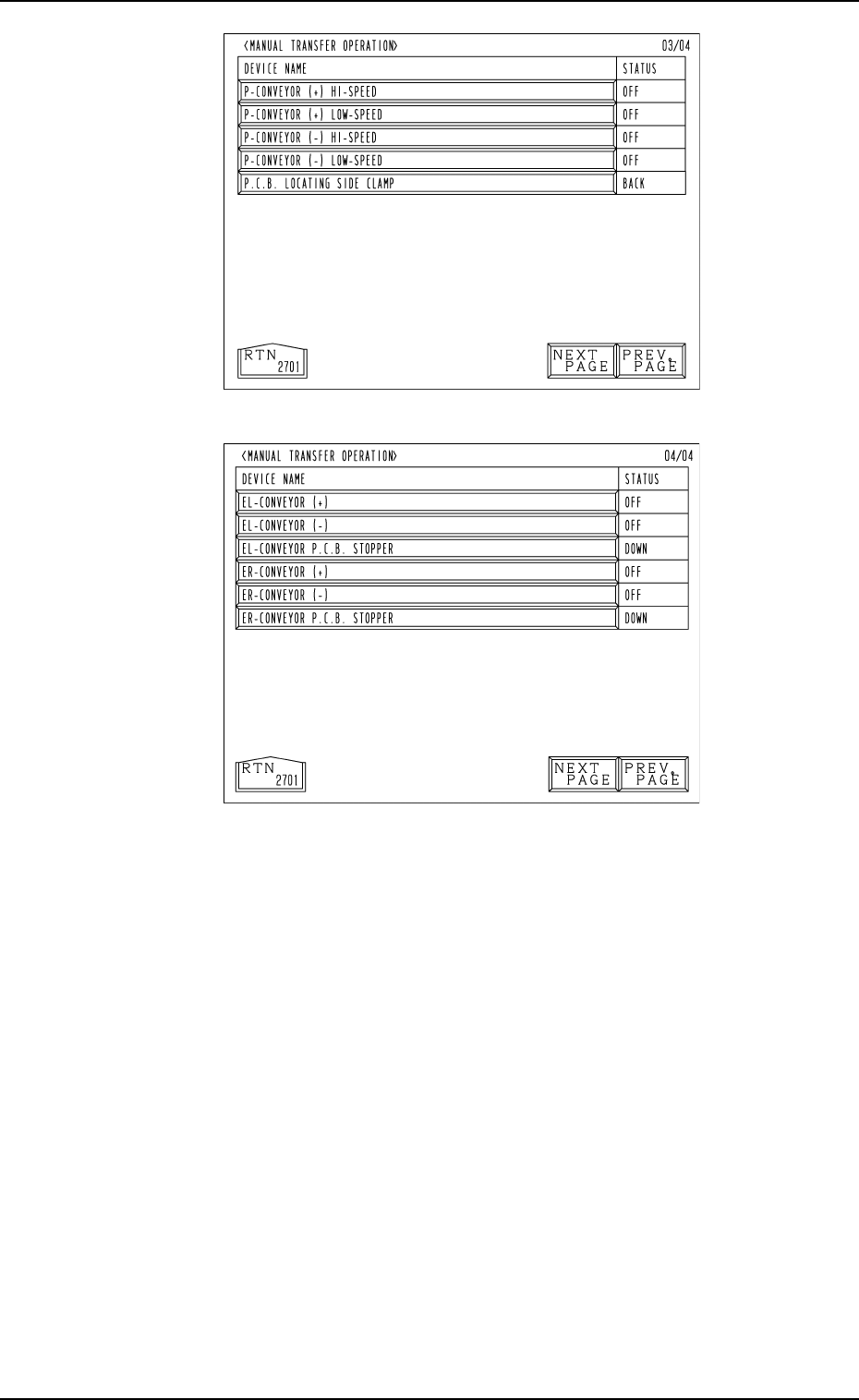
Second Page
8. Manual Transfer Operation
When the [MANUAL TRANSFER OPERATION] key is pressed at the
“MANUAL MODE” display, the following display (Fig. 4.11-1) appears on
the screen.
Every time the [NEXT PAGE] or the [PREV. PAGE] key is pressed, another or
previous page appears on the screen.
This display enables the manual P.C.B. input and output operations and the
cycle operation of each individual conveyors and P.C.B. stoppers.
Notes: (a) These keys can be selected only when the machine is in the “STOP”
mode.
(b) The -marked functions are optional.
(c) The fourth page appears only when the machine is equipped with
the optional device.
This page does not appear when a standard machine is used.
8. Manual Transfer Operation
9910-001 4-18 Tg0246-PM-OP
First Page
A P.C.B. can be transferred manually and the backup base can be cycle-oper-
ated.
[TRANSFER] Key
When this key is selected and the [MOVE] button is pressed, a P.C.B. can
be transferred or discharged.
When there is a P.C.B. on the input conveyor, it is transferred onto the P
conveyor. When a P.C.B. is located on the P conveyor, it is discharged to
the output conveyor.
When there are P.C.B.’s on both the input and P conveyors, both transfer
and discharge actions take place in succession.
[BACKUP UP/DOWN AXIS LOCATE POSITION MOVE] Key
When this key is selected and the [MOVE] button is pressed, the backup
base moves to the positioning place.
[BACKUP UP/DOWN AXIS WAIT POSITION MOVE] Key
When this key is selected and the [MOVE] button is pressed, the backup
base moves to the standby position.
Fig. 4.11-3
Fig. 4.11-4
Fourth Page
(Option)
Third Page
8. Manual Transfer Operation
9910-001 4-19 Tg0246-PM-OP

[BACKUP UP/DOWN AXIS ZERO POSITION MOVE] Key
When this key is selected and the [MOVE] button is pressed, the backup
base moves to the origin position.
[P.C.B. LOCATING SIDE CLAMP] Key
When this key is selected and the [MOVE] button is pressed, the P.C.B.
locating side clamp is activated.
P.C.B.-T [ ], [ ] key
The value for the positioning location can be set when a P.C.B. is trans-
ferred manually. Every time the [ ] or the [ ] key is pressed, the parameter
increases or decreases in the increment or the decrement of 0.01 mm.
This value is not reflected on the automatic operation.
P.C.B. WAIT POSITION [ ], [ ] key
A parameter representing the standby position can be set when a P.C.B. is
transferred manually.
Press the [ ] or the [ ] key to select “WAIT POS. 1”, “WAIT POS. 2”, or
“WAIT POS. 3”.
This setting is not reflected on the automatic operation.
Second Page
Cycle operations related to the L and R conveyors can be performed.
[L-CONVEYOR (+) HI-SPEED] Key
When this key is selected and the [MOVE] button is pressed, the L con-
veyor moves forward at high speed.
[L-CONVEYOR (+) LOW-SPEED] Key
When this key is selected and the [MOVE] button is pressed, the L con-
veyor moves forward at low speed.
[L-CONVEYOR (-) HI-SPEED] Key
When this key is selected and the [MOVE] button is pressed, the L con-
veyor moves backward at high speed.
[L-CONVEYOR (-) LOW-SPEED] Key
When this key is selected and the [MOVE] button is pressed, the L con-
veyor moves backward at low speed.
[L-CONVEYOR P.C.B. STOPPER] Key
When this key is selected and the [MOVE] button is pressed, the P.C.B.
stopper of the L conveyor moves up or down.
[R-CONVEYOR (+) HI-SPEED] Key
When this key is selected and the [MOVE] button is pressed, the R con-
veyor moves forward at high speed.
[R-CONVEYOR (+) LOW-SPEED] Key
When this key is selected and the [MOVE] button is pressed, the R con-
veyor moves forward at low speed.
[R-CONVEYOR (-) HI-SPEED] Key
When this key is selected and the [MOVE] button is pressed, the R con-
veyor moves backward at high speed.
[R-CONVEYOR (-) LOW-SPEED] Key
When this key is selected and the [MOVE] button is pressed, the R con-
veyor moves backward at low speed.
[R-CONVEYOR P.C.B. STOPPER] Key
When this key is selected and the [MOVE] button is pressed, the P.C.B.
stopper of the R conveyor moves up or down.
8. Manual Transfer Operation
9910-001 4-20 Tg0246-PM-OP